
1. Produktet er slutview
The Hunter ZenTech 52 Inch Smart Ceiling Fan (Model 53638) is designed for both indoor and covered outdoor spaces, offering quiet, efficient performance with advanced smart home integration. This 5-blade fan features a slim DC motor, adjustable LED lighting with TrueLight technology, and Wi-Fi connectivity for control via the HunterSMART app, Amazon Alexa, Google Assistant, and Apple HomeKit. It is ENERGY STAR certified and damp-rated for versatile use.
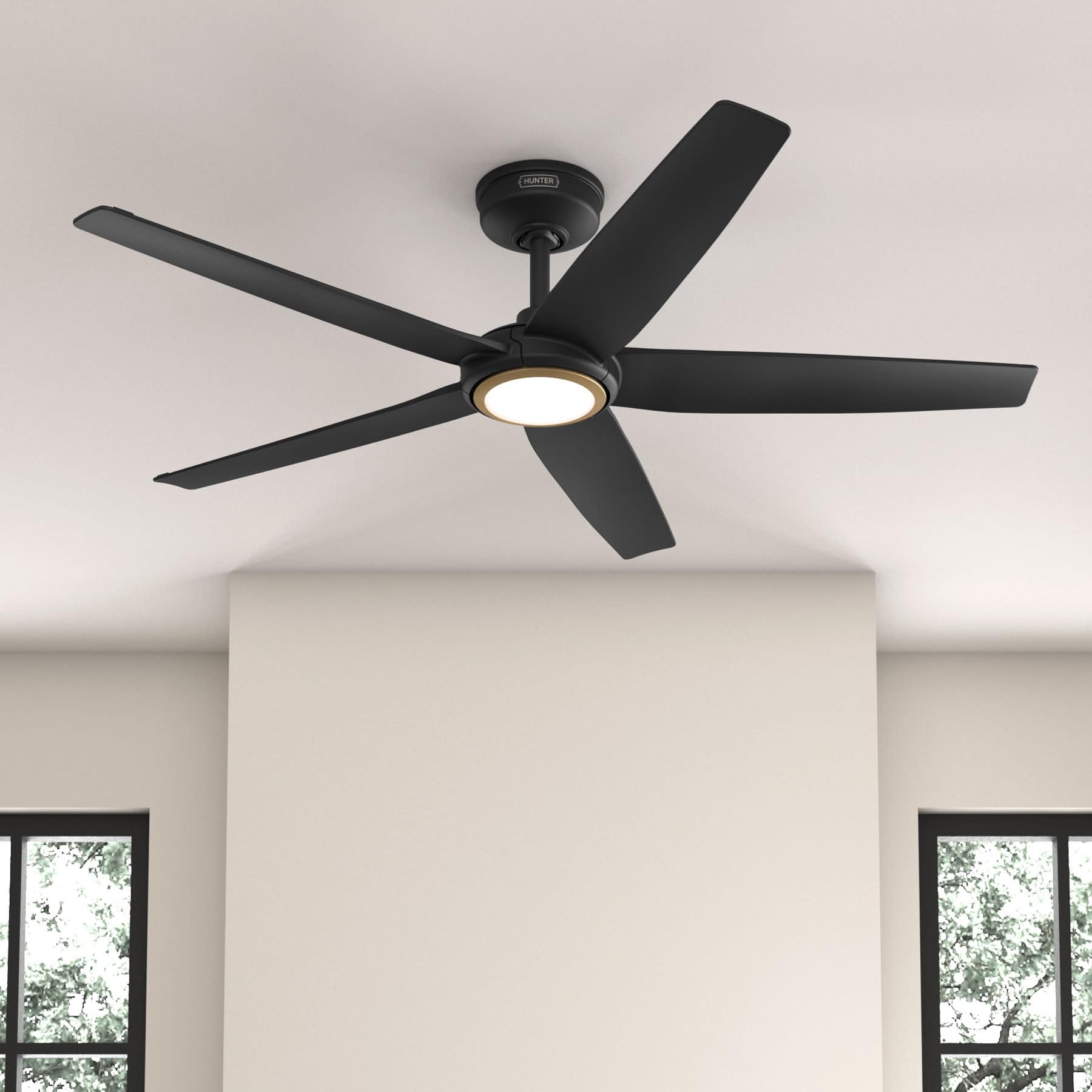
Figure 1: Hunter ZenTech 52 Inch Smart Ceiling Fan (Matte Black)
Nøglefunktioner:
- Avanceret design: Ultra-slim DC motor for powerful, quiet airflow and a modern aesthetic.
- Smart Home Integration: HunterSMART technology for app and voice control via Amazon Alexa, Google Assistant, and Apple HomeKit.
- Justerbar LED-belysning: TrueLight LED offers 10 brightness levels and 10 color temperatures, protected by a durable Duralight lens.
- SureSpeed Guarantee: Delivers strong, consistent airflow with quiet, wobble-free performance.
- Energieffektiv: ENERGY STAR certified reversible 6-speed DC motor.
- Damp Vurderet: Suitable for indoor and covered outdoor areas.
2. Vigtige sikkerhedsinstruktioner
Læs alle instruktioner omhyggeligt, inden installationen påbegyndes. Manglende overholdelse af disse instruktioner kan resultere i elektrisk stød, brand eller personskade.
- Afbryd altid strømmen ved hovedafbryderen før installation eller service.
- Sørg for, at alle elektriske forbindelser overholder lokale forskrifter og bestemmelser. Hvis du ikke er bekendt med elektriske ledninger, skal du kontakte en kvalificeret elektriker.
- Monteringsstrukturen skal kunne bære ventilatorens vægt (ca. 14.11 kg).
- Do not bend blade brackets during installation or cleaning.
- Hold hænderne væk fra ventilatorbladene, når ventilatoren er i drift.
- Denne ventilator er damp-rated for use in covered outdoor areas but should not be exposed directly to water.
3. Pakkens indhold
Kontroller, at alle nedenstående komponenter er til stede i din pakke, før du starter installationen.
- Loftventilator motorhus
- 5 Fan Blades
- Light Kit with Duralight Lens
- 6-tommer nedstang
- Baldakin og monteringsbeslag
- Håndholdt fjernbetjening
- Hardwarepakke (skruer, skiver, trådmøtrikker)

Figure 2: ZenTech 52 Inch Fan Components
4. Installationsvejledning
Professional installation is recommended. Ensure the power is OFF at the circuit breaker before starting.
4.1 Montering af ventilatoren
- Secure the mounting bracket to the ceiling junction box. The junction box must be listed for fan support.
- Assemble the downrod (6-inch included, compatible with up to 24-inch downrods) to the fan motor housing.
- Hæng ventilatorenheden fra monteringsbeslaget.
- Complete electrical wiring connections as per the wiring diagram provided in the full manual.
- Fastgør ventilatorbladene til motorhuset.
- Install the light kit and Duralight lens.

Figure 3: ZenTech Fan installed in a covered outdoor space
5. Betjeningsvejledning
The ZenTech fan can be operated using the included handheld remote control or through the HunterSMART app.
5.1 Betjening af fjernbetjening
- Blæser tændt/slukket: Tryk på ventilatorknappen for at tænde eller slukke ventilatoren.
- Blæserhastighed: Use the speed buttons to cycle through 6 fan speeds.
- Lys til/fra: Tryk på lysknappen for at tænde eller slukke lyset.
- Lysdæmpning: Hold the light button to dim or brighten the light.
- Farvetemperatur: Press the color temperature button to cycle through different color temperatures (warm to cool).
- Omvendt funktion: Press the reverse button to change the fan's direction for seasonal use.
5.2 LED Light Control (TrueLight Technology)
The TrueLight LED system allows for precise control over your lighting environment. You can select from 10 brightness levels and 10 color temperatures to match your preference.

Figure 4: TrueLight LED Technology for adjustable lighting
6. Smart Home Integration
The ZenTech fan features HunterSMART technology, enabling seamless integration with popular smart home ecosystems.
6.1 Connecting to HunterSMART App
- Download the HunterSMART app from your device's app store.
- Follow the in-app instructions to create an account and add your ZenTech fan.
- Ensure your fan is powered on and your mobile device is connected to a 2.4 GHz Wi-Fi network during setup.
6.2 Voice Control Compatibility
Once connected to the HunterSMART app, you can link your fan to:
- Amazon Alexa
- Google Assistant
- Apple HomeKit
Refer to the respective smart home platform's instructions for linking smart devices.

Figure 5: HunterSMART Control Options
7. Pleje og vedligeholdelse
Regelmæssig vedligeholdelse sikrer optimal ydeevne og levetid for din loftsventilator.
- Rensning: Dust the fan blades and motor housing periodically with a soft, lint-free cloth. For damp-rated areas, wipe down with a slightly damp cloth, then dry thoroughly. Do not use abrasive cleaners or solvents.
- Tæthedskontrol: Annually, check all screws and connections for tightness. Vibrations can cause them to loosen over time.
- Lyssæt: The LED light source is designed for long life and is not user-serviceable.
8. Fejlfindingsvejledning
If you encounter issues with your ZenTech ceiling fan, refer to the table below for common problems and solutions.
| Problem | Mulig årsag | Løsning |
|---|---|---|
| Ventilator starter ikke | Ingen strøm til ventilatoren; Løse ledningsforbindelser; Lavt batteriniveau i fjernbetjeningen. | Kontroller afbryderen; Verificer at alle ledningsforbindelser er sikre; Udskift batteriet i fjernbetjeningen. |
| Lys virker ikke | No power to the light kit; Loose wire connection; Light kit malfunction. | Check circuit breaker; Verify light kit wiring; Contact customer support if LED is faulty. |
| Blæseren slingrer | Loose blades or blade holders; Improperly balanced blades; Loose mounting bracket. | Ensure all blade screws are tight; Use a blade balancing kit (not included); Tighten mounting bracket screws. |
| Smart features not connecting | Incorrect Wi-Fi network (not 2.4 GHz); Incorrect app setup; Router issues. | Ensure connection to 2.4 GHz Wi-Fi; Re-attempt app setup; Restart router and fan. |
9. Tekniske specifikationer
| Specifikation | Detalje |
|---|---|
| Mærke | Jæger |
| Modelnavn | ZenTech |
| Modelnummer | 53638 |
| Størrelse | 52 tommer |
| Farve | Mat sort |
| Produktdimensioner | 52" D x 52" B x 11.78" H |
| Varens vægt | 14.11 pund |
| Antal blade | 5 |
| Motortype | DC |
| Antal hastigheder | 6 |
| Luftmængde kapacitet | 5443.94 kubikfod i minuttet |
| Wattage | 17 watt |
| Voltage | 120 volt |
| Indendørs/Udendørs brug | Indoor, Covered Outdoor (Damp Bedømt) |
| Særlige funktioner | LED Light, Quiet Operation, Water Resistant, Wi-Fi Enabled |
| Controller type | App-styring, fjernbetjening |
| Certificeringer | ETL, Energy Star, FCC |
| Downrod Længde | 6 Inches (included) |
10. Garantioplysninger
The Hunter ZenTech 52 Inch Smart Ceiling Fan is backed by Hunter's commitment to quality. It includes a limited lifetime motor warranty, ensuring long-term confidence in your product. For full warranty details and terms, please refer to the documentation included with your fan or visit the official Hunter Fan Company webwebsted.
11. Kundesupport
If you require further assistance, have questions about installation, operation, or troubleshooting that are not covered in this manual, please contact Hunter Fan Company customer support. You can typically find contact information on the official Hunter Fan Company webwebstedet eller i produktemballagen.