
1. Introduktion
Tak for købetasing the Sharp PS-916 Bluetooth Party Speaker System. This system includes two identical portable Bluetooth speakers designed to deliver powerful audio with versatile connectivity options. Please read this manual carefully before using the product to ensure proper operation and to maximize your listening experience.
Pakkeindhold:
- 2 x Sharp PS-916 Party Speakers
- 1 x ladekabel
- 1 x fjernbetjening
- 1 x brugermanual

Image: The Sharp PS-916 system includes two speakers for a complete stereo experience.
2. Opsætning
2.1 Opladning af højttalerne
The PS-916 speakers are equipped with rechargeable batteries, providing up to 12 hours of playback. Before initial use, fully charge both speakers.
- Connect the charging cable to the DC IN port on the rear of each speaker.
- Plug the other end of the charging cable into a suitable power adapter (not included) or USB power source.
- Opladningsindikatorlampen lyser. Den skifter farve eller slukker, når opladningen er færdig.
2.2 Tænd/sluk
To power on or off each speaker, press and hold the ON/STAND BY INPUT knappen placeret på kontrolpanelet.
2.3 Bluetooth-parring (enkelt højttaler)
- Ensure the speaker is powered on and in Bluetooth mode. The Bluetooth indicator will flash, indicating it is ready for pairing.
- Aktiver Bluetooth på din mobilenhed, og søg efter tilgængelige enheder.
- Select "Sharp PS-916" from the list of devices.
- Når der er oprettet forbindelse, holder Bluetooth-indikatoren op med at blinke og forbliver konstant.
2.4 Ægte trådløs stereo (TWS) parring (to højttalere)
TWS allows you to connect two PS-916 speakers wirelessly for a stereo sound experience.
- Power on both PS-916 speakers.
- Ensure neither speaker is currently connected to a Bluetooth device.
- På en af højttalerne (dette vil være den primære højttaler) skal du trykke på TWS knappen. Højttaleren vil gå i TWS-parringstilstand.
- The primary speaker will automatically search for the secondary speaker. Once connected, you will hear an audible confirmation, and the TWS indicator lights on both speakers will illuminate.
- Tilslut nu din mobilenhed til den primære højttaler via Bluetooth som beskrevet i afsnit 2.3. Lyden afspilles i stereo gennem begge højttalere.
3. Betjening
3.1 Kontrolpanel overview

Image: Main control panel for the Sharp PS-916 speaker.
- ON/STAND BY INPUT: Power on/off, switch input modes (Bluetooth, USB, TF, AUX, FM).
- PLAY/PAUSE (►/∕∕): Afspil eller sæt lydafspilning på pause.
- FORRIGE (◀◀): Spring til forrige spor.
- NEXT (▶▶): Spring til næste nummer.
- LYDSTYRKNAPP: Drej for at justere masterlydstyrken.
- TWS: Initiate or disconnect True Wireless Stereo pairing.
- Equalizer: Cycle through preset equalizer modes.
- BAS: Activate or deactivate bass boost.
- LYS: Change or turn off the LED light effects.
- MIC CONTROL: Adjust microphone volume or echo (if applicable).
3.2 Indgangsporte
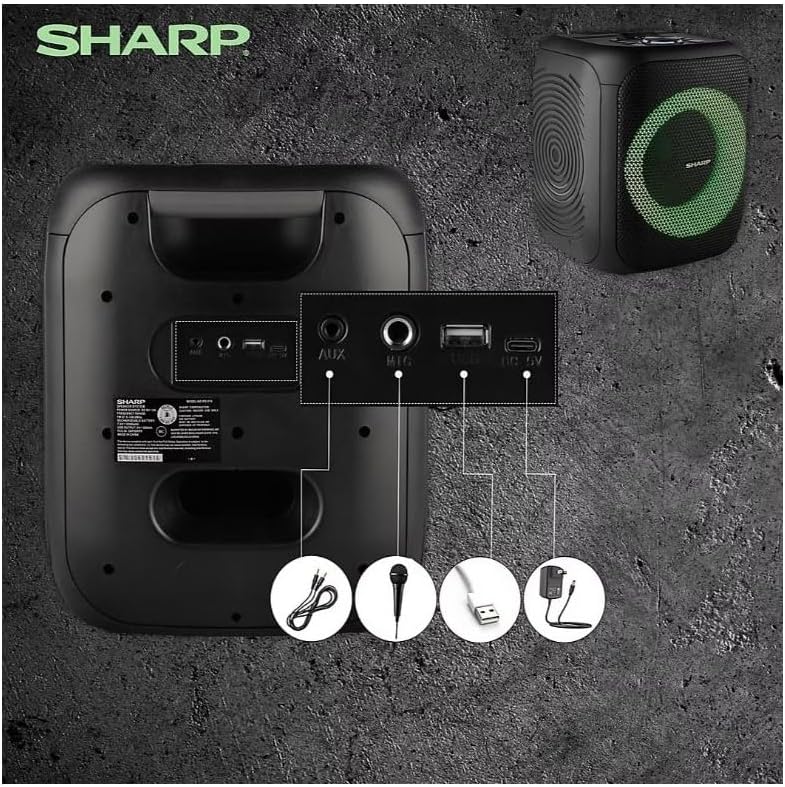
Image: Rear panel with various input and charging ports.
- AUX IN: Tilslut eksterne lydenheder med et 3.5 mm lydkabel.
- MIKROFON IND: Connect a microphone (sold separately) for karaoke or announcements.
- USB: Indsæt et USB-flashdrev til lydafspilning.
- TF -KORT: Insert a TF (microSD) card for audio playback.
- DC IN: Connect the charging cable to power and charge the speaker.
3.3 Playing Audio from USB/TF Card
- Insert a USB flash drive or TF card into the corresponding port.
- Tryk på ON/STAND BY INPUT button repeatedly until the display shows the USB or TF mode.
- Afspilningen starter automatisk. Brug AFSPIL/PAUSE, TIDLIGERE, og NÆSTE knapper til at styre afspilning.
3.4 Using AUX Input
- Connect one end of a 3.5mm audio cable to the AUX IN port on the speaker.
- Tilslut den anden ende til hovedtelefonstikket eller lydudgangen på din eksterne enhed.
- Tryk på ON/STAND BY INPUT button repeatedly until the display shows AUX mode.
- Styr afspilning og lydstyrke fra din eksterne enhed.
3.5 FM-radiofunktion

Image: The PS-916 features an integrated FM Tuner.
- Tryk på ON/STAND BY INPUT button repeatedly until the display shows FM mode.
- Tryk og hold på AFSPIL/PAUSE knappen for automatisk at scanne og gemme tilgængelige FM-stationer.
- Brug TIDLIGERE og NÆSTE knapper til at navigere gennem gemte stationer.
3.6 LED-lyseffekter
Tryk på LYS button to cycle through different LED light modes or to turn the lights off.
4. Vedligeholdelse
4.1 Rengøring
- Sluk altid højttaleren og afbryd den fra strømkilden før rengøring.
- Brug en blød, tør klud til at tørre de udvendige overflader af.
- Brug ikke flydende rengøringsmidler, aerosoler eller opløsningsmidler, da disse kan beskadige overfladen eller de indvendige komponenter.
4.2 Opbevaring
- Opbevar højttalerne et køligt, tørt sted væk fra direkte sollys og ekstreme temperaturer.
- Hvis batteriet opbevares i en længere periode, skal det oplades til cirka 50% hver par måneder for at opretholde batteriets tilstand.
5. Fejlfinding
If you encounter issues with your Sharp PS-916 speakers, please refer to the following common problems and solutions:
| Problem | Mulig løsning |
|---|---|
| Højttaleren tænder ikke. | Sørg for, at batteriet er opladet. Tilslut opladningskablet, og prøv igen. |
| Ingen lyd fra højttaleren. | Kontroller lydstyrken på både højttaleren og din tilsluttede enhed. Sørg for, at den korrekte inputtilstand er valgt. |
| Bluetooth-enheden kan ikke parres. | Ensure the speaker is in Bluetooth pairing mode (indicator flashing). Move your device closer to the speaker. Disconnect from other Bluetooth devices. |
| TWS-parring mislykkes. | Ensure both speakers are powered on and not connected to any other Bluetooth devices. Try initiating TWS pairing again. |
| Forvrænget lyd. | Reduce the volume on both the speaker and your connected device. Ensure the audio source is not distorted. |
6. Specifikationer
| Feature | Detalje |
|---|---|
| Mærke | Skarp |
| Modelnavn | PS-916 |
| Højttalerkonfiguration | 8" Woofer, 1" Tweeter (per speaker) |
| Maksimal udgangseffekt | 400 watt (pr. højttaler) |
| RMS udgangseffekt | 40 watt (pr. højttaler) |
| Forbindelsesteknologi | Bluetooth |
| Yderligere input | USB, TF Card, 3.5mm AUX, Microphone Input |
| Batterilevetid | Op til 12 timer |
| Særlige funktioner | True Wireless Stereo (TWS) Pairing, Bass Boost, LED Light Effects, FM Tuner |
| Farve | Sort |
| Varens vægt | 6.5 pund (pr. højttaler) |
| UPC | 728434122111 |
| GTIN | 728434122111 |
7. Garanti og support
7.1 Garantioplysninger
This Sharp PS-916 product comes with a 90-day limited warranty. This warranty covers manufacturing defects under normal use. It does not cover damage caused by misuse, accidents, unauthorized modifications, or normal wear and tear.
7.2 Kundesupport
For technical assistance, warranty claims, or further inquiries, please refer to the contact information provided with your purchase documentation or visit the official Sharp support webwebsted.