
1. Introduktion
This manual provides detailed instructions for the installation, operation, and maintenance of your Backnets Round Digital Display Shower Valve. Please read this manual thoroughly before installation and use to ensure proper function and longevity of the product. This shower valve features a digital temperature display and is designed for concealed installation within a wall.
2. Sikkerhedsoplysninger
Always adhere to local plumbing codes and regulations during installation. If you are unsure about any part of the installation process, consult a qualified plumber. Ensure the main water supply is turned off before beginning any work. Wear appropriate personal protective equipment, such as safety glasses and gloves.
- Turn off the main water supply before installation or maintenance.
- Do not overtighten connections, as this may damage the valve or pipes.
- Sørg for, at alle forbindelser er vandtætte for at forhindre lækager.
- Beskyt produktet mod frost.
3. Pakkens indhold
Pakken indeholder:
- 1x Backnets Round Digital Display Shower Valve (Single Function, Matte Black)
4. Produktet er slutview og funktioner
The Backnets Round Digital Display Shower Valve is designed to provide precise temperature control and a modern aesthetic for your bathroom. Key features include:
- Standard stik: Equipped with standard 3/4-inch pipe inlet and 1/2-inch pipe outlet, suitable for most plumbing systems. Features US standard NPT threads for easy integration.
- LED temperatur display: An integrated LED screen displays the water temperature. This display is powered by hydroelectric energy, requiring no batteries.
- Præcis kontrol: The rotary knob allows for accurate temperature adjustment.
- Holdbar konstruktion: Made from high-quality brass with a multi-layer electroplating stainless steel panel, ensuring longevity and resistance to corrosion.
- Skjult installation: Designed for in-wall installation, providing a clean and minimalist look.

Figur 1: Forside view of the Backnets Round Digital Display Shower Valve, showing the matte black finish and digital temperature display.
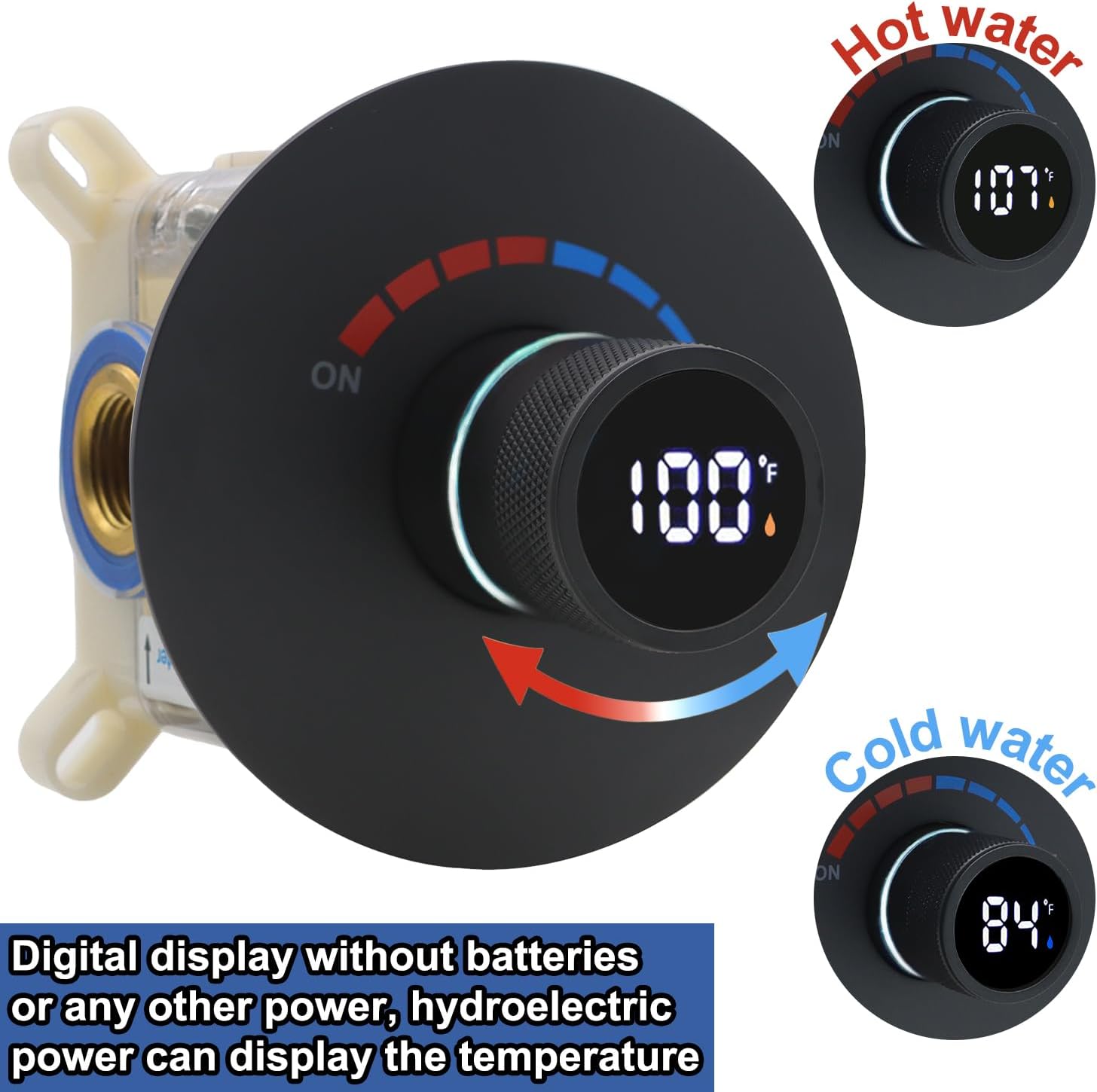
Figure 2: Illustration of the digital display indicating water temperature for both hot and cold water, powered by hydroelectric energy.
5. Opsætning og installation
The shower valve is designed for concealed installation. Follow these steps carefully:
- Forbered installationsområdet: Ensure the wall cavity is appropriately sized for the valve body. The valve is designed for concealed installation.
- Connect Water Inlets: Connect the 3/4-inch hot water inlet (marked 'Hot') and cold water inlet (marked 'Cold') to your plumbing system. Ensure secure, watertight connections using US standard NPT threads.
- Tilslut vandudløb: Connect the 1/2-inch water outlet to your shower head or other single function shower accessory.
- Fastgør ventilen: Mount the valve securely within the wall cavity according to the manufacturer's guidelines.
- Tryktest: After installation, it is crucial to perform a pressure test. Block all outlets of the shower valve and adjust the water pressure to 10 kg (1 MPa) for testing. Carefully check all water pipe connections and the interior of the shower valve for any signs of leakage.

Figure 3: Illustration detailing the important pressure test procedure after shower valve installation.
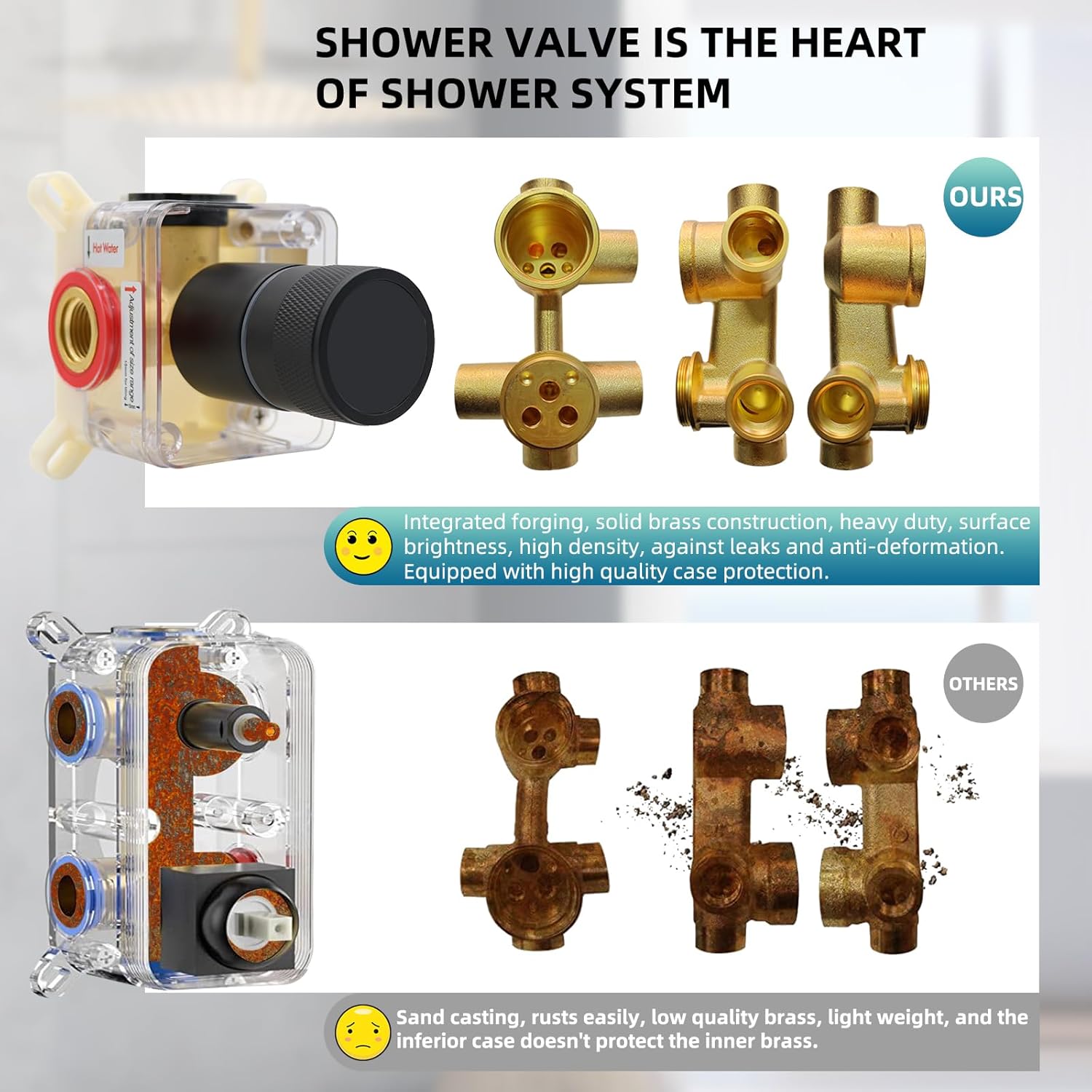
Figure 4: Comparison highlighting the integrated forging and solid brass construction of the Backnets shower valve for durability and leak prevention.
6. Betjeningsvejledning
The Backnets Digital Display Shower Valve offers straightforward operation for controlling water flow and temperature.
- Tænd/sluk: Rotate the main knob to the 'ON' position to start water flow. Rotate to 'OFF' to stop.
- Juster temperatur: Rotate the knob to adjust the water temperature. The digital display will show the current temperature in real-time. The display is powered by the water flow itself, so no batteries are needed.
- Temperaturindikator: The temperature indicator light around the knob will typically display blue for temperatures ≤ 100°F and orange for temperatures > 100°F, providing a visual cue for water warmth.
Vigtig bemærkning:
This single-function valve is designed to connect to only one shower product (e.g., a single shower head) at a time. It is not intended for simultaneous operation of multiple shower outlets.

Figure 5: Diagram illustrating the shower mixer valve control, showing ON/OFF, hot/cold indicators, and the temperature display with color-coded temperature ranges.

Figur 6: Et example of the shower valve installed in a bathroom, demonstrating its integrated appearance.
7. Vedligeholdelse
Regular cleaning and maintenance will help preserve the appearance and functionality of your shower valve.
- Rensning: Clean the surface of the valve regularly with a soft, damp cloth. Avoid abrasive cleaners, harsh chemicals, or scouring pads, as these can damage the matte black finish and electroplating.
- Mineralforekomster: In areas with hard water, mineral deposits may accumulate. Use a mild descaling solution specifically designed for bathroom fixtures, applied with a soft cloth, and rinse thoroughly.
- Inspektion: Periodically check for any signs of leaks around the connections. Address any leaks promptly to prevent water damage.
8. Fejlfinding
If you encounter issues with your shower valve, refer to the following common problems and solutions:
| Problem | Mulig årsag | Løsning |
|---|---|---|
| Intet digitalt display | Insufficient water flow to power the hydroelectric generator. | Ensure adequate water pressure and flow. Check for blockages in the water lines. |
| Unøjagtig temperaturaflæsning | Sensor malfunction or extreme water temperature fluctuations. | Verify water supply temperatures. If the issue persists, contact customer support. |
| Vandlækage fra tilslutninger | Løse forbindelser eller beskadigede pakninger. | Turn off water supply. Carefully tighten connections. Inspect and replace seals if necessary. |
| Vanskeligheder med at justere temperaturen | Mineral buildup or internal mechanism issue. | Clean the valve exterior. If internal, contact customer support. |
9. Specifikationer
| Attribut | Specifikation |
|---|---|
| Model | B0FJRTCHFQ |
| Mærke | Backnets |
| Type | Round Digital Display Shower Valve |
| Fungere | Enkelt funktion |
| Farve | Mat sort |
| Materiale | Messing |
| Indløbsrør størrelse | 3/4 tomme |
| Outlet Pipe Size | 1/2 tomme |
| Produktmål (L x B x H) | 8 x 6 x 6 tommer |
| Varens vægt | 2.9 pund |
| Batterier påkrævet | No (Hydroelectric power for display) |

Figure 7: Detailed dimensions of the Backnets Round Digital Display Shower Valve.
10. Garanti og support
Backnets is committed to serving all customers with their bathing needs. For any questions, concerns, or support regarding your Backnets Round Digital Display Shower Valve, please refer to your purchase documentation or contact Backnets customer service through the retailer where the product was purchased.