
1. Velkommen
Thank you for choosing the AWEI T1 Pro Wireless Bluetooth Headphones. This manual provides detailed instructions for setting up, operating, and maintaining your new earbuds. Please read this manual carefully before use to ensure optimal performance and longevity of your device.
2. Produktet er slutview
2.1. Pakkens indhold
- Trådløse øretelefoner (venstre og højre)
- Opladningsetui
- USB opladningskabel
- Ørepropper (forskellige størrelser)
- Brugermanual
2.2. Earbud and Charging Case Components
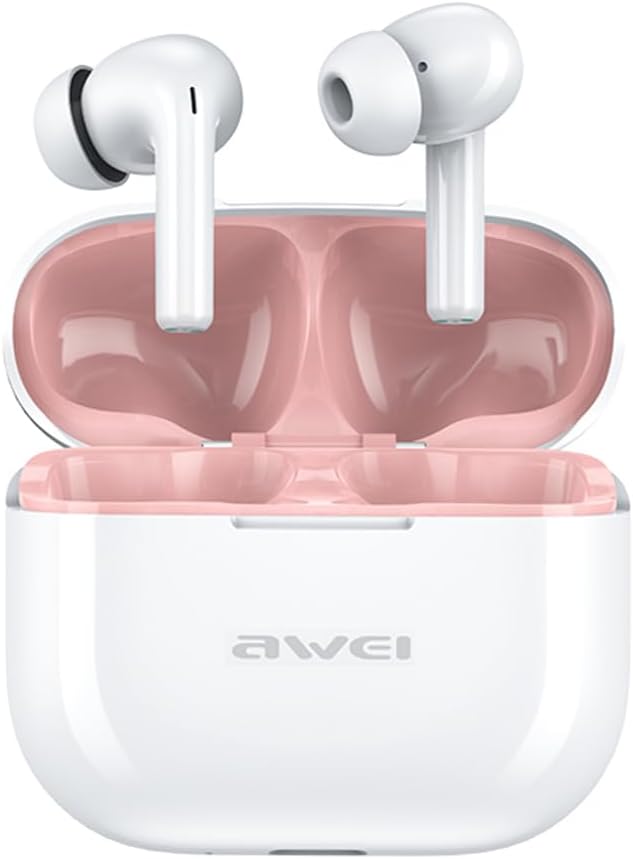
Image: The AWEI T1 Pro wireless earbuds are shown in their open charging case. The earbuds are white with a stem design, and the interior of the charging case is a light pink color. The AWEI logo is visible on the front of the white charging case.
The AWEI T1 Pro earbuds feature an ergonomic in-ear design for a comfortable and secure fit. The compact charging case not only protects the earbuds but also provides multiple charges on the go.
2.3. Nøglefunktioner
- Hi-Fi lydkvalitet: Equipped with 13mm speakers for an immersive audio experience and clear call performance.
- Bluetooth 5.4-teknologi: Ensures a faster, more stable signal transmission with low latency and a wireless range of up to 10 meters. (Note: Some packaging may indicate Bluetooth 5.3, but the device supports 5.4 for enhanced performance).
- Smart Touch Control: Intuitive touch sensors on each earbud allow for easy control of music playback, calls, and voice assistant activation.
- Lang batterilevetid: Enjoy up to 7 hours of continuous playback per charge. The 300mAh charging case extends total playtime to 36 hours in dual-ear mode or up to 60 hours in single-ear mode. The case fully charges in approximately 1 hour via Type-C.
- IPX6 vandtæt design: Resistant to sweat and rain, making them suitable for sports and outdoor activities.

Image: A detailed diagram illustrating the internal components of an earbud speaker, labeled as 'Drive Units HiFi Stereo', highlighting the layered structure of the audio driver for high-fidelity sound.

Image: A stylized depiction of a microchip labeled '5.3 Bluetooth', surrounded by circuit board elements, emphasizing lower latency and increased stability in wireless communication.

Image: A black earbud is shown next to a smartphone displaying a music player interface. Text indicates 'Touch Control Wake up Voice Assistant', illustrating how touch gestures on the earbud can control phone functions like answering calls or activating a voice assistant.

Image: A smartphone displaying a music player is shown alongside a transparent block, symbolizing extended power. Text highlights 'Full of Energy Long Battery Life', indicating the 300mAh charging case provides 7 hours of continuous use per charge.

Image: Two black earbuds are depicted, one dry and the other surrounded by water droplets, illustrating the 'No Fear of Sweat & Rain IPX6 Waterproof Rate' feature, which prevents water penetration during sports.
3. Opsætning
3.1. Første opladning
- Før første brug skal begge ørepropper placeres i opladningsetuiet.
- Tilslut det medfølgende USB Type-C-opladerkabel til opladningsporten på etuiet og en strømkilde (f.eks. USB-vægadapter, computerens USB-port).
- The indicator lights on the charging case will show charging status. A full charge for the case takes approximately 1 hour.
- Sørg for, at ørepropperne er fuldt opladede inden første parring.
3.2. Parring med en enhed
- Åbn opladningsetuiet. Ørepropperne tændes automatisk og går i parringstilstand.
- Aktiver Bluetooth på din enhed (smartphone, tablet, bærbar computer).
- Søg efter tilgængelige Bluetooth-enheder.
- Select "AWEI T1 Pro" from the list of devices.
- Når der er forbindelse, hører du en bekræftelsestone, og ørepropperne er klar til brug.
- Ørepropperne genopretter automatisk forbindelse til den sidst parrede enhed, når de tages ud af etuiet, hvis Bluetooth er aktiveret på enheden.
4. Betjeningsvejledning
4.1. Tænd/sluk
- Tænd: Åbn opladningsetuiet, eller tryk længe på berøringsområdet på begge ørepropper i 3 sekunder.
- Sluk: Placer ørepropperne tilbage i opladningsetuiet, og luk låget, eller tryk længe på berøringsområdet på begge ørepropper i 5 sekunder.
4.2. Tryk på Kontrolelementer
| Fungere | Handling |
|---|---|
| Afspil/pause musik | Et enkelt tryk på begge øretelefoner |
| Næste sang | Dobbelttryk på den højre øreprop |
| Forrige sang | Dobbelttryk på den venstre øreprop |
| Lydstyrke op | Tryk tre gange på den højre øretelefon |
| Lydstyrke ned | Tryk tre gange på venstre øretelefon |
| Besvar/afslut opkald | Et enkelt tryk på begge øretelefoner |
| Afvis opkald | Long press on either earbud for 2 seconds |
| Aktiver Voice Assistant | Long press on either earbud for 2 seconds (when not on a call) |
4.3. Foretage og modtage opkald
When a call comes in, you can answer or reject it using the touch controls as described above. During a call, a single tap will end the conversation.
4.4. Musikafspilning
Control your music directly from the earbuds. Use single, double, or triple taps to play, pause, skip tracks, or adjust volume.
5. Vedligeholdelse
5.1. Rensning
- Rengør regelmæssigt ørepropperne og opladningsetuiet med en blød, tør og fnugfri klud.
- Brug ikke slibende rengøringsmidler, alkohol eller kemiske opløsningsmidler.
- Gently remove any earwax or debris from the earbud mesh and charging contacts using a dry cotton swab or a small, soft brush.
5.2. Opbevaring
- Når ørepropperne ikke er i brug, skal de altid opbevares i deres opladningsetuier for at beskytte dem mod støv og skader.
- Opbevar enheden et køligt, tørt sted, væk fra ekstreme temperaturer og direkte sollys.
5.3. Vandafvisende
The AWEI T1 Pro earbuds are rated IPX6 waterproof, meaning they are protected against high-pressure water jets from any direction. This makes them suitable for workouts and light rain. However, they are not designed for swimming or submersion in water. Ensure the earbuds are dry before placing them back into the charging case to prevent damage.
6. Fejlfinding
6.1. Almindelige problemer og løsninger
- Øretelefoner parrer ikke med enheden:
Ensure both earbuds are charged. Turn off and on your device's Bluetooth. Forget "AWEI T1 Pro" from your device's Bluetooth list and try pairing again. - Kun én øreprop virker:
Place both earbuds back into the charging case, close the lid, wait a few seconds, then open the lid and take them out. This should reset their connection. If the issue persists, try resetting the earbuds (refer to manufacturer's webwebsted for specifikke nulstillingsinstruktioner, hvis det er nødvendigt). - Ingen lyd eller lav lydstyrke:
Check the volume level on both your device and the earbuds. Ensure the earbuds are properly seated in your ears. Try cleaning the earbud mesh for any obstructions. - Opladeretuiet oplader ikke:
Ensure the USB cable is securely connected to both the case and the power source. Try a different charging cable or power adapter. - Øretelefonerne oplader ikke i tilfælde af:
Ensure the charging contacts on both the earbuds and the case are clean and free of debris. Make sure the earbuds are correctly seated in the case.
7. Specifikationer

Image: A graphic displaying the technical specifications of the AWEI T1 Pro, including basic information, horn details, Bluetooth version, and battery capacities.
| Generel information | |
|---|---|
| Modelnavn | T1 Pro |
| Produkttype | Stereo TWS øretelefoner |
| Nettovægt | 36 g |
| Dimensioner (sag) | 58*50*24 mm |
| Øreplacering | In Ear |
| Kontroltype | Tryk på kontrol |
| Vandmodstandsniveau | IPX6 vandtæt |
| Støjkontrol | Adaptiv støjreduktion |
| Lydspecifikationer | |
| Højttaler diameter | 13 mm |
| Følsomhed | 100±3dB |
| Frekvensresponsområde | 20Hz~20,000Hz |
| Impedans | 32 Ohm |
| Forbindelse | |
| Bluetooth version | 5.4 (Image shows 5.3) |
| Wireless Range | Op til 10 meter |
| Understøttede protokoller | HSP, HFP, A2DP, AVRCP |
| Kompatible enheder | Laptops, Tablets, Mobile Phones |
| Batteri & opladning | |
| Opladeretuiet batteri | 300mAh / 3.7V |
| Earbud batterikapacitet | 45 mAh * 2 |
| Musikafspilningstid | Op til 7 timer (pr. opladning) |
| Taletid | Op til 8 timer |
| Standby tid | Op til 300 timer |
| Opladningstid (etui) | Cirka 1 time |
| Opladningsport | USB Type-C |
8. Garanti og support
AWEI products are designed and manufactured to the highest quality standards. For information regarding warranty coverage, please refer to the warranty card included in your product packaging or visit the official AWEI website. If you encounter any issues or require technical assistance, please contact AWEI customer support through the contact information provided on the official webwebsted eller din købsplatform.