
Neoteck TL338
Neoteck Digital Thickness Gauge TL338 User Manual
Model: TL338 | Brand: Neoteck
1. Sikkerhedsoplysninger
Please read and understand all instructions before operating this device. Keep this manual for future reference.
- Handle the gauge with care to avoid damage to the measuring surfaces or internal components.
- Udsæt ikke enheden for ekstreme temperaturer, fugt eller direkte sollys.
- Undgå at tabe enheden eller udsætte den for kraftige stød.
- Keep the device clean and free from dust, oil, and other contaminants.
- Forsøg ikke at skille enheden ad eller ændre den, da dette vil ugyldiggøre garantien og kan forårsage skade.
- Bortskaf batterier i henhold til lokale regler.
2. Produktet er slutview
The Neoteck Digital Thickness Gauge TL338 is a precision instrument designed for accurate measurement of various materials. It features a high-resolution LCD display and a durable construction for reliable performance.
Nøglefunktioner:
- Ultra-Precise Measurements: 0.00005inch (0.001mm) resolution across a 0-1inch (0-25.4mm) range.
- 10mm Aluminum Alloy Measuring Surface: Ensures wear resistance and long-term stability.
- Effortless One-Handed Operation: Constant-force press lever and ergonomic handle for swift measurements.
- User-Friendly Smart Design: One-touch ZERO, instant mm/inch unit switching, backlit LCD, and auto power-off.
- Durable Construction: Aluminum Alloy/Iron body for demanding environments.
- Versatile Application: Suitable for paper, leather, plastic, metal sheets, film, and more.
Komponenter:
The package includes the Digital Thickness Gauge, one 1.5V LR44 battery, and this instruction manual.
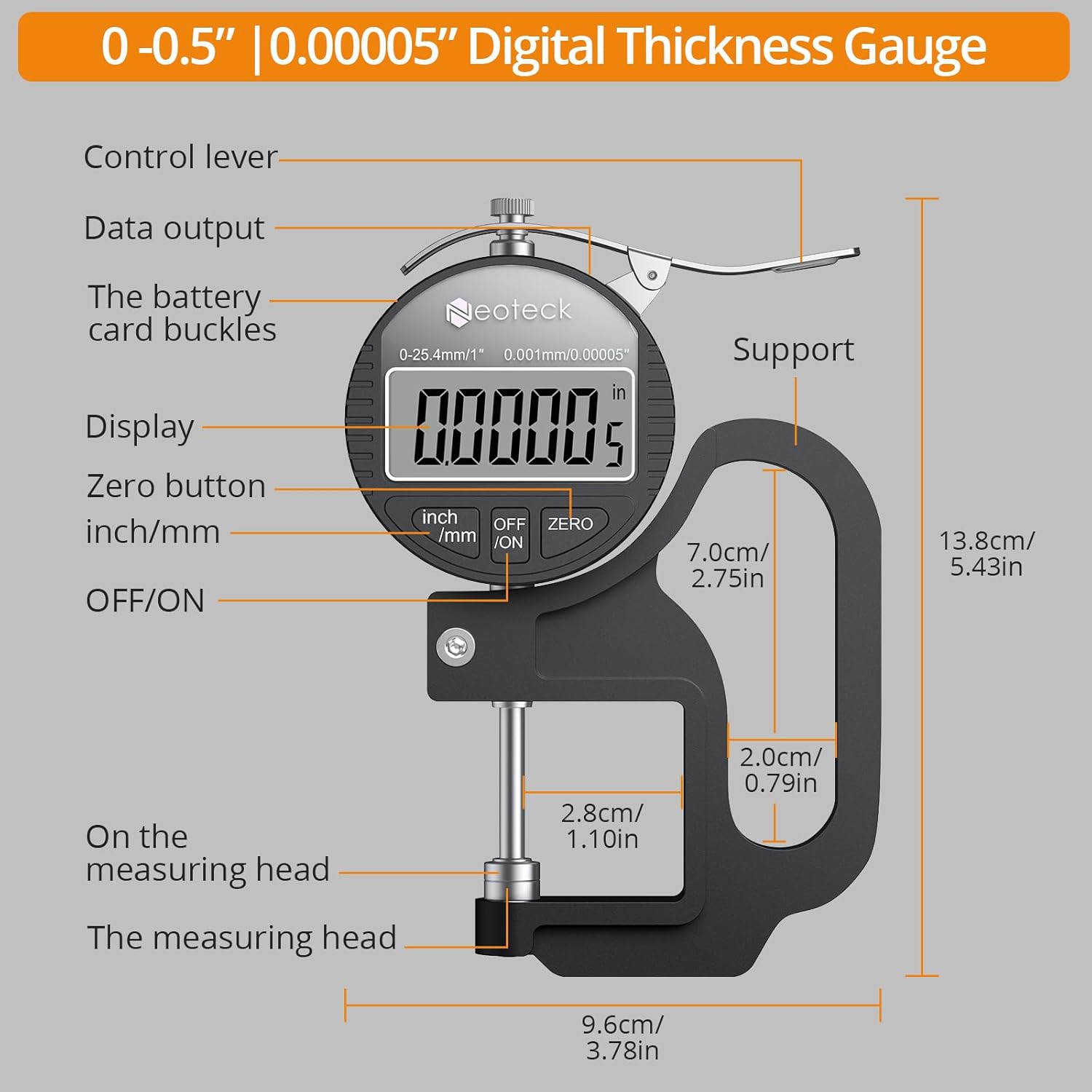
Figur 1: Detaljeret view of the Neoteck Digital Thickness Gauge components and dimensions.
3. Opsætning
Batteri installation:
- Find batterirummet på bagsiden af måleren.
- Åbn batteridækslet.
- Insert one 1.5V LR44 battery, ensuring correct polarity (+/-).
- Luk batteridækslet forsvarligt.
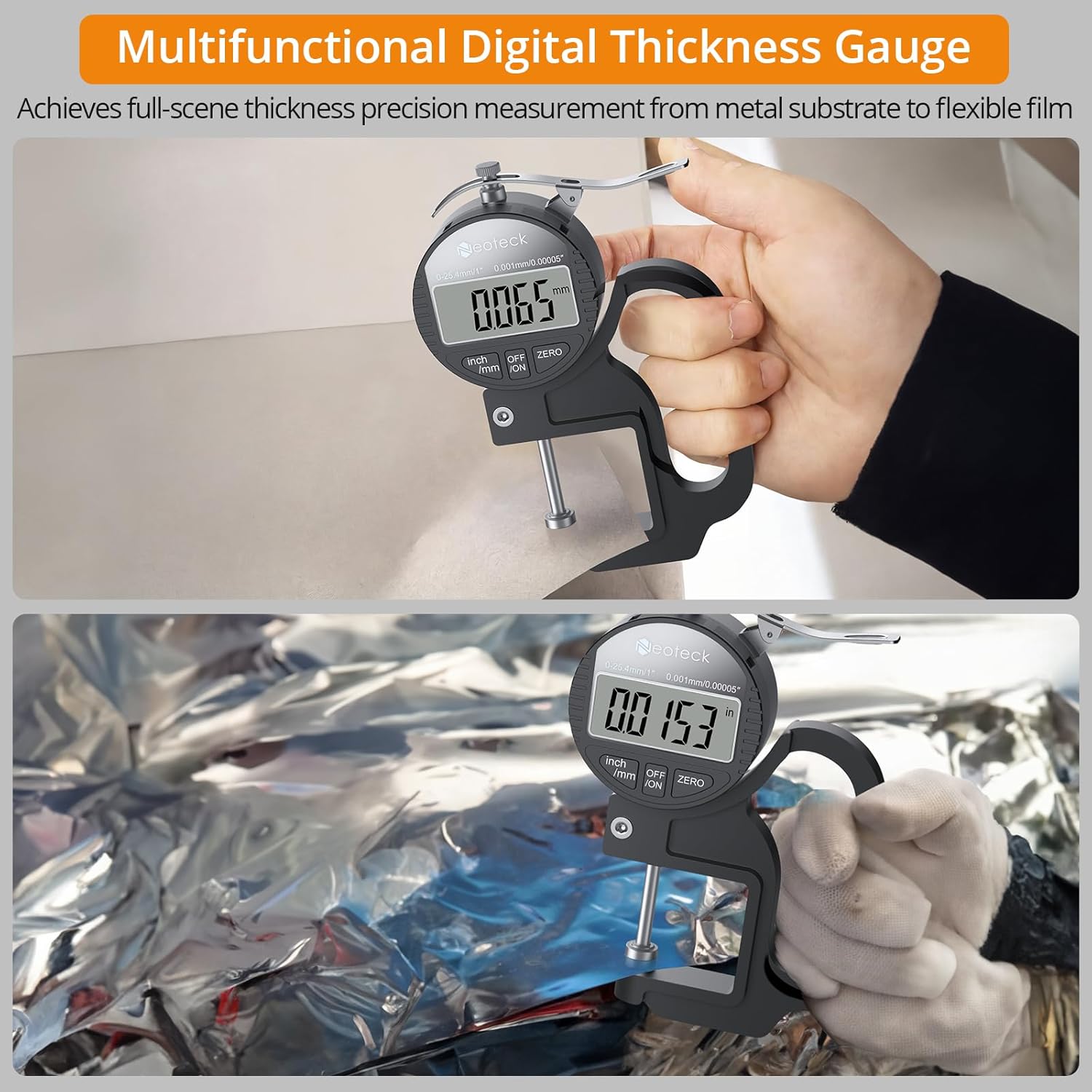
Figure 2: Contents of the Neoteck Digital Thickness Gauge package, including the gauge, battery, and manual.
4. Betjeningsvejledning
Tænd/sluk:
Press the 'OFF/ON' button to turn the device on or off. The device will automatically power off after 5 minutes of inactivity to conserve battery life.
Inch/MM Unit Conversion:
Press the 'inch/mm' button to switch between imperial (inches) and metric (millimeters) units. The selected unit will be displayed on the LCD screen.

Figure 3: The large LCD display and unit conversion buttons.
Nul indstilling:
Before taking a measurement, ensure the measuring surfaces are clean and then press the measuring rod to the bottom. Press the 'ZERO' button to set the display to zero. This calibrates the gauge for accurate readings.
Foretag en måling:
- Ensure the gauge is powered on and zeroed.
- Hold the gauge comfortably with one hand using the ergonomic grip.
- Press the control lever to open the measuring jaws.
- Carefully place the material to be measured between the measuring surfaces.
- Release the control lever slowly, allowing the measuring surfaces to gently contact the material.
- Read the thickness value directly from the LCD display.

Figure 4: One-hand operation for quick and easy measurements.

Figure 5: Measuring various materials with the alloy measuring surface.
Important Measurement Notes:
- The thickness gauge should be placed vertically during measurement, as gravity can affect data.
- For optimal accuracy, take multiple measurements and calculate the average value.
- Avoid applying excessive pressure when closing the measuring surfaces on the material.
Videodemonstration:
Video 1: A demonstration of the Neoteck Digital Thickness Meter in use, showcasing its features and measurement process.
5. Vedligeholdelse
Rensning:
Regularly clean the measuring surfaces with a soft, dry cloth. For stubborn dirt, a slightly damp en klud kan bruges, efterfulgt af øjeblikkelig tørring. Brug ikke opløsningsmidler eller slibende rengøringsmidler.
Opbevaring:
When not in use, store the thickness gauge in its protective case in a dry, cool place, away from direct sunlight and extreme temperatures. Remove the battery if the device will not be used for an extended period.
Udskiftning af batteri:
If the display becomes dim or unresponsive, replace the LR44 battery as described in the 'Battery Installation' section.
6. Fejlfinding
| Problem | Mulig årsag | Løsning |
|---|---|---|
| Skærmen er tom eller svag | Lavt batteri eller forkert batteriinstallation. | Udskift LR44-batteriet, og sørg for korrekt polaritet. |
| Unøjagtige aflæsninger | Measuring surfaces are dirty or not zeroed correctly. | Clean measuring surfaces and perform zero setting. Ensure the gauge is held vertically. |
| Knapperne reagerer ikke | Enhedsfejl eller lavt batteri. | Udskift batteriet. Kontakt kundesupport, hvis problemet fortsætter. |
7. Specifikationer
| Feature | Specifikation |
|---|---|
| Mærke | neotech |
| Model | TL338 |
| Måleområde | 0-1 tommer (0-25.4 mm) |
| Opløsning | 0.00005 tommer (0.001 mm) |
| Målenøjagtighed | 0.0005"/0.00005" |
| Materiale | Aluminum Alloy/Iron |
| Batteritype | 1 x 1.5V LR44 (included) |
| Driftstemperatur | 0°C til 40°C (32°F til 104°F) |
| Inkluderede komponenter | Thickness Gauge, 1.5V Battery, Instruction Manual |
8. Garanti og support
Garanti:
This Neoteck Digital Thickness Gauge is covered by an 18-month warranty from the date of purchase. The warranty covers manufacturing defects and material faults under normal use. It does not cover damage caused by misuse, accidents, unauthorized modifications, or improper maintenance.
Kundesupport:
For technical assistance, warranty claims, or any questions regarding your Neoteck Digital Thickness Gauge, please contact our customer support team. Refer to the contact information provided on the product packaging or our official webwebsted.
Ask a question about this manual
Ask about setup, troubleshooting, compatibility, parts, safety, or missing instructions. Manuals+ will review the question and use this page’s manual context to help answer it.