
Indledning
Thank you for choosing the Philips Solar Security Light. This manual provides essential information for the safe and efficient operation of your solar-powered, wall-mounted flood light with PIR motion sensor. Please read these instructions carefully before installation and use, and retain them for future reference.
Sikkerhedsoplysninger
- Sørg for, at monteringsfladen er stabil og kan bære vægten af lampen.
- Forsøg ikke at skille produktet ad eller ændre det. Dette kan ugyldiggøre garantien og udgøre en sikkerhedsrisiko.
- Hold solpanelet rent for at sikre optimal opladningsydelse.
- Avoid looking directly into the light source when it is active, as it may cause eye strain.
- Bortskaf produktet og dets komponenter forsvarligt i henhold til lokale regler ved udgangen af dets levetid.
Pakkens indhold
Kontroller, at alle komponenter er til stede før installation:
- Philips Solar Security Light (1 unit)
- Fjernbetjening (1 enhed)
- Monteringsbeslag (1 enhed)
- Skruer (2 enheder)
- Wall Plugs (2 units)
Produkt overview
The Philips Solar Security Light is an outdoor, solar-powered flood light designed for enhanced security and illumination. It features a PIR motion sensor, high-brightness LEDs, and multiple lighting modes.

Billede: Overview of the Philips Solar Security Light, highlighting its durable design with a solar panel, three LED light heads, and an integrated motion sensor.
Nøglefunktioner:
- Høj lysstyrke: 800 lumens with 6500K cool daylight color temperature.
- PIR Motion Sensor: Detects motion up to 49.2 feet with a 180-degree detection angle.
- 3 lystilstande: Customizable illumination settings for various needs.
- Solcelledrevet: Equipped with an upgraded polycrystalline solar panel and a 2000 mAh high-capacity battery for efficient charging and extended use.
- Vejrbestandig: IP65 rated for resistance against heavy rain, humidity, and extreme temperatures.
- Fjernbetjening: Allows convenient adjustment of light modes without manual interaction.
Opsætning og installation
The Philips Solar Security Light is designed for easy wall-mounted installation with no wiring required. It comes pre-assembled.
Installationstrin:
- Vælg en placering: Select an outdoor location that receives direct sunlight for most of the day to ensure optimal charging of the solar panel. The light should be mounted on a wall.
- Markér borepunkter: Hold the mounting bracket against the desired wall location and mark the positions for the two screws.
- Bore huller: Drill two holes at the marked points. Insert the wall plugs into the drilled holes.
- Fastgør monteringsbeslag: Fastgør monteringsbeslaget til væggen med de medfølgende skruer.
- Monter lyset: Slide the solar security light onto the mounting bracket until it clicks securely into place.
- Juster lyshoveder og sensor: Adjust the three light heads and the PIR motion sensor to cover the desired area. The motion sensor has an adjustable angle of 180 degrees.
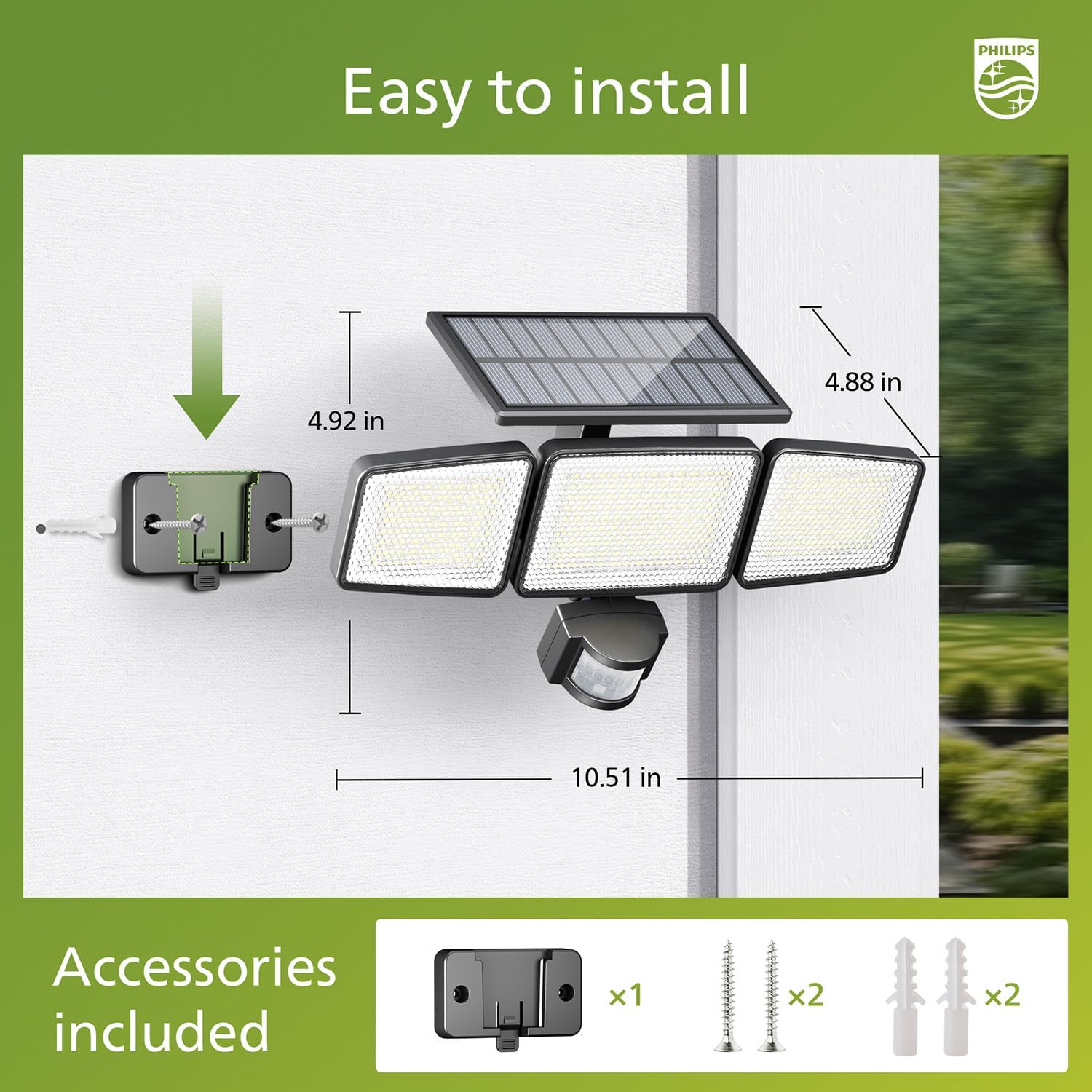
Image: Visual guide for installing the Philips Solar Security Light, including dimensions and the accessories provided for wall mounting.
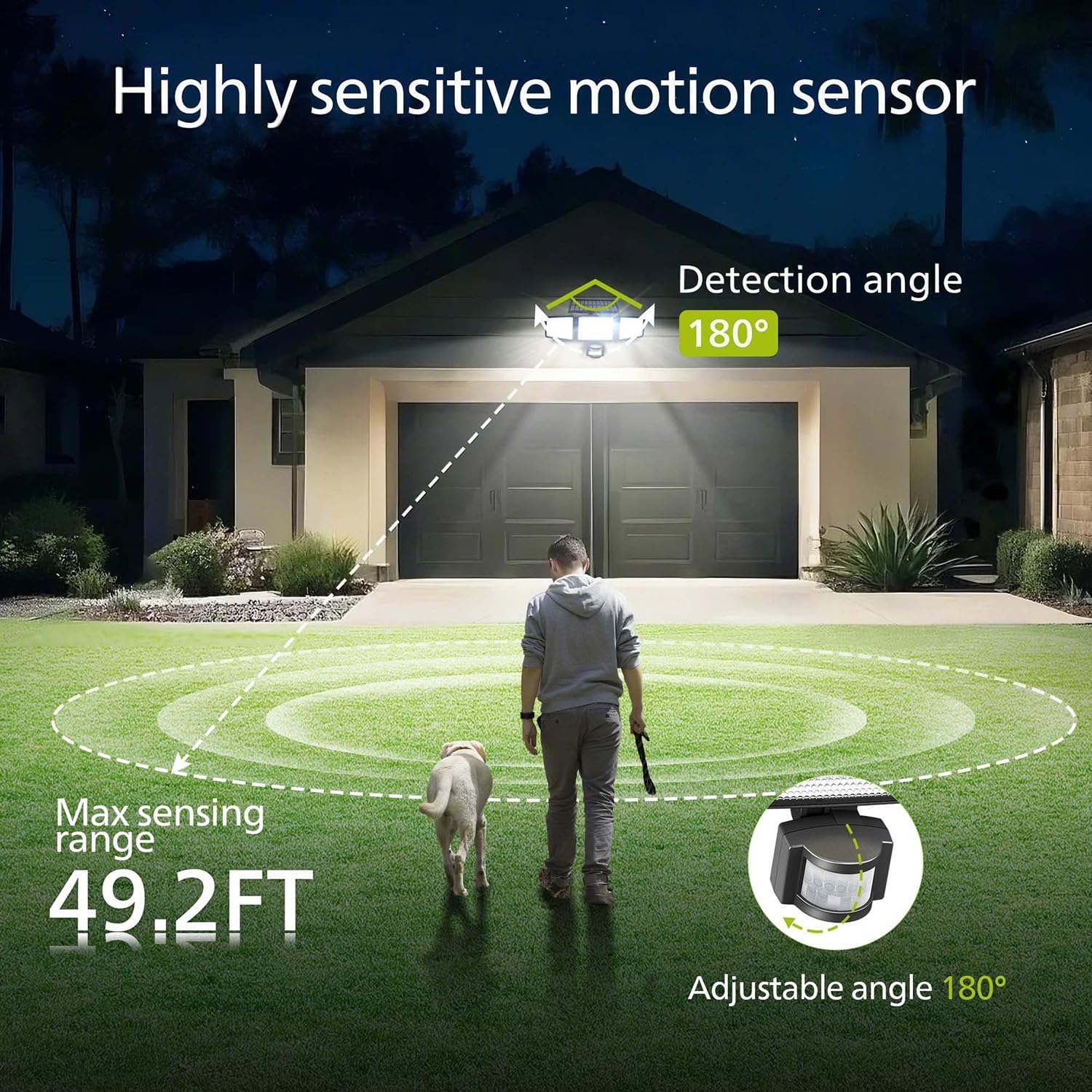
Image: Illustration of the motion sensor's coverage, showing a 180-degree detection angle and a maximum sensing range of 49.2 feet.
Betjeningsvejledning
The Philips Solar Security Light features three distinct lighting modes, controllable via the included remote control.
Belysningstilstande:
- Sensortilstand: The light remains off until motion is detected. Upon detection, it illuminates at 100% brightness (800 lumens) for approximately 25 seconds, then turns off.
- Dæmp tilstand: The light stays on continuously at a low brightness of 10% (80 lumens) throughout the night.
- Dæmpning + Sensortilstand: The light stays on continuously at a very low brightness of 2-3% (16-24 lumens). When motion is detected, it brightens to 100% (800 lumens) for approximately 25 seconds, then returns to the dim state.

Image: Detailed explanation of the three operational modes, showing how the light behaves in Sensor, Dim, and Dim + Sensor modes based on motion detection and ambient light.
Use the remote control to switch between these modes as needed. Ensure the remote control has a clear line of sight to the light fixture for proper function.
Opretholdelse
Regular maintenance ensures optimal performance and longevity of your Philips Solar Security Light.
- Rengøring af solpaneler: Tør solpanelet regelmæssigt af med en blød kludamp klud til at fjerne støv, snavs eller affald. Et rent solpanel sikrer maksimal absorption af sollys og opladningseffektivitet.
- Rengøring af armaturer: Clean the light fixture with a soft, dry cloth. Avoid using abrasive cleaners or solvents that could damage the finish or electronic components.
- Batteri: The integrated high-capacity 2000 mAh battery is designed for long-term use. No user maintenance or replacement is required for the battery.
- Vejrbestandighed: The IP65 rating ensures the light is protected against dust and water jets. However, avoid submerging the unit in water.

Image: Focus on the high-quality solar panel, illustrating its role in providing power for 8-10 hours of operation and its 1800mAh high-capacity battery.
Fejlfinding
Hvis du støder på problemer med din Philips solcellesikrede sikkerhedslampe, kan du se følgende almindelige problemer og løsninger:
- Lyset tændes ikke om natten:
- Sørg for, at solpanelet får tilstrækkeligt med direkte sollys i løbet af dagen.
- Check if the light is in the correct operating mode (e.g., not in 'off' state if the remote has an off button).
- Verify that the remote control battery is functional.
- Lyset er svagt eller forbliver kun tændt i en kort periode:
- The solar panel may not be fully charged. Ensure it is clean and exposed to direct sunlight for at least 6-8 hours.
- Ambient temperature can affect battery performance; extreme cold may reduce operating time.
- Bevægelsessensoren registrerer ikke bevægelse:
- Sørg for, at sensorlinsen er ren og uhindret.
- Verify the light is in a motion-activated mode (Sensor Mode or Dim + Sensor Mode).
- Adjust the angle of the motion sensor to cover the desired detection area.
If problems persist, please contact Philips customer support for further assistance.
Specifikationer
| Feature | Specifikation |
|---|---|
| Mærke | PHILIPS |
| Model | 929004621403 |
| Farve | Sort |
| Materiale | Aluminium |
| Lysarmatur Form | Projektørlys |
| Indendørs/Udendørs brug | Udendørs |
| Strømkilde | Solcelledrevet |
| Kontrolmetode | Fjern |
| Lyskilde | LED |
| Antal lyskilder | 4 |
| Voltage | 3.7 volt DC |
| Lys farve | Cool White (6500K) |
| Lysstyrke | 800 lumen (maks.) |
| Vandmodstandsniveau | IP65 vandtæt |
| Monteringstype | Vægmontering |
| Batterikapacitet | 2000 mAh |
| Følende vinkel | 180 grader |
| Sensing Range | Op til 49.2 fod |

Image: A comparison table highlighting key specifications of the Philips solar security light, such as brightness, lighting modes, battery capacity, and waterproof rating.
Garanti og support
For garantioplysninger og kundesupport henvises til den officielle Philips- webwebstedet eller kontakt deres kundeserviceafdeling. Behold din købskvittering som købsbevis.
For yderligere hjælp, besøg: www.philips.com/support


