
Indledning
This manual provides essential information for setting up, operating, and maintaining your XIAOMI TV F 32-inch HD Smart Fire TV. Please read this manual thoroughly before using the product to ensure safe and optimal performance.
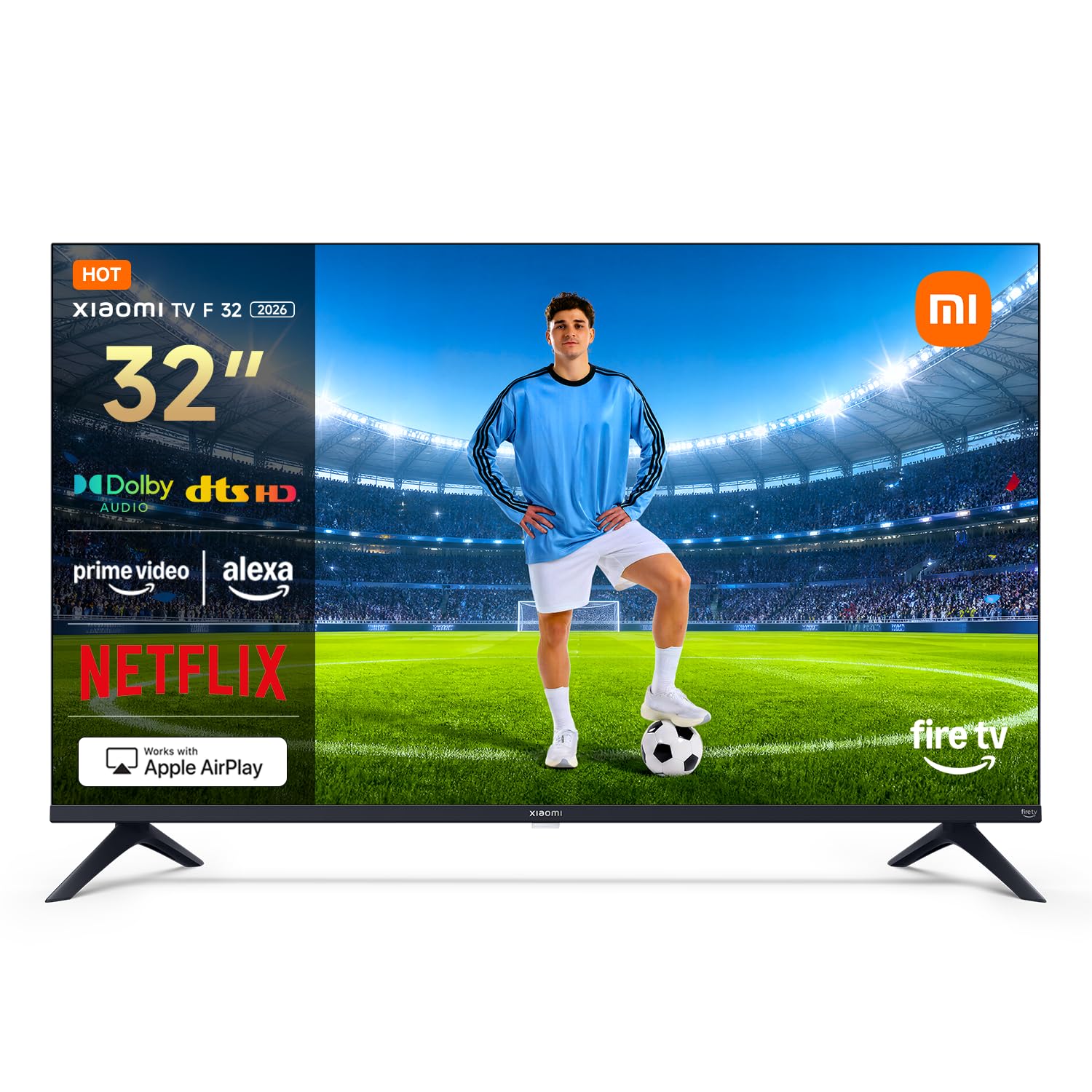
Figur 1: Forside view of the XIAOMI TV F 32-inch Smart Fire TV.
Hvad er der i æsken
Carefully unpack your new XIAOMI TV. The package should contain the following items:
- XIAOMI TV F 32-inch
- Strømkabel
- Safety and Installation Instruction Manual
- Base Components (for stand assembly)
- Screw Kit (for stand assembly)
- Bluetooth Remote Control (2 AAA batteries included)

Figure 2: The XIAOMI TV F 32-inch and its main accessories.
Opsætning
1. Samling af stativet eller vægmonteringen
If using the included stand, attach the base components to the TV using the provided screw kit. Ensure all screws are tightened securely. If wall mounting, use a VESA-compatible wall mount (100 x 200 mm) and follow the wall mount manufacturer's instructions. The TV weighs approximately 3.1 kg without the stand.
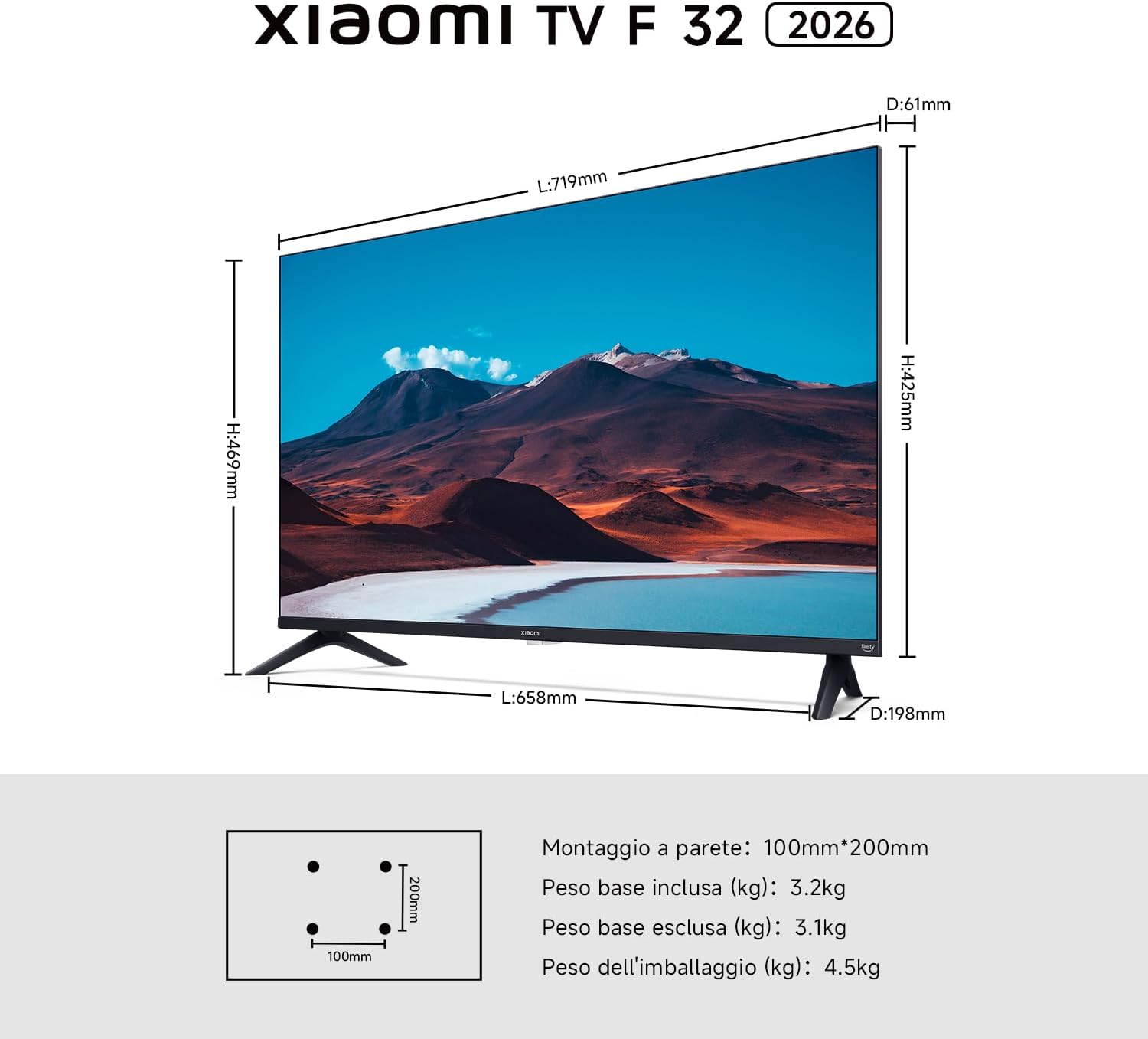
Figure 3: TV dimensions and VESA mounting pattern (100x200mm).
2. Tilslutning af strøm
Connect the power cable to the TV's power input and then plug it into a suitable electrical outlet.
3. Første opstart og konfiguration
Press the power button on the remote control to turn on the TV. Follow the on-screen instructions to select your language, connect to your Wi-Fi network, and complete the initial Fire TV setup.
Betjening af dit tv
Fire TV-grænseflade
Your XIAOMI TV F 32 features an integrated Fire TV experience. The home screen provides easy access to thousands of apps, including Netflix, Prime Video, Disney+, and YouTube. Browse, stream, and discover new content with personalized suggestions.

Figure 4: The Fire TV interface for endless entertainment.
Alexa stemmestyring
The included Bluetooth remote control features an Alexa button. Press this button and use your voice to search for content, adjust volume, change channels, or control compatible smart home devices. The 360-degree coverage allows voice commands from various angles.

Figure 5: Bluetooth remote control with dedicated Alexa button.
Apple AirPlay
Stream content directly from your iPhone, iPad, or Mac to your TV using Apple AirPlay. Share photos, watch videos, or mirror your entire screen wirelessly.

Figure 6: Using Apple AirPlay to cast content to the TV.
Lydfunktioner
Experience immersive sound with Dolby Audio and DTS-HD technologies. The TV is equipped with two 8W speakers, delivering clear and dynamic audio for movies, music, and games.

Figure 7: Enhanced audio experience with Dolby Audio and DTS-HD.
Forbindelse
The TV offers versatile connectivity options including Bluetooth 5.0, dual-band Wi-Fi, Ethernet, 2 HDMI ports, and 1 USB port (USB 2.0 or 3.0). These allow for seamless connection to various devices and networks.

Figure 8: Wireless connectivity options: Bluetooth 5.0 and Dual-band Wi-Fi.
Tredobbelt tuner
The integrated triple tuner supports DVB-C, DVB-S/S2, and DVB-T/T2 standards, allowing you to receive digital terrestrial, satellite, and cable broadcasts without an external decoder.
Opretholdelse
Rengøring af TV
Before cleaning, ensure the TV is turned off and unplugged from the power outlet. Use a soft, dry, lint-free cloth to gently wipe the screen and exterior surfaces. For stubborn marks, lightly dampen the cloth with water or a specialized screen cleaner. Avoid using harsh chemicals, abrasive cleaners, or solvents, as these can damage the screen or finish.
Almen pleje
Avoid placing the TV in direct sunlight or near heat sources. Ensure adequate ventilation around the TV to prevent overheating. Do not block the ventilation openings. Protect the TV from moisture and dust.
Fejlfinding
Hvis du støder på problemer med dit tv, kan du bruge følgende almindelige løsninger:
- Ingen strøm: Ensure the power cable is securely connected to both the TV and the power outlet. Check if the outlet is functioning by plugging in another device.
- Intet billede/lyd: Verify that the correct input source is selected. Check all cable connections (HDMI, antenna, etc.). If using an external device, ensure it is powered on.
- Fjernbetjeningen virker ikke: Check the batteries in the remote control (2 AAA batteries). Ensure there are no obstructions between the remote and the TV. Re-pair the Bluetooth remote if necessary.
- Problemer med netværksforbindelse: Restart your Wi-Fi router. Go to the TV's network settings and try reconnecting to your Wi-Fi network. If using Ethernet, ensure the cable is properly connected.
- Dårlig billedkvalitet: Juster billedindstillingerne (lysstyrke, kontrast, skarphed) i TV-menuen. Sørg for, at inputkilden leverer et signal af høj kvalitet.
For persistent issues, consult the full safety and installation manual or contact customer support.
Specifikationer
| Feature | Detalje |
|---|---|
| Modelnavn | Xiaomi TV F 32 |
| Modelnummer | L32MB-FAEU |
| Skærmstørrelse | 32 tommer (81 cm) |
| Displayteknologi | LED |
| Opløsning | 720p (HD) |
| Opdateringshastighed | 120 Hz |
| Aspektforhold | 1.77:1 |
| Kontrastforhold | 1200:1 |
| Max lysstyrke | 200 nit |
| Viewi vinkel | 178 grader |
| Operativsystem | FireOS |
| Intern opbevaring | 8 GB |
| VÆDDER | 1.5 GB |
| Lydudgang | 2 x 8 W Speakers |
| Lydteknologier | Dolby Audio, DTS Virtual:X, DTS-HD |
| Forbindelse | Bluetooth 5.0, Dual-band Wi-Fi, Ethernet, 2x HDMI, 1x USB |
| Tuner | Triple Tuner (DVB-C/S/S2/T/T2) |
| Stemmekontrol | Alexa indbygget |
| Skærmspejling | Apple AirPlay 2 |
| VESA Monteringsstandard | 100 x 200 mm |
| Produktdimensioner (DxBxH) | 19.8P x 71.9L x 46.9H cm |
| Vægt (uden stativ) | 3.1 kg |
Garantioplysninger
The XIAOMI TV F 32-inch HD Smart Fire TV comes with a two-year manufacturer's limited warranty. Please retain your proof of purchase for warranty claims. For detailed terms and conditions, refer to the warranty card included in the packaging or visit the official XIAOMI webwebsted.
Kundesupport
For technical assistance, troubleshooting, or service inquiries, please contact XIAOMI customer support through their official website or the contact information provided in your product documentation. When contacting support, please have your model number (L32MB-FAEU) and serial number ready.