
1. Produktet er slutview
The atomberg Studio Nexus 1200mm BLDC Ceiling Fan is designed for efficient air circulation and modern aesthetics. It features a Brushless Direct Current (BLDC) motor for energy savings, a BEE 5-star rating, and quiet operation. This fan includes a remote control for convenient adjustments and a unique Moonbeam Light function.
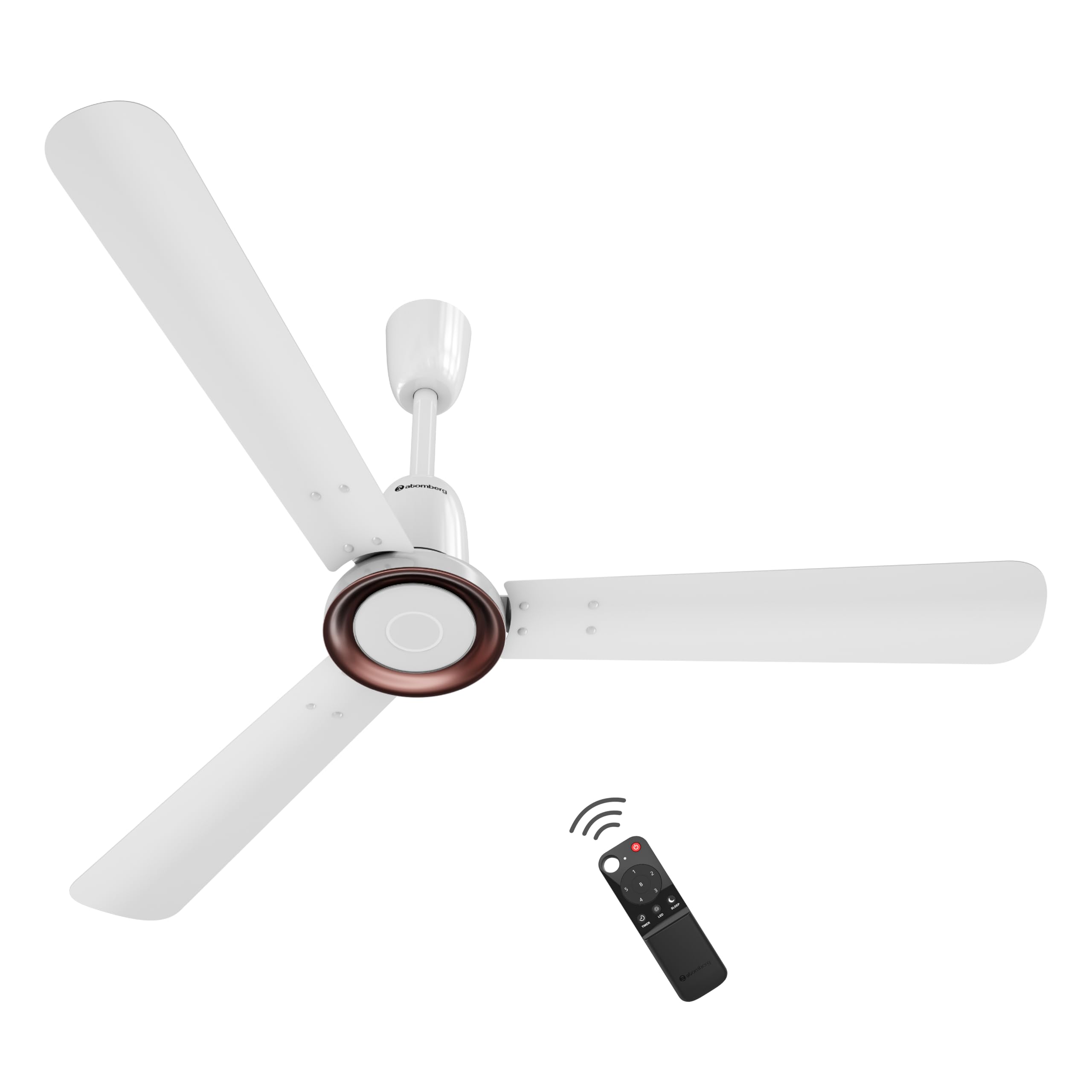
Figure 1: atomberg Studio Nexus 1200mm BLDC Ceiling Fan (Gloss White)
Nøglefunktioner:
- Energieffektiv BLDC-motor: Consumes only 35W at top speed, saving up to 65% electricity compared to unrated fans.
- BEE 5-Star Rated: Certificeret for høj energieffektivitet.
- Høj lufttilførsel: Provides 230 CMM (Cubic Meters Per Minute) for optimal airflow.
- Støjsvag drift: Operates at less than 57 dB, ensuring a quiet environment.
- Smart IR Remote Control: Allows adjustment of speed, Boost Mode, Timer, and Sleep Mode.
- Moonbeam Light: Integrated night light with two intensity levels, providing visual feedback for remote commands.
- IoT-forbindelse: Supports smart control (details for app control are typically provided in a separate IoT guide).
- Moderne minimalistisk design: Features a premium metallic body trim and wide designer curved blades.

Figure 2: Advanced Air+ Technology for enhanced air delivery and comfort.

Figur 3: Overview of best-in-class performance, including remote operation, high air delivery, and low noise.
2. Sikkerhedsoplysninger
Læs venligst alle sikkerhedsinstruktioner omhyggeligt inden installation og brug. Gem denne manual til senere brug.
- Sørg for, at strømforsyningen er afbrudt før installation, rengøring eller vedligeholdelse.
- Installationen skal udføres af en kvalificeret elektriker i overensstemmelse med lokale el-forskrifter.
- Mount the fan securely to a ceiling structure capable of supporting its weight.
- Keep hands, hair, and clothing clear of the fan blades during operation.
- Forsøg ikke selv at reparere eller modificere ventilatoren. Kontakt kundesupport for at få hjælp.
3. Pakkens indhold
Kontroller, at alle komponenter er til stede i pakken, før du fortsætter installationen:
- Knivsæt (1 enhed)
- Fjernbetjening (1 enhed)
- Motorboks (1 enhed)
- Baldakinsæt (1 enhed)
- Nedstang (1 enhed)
- Sjækelsæt (1 enhed)
- Manual og garantikort (1 enhed)
4. Installation
The atomberg Studio Nexus fan is designed for versatile installation, accommodating both standard and false/low ceilings.
Loftkompatibilitet:
- For Standard Ceilings: Use both the bottom and top canopy for a complete finish.
- For Low Height or False Ceilings: An additional ceiling plate is provided. Use this ceiling plate with the bottom canopy for a flush installation.
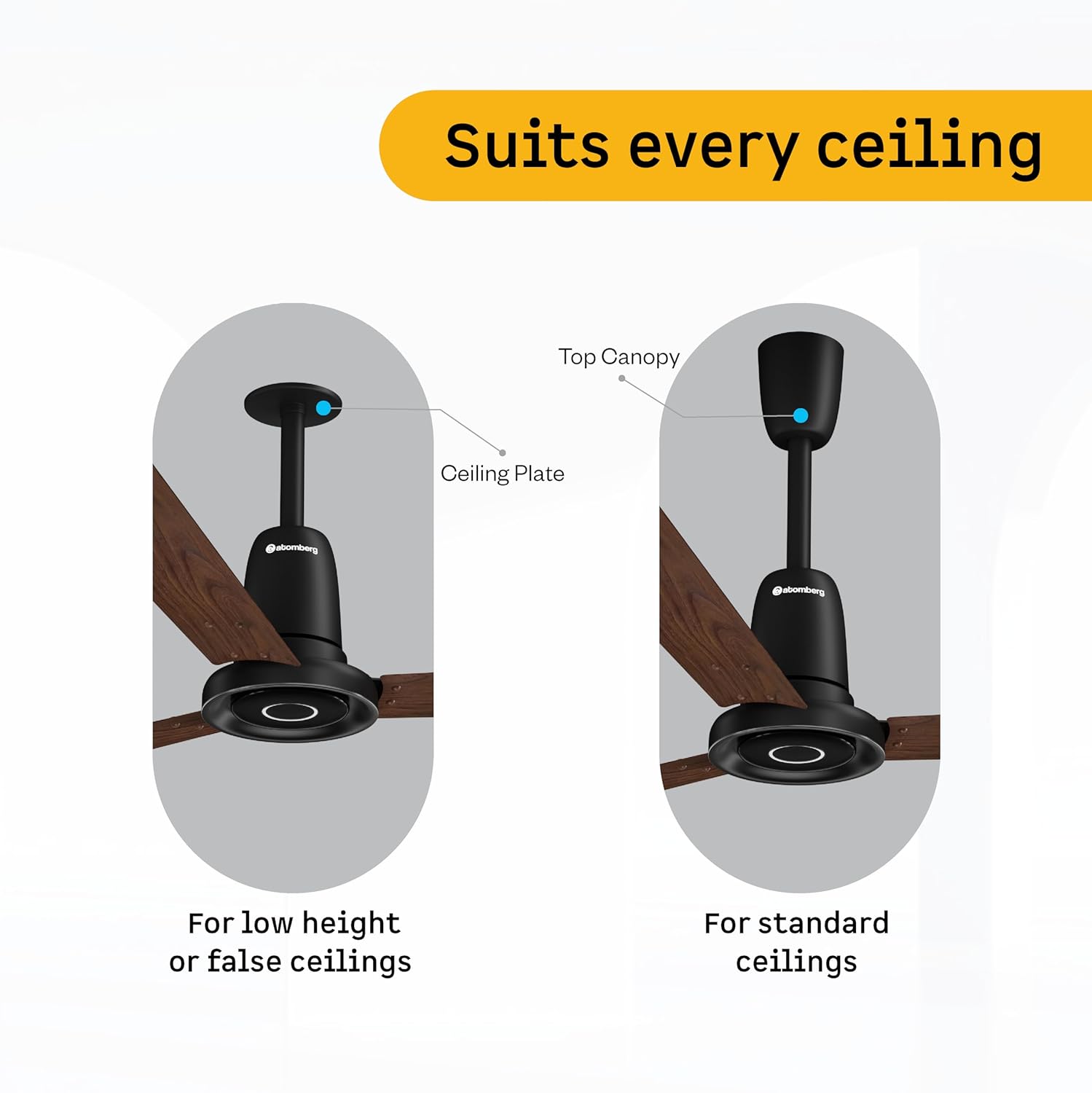
Figure 4: Illustration of ceiling fan installation for different ceiling types.
Detailed installation steps are provided in the included manual leaflet. It is recommended to have the fan installed by a professional.
5. Betjening
Control your atomberg Studio Nexus fan using the included Smart IR Remote or through IoT connectivity.
Brug af fjernbetjeningen:
The universal IR remote allows for easy control of various fan functions. No pairing is required.

Figure 5: Smart IR Remote Control for the Studio Nexus fan.
- Tænd/sluk: Tryk på tænd/sluk-knappen for at tænde eller slukke for ventilatoren.
- Hastighedstilpasning: Use the numbered buttons (1-6) to select your desired fan speed.
- Boost-tilstand: Activates the highest fan speed for rapid cooling.
- Timertilstand: Indstil ventilatoren til at slukke automatisk efter et forudindstillet antal timer.
- Sove mode: Sænk gradvist ventilatorens hastighed hver anden time for at sikre en behagelig søvn.
- LED -lysstyring: Turn the Moonbeam Light ON or OFF.
Moonbeam Light Function:
The integrated Moonbeam Light serves as a night light and provides visual feedback.
- It has two intensity levels, adjustable via the remote.
- The light blinks in response to remote commands (e.g., power on/off, speed change, timer, sleep mode) to confirm action.
IoT and App Control:
For advanced control and smart home integration, refer to the dedicated IoT setup guide or the atomberg app for instructions on connecting and controlling your fan via a smart device.
6. Vedligeholdelse
Regelmæssig vedligeholdelse sikrer optimal ydeevne og levetid for din ventilator.
- Rensning: Tør ventilatorbladene og motorhuset regelmæssigt af med en blød klud.amp klæde. Brug ikke slibende rengøringsmidler eller opløsningsmidler.
- Bladinspektion: Check blades for any damage or warping. Damaged blades can cause imbalance and noise.
- Sikker montering: Sørg for, at alt monteringsudstyr forbliver stramt og sikkert.
- Smøring: BLDC-motoren er designet til vedligeholdelsesfri drift og kræver ikke smøring.
Afbryd altid strømmen, før du udfører nogen form for rengøring eller vedligeholdelse.
7. Fejlfinding
If you encounter issues with your atomberg Studio Nexus fan, refer to the following common troubleshooting tips:
- Ventilator tænder ikke:
- Kontroller om hovedstrømforsyningen til ventilatoren er tændt.
- Sørg for, at fjernbetjeningens batterier ikke er opbrugt.
- Verify that the remote control is pointed directly at the fan's receiver.
- Ventilatorens vaklen:
- Ensure all blade screws are tightened securely.
- Check that the downrod and mounting bracket are firmly attached to the ceiling.
- Kontroller, at knivene ikke er bøjede eller beskadigede.
- Fjernbetjeningen reagerer ikke:
- Udskift fjernbetjeningens batterier.
- Sørg for, at der ikke er nogen forhindringer mellem fjernbetjeningen og ventilatoren.
- Moonbeam Light Not Working:
- Check if the light function is enabled via the remote.
- Kontakt kundesupport, hvis problemet fortsætter.
For issues not covered here, please contact atomberg customer support.
8. Specifikationer
Detailed technical specifications for the atomberg Studio Nexus 1200mm BLDC Ceiling Fan:
| Feature | Specifikation |
|---|---|
| Mærke | atomberg |
| Modelnavn | Studio Nexus |
| Farve | Glans hvid |
| Elektrisk ventilator design | Loft Fan |
| Strømkilde | Elektrisk med ledning |
| Produktmål (D x B x H) | 57D x 29B x 25.5H Centimeter |
| Værelsestype | Soveværelse, Spisestue, Hjemmekontor, Stue, Læserum |
| Særlige funktioner | BLDC Motor with Remote, Low noise, Boost Mode, Timer, Moonbeam Light |
| Monteringstype | Loftmontering |
| Controller type | Button Control, Remote Control, App |
| Antal hastigheder | 6 |
| Støjniveau | 57 decibel |
| Wattage | 35 watt |
| Antal blade | 3 |
| Luftmængde kapacitet | 230 Cubic Meters Per Minute |
| Hastighed | 360 RPM |
| Voltage | 220 volt |
| Indendørs udendørs brug | Indendørs |
| Materiale Type | Aluminium |
| Bladmateriale | Aluminium |
| Specifikation Met | BEE 5 Star |
| Bladlængde | 1200 millimeter |
| Varens vægt | 4.2 kilo |
| Oprindelsesland | Indien |
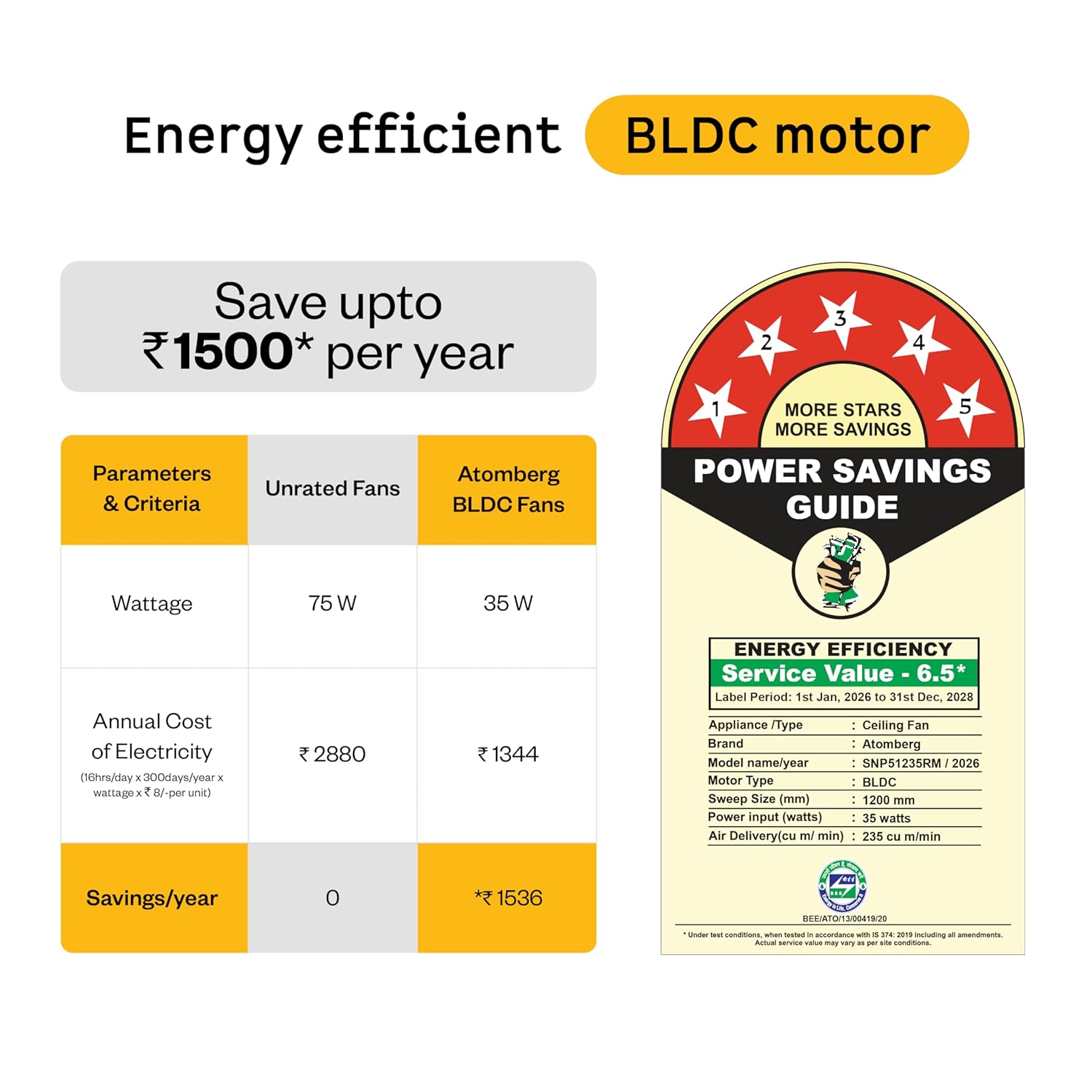
Figure 6: Energy Efficiency Guide for atomberg BLDC motor, highlighting 5-star rating and electricity savings.
9. Garanti og support
Your atomberg Studio Nexus ceiling fan comes with comprehensive warranty coverage and dedicated customer support.
Garantioplysninger:
- Standard garanti: A 3-year warranty is included with your purchase.
- Udvidet garanti: An additional 2-year warranty can be availed by registering your product on the official atomberg website. This extends the total warranty period to 5 years.

Figure 7: Warranty details and registration process for extended coverage.
Kundesupport:
For any queries, technical assistance, or warranty claims, please contact atomberg customer support:
- E-mail: support@atomberg.com
- Telefon: 08448449442
- Webwebsted: Visit the official atomberg website for product registration and further information.