
NexFoto NF-W215BN-T-BT-U-US
NexFoto 21.5 Inch Touchscreen Digital Picture Frame User Manual
Model: NF-W215BN-T-BT-U-US
1. Introduktion
Welcome to the NexFoto 21.5 Inch Touchscreen Digital Picture Frame. This manual provides detailed instructions for setting up, operating, and maintaining your new digital photo frame. Designed for ease of use, this frame allows you to effortlessly share and display your cherished memories in vibrant Full HD.

Figure 1: NexFoto 21.5 Inch Digital Picture Frame
2. Produktfunktioner
- 21.5-inch FHD Glossy Touch Screen: Features 1920 x 1080 resolution with a 16:9 aspect ratio and IPS display technology for wide viewing angles and sharp details.
- 64 GB intern hukommelse: Stores up to 160,000 pictures, with support for Micro SD card extended storage (up to 64GB, not included).
- Wi-Fi-forbindelse: Compatible with 2.4GHz and 5Ghz networks for easy photo and video sharing.
- Alsidig placering: Can be freestanding or wall-mounted in both landscape and portrait orientations with auto-rotation.
- Multifunctional Custom Settings: Includes options for captions, weather display, calendar, clock, alarm, and sleep mode.
- Cloudbaseret lagring: Offers convenient, private, and secure cloud storage.
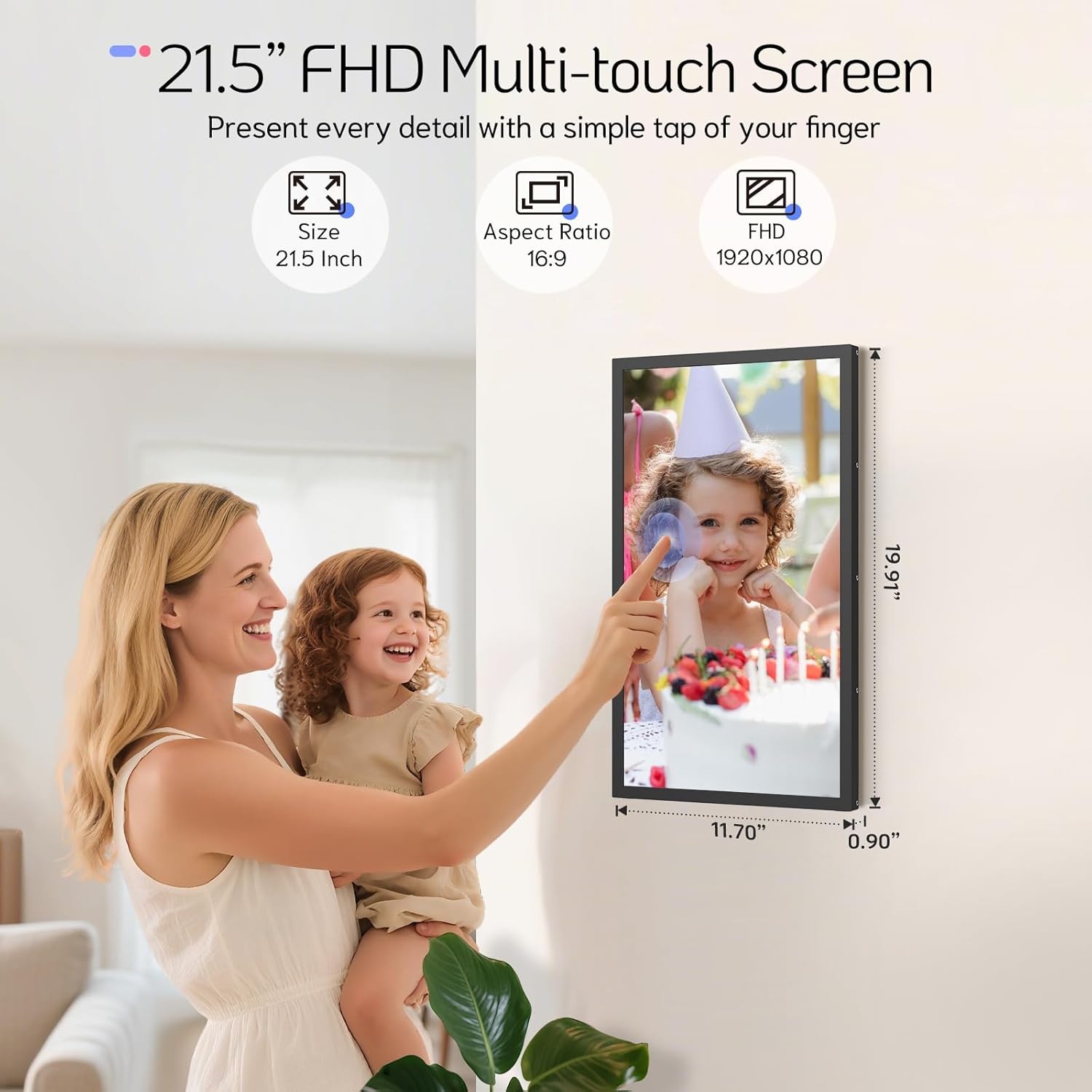
Figure 2: 21.5 Inch FHD Multi-touch Screen Details

Figure 3: Effortless Photo and Video Sharing

Figure 4: Built-In Bluetooth Speakers & Art Gallery
3. Pakkens indhold
Markér venligst feltet for følgende elementer:
- NexFoto 21.5 Inch Digital Picture Frame
- Wall Adaptor with US plug
- 64GB USB drive
- Brugervejledning & hurtigstartguide
- Skruetrækker
- Rotatable Wall Mount (100x100 VESA Compatible)
- Vægankre og skruer
- Stå

Figur 5: Indhold af den medfølgende pakke
4. Opsætningsvejledning
4.1 Indledende opsætning
- Tænd: Tilslut strømadapteren til stellet, og sæt den i en stikkontakt. Stellet tænder automatisk.
- Sprogvalg: Følg vejledningen på skærmen for at vælge dit foretrukne sprog.
- Wi-Fi-forbindelse: Connect the frame to your Wi-Fi network (supports 2.4GHz and 5GHz). Ensure a stable connection for optimal performance.
- Download NexFoto App: Scan the QR code displayed on the screen or search for "NexFoto" in your mobile app store (iOS/Android) to download the companion app.
- Par din ramme: Open the NexFoto app, create an account, and follow the in-app instructions to pair your mobile device with the digital frame via Bluetooth and Wi-Fi.

Figur 6: Hurtige opsætningstrin
Video 1: Denne video giver en kort oversigtview of the NexFoto Digital Picture Frames, showcasing their features and ease of use for sharing memories.
5. Betjeningsvejledning
5.1 Deling af fotos og videoer
Once your frame is paired with the NexFoto app, you can easily upload photos and videos from your smartphone. The app allows you to select media from your gallery, add captions, and choose which album to send them to. You can also invite family and friends to join your private social circle to share their own memories directly to your frame.
The frame also supports direct upload via USB drive or Micro SD card (not included) for added convenience.

Figure 7: Interact and Connect with Shared Memories
5.2 Brugerdefinerede indstillinger
The NexFoto frame offers various customizable settings accessible through the touchscreen interface or the app:
- Billedtekster: Add personalized captions to your photos.
- Vis oplysninger: Enable or disable the display of weather, calendar, and clock.
- Alarm & Sleep Mode: Set alarms or schedule sleep mode to conserve energy and manage display times.
5.3 Skærmretning
The frame can be used in both landscape and portrait orientations. Its auto-rotation feature adjusts the display content automatically. For wall mounting, use the included rotatable wall mount for easy adjustment.

Figure 8: Rotatable Wall Mount for Flexible Display
6. Vedligeholdelse og pleje
- Rengøring af skærmen: Brug en blød, fnugfri klud til forsigtigt at tørre skærmen af. Ved genstridige pletter, tør let afampRengør kluden med vand eller en skærmrengøringsopløsning. Undgå skrappe kemikalier.
- Rengøring af rammen: Wipe the frame with a dry, soft cloth.
- Placering: Avoid placing the frame in direct sunlight or in areas with extreme temperatures or high humidity.
- Håndtering: Handle the frame with care to prevent damage to the screen or internal components.
7. Fejlfinding
| Problem | Løsning |
|---|---|
| Rammen tændes ikke. | Sørg for, at strømadapteren er korrekt tilsluttet både rammen og en fungerende stikkontakt. Prøv en anden stikkontakt. |
| Kan ikke oprette forbindelse til Wi-Fi. | Check if your Wi-Fi network is 2.4GHz or 5GHz compatible. Ensure the Wi-Fi password is correct. Restart your router and the frame. |
| Billederne vises ikke på rammen. | Verify that photos have been successfully uploaded via the NexFoto app or inserted USB/Micro SD card. Ensure the frame is connected to Wi-Fi if using the app. |
| Skærmen reagerer ikke. | Genstart rammen ved at tage strømadapteren ud og sætte den i igen. Sørg for, at skærmen er ren og fri for snavs. |
| Frame is displaying incorrect time/weather. | Ensure the frame is connected to Wi-Fi and location services are enabled (if applicable) for accurate data synchronization. |
8. Tekniske specifikationer
| Feature | Detalje |
|---|---|
| Skærmstørrelse | 21.5 tommer |
| Opløsning | 1920 * 1080 FHD |
| Aspektforhold | 16:9 |
| Intern hukommelse | 64 GB |
| Kompatible enheder | iOS, Android |
| Wi-Fi-kompatibilitet | 2.4 GHz, 5 GHz |
| Produktdimensioner | 19.91 x 11.7 x 0.99 tommer |
| Varens vægt | 8.67 pund |
| Farve | Sort |
| Modelnummer | NF-W215BN-T-BT-U-US |
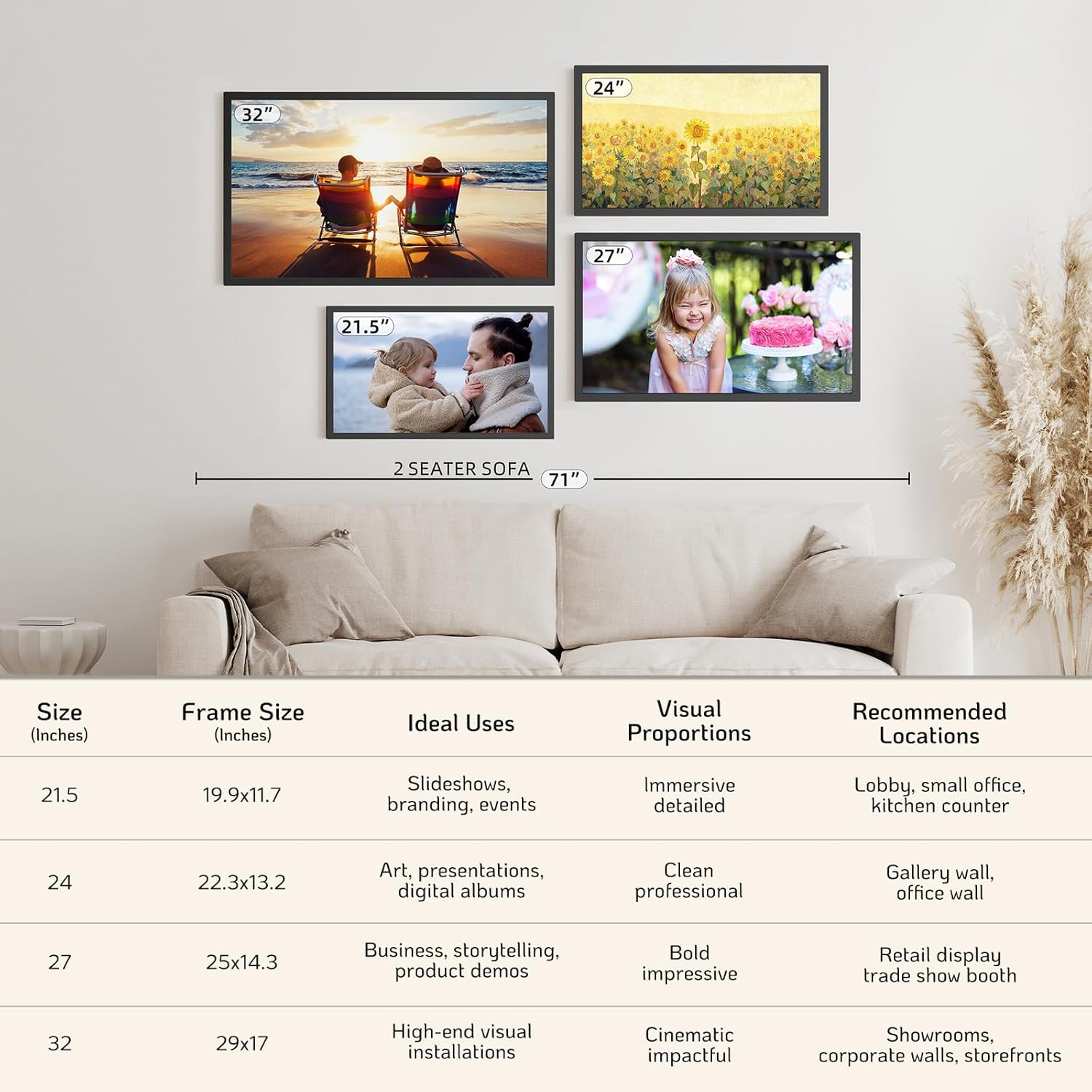
Figure 9: NexFoto Frame Sizes and Placement Examples
9. Garanti og support
9.1 Et års garanti
NexFoto is committed to delivering top-quality digital photo frames. This product comes with a one-year warranty from the date of purchase, covering manufacturing defects and malfunctions under normal use. Please retain your proof of purchase for warranty claims.
9.2 Kundesupport
If you have any questions, require technical assistance, or need to make a warranty claim, please contact NexFoto customer support. Our team is available to provide satisfactory responses within 12 hours.
For the most up-to-date contact information, please refer to the official NexFoto website or the contact details provided in your Quick Start Guide.
Ask a question about this manual
Ask about setup, troubleshooting, compatibility, parts, safety, or missing instructions. Manuals+ will review the question and use this page’s manual context to help answer it.