
Yealink AX83H
Yealink AX83H IP-telefon brugermanual
Model: AX83H
Indledning
This manual provides comprehensive instructions for the setup, operation, and maintenance of your Yealink AX83H IP Phone. The AX83H is an enterprise portable Wi-Fi IP color screen phone designed for wireless communication needs in various professional environments. It features advanced audio technology, robust connectivity, and a long-lasting battery.
Pakkens indhold
Før du begynder, skal du kontrollere, at alle varer er til stede i pakken:
- Yealink AX83H Handset
- Genopladeligt batteri
- Bælteclips
- Opladningsholder
- Strømadapter
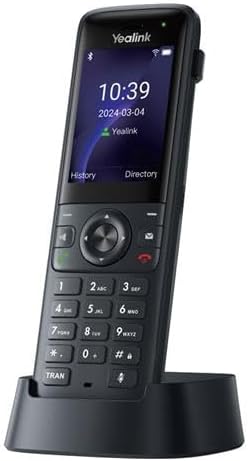
Image: The Yealink AX83H IP Phone shown in its charging cradle, displaying the screen and keypad. This image illustrates the phone's design and how it sits in its base.
Opsætningsvejledning
1. Installation af batteriet
- Find batteridækslet på bagsiden af håndsættet.
- Skub eller løft forsigtigt dækslet for at åbne rummet.
- Isæt det medfølgende genopladelige batteri, og sørg for, at kontakterne er justeret korrekt.
- Sæt dækslet til batterirummet på plads, indtil det klikker på plads.
2. Opladning af håndsættet
- Tilslut strømadapteren til opladeren.
- Sæt strømadapteren i en stikkontakt.
- Place the AX83H handset into the charging cradle. Ensure it is seated properly and the charging indicator light illuminates.
- Allow the phone to charge fully before first use (approximately 4 hours). A full charge provides up to 9 hours of talk time and 200 hours of standby time.
3. Initial Configuration (Network & SIP Account)
The AX83H supports Wi-Fi 6 and can register up to four SIP accounts. Network configuration is typically handled by your IT administrator or service provider.
- Wi-Fi-forbindelse: Naviger til Menu > Settings > Wi-Fi. Select your desired Wi-Fi network and enter the password if prompted. The phone supports dual-band 2.4G/5G Wi-Fi.
- SIP Account Registration: This process usually involves entering SIP server details, username, and password provided by your VoIP service provider. Consult your IT department for specific instructions. The phone supports advanced seamless roaming technology for stable connections.

Billede: En nærbillede forfra view of the Yealink AX83H IP Phone, highlighting its color display, navigation buttons, and numeric keypad. This image helps users identify key physical features.
Betjeningsvejledning
Foretage opkald
- Opkald: Indtast telefonnummeret ved hjælp af tastaturet, og tryk på Urskive or Sende nøgle.
- Fra kontakter: Naviger til Vejviser, vælg en kontakt, og tryk på Urskive nøgle.
- Fra opkaldshistorik: Naviger til Historie, select a call entry, and press the Urskive nøgle.
Besvarelse af opkald
Når telefonen ringer, tryk på Svar nøgle eller Højttalertelefon tasten for at besvare opkaldet.
Opkaldsstyring
- Afslutning af et opkald: Tryk på Afslut opkald nøgle.
- Holde: Under et opkald skal du trykke på Holde Tryk igen for at genoptage.
- Overførsel: Under et opkald skal du trykke på Overførsel soft key, dial the new number, and press Overførsel igen.
- Stum: Tryk på Stum key to mute your microphone. Press again to unmute.
- Lydstyrkejustering: Use the side volume keys to adjust the earpiece, speaker, or ringer volume.
Bluetooth-forbindelse
The AX83H features Bluetooth 5.0 for connecting wireless headsets or other Bluetooth devices.
- Naviger til Menu > Indstillinger > Bluetooth.
- Slå Bluetooth til On.
- Vælge Par ny enhed and choose your device from the list.
- Følg anvisningerne på skærmen for at fuldføre parringen.
Brug af headset
The phone supports a 3.5mm headset jack for wired headsets.
- Plug your 3.5mm headset into the headset jack on the side of the phone.
- Calls will automatically route to the headset when connected.
Vedligeholdelse og pleje
- Rensning: Brug en blød, tør klud til at rengøre telefonens overflade. Brug ikke flydende rengøringsmidler eller aerosoler.
- Batteripleje: To prolong battery life, avoid extreme temperatures. If the phone will not be used for an extended period, store it with a partial charge.
- Opbevaring: Opbevar telefonen et køligt, tørt sted væk fra direkte sollys og fugt.
- Miljøforhold: Avoid exposing the phone to excessive dust, humidity, or direct water contact.
Fejlfinding
| Problem | Mulig årsag | Løsning |
|---|---|---|
| Telefonen tænder ikke. | Batteriet er ikke installeret korrekt eller afladet. | Ensure battery is properly seated. Place phone on charging cradle for at least 30 minutes. |
| Ingen klartone / Kan ikke foretage opkald. | No network connection or SIP account not registered. | Check Wi-Fi connection status. Verify SIP account registration with your IT administrator. |
| Dårlig lydkvalitet (ekko, statisk støj). | Weak Wi-Fi signal, network congestion, or interference. | Move closer to your Wi-Fi access point. Check for other devices causing interference. The phone features Smart Noise Cancellation, but extreme conditions can still affect quality. |
| Bluetooth-enhed parres ikke. | Enheden er ikke i parringstilstand eller uden for rækkevidde. | Ensure the Bluetooth device is in pairing mode. Bring the device closer to the phone. |
If the problem persists after attempting these solutions, please contact your IT support or Yealink customer service.
Specifikationer
| Feature | Detalje |
|---|---|
| Model | AX83H |
| Vise | 2.4 tommer farveskærm |
| SIP-konti | Op til 4 |
| Lydteknologi | Optima HD Audio, Smart Noise Cancellation |
| Wi-Fi | Dual-band 2.4G/5G Wi-Fi 6, Advanced Seamless Roaming |
| Bluetooth | Bluetooth 5.0 |
| Batterikapacitet | 2000mAh |
| Taletid | Op til 9 timer |
| Standby tid | Op til 200 timer |
| Headset Jack | 3.5 mm |
| Opladningsport | Type-C (for charging cradle connection) |
| Dimensioner (L x B x H) | 7 x 4 x 3.5 tommer |
| Varens vægt | 13.6 ounce |
Garantioplysninger
Yealink products typically come with a standard manufacturer's warranty. For detailed information regarding the warranty period, coverage, and terms and conditions for your AX83H IP Phone, please refer to the warranty card included in your product packaging or visit the official Yealink webwebsted. Behold din købskvittering som købsbevis i tilfælde af garantikrav.
Kundesupport
For technical assistance, product inquiries, or support, please contact Yealink customer service through their official channels. You can find contact information, FAQs, and additional resources on the Yealink Official Store on Amazon eller deres virksomhed webwebsted.
When contacting support, please have your product model (AX83H) and serial number ready.
Ask a question about this manual
Ask about setup, troubleshooting, compatibility, parts, safety, or missing instructions. Manuals+ will review the question and use this page’s manual context to help answer it.