
1. Introduktion
The MiBOXER SWR Smart Switch is an advanced lighting control solution designed for seamless integration into modern lighting systems. It combines 2.4GHz wireless technology with traditional push-button functionality, offering both smart and manual control options for a flexible and user-friendly experience. This manual provides essential information for the safe and effective installation, operation, and maintenance of your SWR Smart Switch.
2. Sikkerhedsoplysninger
Læs alle sikkerhedsinstruktioner omhyggeligt inden installation og betjening. Manglende overholdelse af disse instruktioner kan resultere i elektrisk stød, brand eller andre farer.
- Installation should only be performed by a qualified electrician or trained professional.
- Afbryd altid strømmen til afbryderen, før du installerer eller servicerer afbryderen.
- Sørg for, at alle ledningsforbindelser er sikre og overholder lokale el-forskrifter.
- Do not operate the switch with wet hands or in damp miljøer.
- Do not exceed the maximum load capacity specified in the product specifications.
- Hold enheden væk fra børn.
3. Produktet er slutview
The MiBOXER SWR Smart Switch offers versatile control for various electrical equipment, supporting both 2.4G remote control and traditional push-button operation.

Figur 3.1: Forside view of the MiBOXER SWR Smart Switch, showing input/output terminals and model information.
Nøglefunktioner:
- 2.4G fjernbetjening: Supports remote control with a distance of up to 30 meters.
- Push-Button Functionality: Allows for manual control.
- Multitimer-funktion: Supports various timing functions for automated control.
- Bred kompatibilitet: Compatible with a range of electrical equipment.
- Hukommelsesfunktion: Recalls the last-used setting automatically.
4. Specifikationer
Technical specifications for the MiBOXER SWR Smart Switch.
| Parameter | Værdi |
|---|---|
| Modelnummer | SWR |
| Input bindtage | 100-240V~ 50/60Hz |
| Udgangsstrøm (maks.) | 10A |
| Arbejdstemperatur | -10~40°C |
| Kontrol afstand | 30m (2.4G) |
| Varens vægt | 2.08 ounce |
| Pakkedimensioner | 3 x 3 x 1.5 tommer |
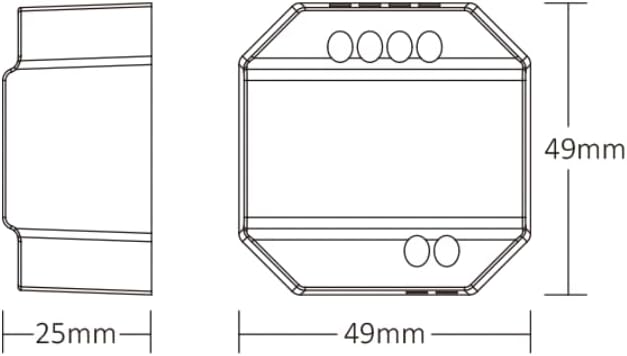
Figure 4.1: Dimensional drawing of the SWR Smart Switch, showing its compact size (49mm x 49mm x 25mm).
5. Opsætning og installation
Vigtig: Ensure power is disconnected at the main circuit breaker before beginning any installation. Professional installation is recommended.
Ledningsinstruktioner:
The SWR Smart Switch supports two common wiring methods for integration with a push switch (rocker switch).

Figure 5.1: Connection diagram illustrating two methods for wiring the SWR Smart Switch with a push switch and an electrical appliance.
Metode 1: The push switch is connected to the L1 and SWITCH terminals. The main Live (L) and Neutral (N) inputs are connected to the L and N input terminals respectively. The output Live (L) and Neutral (N) are connected to the electrical appliance.
Metode 2: The push switch is connected to the L and SWITCH terminals. The main Live (L) and Neutral (N) inputs are connected to the L and N input terminals respectively. The output Live (L) and Neutral (N) are connected to the electrical appliance.
Installationstrin:
- Sluk: Turn off the main power supply at the circuit breaker to avoid electric shock.
- Forbered ledninger: Strip approximately 7mm of insulation from the wires.
- Tilslut indgang: Connect the Live (L) and Neutral (N) wires from your power source to the 'L' and 'N' input terminals on the switch.
- Tilslut udgang: Connect the Live (L) and Neutral (N) wires leading to your electrical appliance (e.g., light fixture) to the 'L' and 'N' output terminals on the switch.
- Connect Push Switch (Optional): If using a traditional push switch, connect its terminals to the 'L1' and 'SWITCH' terminals (Method 1) or 'L' and 'SWITCH' terminals (Method 2) as per the diagram.
- Sikker enhed: Mount the SWR Smart Switch securely within a suitable electrical box or enclosure.
- Gendan strøm: Når alle forbindelser er sikre og verificeret, skal strømmen til afbryderen genoprettes.
6. Betjeningsvejledning
Manuel kontrol:
If a push switch is connected, you can manually turn the connected appliance on or off by pressing the physical switch. The switch will retain its last state due to the memory function.
Smart Control (2.4GHz Wireless):
The SWR Smart Switch can be controlled wirelessly using a compatible MiBOXER 2.4G remote control (sold separately) or integrated into a smart home system via a 2.4GHz gateway.
- Pairing with 2.4G Remote: Refer to your MiBOXER 2.4G remote control's manual for specific pairing instructions. Typically, this involves powering on the SWR switch and then performing a pairing sequence on the remote within a short timeframe.
- Tuya Smart App Control: For app control, a 2.4GHz gateway is required. Once connected to the gateway, the switch can be managed via the Tuya Smart app, allowing for remote control, scheduling, and scene creation.

Figure 6.1: Illustration of Tuya smart app control interface, demonstrating color and brightness adjustments, requiring a 2.4GHz gateway.
Voice Assistant-integration:
When integrated with a compatible 2.4GHz gateway and the Tuya Smart app, the SWR Smart Switch can be linked with popular voice assistants like Amazon Alexa and Google Assistant for voice-activated control.

Figure 6.2: The SWR Smart Switch is compatible with Amazon Alexa and Google Assistant when connected through a compatible gateway.
7. Vedligeholdelse
- Rensning: Disconnect power before cleaning. Use a soft, dry cloth to wipe the surface of the switch. Do not use abrasive cleaners or solvents.
- Inspektion: Periodically check for any loose wiring or signs of damage. If damage is found, discontinue use and consult a qualified electrician.
- Firmwareopdateringer: If using with a smart gateway, check the Tuya Smart app for any available firmware updates for improved performance and features.
8. Fejlfinding
- Kontakten reagerer ikke:
- Kontroller om strømforsyningen er tilsluttet og aktiv.
- Kontroller, at alle ledningsforbindelser er sikre.
- Ensure the connected appliance is functional.
- 2.4G Remote Control Not Working:
- Sørg for, at fjernbetjeningen har friske batterier.
- Re-attempt the pairing process between the switch and the remote.
- Check for obstructions or excessive distance between the switch and remote (max 30m).
- App-kontrol virker ikke:
- Verify that the 2.4GHz gateway is powered on and connected to your home Wi-Fi network.
- Ensure the SWR switch is successfully paired with the gateway in the Tuya Smart app.
- Tjek din internetforbindelse.
- Intermitterende drift:
- Check for potential sources of 2.4GHz interference (e.g., other wireless devices, microwaves).
- Ensure the switch is not overloaded beyond its 10A maximum capacity.
9. Garanti og support
MiBOXER products are designed for reliability and performance. This product comes with a standard manufacturer's warranty against defects in materials and workmanship. Please refer to the warranty card included with your purchase or visit the official MiBOXER webhjemmeside for detaljerede garantivilkår.
For technical support, troubleshooting assistance, or warranty claims, please contact MiBOXER customer service through their official website or the retailer from whom you purchased the product. When contacting support, please have your product model number (SWR) and purchase information readily available.