
Indledning
Thank you for choosing the AWEI T36 Bluetooth Earbuds. This manual provides detailed instructions on how to set up, operate, and maintain your new earbuds. Please read this manual carefully before use to ensure optimal performance and longevity of your device.
Pakkens indhold
- AWEI T36 Wireless Earbuds (Left and Right)
- Opladningsetui
- USB-C ladekabel
- Ørepropper (forskellige størrelser)
- Brugermanual
Produkt overview
Familiarize yourself with the components of your AWEI T36 earbuds and charging case.
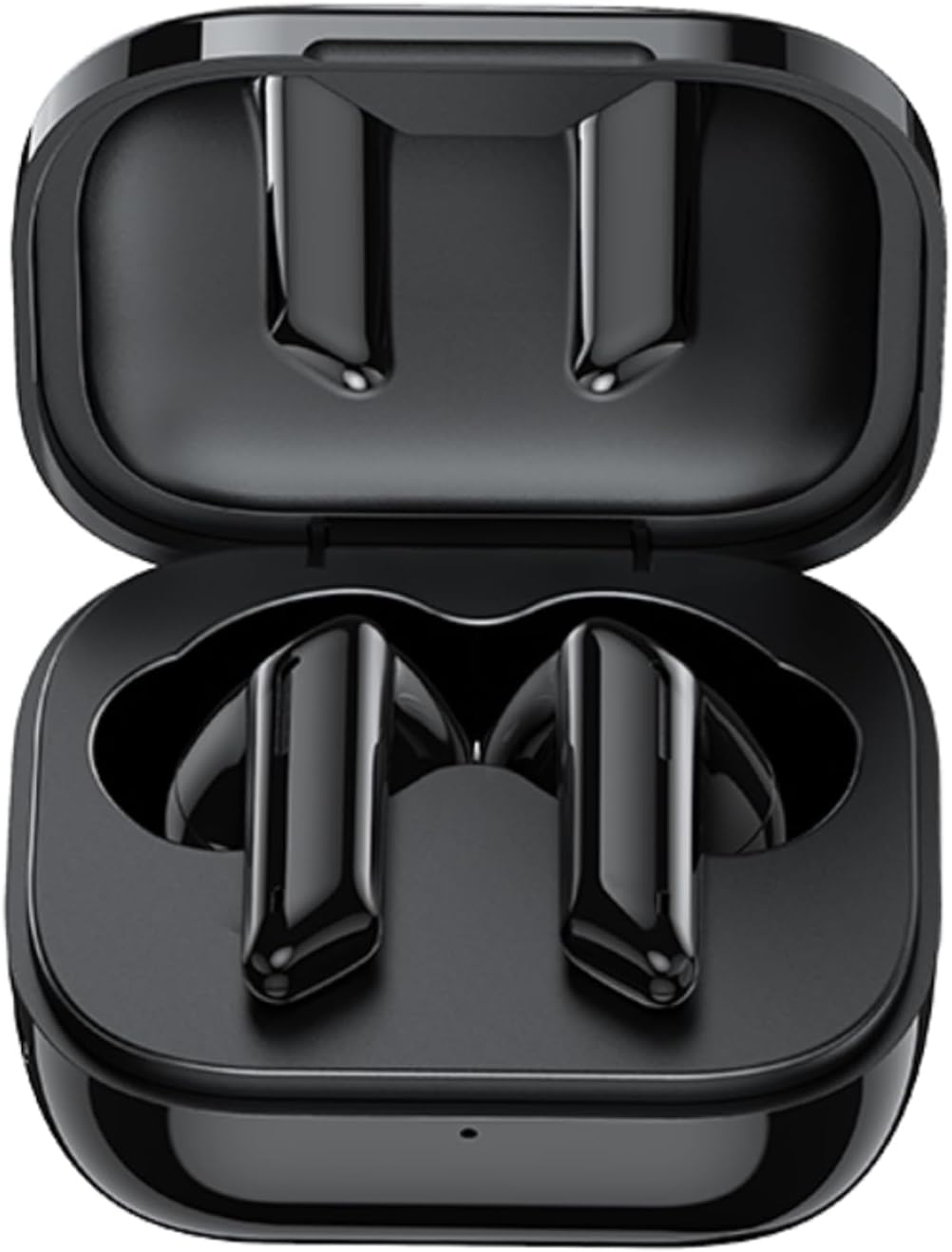
Image: AWEI T36 earbuds securely placed inside their open charging case, showcasing the sleek black design of both the earbuds and the case interior.
Øreproppernes komponenter
- Berøringskontrolområde: Til styring af musikafspilning, opkald og stemmeassistent.
- Mikrofon: For clear call performance.
- Opladningskontakter: Located at the bottom of each earbud.
- LED-indikator: Viser parringsstatus og batteriniveau.
Komponenter til opladningsetuiet
- Opladningsstik til øretelefoner: Hold og oplad ørepropperne sikkert.
- USB-C opladningsport: Til opladning af etuiet.
- LED-indikator: Viser etuiets opladningsstatus.
Opsætning
1. Opladning af øretelefoner og etuiet
Oplad både ørepropperne og opladningsetuiet helt inden første brug.
- Placer ørepropperne i opladningsetuiet, og sørg for, at de sidder korrekt. Øreproppernes LED-indikatorer lyser for at vise, at de oplades.
- Tilslut USB-C-opladerkablet til opladningsporten på etuiet og den anden ende til en USB-strømadapter (medfølger ikke) eller en computers USB-port.
- The charging case LED indicator will show charging progress. A full charge takes approximately 1.5 hours for the case.

Image: AWEI T36 earbuds and their charging case resting on a circular charging pad, illustrating the product's battery life and charging capabilities. The image indicates a 320mAh charging case, 4-5 hours playtime, and 1.5 hours charging time.
Note: The product specifications indicate 7 hours of continuous use per charge for earbuds and 35 hours of playback with the charging case.
2. Parring med din enhed
The earbuds support Bluetooth 5.3 for a stable and fast connection.
- Første gangs parring:
- Åbn opladningsetuiet. Ørepropperne tændes automatisk og går i parringstilstand.
- Aktiver Bluetooth på din enhed (smartphone, tablet, bærbar computer).
- Søg efter "AWEI T36" in the list of available Bluetooth devices and select it to connect.
- Once connected, you will hear a confirmation tone, and the earbud LED indicators will turn off or flash slowly.
- Efterfølgende parring:
- Once paired, the earbuds will automatically connect to the last paired device when taken out of the charging case, provided Bluetooth is enabled on the device.

Image: A smartphone displaying a game, with the AWEI T36 earbuds and their charging case in the foreground, illustrating the Bluetooth connection. The image highlights "Bluetooth 5.1 Faster & More Stable" (Note: Product specifications state Bluetooth 5.3 for this model, which offers improved performance.)

Image: Two AWEI T36 earbuds, one in its open charging case and one outside, demonstrating that both earbuds can function independently as "hosts" or "main engines" for flexible use.
Betjeningsvejledning
The AWEI T36 earbuds feature smart touch controls for easy operation.
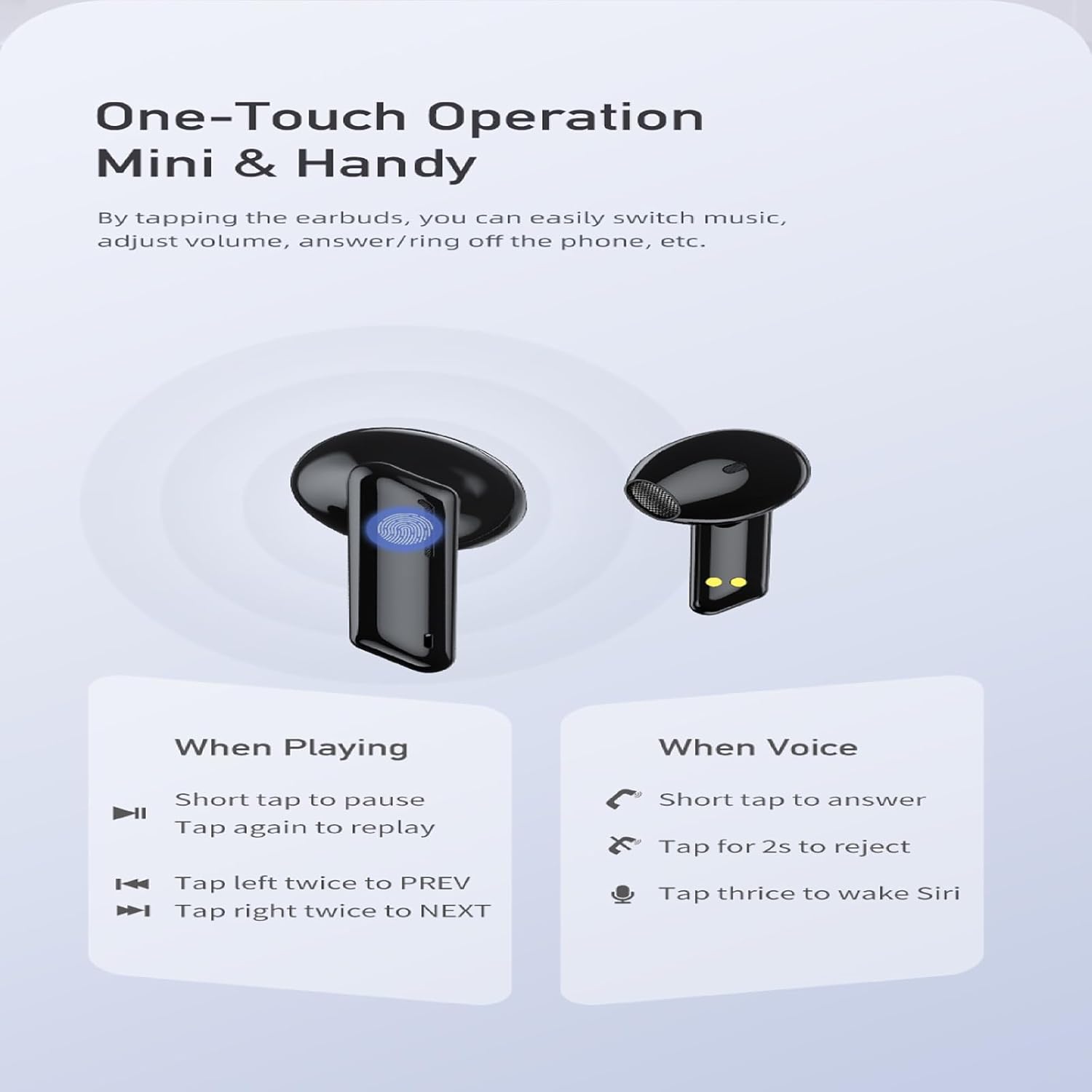
Image: A visual guide to the one-touch operation of the AWEI T36 earbuds, detailing touch commands for music playback (pause/play, previous/next song) and call management (answer/reject, activate voice assistant).
Musikafspilning
- Afspil/pause: Short tap on either earbud.
- Næste sang: Tryk to gange på den højre øreprop.
- Forrige sang: Tryk to gange på den venstre øreprop.
- Lydstyrkekontrol: (Specific gesture not detailed in image, typically long press or multiple taps. Refer to device settings if not working as expected.)
Opkaldsstyring
- Besvar opkald: Short tap on either earbud.
- Afvis opkald: Tryk og hold en af øretelefonerne nede i 2 sekunder.
- Afslut opkald: Short tap on either earbud during a call.
Stemmeassistent
- Aktivér stemmeassistent (Siri/Google Assistant): Tryk tre gange på en af øretelefonerne.
Tænd/sluk
- Tænd: Ørepropperne tændes automatisk, når de tages ud af opladningsetuiet.
- Sluk: Ørepropperne slukker automatisk, når de sættes tilbage i opladningsetuiet, og låget lukkes.
Opretholdelse
Rensning
- Rengør regelmæssigt ørepropperne og opladningsetuiet med en blød, tør og fnugfri klud.
- Brug en vatpind letampened with isopropyl alcohol to clean the charging contacts on both the earbuds and inside the case.
- Brug ikke slibende rengøringsmidler, og nedsænk ikke ørepropperne eller etuiet i vand.
Opbevaring
- Opbevar øretelefonerne i deres opladningsetui, når de ikke er i brug for at beskytte dem og holde dem opladet.
- Undgå at opbevare enheden i ekstreme temperaturer (varme eller kolde) eller i meget fugtige omgivelser.
Batteripleje
- To preserve battery life, charge the earbuds and case regularly, even if not used frequently.
- Undgå at aflade batteriet helt før genopladning.

Image: AWEI T36 earbuds and their charging case with water droplets on them, emphasizing their IPX4 waterproof rating, which protects against sweat and light rain during exercise.
Fejlfinding
If you encounter any issues with your AWEI T36 earbuds, please refer to the following common solutions:
- Øretelefoner parrer ikke med enheden:
- Sørg for, at øretelefonerne er fuldt opladede.
- Make sure Bluetooth is enabled on your device and the earbuds are within range (up to 10 meters).
- Forget "AWEI T36" from your device's Bluetooth list and try pairing again.
- Place both earbuds back into the charging case, close the lid, wait a few seconds, then open the lid to reset them.
- Kun én øreprop virker:
- Sørg for, at begge øretelefoner er opladet.
- Sæt begge ørepropper tilbage i opladningsetuiet, luk låget, og åbn det derefter igen. Dette synkroniserer dem ofte igen.
- Rengør opladningskontakterne på begge ørepropper og inde i etuiet.
- Øretelefoner oplader ikke:
- Kontroller, om opladningskablet er korrekt tilsluttet til både etuiet og strømkilden.
- Sørg for, at opladningskontakterne på ørepropperne og inde i etuiet er rene og fri for snavs.
- Prøv et andet USB-C-kabel eller strømadapter.
- Lav lydstyrke eller dårlig lydkvalitet:
- Juster lydstyrken på både din enhed og ørepropperne.
- Ensure the eartips are properly seated in your ears to create a good seal. Try different sized eartips.
- Clean any earwax or debris from the earbud speaker mesh.
Specifikationer
| Feature | Beskrivelse |
|---|---|
| Modelnavn | T36 |
| Mærke | AWEI |
| Forbindelsesteknologi | Trådløs (Bluetooth 5.3) |
| Bluetooth rækkevidde | Op til 10 meter (33 fod) |
| Øretelefon batterilevetid | Op til 7 timer (enkelt opladning) |
| Samlet spilletid (med etui) | Op til 35 timer |
| Opladningstid (etui) | Ca. 1.5 timer |
| Vandmodstand | IPX4 (sved- og stænksikker) |
| Kontroltype | Tryk på kontrol |
| Ørestykke form | In-Ear |
| Materiale | Silicone (Eartips) |
| Inkluderede komponenter | Earbuds, Charging Case, USB-C Cable, Eartips, User Manual |
Garanti og support
AWEI products are manufactured to the highest quality standards. For information regarding warranty coverage, technical support, or customer service, please refer to the warranty card included in your package or visit the official AWEI webwebsted.
For further assistance, please contact AWEI customer support with your product model number (T36) and purchase details.