
Indledning
Thank you for choosing the edx Electric Adjustable Height Desk. This manual provides essential information for the proper assembly, operation, maintenance, and troubleshooting of your new desk. Please read it thoroughly before use to ensure optimal performance and safety.

Image: The edx Electric Adjustable Height Desk, showcasing its spacious desktop and ergonomic design with two monitors and various office accessories.
Opsætning og montering
The edx Electric Adjustable Height Desk is designed for straightforward assembly. All necessary tools and an instruction manual are included in the package. For detailed step-by-step guidance, please refer to the provided assembly instructions. Ensure all components are present and undamaged before beginning assembly.
Nøglekomponenter:
- Desktop (55.1"D x 23.6"W)
- T-shaped metal frame and legs
- Elmotor og kontrolpanel
- Strømadapter og kabler
- Monteringsudstyr (skruer, bolte osv.)
- 2 hooks for accessories
- 2 cord collection holes
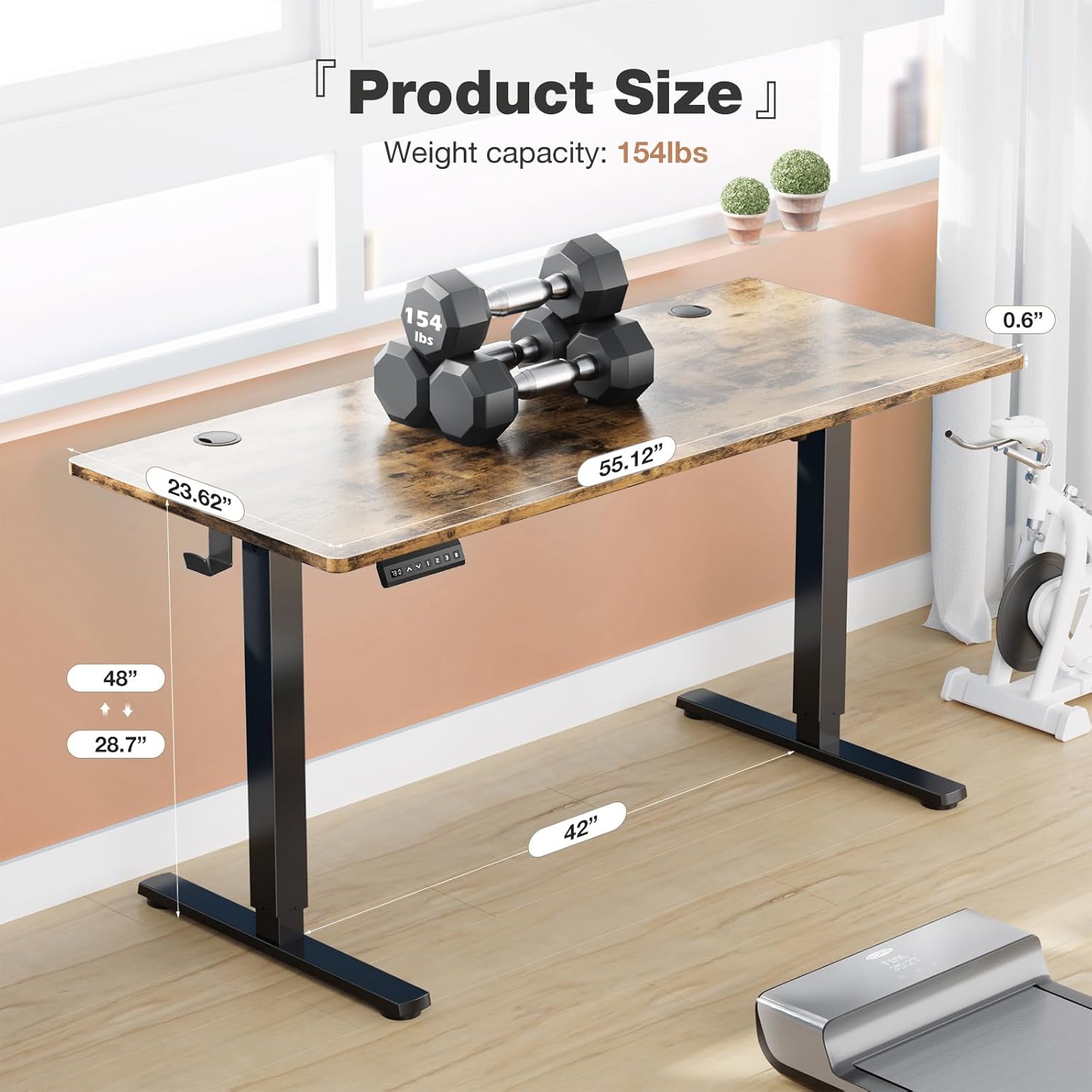
Image: A diagram illustrating the product dimensions of the edx desk, including desktop length (55.12 inches), width (23.62 inches), and thickness (0.6 inches). The maximum weight capacity is 154 lbs.
Betjeningsvejledning
Your edx Electric Adjustable Height Desk features an intuitive control panel for easy height adjustments and memory presets.
Kontrolpanelets funktioner:

Billede: En detaljeret view of the multi-function control panel. It features an LED display, Up/Down arrows, three memory preset buttons (1, 2, 3), and an 'S' (Save) button.
- LED display: Viser den aktuelle skrivebordshøjde i tommer.
- Up & Down Arrows (▲ ▼): Tryk og hold nede for manuelt at justere skrivebordets højde. Slip for at stoppe ved den ønskede højde.
- Hukommelsesforudindstillinger (1, 2, 3):
- To save a height: Adjust the desk to your desired height using the Up/Down arrows. Press the 'S' button, then press one of the number buttons (1, 2, or 3) within 3 seconds. The display will show 'S-' followed by the number to confirm.
- To recall a saved height: Press the corresponding number button (1, 2, or 3). The desk will automatically move to the saved height.
- 'S' Button (Save): Used in conjunction with memory preset buttons to save desired heights.
Højdejusteringsområde:
- Minimum Height: Approximately 28.7 inches
- Maximum Height: Approximately 48 inches

Image: A visual representation of the desk's height adjustment capabilities, showing a person comfortably using the desk in both standing (48 inches) and sitting (28.7 inches) positions.
Stille drift:
The desk's motor operates quietly, typically below 55 decibels, ensuring minimal disruption in any environment.

Image: A graphic comparing the noise level of the edx desk (55dB) to other common sounds like a quiet bedroom (35dB), talking (65dB), and a truck (80dB), highlighting its quiet operation.
Opretholdelse
Regular maintenance ensures the longevity and smooth operation of your edx Electric Adjustable Height Desk.
- Rensning: Tør skrivebordet og rammen af med en blød kludamp klud. Undgå slibende rengøringsmidler eller barske kemikalier, der kan beskadige overfladen.
- Kabelstyring: Utilize the integrated cord collection holes and hooks to keep cables tidy and prevent them from interfering with the desk's movement.
- Inspektion: Kontrollér regelmæssigt alle skruer og bolte for at sikre, at de er stramme. Spænd dem ikke for hårdt.
- Vægt kapacitet: Do not exceed the maximum weight capacity of 176 lbs (80 kg) to prevent damage to the motor and frame.
Fejlfinding
If you encounter any issues with your edx Electric Adjustable Height Desk, please refer to the following common solutions:
| Problem | Mulig årsag | Løsning |
|---|---|---|
| Skrivebordet bevæger sig ikke | Strømkabel frakoblet; Overbelastning; Motorfejl | Kontroller strømforbindelsen; Reducer vægten på skrivebordet; Tag stikket ud i 10 sekunder og sæt det i igen. |
| Skrivebordet bevæger sig ujævnt | Obstruction; Uneven weight distribution | Remove any obstructions; Redistribute weight evenly. |
| Hukommelsesforudindstillinger virker ikke | Not saved correctly | Re-save the desired height following the instructions in the 'Operating Instructions' section. |
| Fejlkode på display | Specific system error | Refer to the full assembly manual for specific error code meanings or contact customer support. |
If the problem persists after attempting these solutions, please contact edx customer support for further assistance.
Specifikationer
Detailed technical specifications for the edx Electric Adjustable Height Desk:
- Mærke: edx
- Model: 55x24 Inch Electric Adjustable Height Desk
- Produktmål (D x B x H): 55.1" x 23.6" x 28.7" - 46.4"
- Farve: Rust
- Stil: Moderne
- Grundmateriale: Metal
- Top materialetype: Wood (Engineered Wood finish)
- Speciel funktion: Adjustable Height, Memory Presets
- Maksimal vægtkapacitet: 176 lbs (80 kg)
- Motorstøjniveau: < 55 dB
- UPC: 702417958607
- ASIN: B0DGXZRGHS

Image: A close-up of the desk's eco-friendly desktop, highlighting its wood grain finish and a certification indicating compliance with TSCA Title VI standards for healthy indoor air quality.
Garantioplysninger
edx products are manufactured to high-quality standards. This product comes with a limited warranty covering manufacturing defects. Please refer to the warranty card included in your product packaging for specific terms, conditions, and duration of coverage. Keep your purchase receipt as proof of purchase for any warranty claims.
Kundesupport
For any questions, technical assistance, or warranty claims, please contact edx customer support. Our team is available to help you with any issues you may encounter.
- Online support: Visit the official edx webwebsted for ofte stillede spørgsmål og supportressourcer.
- E-mail: Refer to your product packaging or the edx webwebsted for kontakt-e-mail.
- Telefon: Refer to your product packaging or the edx webhjemmeside for kontakttelefonnummer.