
1. Introduktion
The Yealink MP52-TEAMS-E2 is a cost-effective basic Teams phone designed for high performance and an outstanding calling experience. Running on Android 13.0 OS, it offers a rich set of practical functions. Its design, featuring a 2.4-inch capacitive touch screen and physical navigation buttons, makes it suitable for common area use and an ideal solution for migrating from Skype for Business to Microsoft Teams. Powered by Microsoft, the MP52-E2 ensures a consistent Teams calling and meeting experience, enhancing daily productivity.
Key features include optimal HD audio with Yealink Noise Proof Technology, a dedicated Microsoft Teams button, and support for Microsoft and Yealink device management platforms. It also features a magnet handset and dual-port Gigabit Ethernet with PoE support.

Figur 1: Forside view of the Yealink MP52-TEAMS-E2 IP Phone, showing the display, keypad, and handset.
2. Hvad er der i æsken
Upon unboxing your Yealink MP52-TEAMS-E2 IP Phone, please verify that all the following components are included:
- Phone Unit
- Håndsæt
- Telefonledning
- Netværkskabel
Note: A power adapter is NOT included with this model. The phone supports Power over Ethernet (PoE) for power supply.
3. Opsætning
3.1 Fysiske forbindelser
- Tilslut håndsættet: Plug one end of the phone cord into the handset port on the phone base and the other end into the handset.
- Opret forbindelse til netværk:
- Connect one end of the provided network cable to the Internettet porten på bagsiden af telefonen.
- Connect the other end of the network cable to a network switch or router that supports Power over Ethernet (PoE). If PoE is not available, you will need to use a separate power adapter (not included) connected to the phone's power port.
- Tilslutning til pc (valgfrit): If you wish to connect a PC through the phone, connect one end of a network cable to the PC port on the phone and the other end to your computer's network port.

Figur 2: Side view of the Yealink MP52-TEAMS-E2 IP Phone, showing the adjustable stand and the handset resting in its cradle.
3.2 Første opstart og konfiguration
Once connected to a PoE-enabled network or an external power adapter, the phone will automatically power on. The boot-up process may take a few minutes. Follow the on-screen prompts to complete the initial setup, which typically includes:
- Network configuration (DHCP is usually default).
- Microsoft Teams account sign-in.
- Indstillinger for dato og klokkeslæt.
Ensure your network provides internet access for Microsoft Teams integration.
4. Betjeningsvejledning
4.1 Grundlæggende opkaldsfunktioner
- Foretag et opkald:
- Løft håndsættet, eller tryk på Højttalertelefon knap.
- Indtast det ønskede nummer ved hjælp af tastaturet.
- Tryk på Ring button (often a green phone icon) or wait for automatic dialing if configured.
- Besvare et opkald:
- Når telefonen ringer, skal du løfte røret eller trykke på Højttalertelefon knap.
- Alternativt kan du trykke på Svar softkey på skærmen.
- Afslutning af et opkald: Læg røret på, eller tryk på Afslut opkald knap (ofte et rødt telefonikon).
- Slå lyden fra/til: Under et opkald skal du trykke på Stum knappen for at slå lyden fra for din mikrofon. Tryk igen for at slå lyden til.
- Lydstyrkejustering: Brug Bind buttons (usually +/-) to adjust the handset, speakerphone, or ringer volume.
4.2 Microsoft Teams Functions
The MP52-TEAMS-E2 is optimized for Microsoft Teams. Many functions are accessible via the dedicated Teams button and the capacitive touch screen.
- Dedicated Teams Button: Press this button to quickly access your Teams dashboard, including calls, calendar, and contacts.
- Navigation: Use the physical navigation buttons (up, down, left, right, OK) around the central select button to navigate through menus on the 2.4-inch capacitive touch screen.
- Teams Meetings:
- Join scheduled meetings directly from your calendar on the phone's display.
- Use in-call controls for muting, adding participants, or sharing content (if supported by the meeting type).
- USB Headset Support: Tilslut et kompatibelt USB-headset til USB Type-A-porten for håndfri kommunikation.
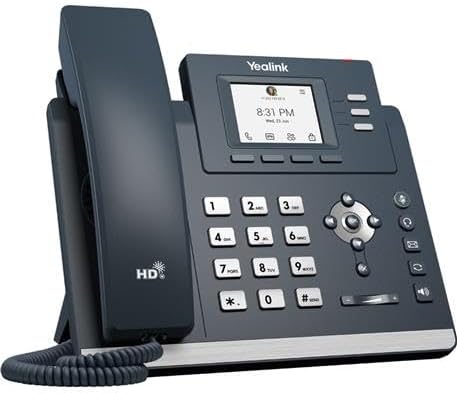
Figur 3: Vinklet view of the Yealink MP52-TEAMS-E2 IP Phone, highlighting the display and keypad layout.
5. Vedligeholdelse
5.1 Rengøring af telefonen
For at bevare din telefons udseende og funktionalitet skal du følge disse rengøringsretningslinjer:
- Always unplug the phone from its power source before cleaning.
- Brug en blød, tør og fnugfri klud til at tørre telefonens overflade af.
- For genstridige mærker, gnid letampen the cloth with water or a mild, non-abrasive cleaner. Avoid spraying liquids directly onto the phone.
- Do not use harsh chemicals, abrasive cleaners, or solvents as they may damage the phone's finish.
5.2 Softwareopdateringer
The Yealink MP52-TEAMS-E2 runs on Android 13 OS and supports updates through Microsoft and Yealink device management platforms. Regular software updates ensure optimal performance, security, and access to new features. Consult your IT administrator or Yealink's official support resources for information on update procedures.
6. Fejlfinding
Dette afsnit omhandler almindelige problemer, du kan støde på med din Yealink MP52-TEAMS-E2 IP-telefon.
| Problem | Mulig årsag | Løsning |
|---|---|---|
| Telefonen tænder ikke. | No power from PoE switch or external adapter. | Ensure the network cable is securely connected to a PoE-enabled port, or verify the external power adapter (if used) is properly connected and functional. |
| Ingen klartone eller kan ikke foretage opkald. | Network connectivity issue; Teams account not signed in or configured. | Check network cable connection. Verify the phone has an IP address. Ensure your Microsoft Teams account is successfully signed in on the phone. |
| Dårlig lydkvalitet (ekko, statisk støj). | Netværksbelastning; defekt kabel; miljøforstyrrelser. | Check network cable. Try a different network port. Ensure no strong electromagnetic interference sources are nearby. Utilize Yealink Noise Proof Technology settings if available. |
| Skærmen reagerer ikke eller fryser. | Softwarefejl. | Perform a soft reboot by disconnecting and reconnecting the power. If the issue persists, consult your IT administrator for a factory reset. |
7. Specifikationer
Detailed technical specifications for the Yealink MP52-TEAMS-E2 IP Phone:
- Model: MP52-TEAMS-E2
- Operativsystem: Android 13 OS
- Vise: 2.4 tommer (320 x 240) kapacitiv berøringsskærm
- Lydfunktioner: Optimal HD-lyd, Yealink Noise Proof Technology
- Forbindelse: Dual-port Gigabit Ethernet, PoE-understøttelse
- USB-port: 1 x USB Type A (supports USB headset)
- Håndsæt: Magnet håndsæt
- Dedicated Button: Microsoft Teams-knap
- Ledelse: Understøtter Microsoft og Yealink enhedsadministrationsplatforme
- Produktdimensioner: 12 x 10 x 5 tommer
- Varens vægt: 2.4 pund
- Farve: Grå
- Materiale: Plast
- Strømkilde: Ledningsbaseret elektrisk (PoE eller valgfri adapter)
- Telefontype: ledning
- Opkaldstype: Enkelt tastatur
- Type svarsystem: Digital
8. Garanti og support
For detailed warranty information regarding your Yealink MP52-TEAMS-E2 IP Phone, please refer to the warranty card included with your product packaging or visit the official Yealink webGarantibetingelserne kan variere afhængigt af region og forhandler.
For technical support, product registration, or to download the latest firmware and documentation, please visit the official Yealink support portal:
You may also contact your reseller or service provider for assistance.