
1. Introduktion
Thank you for choosing the Honeywell H9 Sunturalux™ Eye-Caring LED Desk Lamp. This advanced desk lamp is designed to provide optimal lighting for various tasks, prioritizing eye comfort and energy efficiency. Featuring 1000 lumens of dimmable light, adjustable color temperatures, smart auto-sensing capabilities, and a flexible multi-axis design, the H9 is suitable for reading, studying, working, and other activities. This manual will guide you through the setup, operation, and maintenance of your new desk lamp.

Image 1.1: Honeywell H9 Sunturalux LED Desk Lamp in a modern office setting.
2. Pakkens indhold
Kontroller venligst, at alle nedenstående varer er inkluderet i din pakke:
- 1x Desk Lamp
- 1x-adapter
- 1x brugermanual
- 1x emballageæske

Image 2.1: Contents of the Honeywell H9 Desk Lamp pakke.
3. Opsætning
Follow these steps to assemble and prepare your Honeywell H9 Desk Lamp til brug:
- Udpak komponenter: Carefully remove all items from the packaging. Ensure all protective wrapping is removed from the lamp komponenter.
- Vedhæft Lamp Arm to Base: Lamp arm connects to the sturdy circular base. Align the bottom of the lamp arm with the opening on the base.
- Fastgør basen: Turn the base upside down. Use the provided Allen key and screws to firmly attach the lamp arm to the base. Ensure the screws are tightened to prevent wobbling.
- Tilslut strømadapter: Plug the power adapter cable into the designated port on the lamp base. Then, plug the adapter into a standard electrical outlet.
- Placer Lamp: Placer den samlede lamp on a stable, flat surface. Adjust the multi-axis arm and lamp hovedet til den ønskede position.
Video 3.1: Unboxing and assembly demonstration of the Honeywell H9 Desk Lamp.
4. Betjeningsvejledning
The Honeywell H9 Desk Lamp features an intuitive touch control panel located on the lamp head. Below are the functions of each control:

Billede 4.1: Overview af berøringskontrolpanelet på lamp hoved.
4.1 Tænd/sluk
- Tryk på Power-knap (circle with vertical line) on the control panel to turn the lamp til eller fra.
4.2 Justering af lysstyrke
- Tryk på Lysstyrke - (sun with minus sign) button to decrease brightness.
- Tryk på Lysstyrke + (sun with plus sign) button to increase brightness.
- Lamp offers five brightness levels, ranging from 10% to 100%.
4.3 farvetemperaturtilstande
Lamp provides three distinct color temperature options:
- Varmt lys (2700K): Ideal for relaxing or evening use.
- Naturligt lys (4000K): Best for reading and general tasks.
- Koldt hvidt lys (5000K): Suitable for focused work, studying, or computer use.

Image 4.2: Visual representation of available color temperatures and brightness levels.
4.4 Smart Sensing & Auto-Dimming
- Sensing Mode (Person icon): Activates motion detection. The lamp automatically turns on when you approach (within approx. 0.6 meters) and turns off after 15 minutes of no activity.
- Automatic Dimming (Eye icon): The built-in ambient light sensor automatically adjusts the lamp's brightness based on surrounding light conditions to optimize eye comfort.

Image 4.3: Intelligent Constant Illumination for eye protection.

Image 4.4: Automatic sensor light switch and 45-minute timer.
4.5 Timer funktion
- 45-Minute Timer (Clock icon): Activates a 45-minute countdown, after which the lamp vil automatisk slukke.
- Delayed Light-off (Clock with arrow icon): Provides a 30-second delayed turn-off, allowing you to leave the area before the light extinguishes.
4.6 Hukommelsesfunktion
- Lamp remembers your last used color temperature and brightness settings when turned off, restoring them upon the next power-on.
Video 4.5: Demonstration of the Honeywell H9 Desk Lamp's touch controls and features.
5. Funktioner
- High Color Rendering Index (CRI≥91) for Eye Care: Equipped with 240 Sunturalux full-spectrum LED beads, providing professional-grade eye protection (RG0 level, free of blue light hazard) and a double anti-glare design. Ensures accurate and vivid color representation.
- Multi-Axis Adjustable Design: Features a four-axis flexible head and arm, allowing seamless angle adjustments. The lamp head can tilt up/down by 225° and rotate left/right by 180°.
- Durable Materials & Long Lifespan: Constructed with high-quality aluminum, zinc alloy, and other premium materials for durability. LED lifespan exceeds 30,000 hours.
- Smart Sensing Technology: Automatically turns on when you approach and adjusts brightness based on ambient light conditions.
- Integreret timerfunktion: Includes a convenient 45-minute timer and a 30-second delayed switch-off function.

Image 5.1: Multi-axis adjustable design for flexible positioning.

Image 5.2: Professional eye care technology with flicker-free and no blue light hazard.
Video 5.3: Overståetview of Honeywell H9 Desk Lamp features including smart sensing and adjustability.
6. Specifikationer
| Attribut | Værdi |
|---|---|
| Modelnavn | HWT-H9 |
| Mærke | Honeywell |
| Lyskildetype | LED |
| Lysstyrke | 1000 lumen |
| Wattage | 18 watt |
| Farvetemperatur | Warm Light (2700K), Natural Light (4000K), Cool White Light (5000K) |
| Kontrolmetode | Røre |
| Materiale | Iron, Aluminum, Plastic |
| Varens vægt | 9.92 pund |
| Produktdimensioner | 25.98" D x 6.69" B x 9.64" H |
| Særlige funktioner | 4-Axis Adjustable Arm Design, No Blue Light & Flicker-Free Eye Protection Technology, Precise Touch Control Panel, Smart Light Sensing, Stepless Dimming |
| Montering påkrævet | Ja |
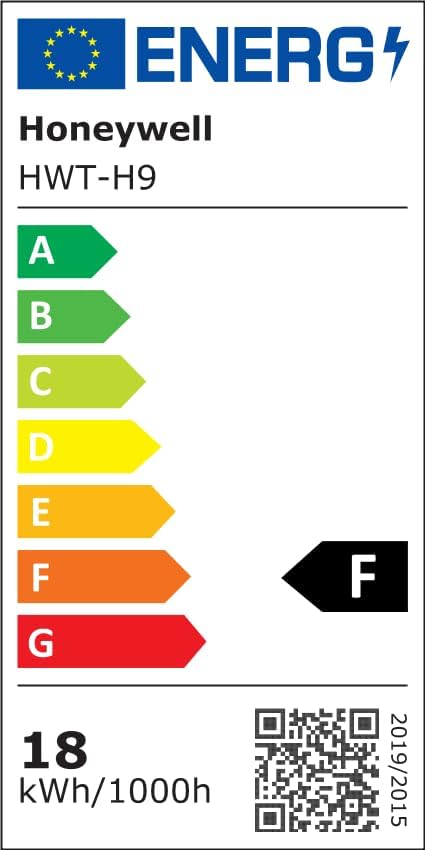
Image 6.1: Lighting Facts for Honeywell H9 Desk Lamp.

Image 6.2: Certifications for Honeywell H9 Desk Lamp.
For yderligere information om energieffektivitet, besøg: https://eprel.ec.europa.eu/qr/2001097
7. Vedligeholdelse
To ensure the longevity and optimal performance of your Honeywell H9 Desk Lampfølg disse vedligeholdelsesretningslinjer:
- Rensning: Afbryd strømmen før rengøring. Brug en blød, tør klud til at tørre l'en af.amp. Avoid abrasive cleaners, solvents, or harsh chemicals that may damage the finish or electronic components.
- Fjernelse af støv: Støv jævnligt lamp head and arm to prevent accumulation that could affect light output or sensor performance.
- Undgå væskekontakt: Udsæt ikke lamp til vand eller andre væsker.
- Håndteres med forsigtighed: Mens lamp is durable, avoid excessive force when adjusting its position to prevent damage to the joints.
8. Fejlfinding
If you encounter any issues with your Honeywell H9 Desk LampSe venligst følgende almindelige fejlfindingstrin:
- Lamp Tænder ikke:
- Sørg for, at strømadapteren er sat ordentligt i både lamp og en fungerende stikkontakt.
- Kontroller om stikkontakten fungerer ved at tilslutte en anden enhed.
- Brightness/Color Temperature Not Changing:
- Ensure you are pressing the correct touch buttons for brightness or color temperature adjustment.
- If in auto-dimming mode, the lamp may be adjusting automatically. Try disabling auto-dimming to manually control.
- Smart Sensing Not Working:
- Ensure the sensing mode (person icon) is activated on the control panel.
- Check for any obstructions blocking the sensor on the lamp hoved.
- Lamp er ustabil:
- Kontroller, at lamp arm is securely fastened to the base with the provided screws.
- Sørg for at lamp placeres på en flad, stabil overflade.
If the issue persists after trying these steps, please contact Honeywell customer support.