
T300
Generic T300 LED Mini Projector User Manual
Model: T300
1. Introduktion
Tak for købetasing the Generic T300 LED Mini Projector. This compact and portable projector is designed for home theater use, offering a clear viewing experience with its short-focus optical lens and diffuse reflection imaging technology, which helps reduce eye strain. This manual provides essential information for setting up, operating, maintaining, and troubleshooting your projector.

Figur 1.1: The T300 Mini Projector's compact size allows for easy portability, fitting conveniently into a bag.
2. Pakkens indhold
Kontroller venligst pakkens indhold ved udpakning for at sikre, at alle varer er til stede:
- 1x T300 Projector
- 1x strømadapter (EU-stik)
- 1x fjernbetjening
- 1x AV-kabel
- 1x Brugermanual (dette dokument)
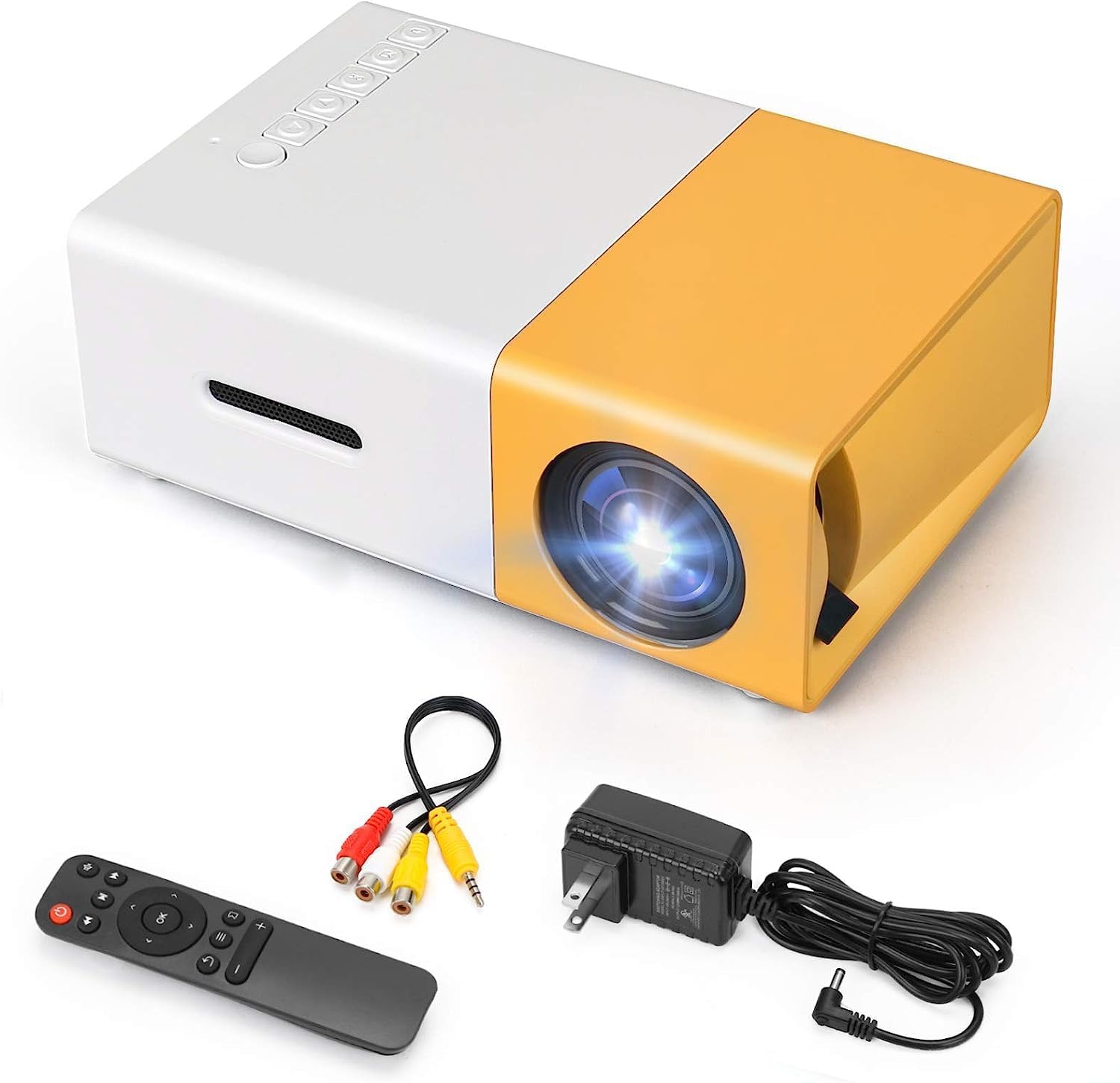
Figur 2.1: The T300 Mini Projector and its included accessories.
3. Produktet er slutview
Familiarize yourself with the various ports and controls on your T300 Mini Projector:

Figur 3.1: For og bag views of the T300 Mini Projector, detailing its input/output ports and control buttons.
3.1. Porte og grænseflader
- HDMI -indgang: Connect to laptops, TV boxes, gaming consoles, and other HDMI-enabled devices.
- USB-indgang: Til afspilning af medier direkte fra USB-drev.
- Micro SD -kortplads: Til afspilning af medier direkte fra Micro SD-kort.
- AV-indgang: Tilslut til ældre enheder ved hjælp af det medfølgende AV-kabel.
- Micro USB (5V/2A): Power input option, compatible with power banks or car chargers.
- Earphone Slot: Til tilslutning af eksterne hovedtelefoner eller højttalere.
- DC strømindgang: Main power input using the provided power adapter.
3.2. Styringer
- Afbryderen: Til at tænde eller slukke projektoren.
- Navigation Buttons (Left, Right, OK): Til menunavigation og valg.
- Input knap: For at vælge inputkilden.
- Returknap: For at gå tilbage i menuerne.
4. Opsætning
4.1. Strømtilslutning
- Connect the provided power adapter to the DC Power Input port on the projector.
- Sæt strømadapteren i en stikkontakt.
- Alternatively, for portable use, connect a 5V/2A power bank or car charger to the Micro USB (5V/2A) port.
4.2. Enhedsforbindelse
The T300 projector supports various input sources:
- HDMI: Connect your laptop, TV box, gaming console (PS4/PS3), or other HDMI devices using an HDMI cable (not included).
- USB: Indsæt et USB-flashdrev i USB-porten for at afspille medier files direkte.
- Micro SD-kort: Insert a Micro SD card into the Micro SD card slot to play media files.
- AV: Use the included AV cable to connect to devices with AV output (e.g., DVD players).

Figur 4.1: Multimedia connectivity options for the T300 Mini Projector.
4.3. Placement and Focus
- Placer projektoren på en stabil, flad overflade.
- Position the projector at a distance between 2 to 5 meters from the projection surface to achieve an optimal image size of 60 to 150 inches.
- Adjust the focus ring on the projector lens until the image appears clear and sharp. The short-focus optical lens allows focusing at a distance of 50cm.
5. Betjeningsvejledning
5.1. Tænd/sluk
Press the Power Switch on the projector or the power button on the remote control to turn the projector on or off.
5.2. Valg af inputkilde
After powering on, use the 'Input' button on the projector or the remote control to cycle through available input sources (HDMI, USB, TF Card, AV) until your desired source is displayed.
5.3. Multimedieafspilning
The projector supports multi-format video, audio, picture, and e-book playback. Navigate through your media files using the navigation buttons on the projector or remote control and press 'OK' to select.
5.4. Lydudgang
The projector has a built-in miniature speaker. For enhanced audio, connect external speakers or headphones to the Earphone Slot.

Figur 5.1: Versatile applications of the T300 Mini Projector for entertainment.
6. Vedligeholdelse
6.1. Rengøring af linsen
Use a soft, lint-free cloth or lens cleaning paper to gently wipe the projector lens. Avoid using abrasive materials or harsh chemicals that could scratch the lens.
6.2. Ventilation
Ensure the projector's ventilation openings are not blocked during operation to prevent overheating. Keep the projector in a well-ventilated area.
6.3. Opbevaring
When not in use, store the projector in a cool, dry place, away from direct sunlight and excessive dust. It is recommended to use the original packaging or a protective case.
6.4. Lamp Liv
LED lamp in your T300 projector has an estimated life of 20,000 hours, providing long-term use without frequent lamp udskiftning.
7. Fejlfinding
Hvis du støder på problemer med din projektor, kan du se følgende almindelige problemer og løsninger:
- Intet billede vist:
- Sørg for, at projektoren er tændt, og at strømadapteren er tilsluttet korrekt.
- Verify the input source is correctly selected (HDMI, USB, AV, etc.).
- Kontroller forbindelseskablet mellem projektoren og kildeenheden.
- Billedet er sløret:
- Juster fokusringen på projektorlinsen, indtil billedet er klart.
- Sørg for, at projektionsafstanden er inden for det anbefalede område (2-5 meter).
- Ingen lyd:
- Kontroller lydstyrkeindstillingerne på både projektoren og kildeenheden.
- If using external speakers/headphones, ensure they are properly connected to the Earphone Slot.
- Bekræft lydudgangsindstillingerne på din kildeenhed.
- Fjernbetjeningen virker ikke:
- Sørg for, at der ikke er nogen forhindringer mellem fjernbetjeningen og projektorens IR-modtager.
- Udskift batterierne i fjernbetjeningen om nødvendigt.
8. Specifikationer
| Feature | Specifikation |
|---|---|
| Model | T300 |
| Support opløsning | 1920 x 1080 (Fuld HD) |
| Indfødt opløsning | 1920 x 1080 |
| Display Type | LCD, DLP |
| Grænseflader | HDMI, USB, TF Card Slot, AV, Micro USB (5V-2A) |
| Indbygget højttaler | Ja |
| Lamp Liv | 20,000 timer |
| Produktstørrelse | 114 x 87 x 50 mm |
| Anbefalede anvendelser | Hjemmebiograf |
| Speciel funktion | Transportabel |
| Maksimal billedstørrelse | 150 tommer |
| Minimum billedstørrelse | 60 tommer |
| Maksimal kasteafstand | 5 meter |
| Minimum kasteafstand | 2 meter |
| Strømindgang | 5V/2A |
9. Garanti og support
9.1. Garantioplysninger
Dette produkt leveres typisk med en 10-dages erstatningspolitik from the date of purchase. Please refer to your retailer's specific warranty terms and conditions for detailed information. The LED lamp is designed for a long life of 20,000 hours, which is not typically covered by short-term replacement policies.
9.2. Kundesupport
For technical assistance, troubleshooting beyond this manual, or warranty claims, please contact your original retailer or the manufacturer, SHUBH LABH ENTERPRISES. Keep your purchase receipt or proof of purchase handy when contacting support.
Ask a question about this manual
Ask about setup, troubleshooting, compatibility, parts, safety, or missing instructions. Manuals+ will review the question and use this page’s manual context to help answer it.