
1. Produktet er slutview
The JINJUNYE Electric Wine Dispenser Model KW-2320 is designed to enhance your wine experience through rapid decanting, precise dispensing, and convenient features. It integrates an aerator, a quantitative dispensing system, and a power bank function, all within a compact, rechargeable unit.
Inkluderede komponenter:
- 1 x JINJUNYE Electric Wine Aerator
- 4 x Different Size Adapters
- 2 x Silicone Tubes (11.81 inches and 13.77 inches)
- 1 x USB-C opladningskabel
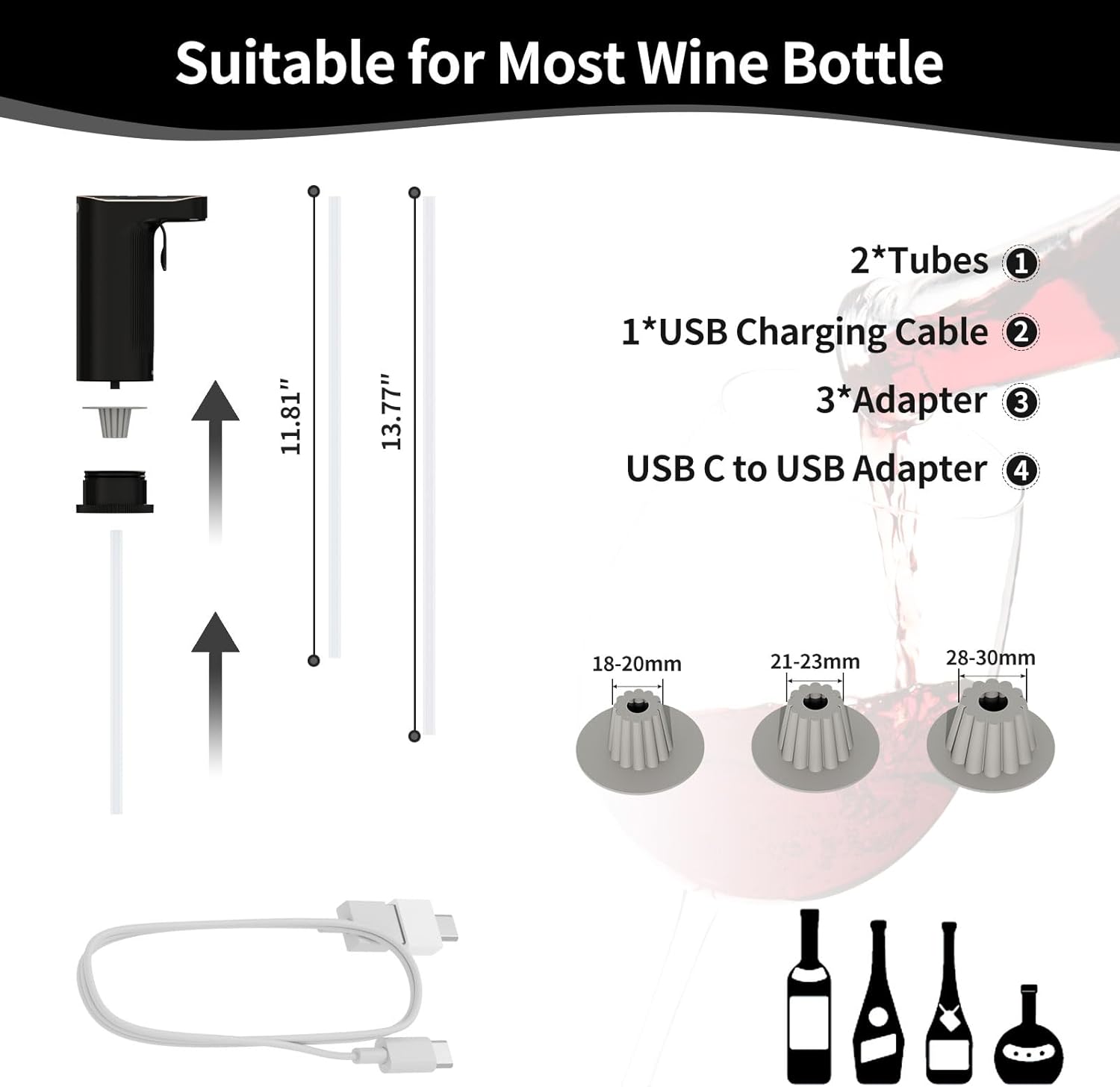
Billede: Overview of the JINJUNYE Electric Wine Dispenser and its included accessories, such as tubes, adapters, and charging cable.
2. Opsætning og montering
2.1 Indledende opladning
Before first use, fully charge the device using the provided USB-C charging cord. Connect the cord to the dispenser and a compatible USB power source. The display will indicate the charging status. A full charge provides power for approximately 100 bottles of 750ML red wine.
2.2 Assembling the Dispenser
- Unscrew the Bottom Lid: Gently twist and remove the bottom lid of the dispenser.
- Take Out the Adapter: Remove any pre-installed adapter from the dispenser.
- Choose Suitable Adapter: Select the appropriate silicone adapter size (18-20mm, 21-23mm, or 28-30mm) that best fits your wine bottle's neck.
- Tighten the Bottom Lid: Insert the chosen adapter and screw the bottom lid back onto the dispenser securely.
- Tilslut røret: Attach one of the silicone tubes to the bottom of the dispenser. Ensure it is firmly connected.
- Insert into Bottle: Place the assembled dispenser firmly into the neck of your wine bottle. Ensure a snug fit to prevent air leakage.

Image: Step-by-step instructions for installing the dispenser onto a wine bottle, including adapter selection and tube connection.
3. Betjeningsvejledning
3.1 Tænd/sluk
The device typically powers on automatically when inserted into a bottle and a button is pressed, or by pressing the main dispensing button. To power off, the device will usually enter standby mode after a period of inactivity or can be manually turned off by holding a specific button (refer to device markings).
3.2 Aerator Mode (Quantitative Dispensing)
This mode allows you to dispense a precise amount of wine (1-999ML) with aeration. The dispenser will automatically stop once the set volume is reached.
- Select Aerator Mode: Press the 'M' button to switch to Aerator Mode. The display will show 'Aerator' or a similar indicator.
- Indstil lydstyrke: Use the '+' and '-' buttons to adjust the desired dispensing volume between 1ML and 999ML.
- Dispense Wine: Place your glass under the spout and press the main dispensing button. The wine will be aerated and dispensed to the set volume, then stop automatically.

Image: The dispenser's display showing the 'Aerator Mode' for setting specific dispensing volumes.
3.3 Amt Mode (Total Consumption Tracking)
The Amt Mode tracks the total amount of wine dispensed over time, allowing you to monitor consumption.
- Select Amt Mode: Press the 'M' button to switch to Amt Mode. The display will show 'Amt' or a similar indicator.
- Dispense Wine: Place your glass under the spout and press the main dispensing button. The wine will be aerated and dispensed continuously until the button is released. The display will show the cumulative volume dispensed.
- Clear Count: To reset the total count to 0, long-press the 'M' button.

Image: The dispenser's display showing the 'Amt Mode' for tracking total wine consumption.
3.4 Powerbankens funktion
The dispenser features a 2000mAh battery that can also function as a power bank to recharge mobile phones and other small devices.
- Connect your device to the USB-C port on the dispenser using a compatible charging cable.
- The dispenser's display will show the remaining power, allowing for real-time monitoring.
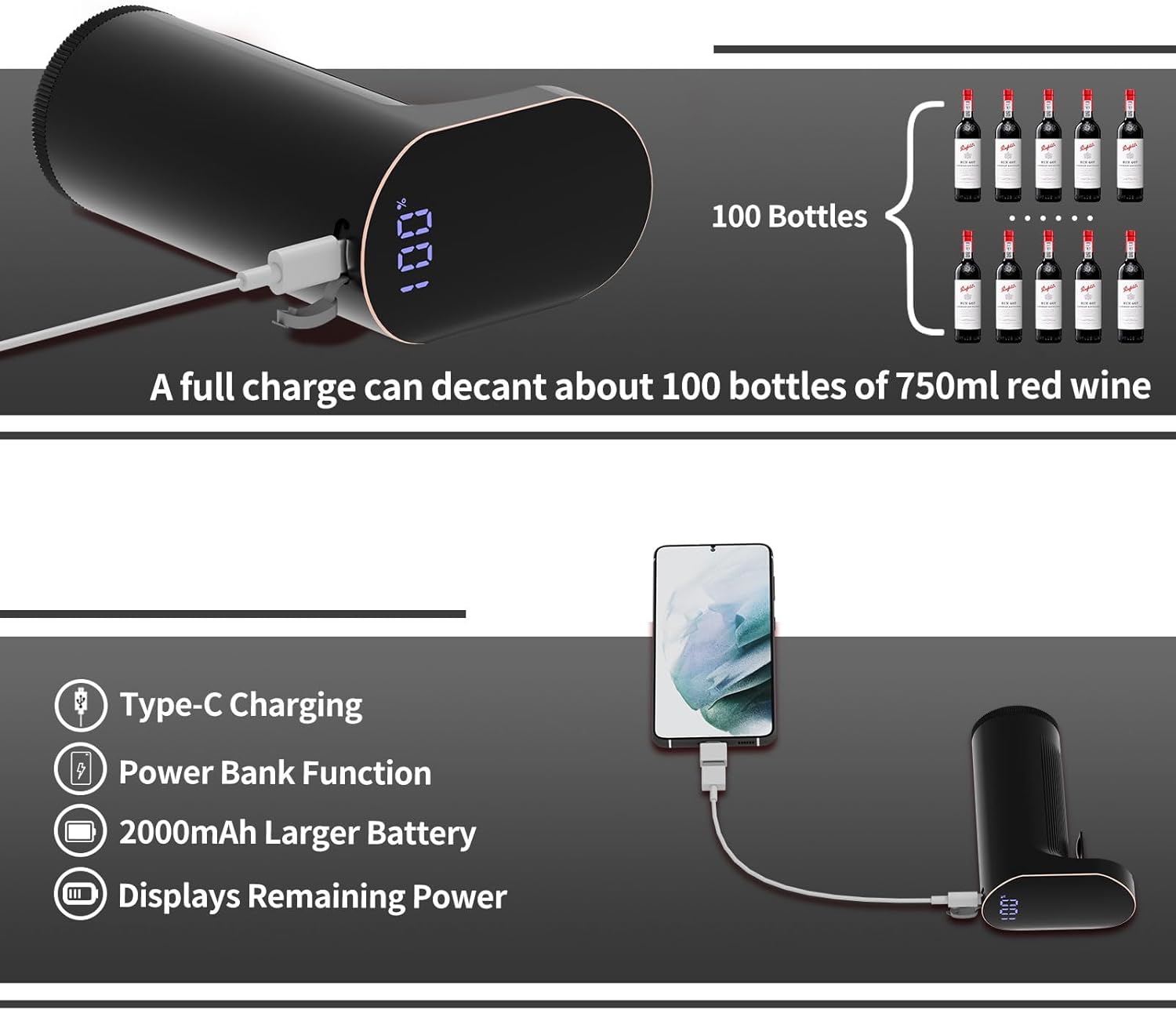
Image: The dispenser's power bank function, showing it charging a mobile phone and highlighting its battery capacity.
4. Vedligeholdelse
4.1 Selvrensning med et enkelt tryk
The dispenser features a self-cleaning function for easy maintenance without disassembly.
- Forbered vand: Fill a clean bottle or container with clean water.
- Indsæt dispenser: Place the dispenser into the water-filled container.
- Press Clean Button: Press the dedicated clean button (usually marked with a water drop icon) on the dispenser. The device will pump water through its system to clean internal components. Repeat as necessary until the water runs clear.

Image: Visual guide for the self-cleaning process of the wine dispenser.
4.2 Generel pleje
- Tør dispenserens yderside af med en blød kludamp klæde. Nedsænk ikke hovedenheden i vand.
- The silicone tubes and adapters are dishwasher safe for thorough cleaning.
- Opbevar dispenseren et rent og tørt sted, når den ikke er i brug.
5. Fejlfinding
If you encounter issues with your JINJUNYE Electric Wine Dispenser, please refer to the following common problems and solutions:
| Problem | Mulig årsag | Løsning |
|---|---|---|
| Device not turning on or charging | Lavt batteri; defekt opladningskabel/adapter; enhedfejl. | Ensure the device is fully charged using the provided USB-C cable and a working power source. Try a different cable or adapter. |
| Wine not dispensing or dispensing slowly | Silicone tube is blocked or not properly connected; adapter not sealed correctly; wine level too low; internal blockage. | Check that the silicone tube is securely attached and clear of obstructions. Ensure the adapter creates a tight seal with the bottle. Perform a self-cleaning cycle. |
| Inaccurate quantitative dispensing | Air leakage; internal sensor issue; improper setting. | Verify the adapter is tightly sealed to the bottle neck. Ensure the desired volume is correctly set in Aerator Mode. Perform a self-cleaning cycle. |
| Enhedens lækager | Løse forbindelser; beskadigede komponenter. | Check all connections, especially the silicone tube and the adapter's seal to the bottle. Ensure the bottom lid is securely tightened. |
Hvis problemet fortsætter efter at have forsøgt disse løsninger, bedes du kontakte kundesupport.
6. Specifikationer
| Feature | Detalje |
|---|---|
| Mærke | JINJUNYE |
| Modelnavn | Electric Wine Aerator (KW-2320) |
| Materiale | Plast, rustfrit stål |
| Farve | Black + Golden |
| Capacity (Dispensing Range) | 1-999 ML |
| Særlige funktioner | Electric Wine Dispenser, One-Touch Decanting, Accurate Quantitative Setting, Power Bank Function, Self-Clean Function |
| Inkluderede komponenter | Electric Wine Aerator, 4*Different Size Adapters, 2*Tube, 1*USB C Charging Cord |
| Varens vægt | 0.46 pund (7.4 ounce) |
| Pakkedimensioner | 7.56 x 6.97 x 2.4 tommer |
| Batteri | 1 Lithium Ion battery (2000mAh), included |
7. Garanti og support
7.1 Garantioplysninger
Dette produkt leveres med en standard producentgaranti. Se venligst produktemballagen eller sælgerens webwebstedet for specifikke garantivilkår og -betingelser, herunder detaljer om varighed og dækning.
7.2 Kundesupport
For technical assistance, troubleshooting not covered in this manual, or warranty claims, please contact JINJUNYE customer support through the retailer where the product was purchased or visit the official JINJUNYE webwebsted for kontaktoplysninger.