
1. Introduktion
Thank you for choosing the Black Shark T11 True Wireless Bluetooth Earbuds. These earbuds are designed to provide a high-quality audio experience with features such as Active Noise Cancellation (ENC), Bluetooth 5.3 connectivity, and extended battery life. This manual will guide you through the setup, operation, and maintenance of your new earbuds to ensure optimal performance and longevity.
2. Pakkens indhold
Kontroller venligst, at alle varer er til stede i din pakke:
- Black Shark T11 True Wireless Bluetooth Earbuds (Left and Right)
- Opladningsetui
- USB-C ladekabel
- Ørepuder (forskellige størrelser)
- Brugermanual
3. Produktet er slutview
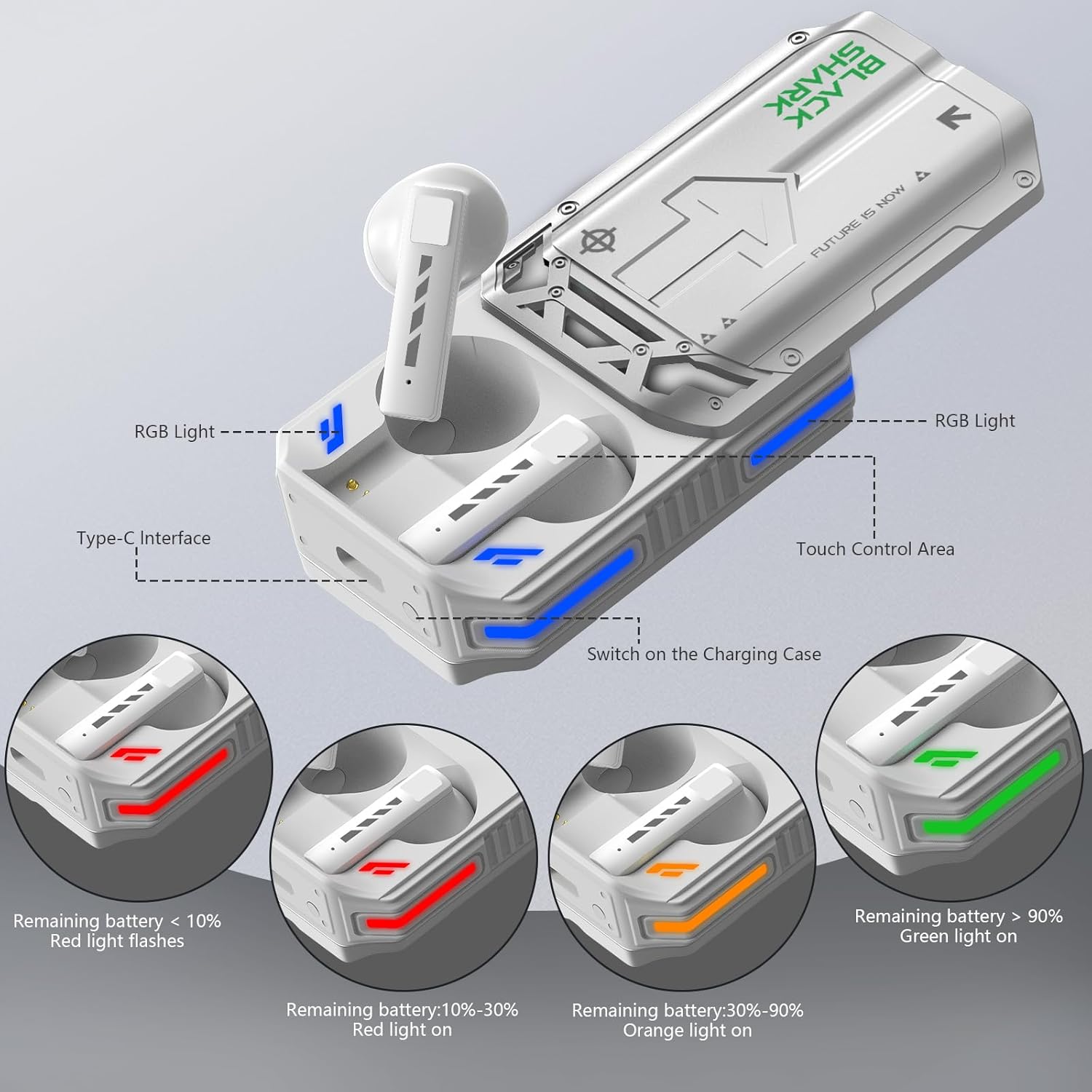
Familiarize yourself with the components of your Black Shark T11 earbuds and charging case.

This image illustrates the key features of the Black Shark T11 earbuds and charging case, including the RGB lighting, Type-C charging port, and the touch control area on the earbuds. It also shows the different colors of the RGB lights indicating battery levels: red for less than 10%, red for 10-30%, orange for 30-90%, and green for over 90%.
- høretelefoner Equipped with touch control areas and RGB lighting.
- Opladningsetui: Features a slide cover design, RGB lighting indicators, and a Type-C charging interface.
4. Opsætning
4.1 Opladning af øretelefoner og etuiet
Oplad opladningsetuiet og ørepropperne helt inden første brug.
- Placer ørepropperne i opladningsetuiet. Sørg for, at de sidder korrekt i deres respektive holdere (V for venstre, H for højre).
- Connect the USB-C charging cable to the Type-C interface on the charging case and plug the other end into a power source.
- The RGB lights on the charging case indicate the battery level:
- Flashing Red: Battery less than 10%
- Solid Red: Battery 10-30%
- Solid Orange: Battery 30-90%
- Solid Green: Battery greater than 90%
- Når det er fuldt opladet, skal du frakoble ladekablet.
4.2 Parring med en enhed
Follow these steps to pair your Black Shark T11 earbuds with your Bluetooth-enabled device.

This image demonstrates the quick and easy pairing process, showing the 'Black Shark T11' earbuds appearing in a smartphone's Bluetooth device list, ready for connection.
- Sørg for, at ørepropperne er i opladningsetuiet, og at etuiet har tilstrækkeligt batteri.
- Åbn låget til opladningsetuiet. Ørepropperne går automatisk i parringstilstand.
- Aktiver Bluetooth på din enhed (smartphone, tablet, computer).
- Søg efter available Bluetooth devices. Select "Black Shark T11" from the list.
- Når der er forbindelse, hører du en lydmeddelelse, og ørepropperne er klar til brug.
- Ørepropperne genopretter automatisk forbindelse til den sidst parrede enhed, når de tages ud af etuiet, hvis Bluetooth er aktiveret på enheden.
4.3 Sådan tager du ørepropperne på
For optimal lydkvalitet og komfort skal du sørge for, at ørepropperne sidder korrekt i dine ører.
- Identificer venstre (L) og højre (R) øretelefon.
- Før forsigtigt hver øreprop ind i den tilsvarende øregang.
- Adjust the earbud until it feels snug and comfortable. The semi-in-ear ergonomic design and lightweight nature (3.2 grams per earbud) are designed for extended wear comfort.
- Experiment with different ear cushion sizes (if provided) to find the best fit for your ears.
5. Betjeningsvejledning
5.1 Tryk på kontrolelementer
The Black Shark T11 earbuds feature intuitive touch controls on each earbud. The specific functions may vary slightly depending on the number of taps or duration of touch.
This image provides a visual guide to the simple touch controls available on the Black Shark T11 earbuds, covering functions like noise reduction, audio adjustment, RGB lighting control, playback, call management, and battery life indication.
| Handling | Fungere |
|---|---|
| Enkelt tryk | Afspil/Sæt musik på pause, Besvar/Afslut opkald |
| Dobbelttryk (venstre øretelefon) | Forrige spor |
| Dobbelttryk (højre øretelefon) | Næste spor |
| Tredobbelt tryk (venstre øretelefon) | Aktiver Voice Assistant |
| Tredobbelt tryk (højre øretelefon) | Switch between Music Mode / Gaming Mode |
| Langt tryk (2 sekunder) | Reject Call, Toggle Active Noise Cancellation (ENC) |
5.2 Active Noise Cancellation (ENC)
The Black Shark T11 earbuds feature Environmental Noise Cancellation (ENC) for clearer calls and an immersive listening experience.

This image visually represents the effectiveness of the noise reduction feature, showing how ambient sound waves are significantly diminished when the noise cancellation is active.
- To activate or deactivate ENC, perform a long press (2 seconds) on either earbud.
- ENC helps to reduce ambient noise during calls and when listening to audio, allowing for greater focus.
5.3 RGB lyseffekter
The earbuds and charging case feature RGB lighting that adds a visual flair and provides functional indications.
- The side RGB lighting on the charging case indicates battery levels (as described in Section 4.1).
- The earbuds also have RGB lighting that may indicate connection status or mode.
6. Vedligeholdelse
6.1 Rengøring
Regelmæssig rengøring hjælper med at opretholde dine øreproppers ydeevne og hygiejne.
- Brug en blød, tør og fnugfri klud til at tørre ørepropperne og opladningsetuiet af.
- Til genstridigt snavs, let dampda kluden med vand eller et mildt, ikke-slibende rengøringsmiddel.
- Clean the ear tips regularly with a soft cloth and mild soap and water, then rinse and dry thoroughly before reattaching.
- Brug ikke skrappe kemikalier, aerosoler eller slibende rengøringsmidler.
- Sørg for, at opladningskontakterne på både ørepropperne og etuiet er rene og fri for snavs.
6.2 Opbevaring
When not in use, store your earbuds properly to protect them.
- Always store the earbuds in their charging case to prevent loss and protect them from damage.
- Store the charging case in a cool, dry place, away from direct sunlight and extreme temperatures.
6.3 Vandtæthed
The Black Shark T11 earbuds have an IPX4 protection rating.
- IPX4 means the earbuds are resistant to splashing water from any direction.
- De er velegnede til brug under træning eller i let regn.
- Note: The earbuds are not waterproof and should not be submerged in water or exposed to heavy rain. The charging case is not water-resistant.
7. Fejlfinding
If you encounter any issues with your Black Shark T11 earbuds, refer to the following common problems and solutions.
| Problem | Mulig løsning |
|---|---|
| Øretelefoner parrer ikke |
|
| Ingen lyd fra et ørepropp |
|
| Opladningsproblemer |
|
| Lav lydstyrke eller dårlig lydkvalitet |
|
| Latency in Gaming Mode |
|
8. Specifikationer
Key technical specifications for the Black Shark T11 True Wireless Bluetooth Earbuds.

This image summarizes key performance metrics: up to 30 hours of total battery life with the charging case, 5 hours of continuous music playback, and a Bluetooth connection range of 10 meters.
| Feature | Specifikation |
|---|---|
| Modelnavn | BLACK SHARK T11 (BS-T11) |
| Forbindelsesteknologi | Trådløs (Bluetooth 5.3) |
| Trådløs kommunikationsrækkevidde | Op til 10 meter |
| Støjkontrol | Aktiv støjreduktion (ENC) |
| Frekvensrespons | 20 Hz - 20 kHz |
| Impedans | 32 Ohm |
| Kontrolmetode | Røre |
| Batterilevetid (ørepropper) | Up to 5 hours (music time) |
| Samlet batterilevetid (med opladningsetui) | Op til 30 timer |
| Vandmodstandsniveau | IPX4 (vandtæt) |
| Earbud vægt | 3.2 gram (hver) |
| Produktdimensioner | 10 x 10 x 10 cm (emballage/samlet) |
| Varens vægt | 181 gram (i alt) |
| Særlige funktioner | Lightweight, Microphone Included, Noise Cancellation, Rechargeable Battery, RGB Lighting Effects |
9. Sikkerhedsoplysninger
Læs og følg disse sikkerhedsretningslinjer for at forhindre skader på din enhed eller personskade.
- Produktet må ikke skilles ad, repareres eller modificeres.
- Hold produktet væk fra ekstreme temperaturer, fugtighed og ætsende miljøer.
- Undgå at udsætte produktet for direkte sollys i længere perioder.
- Do not use the product at high volume for prolonged periods to prevent hearing damage.
- Exercise caution when using earbuds in situations requiring awareness of your surroundings, such as driving or walking in traffic.
- Opbevares utilgængeligt for børn og kæledyr.
10. Garanti og support
Black Shark products are designed and manufactured to the highest quality standards. For warranty information or technical support, please refer to the warranty card included in your package or visit the official Black Shark website. If you require further assistance, please contact Black Shark customer service.