
1. Introduktion
This manual provides essential information for the safe and efficient operation of your Sharp GX-BT190 Portable Bluetooth Speaker. Please read it thoroughly before using the device and retain it for future reference.
2. Sikkerhedsoplysninger
- Udsæt ikke højttaleren for ekstreme temperaturer, direkte sollys eller høj luftfugtighed.
- Højttaleren må ikke skilles ad, repareres eller ændres. Dette kan ugyldiggøre garantien og udgøre en sikkerhedsrisiko.
- Ensure the charging port cover is securely closed when using the speaker near water to maintain its IP67 rating.
- Brug kun det medfølgende opladningskabel eller et tilsvarende certificeret kabel.
- Hold højttaleren væk fra børn og kæledyr.
- Undgå at lytte ved høje lydstyrker i længere perioder for at forhindre høreskader.
3. Pakkens indhold
- Sharp GX-BT190 Portable Bluetooth Speaker
- USB opladningskabel
- Snor
- Instruktionsmanual
4. Produktet er slutview

Front view of the Sharp GX-BT190 speaker, showing the central speaker grille with the Sharp logo and the LED light ring.

Side view of the Sharp GX-BT190 speaker, highlighting the textured speaker grille and the integrated lanyard.
Bag view of the Sharp GX-BT190 speaker, showing the control buttons and the sealed charging port cover.
Kontroller og indikatorer:
- Power knap: Tryk og hold for at tænde/slukke.
- Knap til lydstyrke op / Næste nummer (+): Kort tryk for at skrue op for lydstyrken, langt tryk for næste nummer.
- Knap til lydstyrke ned / forrige nummer (-): Kort tryk for at sænke lydstyrken, langt tryk for at sænke forrige nummer.
- Play/Pause / Call Button (►||): Short press to play/pause, answer/end calls. Long press to reject calls.
- Mode / Light Button (M): Short press to cycle through LED light modes. Long press to turn off LED lights.
- USB-C opladningsport: For charging the speaker. Ensure the rubber cover is sealed when not charging.
- LED-indikator: Displays charging status and Bluetooth pairing status.
5. Opsætning
5.1 Opladning af højttaleren
- Open the rubber cover on the back of the speaker to access the USB-C charging port.
- Connect the provided USB charging cable to the speaker's USB-C port.
- Tilslut den anden ende af USB-kablet til en USB-strømadapter (medfølger ikke) eller en computers USB-port.
- LED-indikatoren lyser under opladning og slukker, når den er fuldt opladet.
- Close the rubber cover securely after charging to maintain the speaker's waterproof rating.
5.2 Tænd/sluk
- For at tænde: Press and hold the Power button for approximately 3 seconds. You will hear an audible prompt, and the LED indicator will flash.
- For at slukke: Press and hold the Power button for approximately 3 seconds. You will hear an audible prompt, and the LED indicator will turn off.
5.3 Bluetooth -parring
- Ensure the speaker is powered on and the LED indicator is flashing, indicating it is in pairing mode.
- Aktiver Bluetooth på din mobilenhed, og søg efter tilgængelige enheder.
- Select "GX-BT190" from the list of devices.
- Once paired, the LED indicator will stop flashing and remain solid, and you will hear a confirmation tone.
- Højttaleren genopretter automatisk forbindelsen til den sidst parrede enhed, når den tændes, hvis enheden er inden for rækkevidde, og Bluetooth er aktiveret.
5.4 Ægte trådløs stereo (TWS) parring
TWS allows you to pair two GX-BT190 speakers together for a stereo audio experience.

Two Sharp GX-BT190 speakers, one red and one blue, positioned together, illustrating the True Wireless Stereo (TWS) pairing feature.
- Sørg for, at begge GX-BT190-højttalere er tændt og ikke er forbundet til nogen Bluetooth-enhed.
- På en af højttalerne (dette vil være den primære højttaler) skal du dobbelttrykke på tænd/sluk-knappen. Højttaleren vil gå i TWS-parringstilstand.
- De to højttalere vil automatisk søge efter og oprette forbindelse til hinanden. Du vil høre en bekræftelsestone, når TWS-parringen er gennemført.
- Når TWS er parret, skal du tilslutte din mobilenhed til den primære højttaler via Bluetooth som beskrevet i afsnit 5.3.
- For at afbryde TWS skal du dobbelttrykke på tænd/sluk-knappen på en af højttalerne.
6. Betjening
6.1 Afspilning af lyd
- Afspil/pause: Tryk kort på Play/Pause-knappen.
- Lydstyrke op: Tryk kort på '+'-knappen.
- Skrue ned for lyden: Tryk kort på '-' knappen.
- Næste nummer: Tryk længe på '+'-knappen.
- Forrige nummer: Tryk længe på '-'-knappen.
6.2 Håndfri opkald
- Besvar opkald: Tryk kort på Afspil/Pause-knappen, når et indgående opkald ringer.
- Afslut opkald: Tryk kort på Afspil/Pause-knappen under et opkald.
- Afvis opkald: Tryk længe på Afspil/Pause-knappen, når et indgående opkald ringer.
6.3 LED Mood Lights
- Short press the 'M' (Mode/Light) button to cycle through the 6 available LED mood light modes.
- Long press the 'M' button to turn off the LED lights.
6.4 Waterproof and Dustproof Usage (IP67)

The Sharp GX-BT190 speaker partially submerged in water, demonstrating its IP67 waterproof and dustproof capabilities.
The GX-BT190 speaker is rated IP67, meaning it is protected from dust ingress and can withstand immersion in water up to 1 meter for 30 minutes. To ensure this protection:
- Always ensure the rubber cover for the charging port is fully and securely sealed before exposing the speaker to water or dust.
- Nedsænk ikke højttaleren med vilje i længere perioder eller ud over den angivne dybde.
- Efter udsættelse for vand skal højttaleren tørres af med en blød klud inden opladning.
7. Vedligeholdelse
7.1 Rengøring
- Tør højttaleren af med en blød, damp klæde.
- Brug ikke slibende rengøringsmidler, alkohol eller kemiske opløsningsmidler.
- Ensure the speaker is dry before charging or storing.
7.2 Opbevaring
- Opbevar højttaleren et køligt, tørt sted væk fra direkte sollys og ekstreme temperaturer.
- Hvis batteriet opbevares i længere tid, skal det oplades med jævne mellemrum (f.eks. hver 3. måned) for at opretholde batteriets tilstand.
8. Fejlfinding
| Problem | Løsning |
|---|---|
| Højttaleren tænder ikke. | Sørg for, at batteriet er opladet. Tilslut højttaleren til en strømkilde med USB-kablet. |
| Kan ikke parres via Bluetooth. | Ensure the speaker is in pairing mode (LED flashing). Turn off and on Bluetooth on your device. Move the speaker closer to your device. Clear previous Bluetooth connections on your device. |
| Ingen lyd eller lav lydstyrke. | Increase the volume on both the speaker and your connected device. Ensure the speaker is properly paired. |
| Dårlig lydkvalitet. | Move the speaker closer to your device. Ensure there are no obstructions between the speaker and your device. Try playing a different audio source. |
| TWS-parring mislykkes. | Ensure both speakers are GX-BT190 models and are not connected to any other Bluetooth device. Try powering both speakers off and on, then re-attempt TWS pairing. |
9. Specifikationer

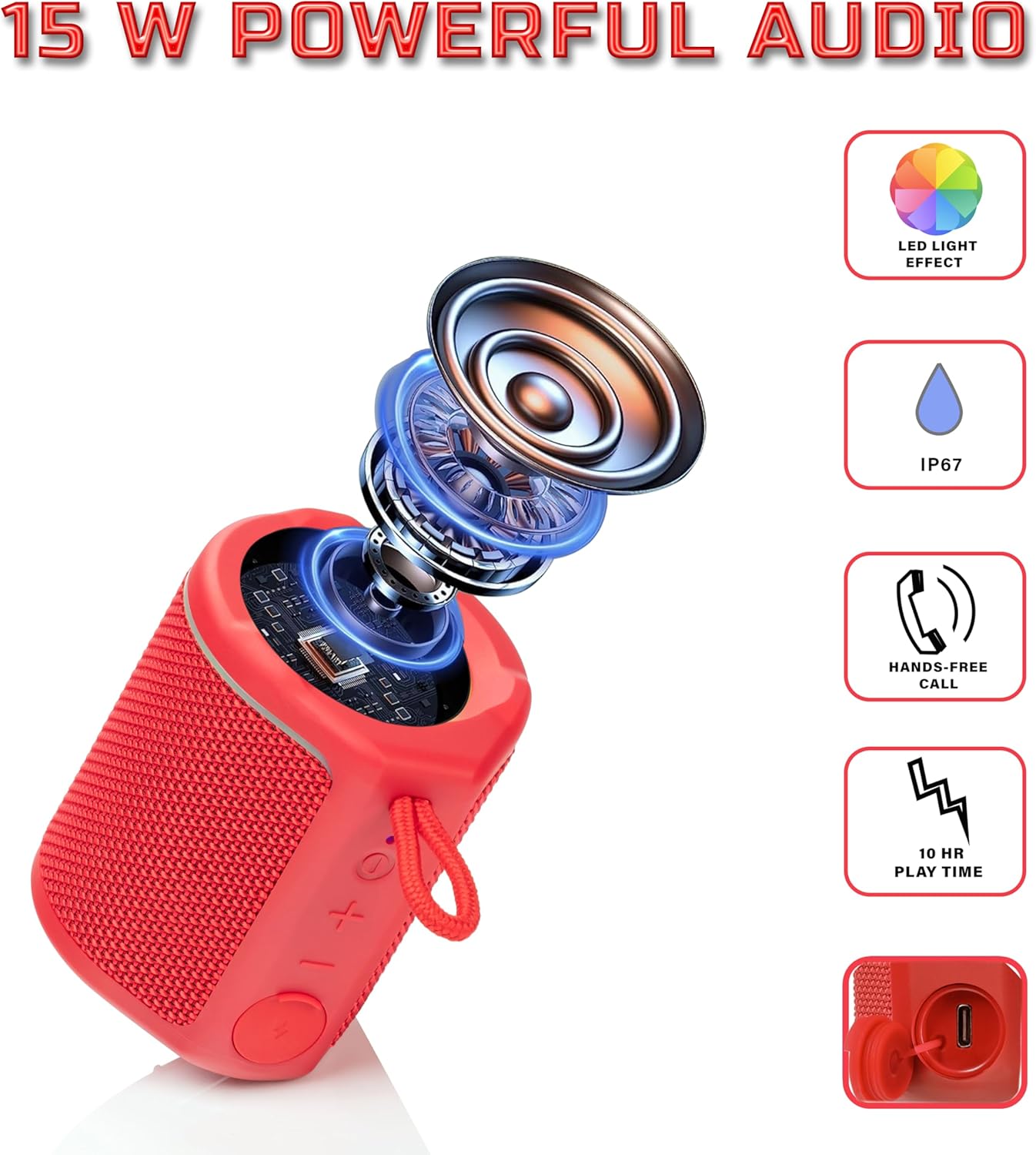
Diagram illustrating the internal components of the Sharp GX-BT190 speaker, including the speaker driver, and highlighting features like LED light effect, IP67 rating, hands-free call function, and battery life.
| Feature | Detalje |
|---|---|
| Modelnummer | GX-BT190 |
| Forbindelsesteknologi | Bluetooth |
| Højttaler Maksimal udgangseffekt | 10 watt |
| Vandtæt vurdering | IP67 |
| Batterilevetid | Op til 15 timer |
| Batteritype | 1 Lithium Ion (inkluderet) |
| Batterikapacitet | 1200 mAh |
| Produktmål (D x B x H) | 7.5 x 7.5 x 7.5 cm (ca.) |
| Varens vægt | 226.8 g (8 ounces) |
| Wireless Range | Op til 33 fod |
| Yderligere funktioner | LED Light, True Wireless Stereo (TWS), Hands-Free Calling |
10. Garanti
The Sharp GX-BT190 Portable Bluetooth Speaker comes with a 1-Year Limited Warranty from the date of purchase. This warranty covers manufacturing defects under normal use. It does not cover damage caused by misuse, accidents, unauthorized modifications, or normal wear and tear. Please retain your proof of purchase for warranty claims.
11. Support
For technical assistance, warranty inquiries, or further information regarding your Sharp GX-BT190 speaker, please contact Sharp Inc. customer support:
- Producentkontakt: Sharp Inc
- Telefon: 1-800-BE-SHARP