
Indledning
Thank you for choosing the FlyEagle Galaxy Projector BL-XK01. This device is designed to transform any room into a captivating cosmic oasis with dynamic colors, adjustable light patterns, and integrated audio features. It projects a field of green stars, accompanied by a nebula cloud and ocean wave effects, creating a soothing and vibrant atmosphere. This manual provides detailed instructions for setup, operation, maintenance, and troubleshooting to ensure optimal performance and enjoyment of your projector.
Sikkerhedsoplysninger
Please read all safety instructions before using the product. Failure to follow these instructions may result in electric shock, fire, or other injuries.
- Enheden må ikke skilles ad eller ændres. Reparationer bør kun udføres af kvalificeret personale.
- Hold enheden væk fra vand og fugt. Må ikke anvendes i våde omgivelser.
- Ensure the power adapter is compatible with your local power supply and is properly connected.
- Avoid direct eye exposure to the laser light.
- Keep out of reach of children and pets to prevent accidental damage or misuse.
- Place the projector on a stable, flat surface to prevent it from falling.
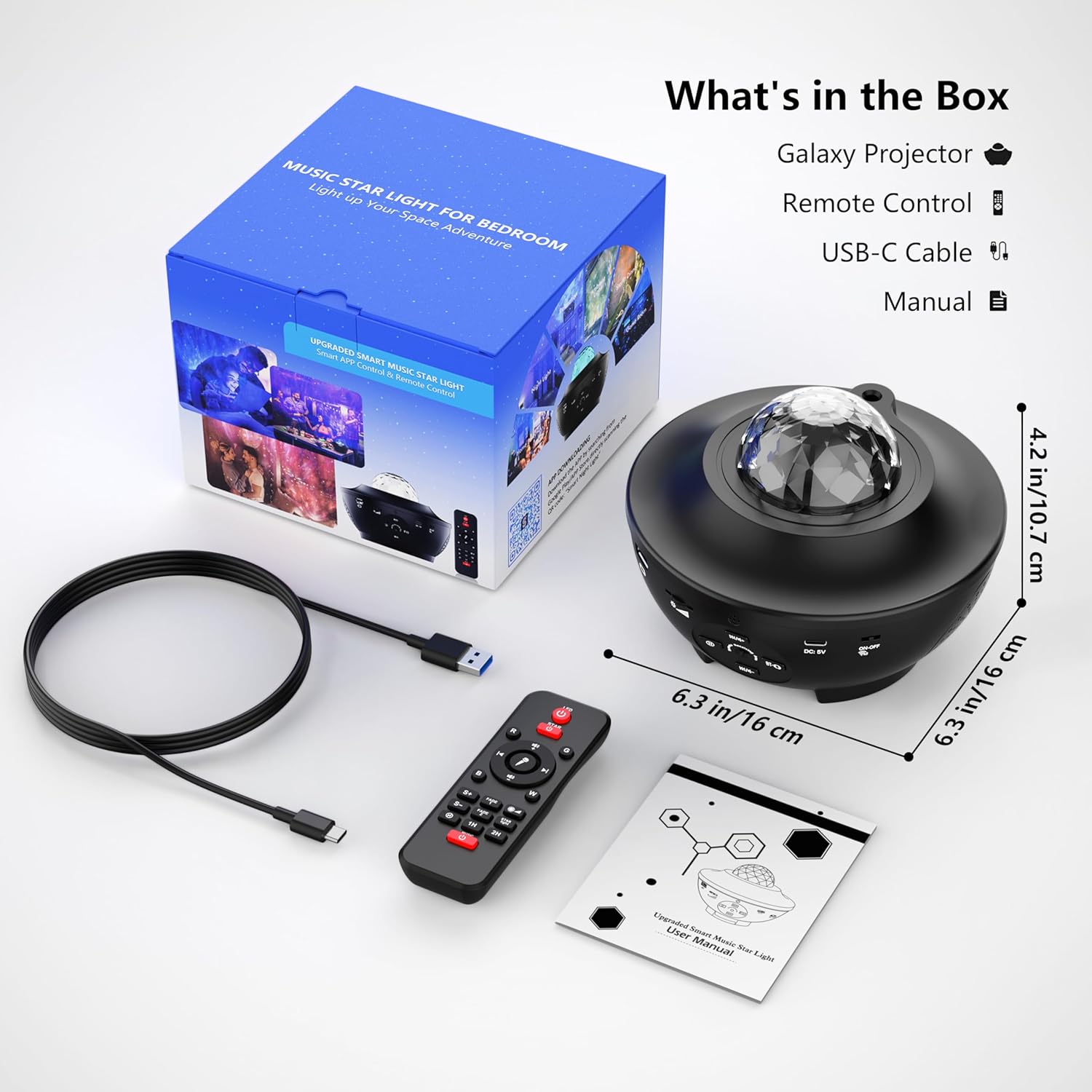
Hvad er der i æsken
Pak forsigtigt kassen ud, og sørg for, at alle dele er til stede og i god stand:
- FlyEagle Galaxy Projector (BL-XK01)
- Fjernbetjening
- USB-C kabel
- Brugermanual
Opsætning
- Placering: Position the projector on a flat, stable surface in your desired room. For optimal projection, ensure there are no obstructions between the projector and the ceiling/walls.
- Strømtilslutning: Connect the provided USB-C cable to the DC 5V port on the projector and plug the other end into a compatible USB power adapter (not included) or a USB port.
- Første gang tændt: Tryk på tænd/sluk-knappen på projektoren eller fjernbetjeningen for at tænde for enheden.
Betjeningsvejledning
The FlyEagle Galaxy Projector offers multiple control methods: onboard buttons, remote control, and a smartphone application.

1. Onboard Button Control
The projector features several buttons for basic functions:
- Power knap: Tænder eller slukker for projektoren.
- Lystilstandsknap: Cycles through different light effects and colors.
- Justering af lysstyrke: Justerer intensiteten af det projicerede lys.
- Musikafspilningskontroller: Play/Pause, Next/Previous track.

2. Fjernbetjening
The included remote control provides full functionality for the projector.
- Tænd/sluk: Separate buttons for stars and ocean wave effects.
- Farvevalg: Choose from 15 different light colors.
- Lysstyrkeniveauer: Three adjustable brightness settings.
- Musik kontrol: Play/Pause, Volume Up/Down, Next/Previous track.
- Timerindstillinger: Set automatic shutdown for 1, 2, or 4 hours.
- Rotationshastighed: Adjust the speed of the light effects.
3. App Control (Smart Night Life APP)
For enhanced control and customization, download the 'Smart Night Life' application on your smartphone.
- Download app: Søg efter 'Smart Night Life' in your device's app store and install it.
- Tænd projektor: Ensure the projector is powered on and within Bluetooth range of your smartphone.
- Tilføj enhed: Open the app, register/log in, and follow the on-screen instructions to 'Add Device'. The app will guide you through the pairing process.
- Tilpas indstillinger: Once connected, you can effortlessly turn the light on/off, adjust light colors, brightness, and set custom timers.

4. Stemmekontrol
The projector is compatible with voice commands through the Smart Night Life APP, allowing integration with smart home assistants like Google Assistant and Alexa.
- Ensure your projector is connected to the Smart Night Life APP.
- Link the Smart Night Life APP to your preferred smart home assistant (e.g., Google Home, Amazon Alexa).
- Use voice commands such as "Alexa, turn on the galaxy projector" or "Hey Google, change projector color to blue."
5. Lystilstande og -effekter
The projector offers 15 LED light color options, projecting green stars, a nebula cloud, and ocean wave effects.
- Farvevalg: Cycle through various single or mixed color combinations using the remote or app.
- Lysstyrke: Adjust between three brightness levels to suit your preference.
- Hastighed: Control the movement speed of the ocean wave and nebula effects.

6. Bluetooth Speaker & Music Playback
The projector features a built-in Bluetooth speaker for audio playback.
- Bluetooth-forbindelse: Tænd Bluetooth på din smartphone eller anden enhed. Søg efter "MX10" (or similar device name) and pair with the projector.
- USB-diskafspilning: Insert a U disk (USB flash drive) into the USB port on the projector to play music directly.
- Musikrytmetilstand: The lights can flicker and change with the rhythm of the music, creating a dynamic visual experience.

7. Timer funktion
The projector includes a built-in timer for automatic shutdown.
- Set the timer for 1 hour, 2 hours, or 4 hours using the remote control or the smartphone app.
- The default automatic shutdown time is 4 hours if no timer is manually set.
- This feature helps conserve energy and is ideal for bedtime use.

Opretholdelse
- Rensning: Brug en blød, tør klud til at rengøre projektorens overflade. Brug ikke slibende rengøringsmidler eller opløsningsmidler.
- Opbevaring: Når projektoren ikke er i brug, skal den opbevares køligt og tørt, væk fra direkte sollys og ekstreme temperaturer.
- Linsepleje: Undgå at berøre projektionslinsen direkte. Brug en linserengøringsklud, hvis rengøring er nødvendig.
Fejlfinding
| Problem | Mulig årsag | Løsning |
|---|---|---|
| Projektoren tænder ikke. | Ingen strømforsyning eller defekt forbindelse. | Ensure the USB-C cable is securely connected and the power adapter is working. Try a different power source. |
| Lights are dim or not projecting clearly. | Brightness setting is low; lens is dirty; room is too bright. | Increase brightness via remote/app. Clean the projection lens. Use in a darker environment. |
| Bluetooth-højttaleren opretter ikke forbindelse. | Bluetooth is off on your device; projector is not in pairing mode; incorrect device selected. | Ensure Bluetooth is enabled on your device. Restart the projector. Søg efter "MX10" and try pairing again. |
| Fjernbetjening virker ikke. | Battery depleted; obstruction between remote and projector. | Replace the remote control battery. Ensure clear line of sight to the projector's IR receiver. |
| App cannot connect to the projector. | Projector is off; Bluetooth is off; app permissions not granted. | Ensure projector is on and Bluetooth is active. Check app permissions in your phone settings. Restart both the app and projector. |
Specifikationer
| Feature | Detalje |
|---|---|
| Modelnavn | BL-XK01 |
| Mærke | FlyEagle |
| Produktdimensioner | 5.11" D x 6.53" B x 6.53" H |
| Varens vægt | 1.32 pund |
| Materiale | Acrylonitrilbutadienstyren (plast) |
| Lyskildetype | LED |
| Antal lyskilder | 1 |
| Skygge farve | Flerfarvet |
| Strømkilde | Ledningsbaseret elektrisk (DC 5V) |
| Voltage | 5 volt (DC) |
| Wattage | 10 watt-timer |
| Kontrolmetode | App, Voice, Remote, Onboard Buttons |
| Særlige funktioner | Auto on/off, Bluetooth, Dimmable, Remote Control, Timer, Color changing, Music responsive |
| Indendørs/Udendørs brug | Indendørs |
| Vandmodstandsniveau | Ikke vandafvisende |
| Montering påkrævet | Ingen |
Garanti og support
For warranty information and customer support, please refer to the documentation included with your purchase or contact FlyEagle customer service through their official webwebstedet eller forhandleren, hvor produktet blev købt. Gem venligst din købsbevis i tilfælde af garantikrav.
Online support: Besøg FlyEagle Store on Amazon for yderligere produktinformation og supportressourcer.