
1. Introduktion
This manual provides essential information for the safe and efficient use of your Amazon Basics 24 Inch FHD 100Hz Monitor. Please read these instructions carefully before operating the device and retain them for future reference.
The Amazon Basics 24 Inch Monitor features a 23.8-inch viewable IPS panel with Full HD (1080p) resolution and a maximum refresh rate of 100Hz. It includes built-in speakers and is VESA compatible for flexible mounting options. The monitor is designed for various uses, including office work, entertainment, and gaming.

Front view of the Amazon Basics 24 Inch FHD 100Hz Monitor.
2. Pakkens indhold
Bekræft at alle varer er til stede i pakken:
- Amazon Basics 24 Inch Monitor
- Stativbase
- Stå hals
- Strømadapter
- HDMI kabel

Image showing the monitor's package contents: stand base, stand neck, power adapter, and HDMI cable.
3. Opsætningsvejledning
3.1 Montering af stativet
- Insert the stand neck into the stand base until it clicks securely into place.
- Align the assembled stand with the mounting slot on the back of the monitor. Push the stand into the slot until it locks. Ensure it is firmly attached.
3.2 Tilslutningskabler
The monitor features multiple input ports for connectivity:
- DP 1.2: DisplayPort input for high-resolution video and audio.
- HDMI 1.4: HDMI input for video and audio from compatible devices.
- VGA: VGA input for analog video signals.
- AUDIO IN: 3.5mm audio input for external audio sources.
- LYD UD: 3.5 mm lydudgang til hovedtelefoner eller eksterne højttalere.
- Connect the provided HDMI cable from your computer's video output port to the HDMI input port on the monitor. Alternatively, use a DisplayPort or VGA cable if your device supports those connections.
- Connect the power adapter to the monitor's power input port, then plug the power adapter into a wall outlet.
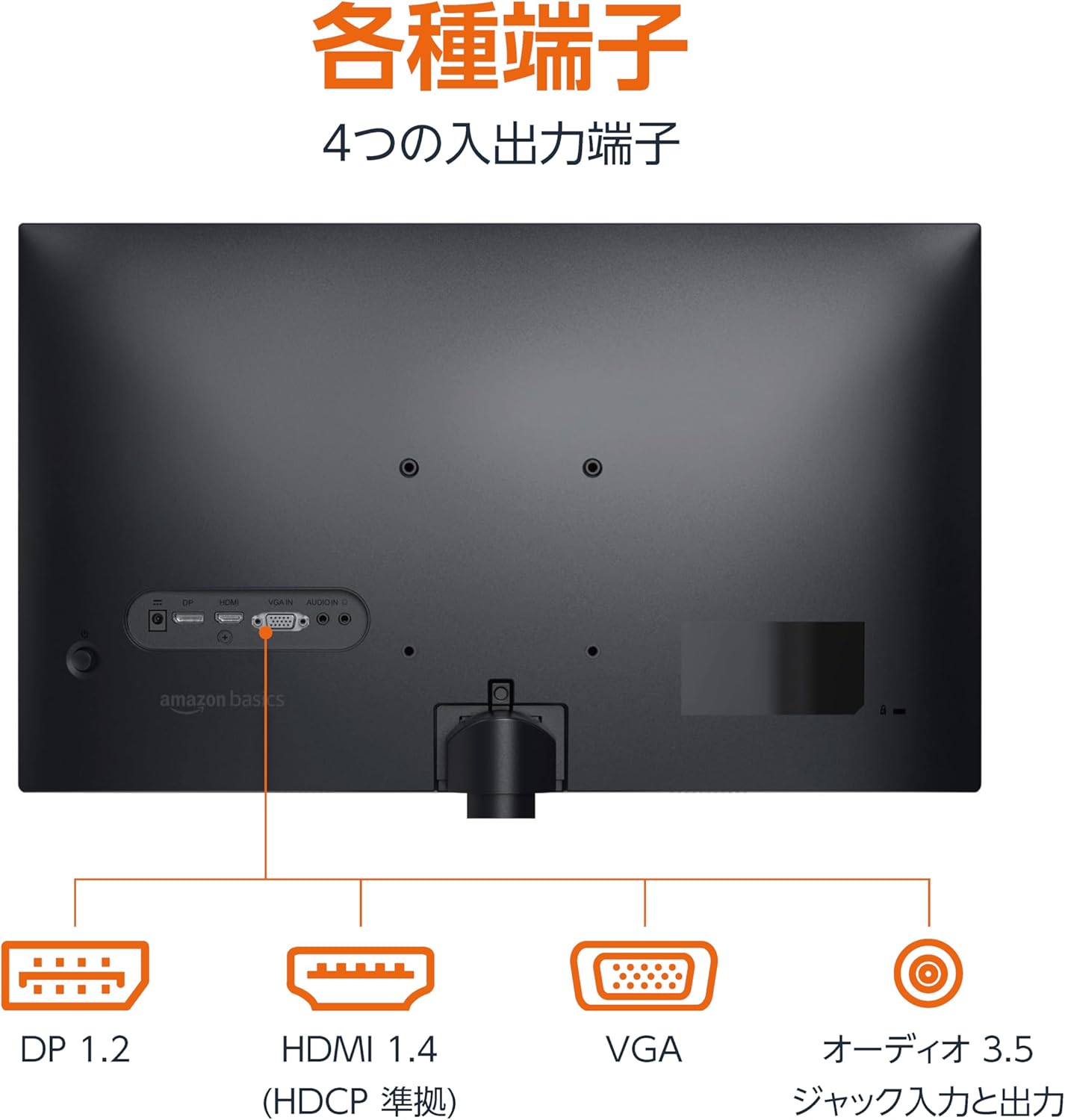
Bag view of the monitor displaying various input and output ports.
3.3 Tænd
Press the power button located on the back or bottom of the monitor to turn it on. The monitor will automatically detect the active input signal.
3.4 Tiltjustering
The monitor allows for tilt adjustment to achieve an optimal viewing angle. Gently hold the top and bottom edges of the monitor and tilt it forward or backward. The tilt range is approximately -5° to 20°.

Monitor demonstrating its tilt adjustment capability.
3.5 Optional: VESA Mounting and Cable Lock
The monitor is VESA compatible, allowing it to be mounted on a wall or an adjustable arm (mounting hardware sold separately). Refer to the VESA mount's instructions for installation.
An optional cable lock slot is available on the rear of the monitor to secure it to a stable object, preventing theft.
3.6 Opsætningsvideoguide
For a visual guide on setting up your Amazon Basics monitor, please watch the video below:
This video demonstrates the assembly of the stand, connecting cables, and basic adjustments for the Amazon Basics monitor.
4. Betjeningsvejledning
4.1 On-Screen Display (OSD) menu
The monitor features an On-Screen Display (OSD) menu for adjusting various settings. Use the buttons located on the back or bottom of the monitor to navigate the menu. Common settings include:
- Lysstyrke/kontrast: Juster skærmens luminans- og kontrastniveauer.
- Farveindstillinger: Rediger farvetemperatur, farvetone og mætning.
- Indgangsvalg: Manually switch between DP, HDMI, and VGA inputs.
- Lyd: Juster lydstyrken for indbyggede højttalere eller tilsluttede hovedtelefoner.
- Billedtilstand: Select from preset display modes (e.g., Standard, Game, Movie).
4.2 Using Built-in Speakers
The monitor includes integrated speakers. Audio will be played through these speakers when connected via HDMI or DisplayPort. If using a VGA connection, ensure an audio cable is connected to the 'AUDIO IN' port on the monitor and your computer's audio output.
5. Specifikationer
| Feature | Specifikation |
|---|---|
| Mærke | Grundlæggende om Amazon |
| Modelnummer | 24M2020DJP |
| Skærmstørrelse | 24 Inches (23.8 inch viewstand) |
| Paneltype | IPS |
| Opløsning | FHD 1080p (1920 x 1080) |
| Opdateringshastighed | Max 100 Hz |
| Aspektforhold | 16:9 |
| Indbyggede højtalere | Ja |
| VESA-kompatibilitet | Ja |
| Indgangsporte | 1x DisplayPort 1.2, 1x HDMI 1.4, 1x VGA, 1x Audio In (3.5mm) |
| Udgangsporte | 1x Audio Out (3.5mm) |
| Produktets vægt | 2.8 kg |
| Bezel tykkelse | 1.44 mm (slim bezel) |
| Garanti | 1 års begrænset garanti |
5.1 Dimensioner
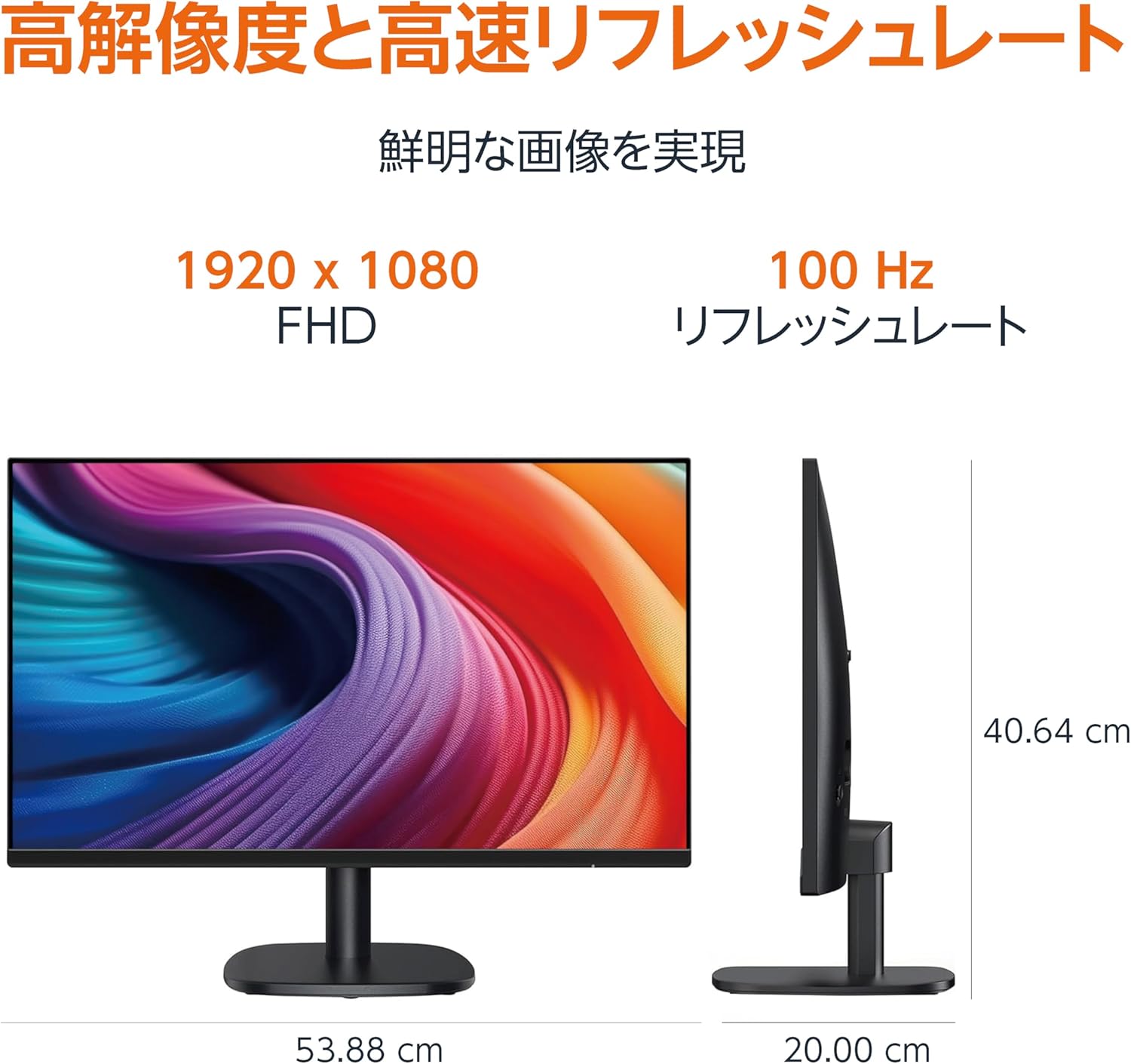
Diagram showing the monitor's dimensions (Width: 53.88 cm, Height: 40.64 cm, Depth: 20.00 cm).
5.2 Slim Bezel Design

Detail showing the monitor's slim bezel design, measuring 1.44 mm.
6. Fejlfinding
Hvis du støder på problemer med din skærm, kan du bruge følgende almindelige løsninger:
- Ingen strøm: Ensure the power cable is securely connected to both the monitor and a working power outlet. Check if the power adapter's indicator light is on.
- Intet signal: Verify that the video cable (HDMI, DP, or VGA) is firmly connected to both the monitor and your computer. Ensure the correct input source is selected in the monitor's OSD menu. Try restarting your computer.
- Flimrende skærm: Check the video cable for damage or loose connections. Ensure your computer's graphics driver is up to date. Adjust the refresh rate in your computer's display settings.
- Ingen lyd fra højttalere: If using HDMI or DisplayPort, ensure the audio output is set to the monitor in your computer's sound settings. If using VGA, confirm the 3.5mm audio cable is connected. Check the volume level on both the monitor and your computer.
- Problemer med billedkvalitet: Adjust brightness, contrast, and color settings via the OSD menu. Ensure the display resolution on your computer matches the monitor's native resolution (1920 x 1080).
Hvis problemet fortsætter efter at have prøvet disse trin, skal du kontakte kundesupport.
7. Vedligeholdelse
Proper maintenance helps ensure the longevity and performance of your monitor:
- Rengøring af skærmen: Tør forsigtigt skærmen af med en blød, fnugfri klud. Tør forsigtigt genstridige mærker afampRengør kluden med vand eller et specialiseret skærmrensemiddel. Undgå at bruge skrappe kemikalier, alkohol eller slibende materialer.
- Rengøring af Casing: Brug en blød, tør klud til at tørre skærmens c afasing.
- Ventilation: Sørg for, at skærmens ventilationsåbninger ikke er blokerede for at forhindre overophedning.
- Sluk, når den ikke er i brug: Sluk skærmen, når den ikke er i brug i længere perioder, for at spare energi og forlænge dens levetid.
8. Garanti og support
This Amazon Basics monitor comes with a 1 års begrænset garanti fra købsdatoen. Denne garanti dækker fabrikationsfejl og udførelse under normal brug.
For warranty claims, technical support, or further assistance, please refer to the Amazon Basics support page or contact Amazon customer service directly. Keep your proof of purchase for warranty validation.