
1. Introduktion
This manual provides essential information for the proper setup, operation, and maintenance of your HAYEAR HY-900B USB3.0 Digital Microscope Camera. This 8-megapixel camera is designed for various applications including industrial vision, visual inspection, and integration with microscopes and astronomical telescopes. It offers high-speed video transmission and compatibility with multiple operating systems.
2. Pakkens indhold
Bekræft, at alle nedenstående varer er inkluderet i din pakke:
- 1 x HAYEAR HY-900B USB3.0 Digital Microscope Camera
- 1 x USB3.0-kabel
- 1 x Software Disk
3. Produktet er slutview
The HAYEAR HY-900B is a compact and versatile digital microscope camera. Familiarize yourself with its components:
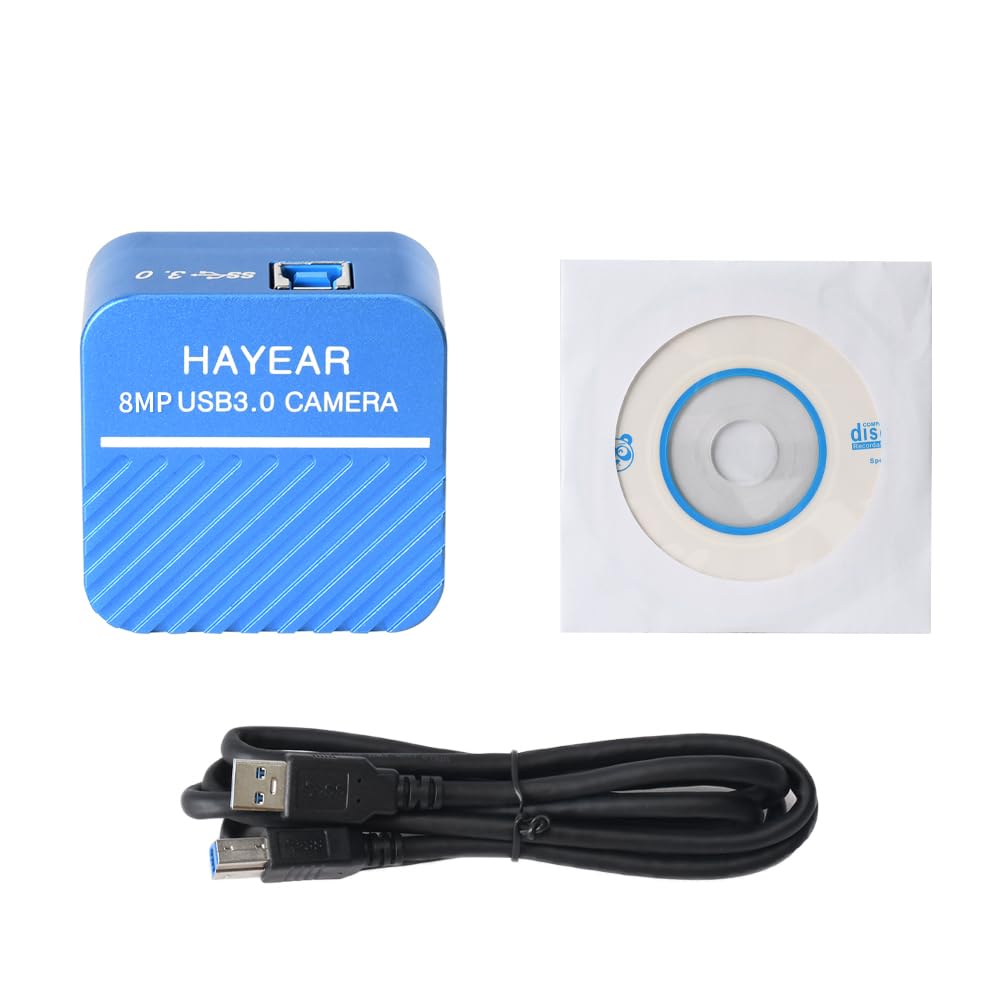
Figur 3.1: Front view of the HAYEAR HY-900B camera, showing the brand and 8MP USB3.0 Camera label.
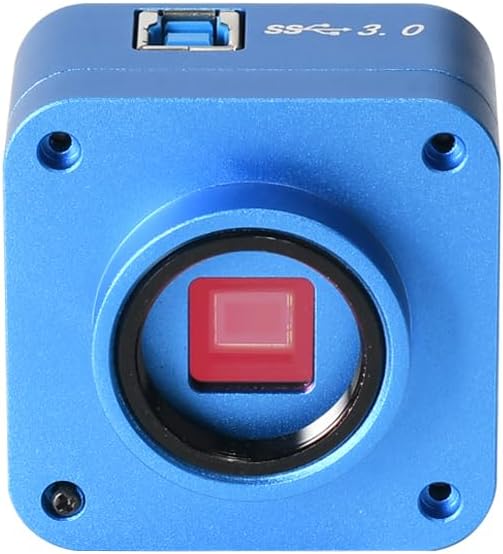
Figur 3.2: Front view of the camera, highlighting the C-mount lens interface and the sensor.

Figur 3.3: Top view of the camera, showing the USB 3.0 port for high-speed data transfer.

Figur 3.4: Vinklet view of the camera with the USB 3.0 cable connected, demonstrating its compact form factor.
4. Opsætningsvejledning
Follow these steps to set up your HAYEAR HY-900B camera:
- Tilslut kameraet: Connect the HAYEAR HY-900B camera to your computer using the provided USB3.0 cable. Ensure it is connected to a USB3.0 port on your PC or laptop for optimal performance and to prevent low power issues.
- Installer software: Insert the included software disk into your computer's optical drive. Follow the on-screen instructions to install the HAYEAR measurement software. This software is compatible with Windows, Linux, and Mac OS (UVC compatible).
- Driver installation: The camera supports USB Video Class (UVC) protocols, meaning it is generally plug-and-play and does not require separate driver installation on most modern operating systems (WinXP/Win7/Win10/Win11, Linux, Android, MAC-OS X10.4.8 or later).
- Montering (valgfrit): The camera features a standard C-mount. It can be directly attached to compatible monocular zoom lenses or, with a CS ring adapter, to stereo trinocular microscopes, FA machine vision lenses, or other 2D/3D monocular lenses.
5. Betjening af kameraet
Once the camera is connected and software is installed, you can begin operation:
- Start software: Open the HAYEAR measurement software on your computer. The camera's live feed should appear in the software interface.
- Juster indstillinger: The software provides controls for various image parameters, including Exposure, Gamma, Color, Gain, Contrast, and Brightness. Adjust these settings to achieve optimal image quality for your specific application.
- Fokusering: If using with a microscope or lens, adjust the focus mechanism of your optical equipment to bring the specimen into sharp view.
- Ansøgninger: The HY-900B camera is suitable for a wide range of applications, including detailed visual inspection of circuit boards, biological samples, and other microscopic subjects.
Video 5.1: Demonstration of the HAYEAR 4K Microscope Camera (HY-900B) in use, showcasing its capabilities for inspecting circuit boards and biological samples under magnification.
6. Vedligeholdelse
For at sikre kameraets levetid og optimale ydeevne:
- Rensning: Use a soft, dry cloth to clean the camera body. For the lens and sensor, use specialized optical cleaning solutions and cloths to avoid scratches or damage.
- Opbevaring: Opbevar kameraet et køligt og tørt sted, væk fra direkte sollys og ekstreme temperaturer.
- Håndtering: Undgå at tabe kameraet eller udsætte det for kraftige stød.
7. Fejlfinding
If you encounter issues with your HAYEAR HY-900B camera, refer to the following common solutions:
- Camera Not Detected/Low Power: Ensure the camera is connected to a USB3.0 port on your PC or laptop. USB2.0 ports may not provide sufficient power or data bandwidth, leading to detection issues or poor performance.
- Intet billede/sort skærm: Verify that the software is correctly installed and launched. Check all cable connections. Ensure the lens cap (if applicable) is removed and any connected microscope or lens is properly configured.
- Dårlig billedkvalitet: Adjust the focus of your optical equipment. Use the software's image settings (Exposure, Gain, Brightness, Contrast) to optimize the image. Ensure adequate lighting for your specimen.
- Softwaren svarer ikke: Close and restart the software. If the issue persists, restart your computer.
8. Specifikationer
Technical specifications for the HAYEAR HY-900B USB3.0 Digital Microscope Camera:
| Feature | Detalje |
|---|---|
| Model | HY-900B USB3.0 Color CMOS USB camera |
| Sensor | 1/2.5" Color CMOS IMX317 |
| Sensor størrelse | 8.365 mm(H) x 6.615 mm(V) |
| Pixel størrelse | 1.62µm(H) x 1.62µm(V) |
| Spektral respons | 400nm~700nm |
| Opløsning | 3840x2160; 2560x1440; 1920x1080 |
| Billedformat | MJPEG / YUV422 |
| Video opløsning | 3840x2160 @30fps; 2560x1440 @30fps; 1920x1080 @30fps; 1280x720 @30fps; 1024x576 @30fps; 640x480 @30fps; 640x360 @30fps |
| Dynamisk rækkevidde | dB (Linear) - dB (HDR) |
| Hvidbalance | Auto/Manuel |
| Billedudgang | USB3.0, 5Gbit/s |
| Funktioner | Exposure, Gamma, Color, Gain, Contrast, Brightness |
| Protokoller | USB Video Class (UVC) |
| Systemsupport | WinXP/Win7/Win10/Win11; Linux / Android (compatible UVC), MAC-OS X10.4.8 or latest (compatible UVC) |
| Optagetilstande | Automatisk |
| Eksponeringskontroltype | Manuel, automatisk |
| Videooptagelsesopløsning | 2160p |
| Medietype | USB |
| Vandmodstandsniveau | Ikke vandafvisende |
| Videooptagelsesformat | MJPEG |
| Effektiv stillopløsning | 8294400 pixel |
| Viewfinder Type | LCD screen (via connected device) |
| Kompatible enheder | Bærbar, personlig computer |
| ISO rækkevidde | 100-3200 |
| Lydoptagelse | Ingen |
| Aspektforhold | 16:9 |
| Fokus Type | Autofocus or Manual Focus (depending on connected lens) |
| Autofokus | Yes (depending on connected lens) |
| Flash Type | Internal (if applicable, typically for illumination) |
| Fabrikant | HAYEAR |
| Varens vægt | 1 kilo |
9. Garanti og support
Garanti: The HAYEAR HY-900B USB3.0 Digital Microscope Camera comes with a 1-year manufacturer's warranty.
Støtte: For any questions, feedback, or technical assistance, please contact HAYEAR customer support. Your inquiries are welcome.