
edx 40white
edx Electric Standing Desk User Manual
Model: 40white
1. Produktet er slutview
The edx Electric Standing Desk is an ergonomic solution designed to promote a healthier work environment by allowing seamless transitions between sitting and standing positions. This desk features an electric height adjustment system, memory presets, and robust construction for stability and durability.
Nøglefunktioner:
- Electric Height Adjustment: Effortlessly customize height between 28.7 inches and 48 inches.
- Quiet Operation: Motor operates at less than 55dB.
- Memory Presets: Three programmable height settings for quick adjustments.
- Robust Construction: Supports up to 176 lbs with a wooden desktop and T-shaped steel frame.
- Safety Features: Automatic anti-collision technology, safety lock function, and overload reminder.
- Convenient Design: Includes 2 hooks and 2 wire collecting holes for organization.

Figure 1.1: The edx Electric Standing Desk, showcasing its spacious white desktop and sturdy white frame, equipped with a monitor, keyboard, and various office accessories. Two integrated hooks are visible, one holding a bag and another holding headphones.
2. Sikkerhedsoplysninger
Læs og forstå alle sikkerhedsinstruktioner før montering og brug. Manglende overholdelse af disse instruktioner kan medføre personskade eller beskadigelse af produktet.
- Forankring: Always ensure the desk is properly anchored to the floor if required by local regulations or for added stability, especially in high-traffic areas.
- Vægtgrænse: Do not exceed the maximum weight capacity of 176 lbs (80 kg). Overloading can cause damage to the motor and frame, and may lead to instability.
- Elektrisk sikkerhed: Be cautious when using the desk near power sources. Ensure all cables are properly managed to avoid tripping hazards or electrical shorts. Do not expose the control panel or motor to water or excessive moisture.
- Forsamling: Follow the assembly instructions carefully to ensure the desk is stable and secure. Do not skip steps or use non-approved parts.
- Forhindringer: The desk features automatic anti-collision technology. However, always ensure there are no obstacles in the desk's path during height adjustment to prevent damage or injury.
- Børn og kæledyr: Hold børn og kæledyr væk fra skrivebordet under brug for at forhindre ulykker.
3. Monteringsvejledning
The edx Electric Standing Desk requires assembly. The package includes all necessary tools and an instruction manual. For visual guidance, an installation video is also available (refer to product listing or manufacturer's webwebsted).
3.1 Udpakning og klargøring
- Carefully unpack all components and verify against the parts list provided in the included instruction manual.
- Place all components on a clean, flat, and soft surface (e.g., a blanket or cardboard) to prevent scratches during assembly.
- Note that the desktop is composed of two separate panels that need to be joined together during assembly.
3.2 Monteringstrin
Follow the step-by-step instructions provided in the physical instruction manual included with your desk. General steps include:
- Attaching the desktop panels.
- Assembling the leg columns and feet.
- Mounting the control box and motor.
- Connecting all cables securely.
- Attaching accessories such as hooks.
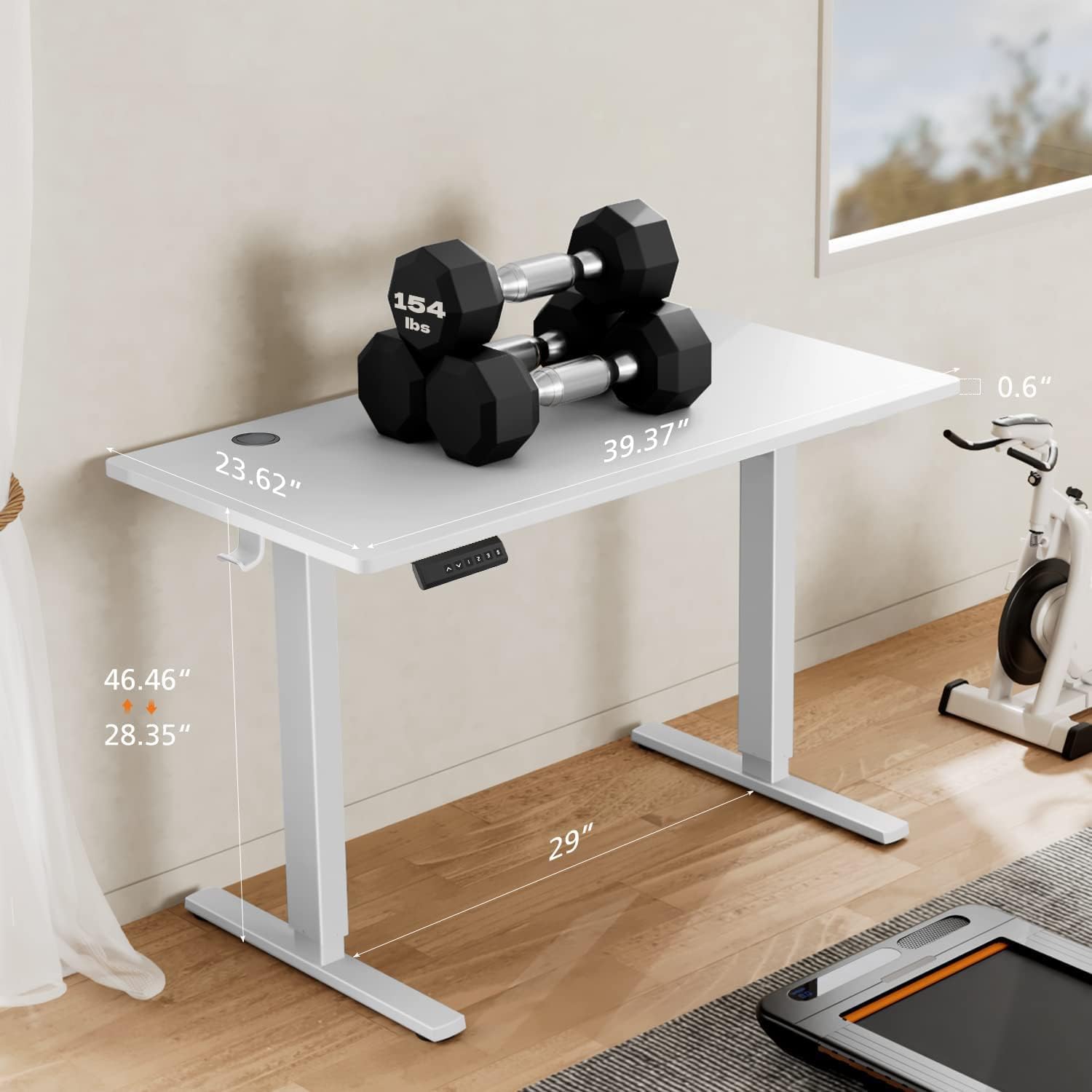
Figur 3.1: Dimensionel overview of the edx Electric Standing Desk, highlighting its 40-inch width, 24-inch depth, and adjustable height range from 28.35 inches to 46.46 inches. The image also shows a weight of 154 lbs on the desktop, demonstrating its robust capacity.
4. Betjeningsvejledning
This section details how to operate your edx Electric Standing Desk, including height adjustment and memory preset functions.
4.1 Kontrolpanel overview
The desk is equipped with a convenient digital control panel. Refer to the image below for button identification.

Figur 4.1: Detaljeret view of the digital control panel. It features an LED display (1) for current height, an 'S' button (2) for saving memory presets, three memory height buttons (3) labeled 1, 2, and 3, and Up/Down arrow buttons (4) for manual height adjustment.
- LED display: Shows the current height of the desk.
- Pil op/ned: Press and hold to manually adjust the desk height up or down.
- 'S'-knap: Used to save desired height settings into memory.
- Hukommelsesknapper (1, 2, 3): Press to automatically move the desk to a saved height.
4.2 Justering af højde
- Manuel justering: Tryk og hold på Up or Ned arrow button until the desk reaches your desired height. Release the button to stop.
- Brug af hukommelsesforudindstillinger: Tryk på den tilsvarende hukommelsesknap (1, 2, eller 3) to automatically move the desk to a pre-set height.
4.3 Saving Memory Presets
- Juster skrivebordet til den ønskede højde ved hjælp af pilene op/ned.
- Tryk på S button. The LED display will show "S-" or flash.
- Inden for 3 sekunder skal du trykke på den ønskede hukommelsesknap (1, 2, eller 3) to save the current height. The display will confirm the save (e.g., "S-1").
- Repeat for other desired heights.
4.4 Safety Features in Operation
- Anti-kollisionsteknologi: If the desk encounters an obstacle during movement, it will automatically stop and reverse slightly to prevent damage.
- Sikkerhedslås funktion: In case of power failure, the desktop will not slide down unexpectedly, maintaining its last set height.
- Overload Reminder: If the desk's load exceeds the maximum limit (176 lbs), the motor will automatically stop to prevent damage. Reduce the load to resume operation.

Figure 4.2: The edx Electric Standing Desk's height adjustability, showing two desks set at different heights to accommodate various user preferences and ergonomic needs.
5. Vedligeholdelse
Regular maintenance ensures the longevity and optimal performance of your edx Electric Standing Desk.
- Rensning: The eco-friendly wood desktop is sleek and easy to clean. Use a soft, damp klud til at tørre overflader af. Undgå slibende rengøringsmidler eller stærke kemikalier, der kan beskadige overfladen.
- Kabelstyring: Periodically check and organize cables to prevent tangles and ensure smooth operation during height adjustments. Utilize the integrated wire collecting holes.
- Fastgørelsesmidler: Kontrollér lejlighedsvis alle skruer og bolte for at sikre, at de er spændte. Efterspænd om nødvendigt.
- Motor and Control Box: Keep the motor and control box free from dust and debris. Do not attempt to open or service these components yourself.

Figure 5.1: The eco-friendly desktop material, certified to meet CARB standards, ensuring a safe and healthy environment. The smooth surface is easy to clean and maintain.
6. Fejlfinding
This section provides solutions to common issues you might encounter with your edx Electric Standing Desk.
| Problem | Mulig årsag | Løsning |
|---|---|---|
| Skrivebordet bevæger sig ikke. | Strømkabel frakoblet; Overbelastning; Motorfejl. | Check power connection. Reduce weight on desk. Unplug and replug power after 10 seconds. |
| Skrivebordet bevæger sig ujævnt eller laver usædvanlige lyde. | Loose fasteners; Obstruction; Uneven load. | Check and tighten all screws. Remove any obstructions. Distribute weight evenly. |
| Antikollisionsfunktionen udløses for ofte. | Indstilling af følsomhed; Obstruktion. | Ensure no objects are near the desk's path. Refer to the full manual for sensitivity adjustment (if applicable). |
| Hukommelsesforudindstillinger gemmes eller genkaldes ikke korrekt. | Forkert lagringsprocedure. | Ensure you press 'S' then the memory button within 3 seconds. |
If the problem persists after attempting these solutions, please contact edx customer support for assistance.
7. Specifikationer
| Feature | Detalje |
|---|---|
| Mærke | edx |
| Modelnummer | 40white |
| Skrivebordsstørrelse | 40''W x 24''D (101.6 cm W x 60.96 cm D) |
| Justerbart højdeområde | 28.7'' - 48'' (72.9 cm - 121.9 cm) |
| Maksimal vægtkapacitet | 176 lbs (80 kg) |
| Støjniveau | Mindre end 55dB |
| Grundmateriale | Legeret stål |
| Skrivebordsmateriale | Eco-friendly Wood (CARB Standard Material) |
| Farve | White Desktop + White Frame |
| Inkluderede komponenter | Standing Desk, Instruction Manual, 2 Hooks |
| Montering påkrævet | Ja |

Figure 7.1: Noise level comparison, illustrating the quiet operation of the edx Electric Standing Desk at less than 55dB, comparable to a quiet conversation.
8. Garanti og support
The edx Electric Standing Desk comes with a Limited Warranty. Please refer to the warranty card included in your package for specific terms and conditions, including coverage duration and what is covered.
For any issues, questions, or to claim warranty service, please contact edx customer support. Contact information can typically be found on the product packaging, the included instruction manual, or the official edx brand store on Amazon.
Online support: Besøg edx Store on Amazon for ofte stillede spørgsmål og yderligere ressourcer.
When contacting support, please have your model number (40white) and purchase information ready.
Ask a question about this manual
Ask about setup, troubleshooting, compatibility, parts, safety, or missing instructions. Manuals+ will review the question and use this page’s manual context to help answer it.