
1. Introduktion
The WORKPRO W159025 is a versatile cordless 3.6V grass and hedge trimmer designed for efficient garden maintenance. This tool features a dual-purpose design, allowing for quick conversion between a grass shear and a hedge trimmer. Its lightweight and compact design, combined with Type-C USB charging, makes it convenient for various trimming tasks around your garden.
This manual provides essential information for the safe and effective use, maintenance, and troubleshooting of your WORKPRO W159025 trimmer. Please read it thoroughly before first use and keep it for future reference.
2. Vigtige sikkerhedsinstruktioner
Følg altid grundlæggende sikkerhedsforanstaltninger, når du bruger elektriske apparater, for at mindske risikoen for brand, elektrisk stød og personskade.
- Læs alle instruktioner: Gør dig bekendt med betjeningselementerne og den korrekte brug af værktøjet.
- Bær øjenbeskyttelse: Brug altid sikkerhedsbriller eller beskyttelsesbriller, når du betjener trimmeren.
- Hold området ryddet: Ensure the work area is free of debris, children, and pets.
- Undgå utilsigtet start: Ensure the safety lock button and operating switch are not engaged unintentionally.
- Brug den rigtige oplader: Only use a 5V/2A adapter for charging. Using a 5V/1A adapter may trigger overvoltage protection and prevent charging.
- Efterse knive: Before each use, check blades for damage or wear. Replace if necessary.
- Sikre klinger: Ensure blades are correctly installed and secured before operation.
- Hold hænderne væk: Never touch the blades while the tool is operating or connected to power.
- Opbevar sikkert: Opbevar værktøjet et tørt og sikkert sted utilgængeligt for børn.
3. Pakkens indhold
Kontroller, at alle genstande er til stede ved udpakning:
- WORKPRO W159025 Main Unit
- Grass Shear Blade (75mm cutting width)
- Hedge Trimmer Blade (120mm cutting width, 7.8mm max cutting diameter)
- Type-C USB Cable (1m)
- Brugermanual
4. Produktet er slutview
The WORKPRO W159025 features a compact and ergonomic design for comfortable use. Key components include:
- TPR Handle: Giver et komfortabelt og sikkert greb.
- Sikkerhedslåsknap: Forhindrer utilsigtet aktivering.
- Operating Switch: Activates the blades.
- Bladudløserknap: For quick and tool-free blade changes.
- Type-C opladningsport: For praktisk opladning.
- LED-opladningsindikatorlampe: Displays charging status (Red: Charging, Green: Fully Charged, Yellow: Approx. 50% charged).
- Udskiftelige klinger: Includes both grass shear and hedge trimmer blades.

Figure 1: WORKPRO W159025 Component Diagram
5. Opsætning
5.1. Opladning af batteriet
The device is powered by a 3.6V rechargeable battery. Before first use, fully charge the battery.
- Find Type-C-opladningsporten på enheden.
- Connect the provided Type-C USB cable to the charging port.
- Tilslut den anden ende af USB-kablet til en 5V/2A USB-strømadapter (medfølger ikke).
- The LED indicator light will show red during charging. It will turn green when fully charged (approximately 2-3 hours). A yellow light indicates approximately 50% charge.

Figur 2: Type-C-opladning
5.2. Changing Blades
The WORKPRO W159025 allows for easy, tool-free blade changes between the grass shear and hedge trimmer blades.
- Sørg for, at enheden er slukket og frakoblet enhver strømkilde.
- Push the two blade release buttons on either side of the blade housing.
- Carefully remove the installed blade.
- Align the desired blade (grass shear or hedge trimmer) with the pins on the main unit.
- Press the blade firmly into place until it clicks securely.

Figure 3: Blade Change Mechanism
6. Betjeningsvejledning
6.1. Tænd/sluk
The WORKPRO W159025 features a dual safety mechanism to prevent accidental starts.
- To start the tool, simultaneously press the safety lock button (located on the top of the handle) and the operating switch (trigger).
- Once the tool starts, you can release the safety lock button, and the tool will continue to operate as long as the operating switch is pressed.
- To turn off the tool, release the operating switch.

Figure 4: Safety Lock and Operating Switch
6.2. Using the Grass Shear
Attach the grass shear blade for trimming grass in small areas, around edges, or where larger mowers cannot reach.
- Ensure the grass shear blade is securely attached.
- Hold the tool firmly with both hands, if possible, or one hand if comfortable and safe.
- Activate the tool as described in Section 6.1.
- Move the tool steadily across the grass, maintaining a consistent height. The cutting width is 75mm.
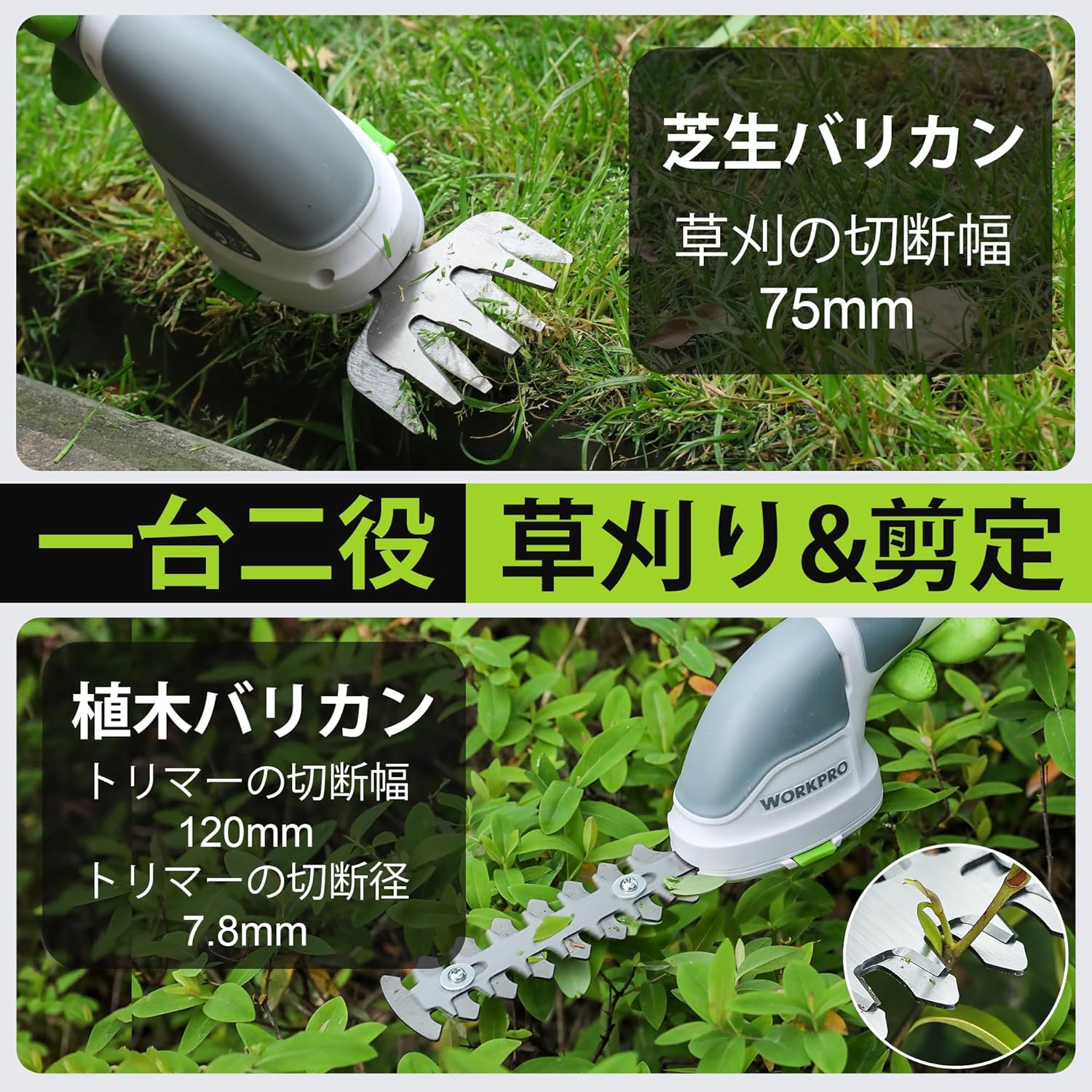
Figure 5: Grass Shearing Operation
6.3. Using the Hedge Trimmer
Attach the hedge trimmer blade for shaping shrubs and hedges. The cutting width is 120mm, and the maximum cutting diameter is 7.8mm.
- Ensure the hedge trimmer blade is securely attached.
- Hold the tool firmly, ensuring a stable grip.
- Activate the tool as described in Section 6.1.
- Move the trimmer smoothly along the hedge, cutting small amounts at a time. Avoid forcing the blades through thick branches.
- The handle can rotate 180 degrees for improved ergonomics and access to different angles. To rotate the handle, press the handle rotation button (if present, otherwise manually rotate if designed for it) and adjust to the desired position.

Figure 6: Hedge Trimming Operation
Video 1: Demonstrates the WORKPRO W159025 in action, showing blade changes, safety features, and use as both a grass shear and hedge trimmer. It highlights the 180-degree handle rotation feature.
7. Vedligeholdelse
7.1. Cleaning and Blade Care
- Always ensure the tool is switched off and the battery is removed (if applicable) before cleaning or performing maintenance.
- Clean the blades after each use to remove sap, debris, and dirt. Use a stiff brush and a damp cloth. For stubborn residue, a blade cleaner or light oil can be used.
- Periodically apply a thin layer of machine oil to the blades to prevent rust and ensure smooth operation.
- Inspect blades for sharpness and damage. Dull or damaged blades can reduce efficiency and increase strain on the motor. Replace worn blades as needed.
7.2. Opbevaring
- Opbevar værktøjet på et tørt, godt ventileret sted, væk fra direkte sollys og ekstreme temperaturer.
- Sørg for, at knivene er rene, tørre og let olierede inden opbevaring.
- Opbevar værktøjet utilgængeligt for børn og uautoriserede personer.
8. Fejlfinding
| Problem | Mulig årsag | Løsning |
|---|---|---|
| Værktøjet starter ikke | Batteriet er lavt eller afladet Safety lock button not pressed simultaneously with operating switch Knivene sidder fast | Oplad batteriet helt Ensure both buttons are pressed together Clear any obstructions from the blades (with tool off) |
| Dårlig skæreydelse | Sløve eller beskadigede klinger Excessive material being cut Blades are dirty or sticky | Udskift knivene Cut smaller sections at a time Clean and lubricate blades |
| Batteriet oplades ikke | Incorrect power adapter (e.g., 5V/1A) Ladekabel er beskadiget Charging port is dirty | Use a 5V/2A USB power adapter Try a different Type-C USB cable Rengør opladningsporten |
9. Specifikationer
| Feature | Detalje |
|---|---|
| Mærke | WORKPRO |
| Modelnummer | W159025 |
| Strømkilde | Batteridrevet (3.6V) |
| Batteritype | Lithium-ion |
| Opladningsport | Type-C USB |
| Opladningstid | Approx. 2-3 hours (with 5V/2A adapter) |
| Driftstid uden belastning | Ca. 40 minutter |
| Slagfrekvens uden belastning | 1100 slag/minut |
| Græssaks klippebredde | 75 mm |
| Hækkeklipperens klippebredde | 120 mm |
| Max Cutting Diameter (Hedge Trimmer) | 7.8 mm |
| Bladmateriale | Rustfrit stål |
| Product Weight (without blade) | 0.37 kg |
| UPC | 820909687412 |
10. Garanti og support
For warranty information, technical support, or replacement parts, please contact WORKPRO customer service or refer to the official WORKPRO webwebstedet. Behold din købskvittering som købsbevis.
For yderligere hjælp kan du besøge WORKPRO-butik på Amazon.