
TimeFlys Triple_Focus Panda
TimeFlys Audio Baby Monitor (Model: Triple_Focus Panda)
Instruktionsmanual
Indledning
This manual provides instructions for the TimeFlys Audio Baby Monitor, Model Triple_Focus Panda. This audio monitor is designed to help parents monitor their baby with sound detection, offering features like two-way talk, a night light, and a long operating range. It operates without an LED screen to minimize light disturbance and uses a secure FHSS digital technology connection.
Produktkomponenter
The TimeFlys Audio Baby Monitor system includes two main units:
- Forældreenhed: Used by the parent to listen to the baby and communicate.
- Babyenhed: Placed in the baby's room to detect sounds and provide a night light.

Image: Parent Unit Overview. This image displays the parent unit with labels for its indicator light, power on/off button, intercom key, volume controls, belt clip, and USB port.
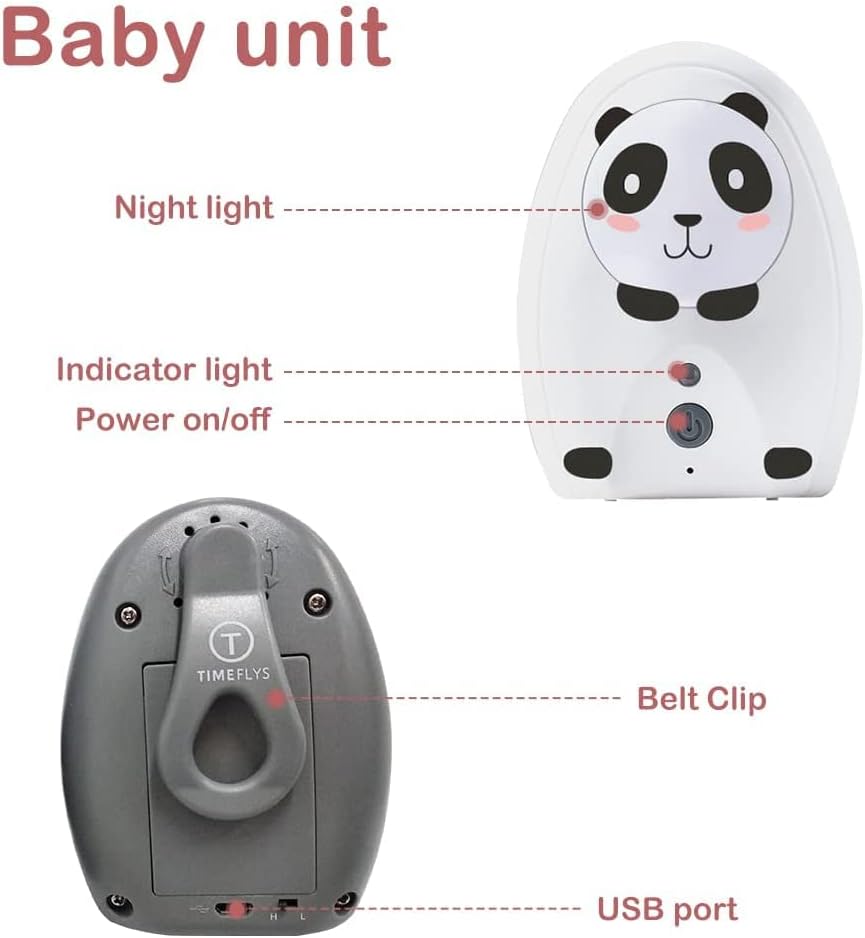
Image: Baby Unit Overview. This image shows the baby unit with labels for its night light, indicator light, power on/off button, belt clip, and USB port.
Opsætningsinstruktioner
- Strømforsyning:
Both the Parent Unit and Baby Unit can be powered by AC adapters or Ni-MH rechargeable batteries (not included). For continuous monitoring, it is recommended to use both battery and AC power simultaneously. The parent unit can operate cordlessly for a short period on battery power alone.

Image: Power Options. This image illustrates the battery compartments and AC power connection points on both the parent and baby units.
- Batteriinstallation (valgfrit):
If using batteries, open the battery compartment on the back of each unit and insert the required Ni-MH rechargeable batteries. Close the compartment securely. Ensure batteries are charged before first use.
- Tilslut til strøm:
Plug the AC adapters into the USB ports on both the Parent Unit and Baby Unit, then connect them to a power outlet.
- Tænd:
Press and hold the Power On/Off button on both units until the indicator light illuminates.
- Linking Units:
The units are designed for automatic linking. Allow approximately one minute for both units to establish a connection. A successful connection will be indicated by a steady light on both units.
- Placering:
Place the Baby Unit in the baby's room, ensuring it is out of reach of the child and at a distance that allows clear sound pickup. Place the Parent Unit with you, within the operational range.

Image: Range Illustration. This image depicts the monitor's range, showing coverage within a house and surrounding outdoor areas.
Betjeningsvejledning
To-vejs talefunktion
To speak to your baby through the Baby Unit, press and hold the "Intercom Key" button on the Parent Unit. Release the button to listen. This feature allows for comforting the baby remotely.

Image: Two-Way Talk. This image illustrates the two-way talk feature, showing a parent speaking into the parent unit and the baby hearing it from the baby unit.
Lydstyrkekontrol
Adjust the listening volume on the Parent Unit using the "Volume +" and "Volume -" buttons located on the side.
Night Light Control
The Baby Unit features a night light. This can be remotely controlled from the Parent Unit to provide comfort for the child or assist with gradual light adaptation at night.

Image: Night Light Feature. This image shows the baby unit's night light illuminated, providing a soft glow in a baby's room.
Out of Range and Low Battery Alarms
The Parent Unit will alert you with an alarm if it goes out of range from the Baby Unit or if its battery level is low. Ensure units are within the specified operating range and batteries are charged.
Opretholdelse
- Rensning: Wipe both units with a soft, dry cloth. Do not use abrasive cleaners or solvents.
- Batteripleje: If using rechargeable batteries, ensure they are charged regularly. If the monitor will not be used for an extended period, remove the batteries.
- Opbevaring: Opbevar skærmen et køligt, tørt sted væk fra direkte sollys og ekstreme temperaturer.
Fejlfinding
| Problem | Mulig årsag | Løsning |
|---|---|---|
| No sound from Parent Unit. | Volume is too low; units are out of range; units are not linked; battery is low. | Increase volume. Move units closer. Ensure both units are powered on and linked. Charge or replace batteries. |
| Parent Unit beeps constantly. | Out of range alarm; low battery alarm. | Move Parent Unit closer to Baby Unit. Charge Parent Unit battery. |
| Kort batterilevetid. | Batteries are old or not fully charged; non-rechargeable batteries used. | Ensure only Ni-MH rechargeable batteries are used and fully charged. Consider replacing old rechargeable batteries. Always use AC power for continuous monitoring. |
| Cannot hear baby crying clearly. | Baby Unit too far from baby; background noise; sound sensitivity setting (if applicable). | Place Baby Unit closer to the baby. Reduce background noise in the baby's room. (Note: This model focuses on sound detection, not continuous sound transmission, which may affect perceived clarity for very soft sounds). |
Specifikationer
- Modelnummer: Triple_Focus Panda
- Mærke: TimeFlys
- Forbindelsesprotokol: DECT
- Frekvensområde: 450-470 MHz
- Antal kanaler: 36
- Maksimal talerækkevidde: Up to 1000 Feet (open field)
- Magt: 1.5 Volts (DC), Ni-MH rechargeable batteries (not included) or AC power
- Vandmodstandsniveau: Vandtæt (IP44)
- Inkluderede komponenter: Baby Unit, Parent Unit
- Fabrikant: MC Devices (USA) LTD
- Oprindelsesland: Kina
- Pakkedimensioner: 19.1 x 12.1 x 6.3 cm; 340 g
Garantioplysninger
Dette produkt leveres med en 1 års garanti from the date of purchase. Please retain your proof of purchase for warranty claims. The warranty covers manufacturing defects under normal use. It does not cover damage caused by misuse, accidents, unauthorized modifications, or failure to follow instructions.
Kundesupport
For technical assistance, warranty claims, or any questions regarding your TimeFlys Audio Baby Monitor, please contact our customer support team:
- E-mail: service@timeflyslab.com
- Telefon: 1-855-846-3359
- Producentens adresse: 1625 Buffalo Ave. Suite 2B#6, Niagara Falls, NY 14303

Image: Customer Support Contact. This image displays the email and phone number for TimeFlys customer support.
Nyttige videoer
TimeFlys Crown Audio Baby Monitor Overview
Video: 2022 The most convenient audio baby monitor TimeFlys Crown. Denne video giver en overview of the TimeFlys Crown audio baby monitor, showcasing its features and ease of use. While a different model, it demonstrates general functionality relevant to TimeFlys audio monitors.
Ask a question about this manual
Ask about setup, troubleshooting, compatibility, parts, safety, or missing instructions. Manuals+ will review the question and use this page’s manual context to help answer it.