
1. Introduktion
Thank you for choosing the TecTake Metal Office Cabinet. This manual provides essential information for the safe and efficient assembly, operation, and maintenance of your new cabinet. Please read these instructions carefully before beginning assembly and retain them for future reference.

Figure 1: TecTake Metal Office Cabinet with doors open, showcasing dens lagerkapacitet.
2. Sikkerhedsoplysninger
Overhold venligst følgende sikkerhedsretningslinjer for at forhindre personskade eller beskadigelse af produktet:
- Keep keys in a secure location and do not leave the cabinet unlocked when unattended.
- Exercise caution to avoid pinching fingers in the hinges of the swing doors during use.
- Ensure the cabinet is assembled on a flat, stable surface to prevent tipping.
- Do not exceed the maximum weight capacity per shelf (40 kg) to maintain stability and prevent structural damage.
- Hold små dele og emballagematerialer væk fra børn for at forhindre kvælningsfare.
3. Pakkens indhold
Før montering skal det kontrolleres, at alle komponenter er til stede og ubeskadigede. Pakken skal indeholde:
- Cabinet panels (sides, top, bottom, back, doors)
- Adjustable shelves (quantity: 3)
- Drawer components (quantity: 2 sets)
- Lock mechanisms and keys (8 keys total, 2 per lock)
- Assembly hardware (screws, bolts, nuts, shelf pins)
- Rubber buffers for silent door operation
- Instruktionsmanual (dette dokument)
Hvis der mangler eller er beskadigede dele, bedes du kontakte kundesupport, inden du fortsætter med monteringen.
4. Monteringsvejledning
Assembly requires careful attention to detail. It is recommended to have two people for assembly. A Phillips head screwdriver is the only tool required. Avoid using power drills, as overtightening can damage the metal.
4.1 Forberedelse
- Ryd et rummeligt, rent og fladt område til samling.
- Unpack all components and lay them out, identifying each part according to the provided parts list (if separate from this manual).
- Ensure all hardware is sorted and easily accessible.
4.2 Trin-for-trin montering
- Saml rammen: Begin by connecting the side panels to the base and top panels using the provided screws. Ensure all connections are secure but do not overtighten until the entire frame is upright.
- Installer bagpaneler: Slide or attach the back panels into the designated grooves or screw points.
- Saml skuffer: Construct the two drawers. Pay close attention to the orientation of the drawer slides and the central support for the drawer mechanism. Incorrect orientation can prevent drawers and doors from closing properly.

Figure 2: Detail of adjustable shelves, drawer, and lock mechanism.
- Indsæt skuffer: Carefully slide the assembled drawers into their respective compartments. Test their movement.
- Fastgør døre: Mount the four swing doors to the cabinet frame using the hinges. Ensure the rubber buffers are placed to allow for silent closing. Adjust hinges if necessary for proper alignment.
- Installer låse: Secure the cylinder locks into the doors. Each lock comes with two keys. Test all locks to ensure they function correctly.
- Place Adjustable Shelves: Insert the shelf pins into the desired height slots. Place the shelves onto the pins. The shelves are adjustable to accommodate various item sizes.

Figure 3: Detail of adjustable shelf brackets.
- Endelig kontrol: Verify all screws are tightened, doors open and close smoothly, and drawers slide without obstruction.
For visual guidance, refer to the assembly diagrams provided in the separate assembly manual (if included) or the product images showing the assembled unit.
5. Betjening
5.1 døre
The cabinet features four swing doors. To open, turn the key in the lock and pull the handle. To close, push the door firmly until it engages with the magnetic catch or lock mechanism, then turn the key to secure. The rubber buffers ensure quiet operation.
5.2 skuffer
The two drawers are designed for smooth operation. Pull the handle to open and push to close. Each drawer has its own lock for securing contents. Insert the key and turn to lock or unlock.
5.3 Justerbare hylder
The three adjustable shelves allow for flexible storage configurations. To adjust a shelf, remove all items from it, lift the shelf, and reposition the shelf pins into the desired slots on the cabinet sides. Ensure all four pins are securely seated before placing items back on the shelf.
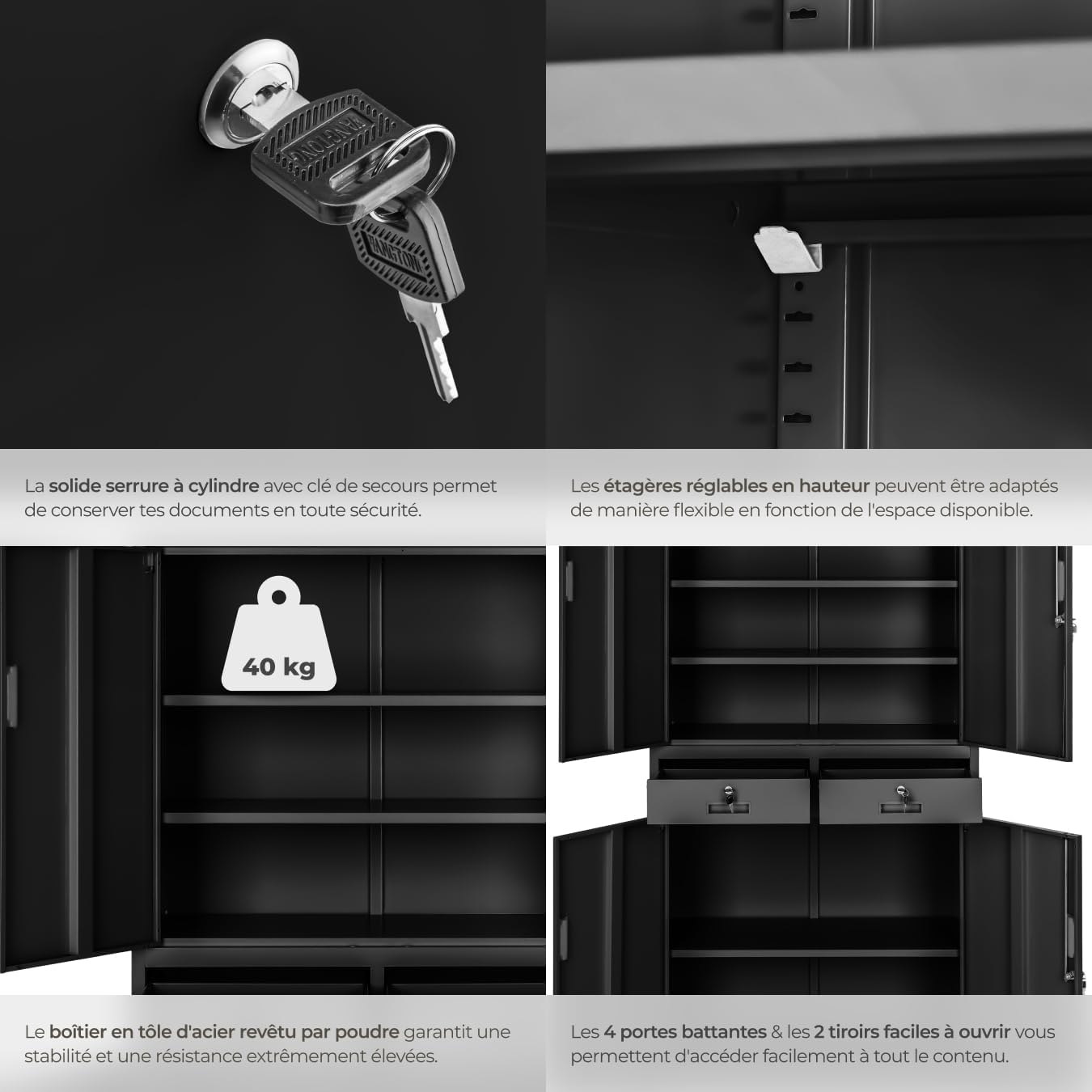
Figure 4: Key features of the cabinet, including adjustable storage and secure locking.
6. Vedligeholdelse
To ensure the longevity and appearance of your TecTake Metal Office Cabinet, follow these simple maintenance guidelines:
- Rensning: Tør alle overflader af med en blød,amp cloth. For stubborn marks, a mild soap solution can be used. Avoid abrasive cleaners or harsh chemicals, as these can damage the powder-coated finish. Dry thoroughly after cleaning.
- Locks and Hinges: Periodically check the locks and hinges for smooth operation. If they become stiff, a small amount of silicone-based lubricant can be applied.
- Stabilitet: Regularly check that all screws and connections remain tight. Retighten if necessary to maintain the cabinet's stability.
- Vægtfordeling: Fordel vægten jævnt på tværs af hylder og skuffer for at forhindre vridning eller ustabilitet.
7. Fejlfinding
Hvis du støder på problemer med dit kabinet, kan du se følgende almindelige problemer og løsninger:
| Problem | Mulig årsag | Løsning |
|---|---|---|
| Dørene lukker ikke ordentligt eller er forkert justeret. |
|
|
| Skufferne er stive eller glider ikke jævnt. |
|
|
| Skabet føles ustabilt eller vakkelvornt. |
|
|
| Lock mechanism is jammed or difficult to turn. |
|
|
8. Specifikationer
Key technical specifications for the TecTake Metal Office Cabinet:
| Modelnummer | 800599 |
| Mærke | TecTake |
| Materiale | Legeret stål (pulverlakeret) |
| Farve | Sort |
| Overordnede mål (L x B x H) | 80 x 40 x 180 cm (ca. 31.5 x 15.7 x 70.9 tommer) |
| Vægt | 44 kg (ca. 97 lbs) |
| Maksimal vægtkapacitet pr. hylde | 40 kg (ca. 88 lbs) |
| Antal døre | 4 (swing doors) |
| Antal skuffer | 2 (låselige) |
| Særlige funktioner | Lockable doors and drawers, adjustable shelves, silent rubber buffers. |

Figure 5: Dimensions of the TecTake Metal Office Cabinet.
9. Garanti og support
Specific warranty information for this product is not provided in the available data. Please refer to your purchase documentation or contact the retailer/manufacturer directly for details regarding warranty coverage and customer support.
For technical assistance or inquiries about replacement parts, please contact TecTake customer service through their official webwebstedet eller de kontaktoplysninger, der er angivet med dit køb.