
1. Introduktion
This manual provides detailed instructions for the Black Shark 5 Pro Gaming Phone. It covers essential information regarding the device's features, setup, operation, maintenance, and troubleshooting. Please read this manual thoroughly to ensure proper use and optimal performance of your device.
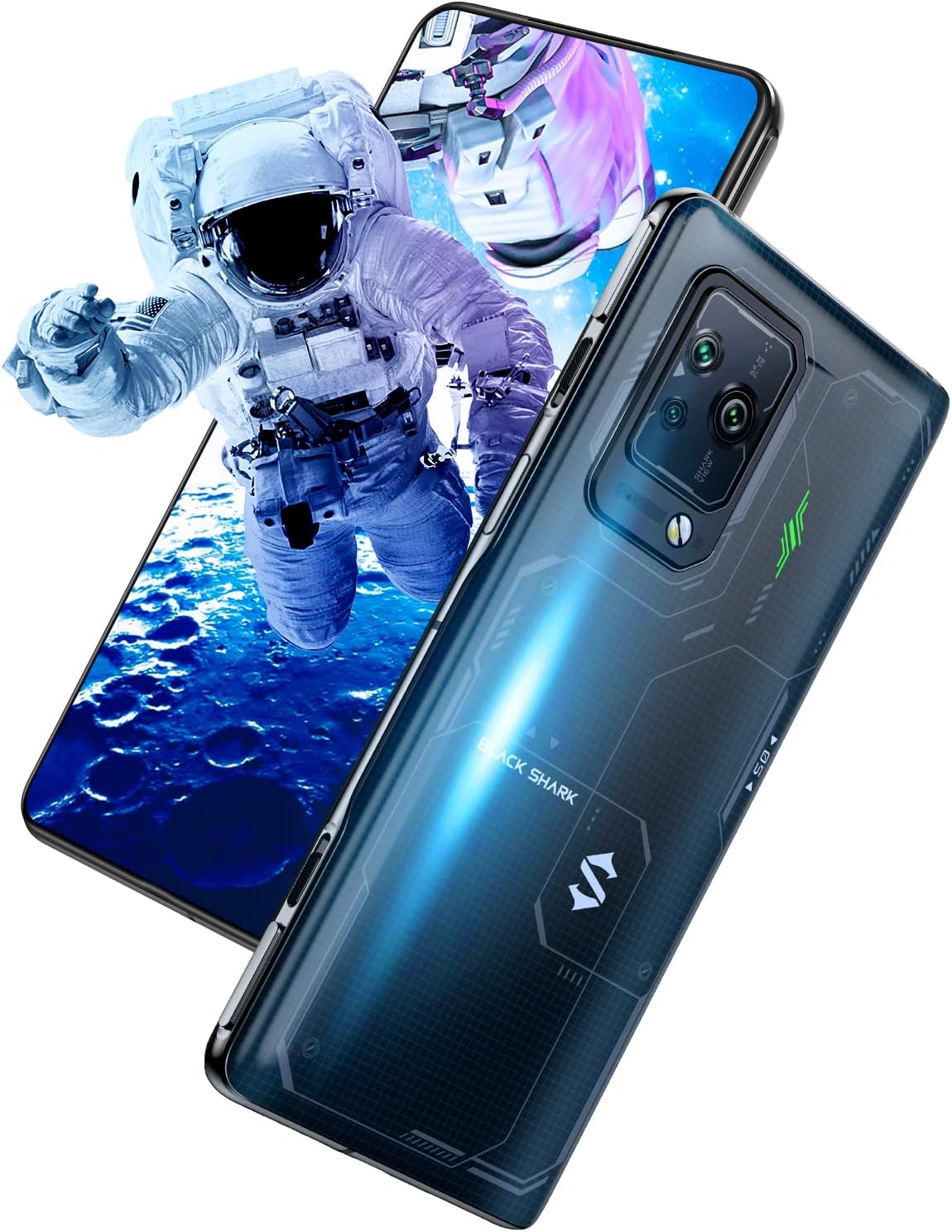
Image 1.1: The Black Shark 5 Pro Gaming Phone, showcasing its display with an astronaut graphic and the sleek design of the device's rear.

Billede 1.2: En overview graphic highlighting the Black Shark 5 Pro's core features, such as the Snapdragon 8 Gen 1 processor, 120W Hyper Charge, 144Hz OLED display, and 108MP triple camera system.
2. Hvad er der i æsken
Upon unboxing your Black Shark 5 Pro, please verify that all the following items are included:
- Black Shark 5 Pro Smartphone
- Strømadapter
- USB kabel
- SIM-bakkeudkaster
- Telefon etui
3. Opsætning
3.1. Isætning af SIM-kortet
- Find SIM-kortbakken på siden af enheden.
- Sæt SIM-kortbakkens udløserværktøj ind i det lille hul ved siden af bakken, og tryk godt ned, indtil bakken springer ud.
- Placer dit/dine Nano-SIM-kort i de dertil beregnede pladser på bakken, og sørg for, at de gyldne kontakter vender nedad.
- Sæt forsigtigt SIM-kortbakken tilbage i telefonen, indtil den klikker på plads.
3.2. Første opstart og konfiguration
- Tryk og hold tænd/sluk-knappen nede, indtil Black Shark-logoet vises.
- Følg vejledningen på skærmen for at vælge dit sprog og din region og oprette forbindelse til et Wi-Fi-netværk.
- Sign in with your Google account or create a new one to access Android services and the Google Play Store.
- Complete the setup by configuring security settings, such as fingerprint unlock or facial recognition, and restoring data if applicable.
4. Betjeningsvejledning
4.1. Ydeevne (Snapdragon 8 Gen 1)
The Black Shark 5 Pro is powered by the Snapdragon 8 Gen 1 processor, featuring an upgraded CPU and GPU built on a 4nm process. This architecture delivers enhanced performance for demanding applications and gaming, ensuring a smooth and responsive user experience.

Image 4.1.1: The Black Shark 5 Pro with an overlay graphic emphasizing the Snapdragon 8 Gen 1 processor, indicating its central role in the phone's high performance.

Image 4.1.2: A graphic detailing the technical specifications of the Snapdragon 8 Gen 1, including its 4nm advanced process, Cortex-X2 CPU, Adreno GPU, Hexagon 790 AI engine, Wi-Fi 6E, and DSDA capabilities.

Image 4.1.3: A performance graph illustrating the frame rate stability and temperature management in an RPG game, comparing performance with the GameEngine enabled versus disabled.
4.2. Display
The device features a 6.7-inch flexible OLED display with a 144Hz refresh rate, providing smooth visuals and vibrant colors. It supports 10-bit color depth, DCI-P3 wide color gamut, HDR10+, and DC Dimming for an optimized viewing experience in various lighting conditions. The 720Hz touch sampling rate and TouchControl Master Algorithm reduce touch latency for precise input.

Image 4.2.1: The Black Shark 5 Pro showcasing its 144Hz E-Sports OLED display during a gaming session, highlighting the smooth visual experience.

Image 4.2.2: A graphic illustrating the key features of the 144Hz OLED Flexible Display, including its size, color depth, contrast ratio, color gamut, and HDR support.

Image 4.2.3: A graphic demonstrating the dual-zone pressure sensitive display, showing how touch input can vary based on pressure applied to the screen.

Image 4.2.4: A graphic highlighting the TouchControl system's enhancements, including a 20% increase in touch sampling process and a 15% improvement in response speed for gaming.
4.3. Lyd
The Black Shark 5 Pro features a powerful acoustic system with two flagship speakers and four driver chips. It incorporates multiple audio algorithms, including NLC, for enhanced bass, clear treble, and an immersive sound experience. The device also includes AudioZOOM with a 4-mic matrix for improved audio capture.

Image 4.3.1: The Black Shark 5 Pro displaying a game with visual representations of sound waves, emphasizing its advanced audio capabilities.

Image 4.3.2: A graphic illustrating the AudioZOOM feature, which utilizes a 4-mic matrix for directional sound recording and enhanced audio clarity.

Image 4.3.3: A graphic explaining the audio processing technologies, including NLC Algorithm for nonlinear compensation, sound field rebuild, bass enhancement, and airflow noise elimination.

Image 4.3.4: A graphic highlighting the Super Symmetric 1216P Speakers, detailing their 0.8mm long amplitude and 1.5cc large tune trope for powerful audio output.
4.4. Opladning
The Black Shark 5 Pro supports 120W Hyper Charge, allowing the 4650mAh battery to reach 100% charge in approximately 15 minutes in Ultimate Mode. An Even Mode is also available, balancing heat dissipation and charging speed, achieving a full charge in about 24 minutes.

Image 4.4.1: The Black Shark 5 Pro connected to its charger, illustrating the 120W Hyper Charge capability with a visual representation of rapid power delivery.

Image 4.4.2: A graphic explaining the 120W Hyper Charge technology, emphasizing its ability to fully charge the 4650mAh dual batteries in just 15 minutes.

Image 4.4.3: A graphic illustrating the different charging modes available: Ultimate Mode for fastest charging, Even Mode for balanced charging, and Bypass Charge for direct power delivery during gaming.
4.5. Kamera
The Black Shark 5 Pro is equipped with a triple camera system, featuring a 108MP ultra-clear main camera with a 1/1.52" sensor, 9-in-1 pixel fusion, f/1.75 large aperture, and 7p lens. It also includes a 13MP wide-angle camera with a 120° large angle and a 5MP macro camera with 3-7cm auto focus.

Billede 4.5.1: En detaljeret view of the Black Shark 5 Pro's triple camera module, showcasing the arrangement of its lenses and sensors.

Image 4.5.2: A graphic outlining the specifications of each camera lens: the 13MP wide-angle, 108MP ultra-clear main camera, and 5MP macro camera.
4.6. Gaming Features (Magnetic Pop-up Triggers & Cooling)
The Black Shark 5 Pro integrates second-generation Magnetic Pop-up Triggers, offering a tactile and responsive gaming experience. These physical buttons provide 7 levels of magnet drive for smooth toggling. To maintain optimal performance during intense gaming, the device utilizes a dual VC liquid cooling system with a total dissipation area of 5320mm², based on an advanced "sandwich" three-dimensional cooling architecture.

Image 4.6.1: The Black Shark 5 Pro showcasing its magnetic pop-up triggers, extended and ready for gaming input.

Image 4.6.2: A graphic detailing the features of the Magnetic Pop-up Trigger 2.0, including its physical button design, 7-level magnetic drive, and e-sports switch functionality.

Image 4.6.3: The Black Shark 5 Pro with a visual effect representing its liquid cooling system, designed to dissipate heat efficiently.

Image 4.6.4: A graphic illustrating the internal cooling components, including a large graphene layer and graphite flake, which contribute to the device's thermal management.
5. Vedligeholdelse
5.1. Rengøring af din enhed
- Brug en blød, fnugfri klud til forsigtigt at tørre telefonens skærm og kabinet af.
- Avoid using harsh chemicals, abrasive cleaners, or aerosol sprays, as these can damage the device's finish.
- Til genstridige pletter, let dampRengør kluden med vand eller en skærmspecifik rengøringsopløsning.
5.2. Batteripleje
- Avoid exposing the phone to extreme temperatures (hot or cold) as this can degrade battery life.
- Use only the provided charger and cable to ensure optimal charging and prevent damage.
- For long-term storage, charge the battery to around 50% and store the device in a cool, dry place.
5.3. Softwareopdateringer
Regularly check for and install software updates to ensure your device has the latest features, security patches, and performance improvements. You can usually find this option in the phone's Settings menu under "About phone" or "System updates."
6. Fejlfinding
6.1. Enheden tændes ikke
- Sørg for, at batteriet er opladet. Tilslut telefonen til opladeren, og vent et par minutter, før du forsøger at tænde den igen.
- Tryk på tænd/sluk-knappen og hold den nede i mindst 10-15 sekunder for at udføre en tvungen genstart.
6.2. Apps der går ned eller fryser
- Luk og genåbn den problematiske app.
- Ryd appens cache og data i Indstillinger > Apps > [Appnavn] > Lagerplads.
- Sørg for, at appen og din telefons operativsystem er opdaterede.
6.3. Dårlig netværksforbindelse
- Kontroller, om dit SIM-kort er isat korrekt.
- Slå flytilstand til og fra.
- Genstart din telefon.
- Nulstil netværksindstillinger (Indstillinger > System > Nulstil indstillinger > Nulstil Wi-Fi, mobil og Bluetooth).
6.4. Overophedning
- Close background applications that consume significant resources.
- Avoid using the phone while charging, especially during heavy tasks like gaming.
- Reduce screen brightness or enable power-saving modes.
- Ensure the phone is in a well-ventilated area.
7. Specifikationer
| Feature | Specifikation |
|---|---|
| Modelnavn | Black Shark 5 Pro |
| Operativsystem | JoyUI 13, based on MIUI |
| CPU model | Snapdragon 8 Gen 1 |
| CPU hastighed | Op til 3 GHz |
| Skærmstørrelse | 6.7 tommer |
| Opdateringshastighed | 144 Hz |
| Hukommelseslagringskapacitet | 128 GB (intern) |
| VÆDDER | 8 GB (as per title, specification lists 256GB which is likely storage) |
| Batterikapacitet | 4650 mioamp Timer |
| Opladning | 120W Hyper Charge |
| Bagkamera | 108MP Ultra-clear Camera, 13MP Wide Angle, 5MP Macro |
| Forreste kamera | Frontkamera tilgængeligt |
| Trådløse teknologier | NFC, 5G Cellular Technology |
| Særlige funktioner | Magnetic Pop-up Triggers, Dual VC Liquid Cooling, Dual-zone Pressure Sensitive Display |
| Varens vægt | 7.8 ounces (220 gram) |
8. Garanti og support
For warranty information and customer support, please refer to the warranty card included with your product or visit the official Black Shark webwebsted. Gem din købsbevis i tilfælde af garantikrav.