
IDOLmain IP-3900II, IPS-680, UHF-630
IDOLmain 2600W Karaoke System User Manual
Models: IP-3900II Mixing Amplifier, IPS-680 Speakers, UHF-630 Wireless Microphones
1. Introduktion
This manual provides detailed instructions for the setup, operation, and maintenance of your IDOLmain 2600W Karaoke System. Please read this manual thoroughly before using the product to ensure proper functionality and safety.
1.1 Pakkens indhold
The IDOLmain 2600W Karaoke System package includes the following components:
- 1 x IDOLmain IP-3900II Professional Mixing Amplivligere
- 2 x IDOLmain IPS-680 Professional Karaoke Speakers
- 2 x IDOLmain UHF-630 Wireless Microphones
- 2 x højttalerstativer
- 2 x højttalerkabler
- 1 x optisk kabel
- 1 x HDMI kabel
- 2 x Microphone Windscreens
- 1 x fjernbetjening

2. Sikkerhedsoplysninger
Please observe the following safety precautions to prevent electric shock, fire, or damage to the equipment:
- Strømkilde: Connect the system only to the specified power supply voltage. Ensure the power cord is securely plugged into an outlet.
- Ventilation: Bloker ikke ventilationsåbningerne. Sørg for tilstrækkelig luftgennemstrømning omkring ampfor at forhindre overophedning.
- Vand og fugt: Do not expose the system to rain, moisture, or excessive humidity. Keep liquids away from all components.
- Varmekilder: Keep the system away from heat sources such as radiators, heat registers, stoves, or other heat-producing appliances.
- Rensning: Unplug the system from the power outlet before cleaning. Use a dry, soft cloth for cleaning. Do not use liquid cleaners or aerosol cleaners.
- Service: Forsøg ikke selv at servicere dette produkt. Overlad al service til kvalificeret servicepersonale.
- Placering: Place the speakers and amplifier on stable, level surfaces. When using speaker stands, ensure they are properly assembled and stable to prevent tipping.
3. Opsætningsvejledning
3.1 Amplifier Setup (IP-3900II)
Position the IP-3900II mixing amplifier on a stable, flat surface with adequate ventilation. Ensure all controls are set to their minimum positions before powering on.


3.2 Speaker Setup (IPS-680)
The IPS-680 speakers can be placed on the included speaker stands for optimal sound projection.
- Assemble the speaker stands according to their individual instructions. Ensure they are stable.
- Carefully place each IPS-680 speaker onto a stand. Ensure the speaker is securely seated.
- Position the speakers to the left and right of your listening area, facing towards the audience.


3.3 Wireless Microphone Setup (UHF-630)
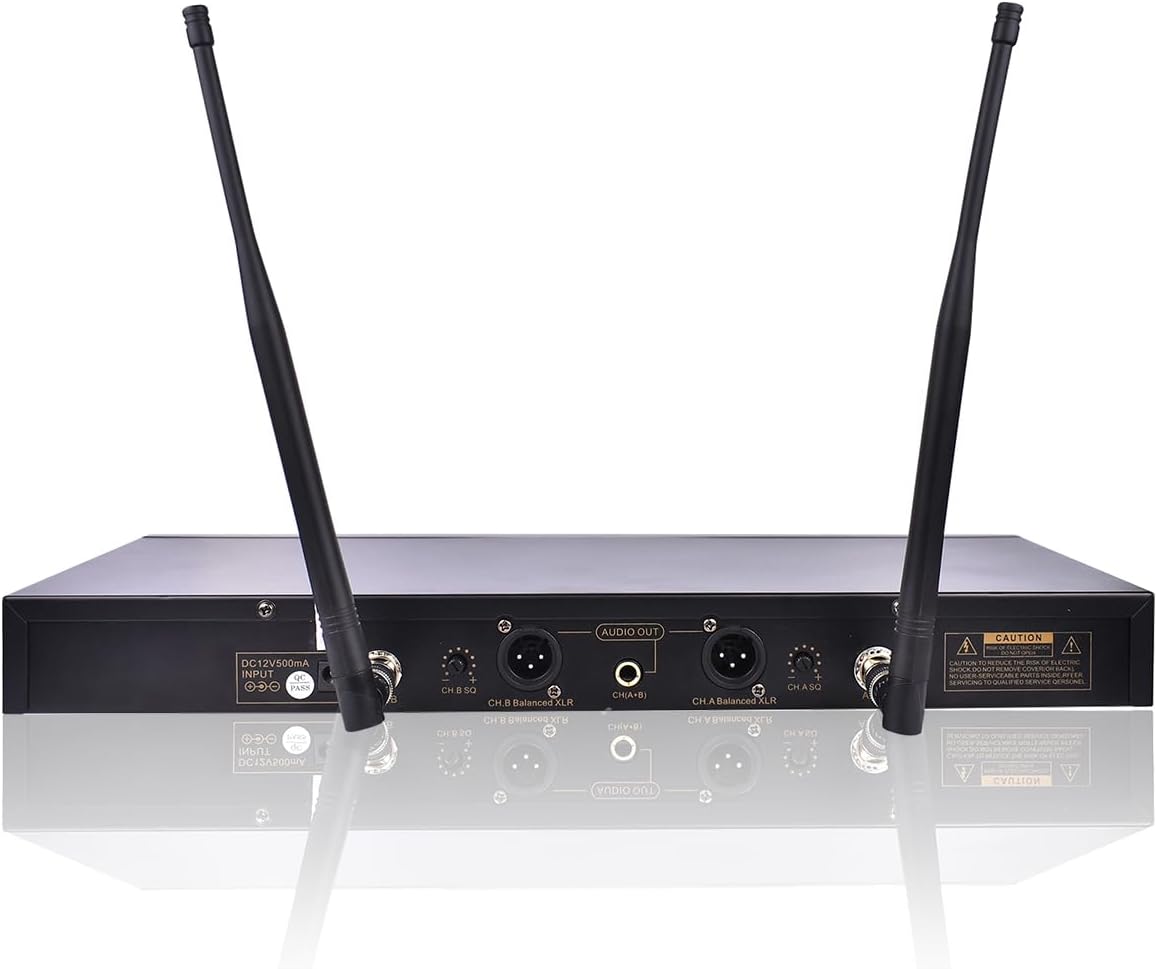
The UHF-630 wireless microphones require their receiver to be connected to the amplivligere.
- Connect the UHF-630 wireless microphone receiver to one of the microphone input ports on the IP-3900II amplifier using an appropriate cable (e.g., 1/4" or XLR).
- Ensure the receiver's antennas are extended for optimal signal reception.
- Insert fresh batteries into the UHF-630 wireless microphones.
- Power on the microphone receiver and the microphones. The system will automatically scan for available frequencies.

3.4 Tilslutning af komponenter
Follow these steps to connect the amplifier, speakers, and audio/video sources:
- Speakers to Amplivligere: Use the provided speaker cables to connect the IPS-680 speakers to the speaker output terminals on the rear of the IP-3900II amplivligere. Det amplifier supports both Banana Plug and Speakon Plug speaker connectors. Ensure correct polarity (+ to + and - to -).
- Lyd-/videokilder:
- HDMI: Connect your TV or media player to the HDMI input (HDMI 1 or HDMI 2) on the amplifier's rear panel using the provided HDMI cable. If your TV supports HDMI ARC, connect it to the HDMI ARC port for audio return.
- Optisk: Connect your TV or other audio device to the OPTICAL input on the amplifier using the provided optical cable.
- Other Audio Inputs: De amplifier also features RCA (DVD, VOD, OPT) and Coaxial inputs for various audio sources.
- Strømtilslutning: Når alle lyd- og højttalertilslutninger er foretaget, skal du tilslutte amplifier's power cord to a suitable electrical outlet.
Important: Ensure all connections are secure before powering on the system.
4. Betjeningsvejledning
4.1 Tænd og grundlæggende betjening
- Press the Power button on the front panel of the IP-3900II ampfor at tænde den.
- Adjust the main volume control (MUS VOL) to a low level.
- Select your desired audio input source (e.g., HDMI, Optical, Bluetooth) using the input selector buttons on the front panel or the remote control.
4.2 Bluetooth -parring
To stream audio wirelessly from your smartphone or tablet:
- Slå Bluetooth til på din mobilenhed.
- Press the "BT" button on the front panel of the amplivligere. Det ampLifier vil gå i parringstilstand.
- On your device, search for Bluetooth devices and select "BT-SPEAKER" to connect.
- Once connected, you can stream audio from your device to the amplifier. Note that only audio is transmitted via Bluetooth; video or graphics will not be transferred.
4.3 Mikrofonbetjening
To use the UHF-630 wireless microphones:
- Ensure the microphone receiver is powered on and connected to the amplivligere.
- Power on the wireless microphones. They should automatically connect to the receiver.
- Adjust the MIC VOL (Microphone Volume) control on the amplifier til det ønskede niveau.
- Use the individual microphone volume, echo, low, mid, and high controls on the amplifier's front panel to fine-tune the microphone sound.
4.4 Karaoke-funktionalitet
To enjoy karaoke with your system:
- Connect your TV or display to the amplifier via HDMI or Optical.
- On your TV remote, navigate to Sound Settings (or Audio Output/Sound Output) and ensure the Digital Audio Output (Audio Format) is set to "PCM". This is crucial for audio to be sent from the TV to the amplifier via Optical or HDMI ARC.
- Access karaoke content from platforms like YouTube on your smartphone, tablet, or smart TV.
- If using a smartphone/tablet, cast the content to your TV. Look for the casting icon on your device to connect to your TV.
- Adjust music volume (MUS VOL) and microphone volume (MIC VOL) on the amplifier to balance the sound.
5. Vedligeholdelse
Regular maintenance ensures the longevity and optimal performance of your karaoke system.
- Rensning:
- Træk altid stikket ud ampTag strømafbryderen ud af stikkontakten før rengøring.
- Use a soft, dry cloth to wipe down the surfaces of the amplifier, speakers, and microphones.
- Brug ikke slibende rengøringsmidler, opløsningsmidler eller kemiske spraymidler, da disse kan beskadige overfladen.
- Ventilation: Sørg for amplifier's ventilation slots remain clear of dust and obstructions. Periodically use a soft brush or compressed air to clean these areas.
- Kabelforbindelser: Periodically check all cable connections for tightness and wear. Loose connections can lead to poor sound quality or intermittent issues.
- Mikrofonbatterier: Replace microphone batteries when the low battery indicator appears or when sound quality degrades. Remove batteries if the microphones will not be used for an extended period.
6. Fejlfinding
If you encounter issues with your IDOLmain Karaoke System, refer to the following table for common problems and solutions.
| Problem | Mulig årsag | Løsning |
|---|---|---|
| Ingen strøm til amplivligere | Netledning ikke tilsluttet; Stikkontakt defekt; Ampslukket for strømafbryderen. | Kontroller netledningens tilslutning; Prøv en anden stikkontakt; Sørg for, at tænd/sluk-knappen er tændt. |
| Ingen lyd fra højttalerne | Speaker cables loose/incorrectly connected; Amplifier input not selected; Volume too low; Source device not playing. | Verify speaker cable connections and polarity; Select correct input source; Increase MUS VOL; Check audio playback on source device. |
| Ingen mikrofonlyd | Microphones off; Low batteries; Receiver not connected/powered; MIC VOL too low; Microphone frequency interference. | Turn on microphones; Replace batteries; Ensure receiver is connected and powered; Increase MIC VOL; Allow receiver to auto-scan for clear frequencies. |
| Bluetooth forbinder ikke | Amplifier not in pairing mode; Device Bluetooth off; Incorrect device selected. | Press "BT" button on amplifier; Enable Bluetooth on device; Select "BT-SPEAKER" from device list. |
| No sound from TV via Optical/HDMI ARC | TV audio output setting incorrect; Cable loose/faulty; AmpLifier-indgang ikke valgt. | Set TV Digital Audio Output to "PCM"; Check cable connections; Select correct input on amplifier (e.g., OPTICAL, HDMI ARC). |
7. Specifikationer
7.1 IDOLmain IP-3900II Mixing Amplivligere
- Strømudgang: 1500W + 1500W @ 8Ω
- Forbindelse: HDMI, Optical, Bluetooth, Wi-Fi (for streaming to amp)
- Mikrofonindgange: 3 x XLR (Front), 2 x 1/4" (Front), 2 x XLR (Rear), 2 x 1/4" (Rear)
- Lydindgange: HDMI (2), Optical, Coaxial, RCA (DVD, VOD)
- Lydudgange: Line Output, Sound Effect Input/Output, Pre-Processing Output
- Højttalerstik: 2 x Banana Plug, 2 x Speakon Plug
- Funktioner: Recording function, Built-in wireless audio streaming
7.2 IDOLmain IPS-680 Professional Karaoke Speakers
- Spidseffekt: 1000 watt pr højttaler
- Bashøjttaler størrelse: 10 tommer
- Tweeter størrelse: 3 tommer
- Farve: Black with Gold trim
7.3 IDOLmain UHF-630 Wireless Microphones
- Frekvensområde: 900 MHz
- Frekvenser: 100 built-in frequencies per microphone
- Funktioner: Automatic frequency scanning, Infrared programming
7.4 Generelle systemspecifikationer
- Mærke: IDOLmain
- Strømkilde: Elektrisk med ledning
- Antal kanaler: 5 (Amplivligere)
- Anbefalet brug: Home Karaoke
- Kompatible enheder: iPhone, iPad (for streaming)
- Monteringstype: Bordplade (Amplifier), Stand (Speakers)
- UPC: 626245246302
- ASIN: B09VYC51MS
Ask a question about this manual
Ask about setup, troubleshooting, compatibility, parts, safety, or missing instructions. Manuals+ will review the question and use this page’s manual context to help answer it.