
1. Introduktion
Thank you for choosing the Awei TC-7 Wired Earphones. These in-ear earphones are designed for clear audio and convenient communication, featuring a Type-C connector for modern devices and an inline microphone with control buttons. Please read this manual carefully to ensure proper use and maintenance of your earphones.
2. Pakkens indhold
- Awei TC-7 Wired Earphones
- Multiple sizes of Ear Cushions (Small, Medium, Large)

Figur 2.1: The Awei TC-7 earphones include ear caps in various sizes to ensure a comfortable and secure fit for different users.
3. Produktet er slutview
The Awei TC-7 earphones feature a durable design with a Type-C plug for direct connection to compatible devices. The inline remote control allows for easy management of audio playback and calls.

Figur 3.1: A close view of the Awei TC-7 earphones, showcasing their in-ear design for optimal sound delivery.

Figur 3.2: The inline remote control features multi-function buttons for managing audio and calls.

Figur 3.3: The integrated HD microphone is designed to pick up clear audio, even in noisy environments.
4. Opsætning
- Vælg ørepuder: Choose the ear cushion size (Small, Medium, or Large) that provides the most comfortable and secure fit for your ears. A proper fit enhances sound quality and noise isolation.
- Opret forbindelse til enhed: Insert the USB-C plug of the earphones into the Type-C port of your smartphone, tablet, laptop, or other compatible device.
- Lydudgang: Ensure your device's audio output is set to the connected earphones. This is usually automatic upon connection.
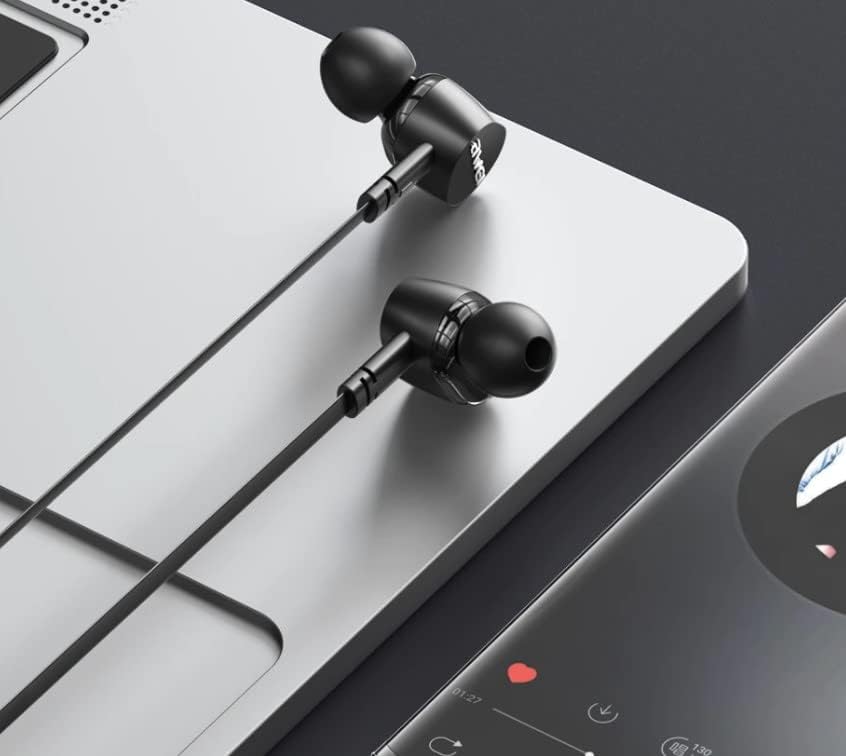
Figur 4.1: The earphones are compatible with various devices featuring a USB-C port, such as laptops and smartphones.
5. Betjeningsvejledning
The Awei TC-7 earphones feature an inline remote with buttons for convenient control of your audio and calls.
5.1. Kontrol af musikafspilning
- Afspil/pause: Tryk én gang på midterknappen.
- Næste nummer: Tryk hurtigt på centerknappen to gange.
- Forrige nummer: Tryk hurtigt på centerknappen tre gange.
- Lydstyrke op: Tryk på '+'-knappen.
- Skrue ned for lyden: Tryk på '-' knappen.
5.2. Opkaldsstyring
- Besvar/afslut opkald: Tryk én gang på midterknappen under et indgående opkald eller et aktivt opkald.
- Afvis opkald: Tryk og hold den midterste knap nede i cirka 2 sekunder under et indgående opkald.
6. Vedligeholdelse
Proper care will extend the lifespan of your Awei TC-7 earphones.
- Rengøring af ørepuder: Regularly remove the ear cushions and clean them with a soft, damp klud. Sørg for, at de er helt tørre, før du sætter dem på igen.
- Kabelpleje: The cable is designed to be tangle-free. Avoid excessive pulling or sharp bending to prevent internal damage.
- Opbevaring: Når øretelefonerne ikke er i brug, skal de opbevares et rent, tørt sted, væk fra ekstreme temperaturer.
- Vandtæthed: The earphones are rated as waterproof. However, avoid prolonged submersion and ensure the USB-C port is dry before connecting to a device after exposure to water.
7. Fejlfinding
If you encounter issues with your Awei TC-7 earphones, please refer to the following common solutions:
| Problem | Mulig årsag | Løsning |
|---|---|---|
| Ingen lyd fra høretelefoner | Earphones not properly connected; device volume too low; incorrect audio output setting on device. | Ensure the USB-C plug is fully inserted. Increase device volume. Check device audio settings to confirm output is set to earphones. |
| Mikrofon virker ikke | Microphone port blocked; incorrect input setting on device; application permissions. | Ensure the microphone area is clear. Check device sound settings for microphone input. Verify application permissions for microphone access. |
| Knapperne reagerer ikke | Loose connection; device incompatibility; software glitch. | Reconnect the earphones. Test with another compatible device if possible. Restart your device. |
8. Specifikationer
| Feature | Detalje |
|---|---|
| Modelnavn | TC-7 |
| Forbindelsesteknologi | Kablet |
| Hovedtelefonstik | USB-C |
| Øreplacering | In Ear |
| Frekvensområde | 20Hz - 20kHz |
| Yderligere funktioner | Microphone Included, Inline Control |
| Materiale | Plast |
| Vandmodstandsniveau | Vandtæt |
| Kabelfunktioner | Tangle Fri |
| Kompatible enheder | Smartphones, Laptops, Tablets, Desktops with USB-C |
9. Garanti og support
For garantioplysninger og kundesupport henvises til den dokumentation, der blev leveret ved køb, eller kontakt din forhandler. Gem din købsbevis i tilfælde af garantikrav.