
Indledning
Thank you for choosing the Mcdodo MC-7050 20W PD GoPower MagSafe 5000mAh Power Bank. This portable charger is designed to provide convenient and efficient power to your devices, featuring both wired USB-C Power Delivery and MagSafe-compatible wireless charging. Please read this manual carefully before use to ensure proper operation and to maximize the lifespan of your device.
Sikkerhedsoplysninger
- Udsæt ikke powerbanken for ekstreme temperaturer, direkte sollys eller ild.
- Undgå at tabe, udsætte stød for eller skille enheden ad.
- Holdes væk fra vand og andre væsker.
- Må ikke anvendes, hvis powerbanken er beskadiget eller hævet.
- Opbevares utilgængeligt for børn.
- Brug kun certificerede opladningskabler og adaptere.
- Bortskaf powerbanken ansvarligt i henhold til lokale regler.
Pakkens indhold
Tjek venligst pakken for følgende varer:
- Mcdodo MC-7050 20W PD GoPower MagSafe 5000mAh Power Bank
- USB-C til USB-C opladerkabel
- Brugermanual
Produkt overview
Familiarize yourself with the components of your Mcdodo MC-7050 Power Bank:

Image: Mcdodo MC-7050 Power Bank shown with its integrated kickstand extended, displaying the MagSafe charging area on the front. This view highlights the compact design and the stand feature for convenient use.
- MagSafe Wireless Charging Area: Central circular area for magnetic wireless charging.
- Power knap: Aktiverer powerbanken og kontrollerer batteriniveauet.
- LED-indikatorer: Vis den resterende batterikapacitet.
- USB-C-port: Used for both charging the power bank and charging other devices.
- Integreret støtteben: Allows the power bank to stand upright, useful for viewing content while charging wirelessly.

Billede: En vinklet view of the Mcdodo MC-7050 Power Bank, clearly showing the USB-C input/output port on the side and the power button located near the top edge. The kickstand is also visible in this perspective.
Opsætning
Første opladning af powerbanken
- Tilslut det medfølgende USB-C-kabel til USB-C-porten på powerbanken.
- Connect the other end of the USB-C cable to a compatible USB power adapter (not included). For optimal charging speed, use a Power Delivery (PD) compatible adapter.
- The LED indicators will illuminate to show the charging status. All LEDs will be solid when fully charged.
- Det anbefales at oplade powerbanken helt inden den tages i brug første gang.
Betjeningsvejledning
Kontrol af batteriniveau
Press the power button once to check the remaining battery capacity. The LED indicators will light up to show the current charge level.
Kablet opladning (USB-C-udgang)
- Connect your device's charging cable to the USB-C port on the power bank.
- Tilslut den anden ende af kablet til din enhed.
- Powerbanken begynder automatisk at oplade din enhed. Hvis ikke, skal du trykke én gang på tænd/sluk-knappen.
Trådløs opladning (MagSafe-kompatibel)
- Ensure your device is compatible with MagSafe or Qi wireless charging.
- Align your MagSafe-compatible device (e.g., iPhone 12 series or newer) with the circular MagSafe charging area on the power bank. The magnets will help align it correctly.
- The power bank will automatically begin wireless charging. If not, press the power button once.
- The integrated kickstand can be used to prop up your phone while wirelessly charging.
Opretholdelse
- Rensning: Brug en blød, tør klud til at rengøre overfladen på powerbanken. Brug ikke skrappe kemikalier eller slibende materialer.
- Opbevaring: Opbevar powerbanken et køligt, tørt sted væk fra direkte sollys og ekstreme temperaturer.
- Batteriets sundhed: For at opretholde batteriets sundhedstilstand skal powerbanken oplades og aflades helt mindst én gang hver tredje måned, hvis den ikke er i regelmæssig brug.
Fejlfinding
- Powerbanken oplader ikke:
- Sørg for, at opladningskablet er korrekt tilsluttet til både powerbanken og strømadapteren.
- Prøv et andet USB-C-kabel eller strømadapter.
- Kontroller, at strømadapteren fungerer korrekt.
- Enheden oplades ikke fra powerbanken:
- Sørg for, at powerbanken har tilstrækkelig opladning.
- Press the power button to activate charging.
- Prøv et andet opladningskabel til din enhed.
- Ensure your device is properly aligned for wireless charging.
- Fjern alle tykke telefoncovers, der kan forstyrre trådløs opladning.
- Langsom opladning:
- Sørg for at bruge et hurtigopladningskompatibelt kabel og en adapter til både powerbanken og din enhed.
- Some devices may limit charging speed when using wireless charging.
Specifikationer
| Feature | Specifikation |
|---|---|
| Modelnavn | MC-7050 |
| Batterikapacitet | 5000 mAh |
| Connector Type | USB Type-C |
| Nøglefunktioner | Fast Charging, Wireless Charging (MagSafe compatible) |
| Strømudgang | 20W strømforsyning (PD) |
| Strømkilde | Batteridrevet |
| Antal havne | 1 (USB-C for input/output, plus wireless charging) |
| Kompatible telefonmodeller | Compatible with all phones (wired), MagSafe compatible phones (wireless) |
| Genanvendelighed | Genopladelig |
| Produktets vægt | 0.18 kilo |
| Produktmål (L x B x H) | 10.7 cm x 6.7 cm x 1.7 cm |
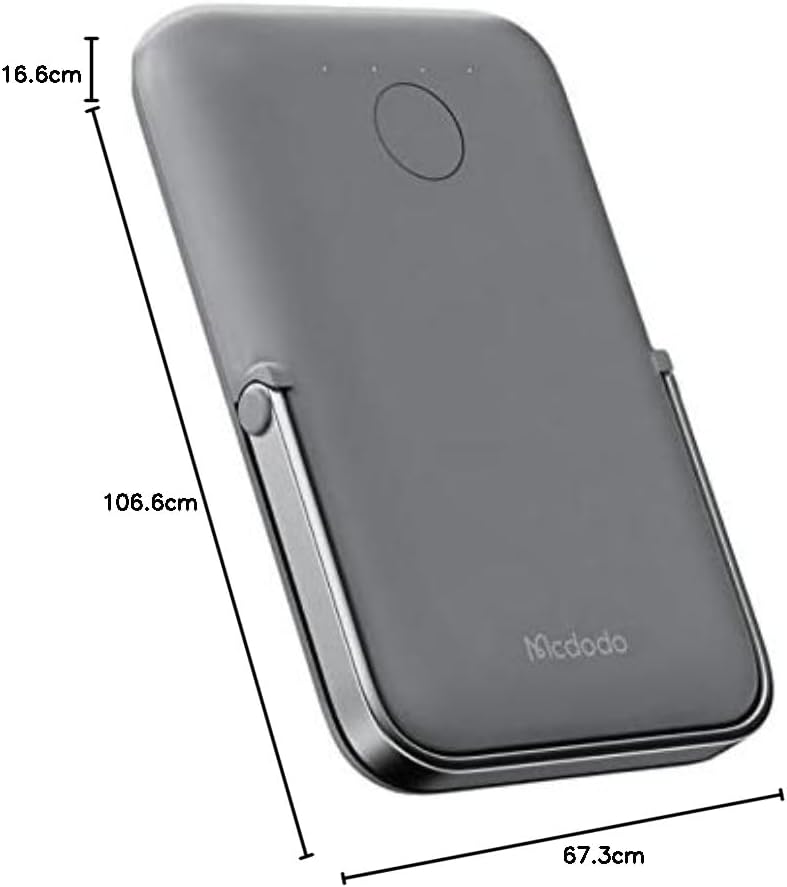
Billede: Top-down view of the Mcdodo MC-7050 Power Bank illustrating its compact dimensions, approximately 10.7 cm in length, 6.7 cm in width, and 1.7 cm in thickness.
Garanti og support
For warranty information and technical support, please refer to the warranty card included in your product packaging or visit the official Mcdodo webwebstedet. Behold din købskvittering som købsbevis.
Mcdodo Official Webwebsted: www.mcdodo.com