
Indledning
Thank you for choosing the BUFFBEE Alarm Clock with Wireless Charging Station. This device combines a digital alarm clock with a versatile wireless charging stand, designed to charge your iPhone, Apple Watch, and AirPods simultaneously. It features a dimmable LED display, adjustable volume, and multiple safety protections to ensure efficient and secure charging. Please read this manual carefully before use to ensure proper operation and to maximize the lifespan of your product.
Hvad er der i æsken
Når du åbner din pakke, bedes du kontrollere, at alle følgende varer er inkluderet:
- BUFFBEE Alarm Clock with Wireless Charging Station
- USB-C ladekabel
- Strømadapter
- Brugervejledning (dette dokument)
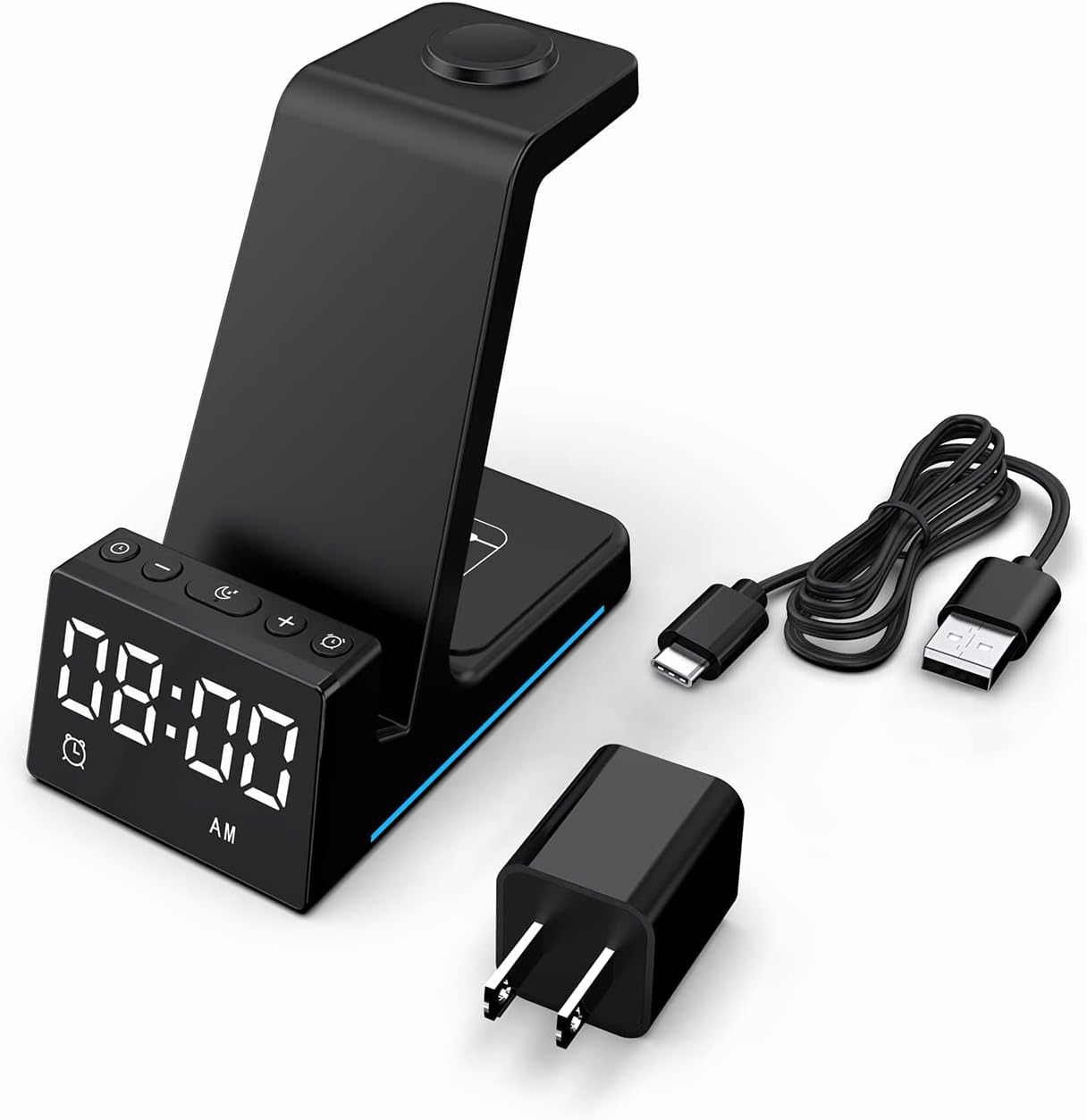
Billede: Alle komponenter er inkluderet i produktemballagen.
Produkt overview
The BUFFBEE Alarm Clock with Wireless Charging Station is designed for convenience and efficiency. It features dedicated charging areas for your smartphone, Apple Watch, and AirPods, alongside a clear digital clock display.
Nøglefunktioner:
- Digitalt vækkeur: Features adjustable brightness and volume, with 12/24 hour format options.
- Trådløs telefonopladning: Supports 15W, 10W, 7.5W, and 5W output for various wireless charging enabled smartphones.
- Apple Watch opladning: Dedicated magnetic charging spot for Apple Watch Series 2-7, SE.
- AirPods opladning: Wireless charging pad for AirPods 2 (with wireless charging case), AirPods 3, and AirPods Pro.
- Sikkerhedsbeskyttelse: Built-in overcharge, overvoltage, overheat, and overcurrent protection.

Image: The charging station with devices in place, highlighting its multi-device capability.

Image: Diagram illustrating the internal safety features and charging coils.
Opsætning
Follow these steps to set up your BUFFBEE Alarm Clock with Wireless Charging Station:
- Tilslut strøm: Insert the USB-C end of the charging cable into the port on the back of the charging station. Plug the other end of the cable into the provided power adapter, then plug the adapter into a wall outlet. The digital display will light up, indicating power is connected.
- Placer enheder:
- Smartphone: Place your wireless charging enabled smartphone vertically or horizontally on the main charging stand. Ensure it is centered for optimal charging.
- Apple Watch: Place your Apple Watch on the magnetic charging disc at the top of the stand.
- AirPods: Place your AirPods (with wireless charging case) on the flat charging pad at the base of the unit.
- Bekræft opladning: A blue indicator light will briefly illuminate when a device is correctly placed and charging. Your device's screen will also show a charging icon.
Video: Official product video demonstrating the setup and charging capabilities of the BUFFBEE Alarm Clock with Wireless Charging Station for iPhone, Apple Watch, and AirPods.

Image: Universal compatibility chart for different devices and charging wattages.
Betjeningsvejledning
Indstilling af tid
- Tryk og hold på Indstil tid button (usually marked with a clock icon) for 3 seconds. The hour digits will begin to flash.
- Brug + og - knapper for at justere timen.
- Tryk på Indstil tid Tryk på knappen igen for at skifte til minutjustering. Minuttifrene vil blinke.
- Brug + og - knapper for at justere minutterne.
- Tryk på Indstil tid knappen én gang til for at bekræfte og afslutte tidsindstillingstilstanden.
- To switch between 12-hour and 24-hour format, briefly press the Indstil tid knappen, når den ikke er i indstillingstilstand.
Indstilling af alarm
- Tryk og hold på Alarmsæt button (usually marked with an alarm clock icon) for 3 seconds. The alarm hour digits will flash.
- Brug + og - knapper for at justere alarmtiden.
- Tryk på Alarmsæt button again to switch to alarm minute adjustment. The alarm minute digits will flash.
- Brug + og - knapper til at justere alarmens minutter.
- Tryk på Alarmsæt knappen én gang til for at bekræfte og afslutte alarmindstillingstilstand.
- For at aktivere eller deaktivere alarmen skal du kort trykke på Alarmsæt knappen. Et alarmikon vil vises/forsvinde på displayet.
- When the alarm sounds, press any button to activate the snooze function (typically 9 minutes). To turn off the alarm completely, press and hold the Alarmsæt knap.

Billede: Overview of the digital alarm clock features.
Justering af displayets lysstyrke
The LED display has multiple brightness levels to suit your preference, especially for nighttime use.
- Tryk på Lysstyrke button (usually marked with a sun icon) repeatedly to cycle through the available brightness levels (e.g., 100%, 40%, 3%, 1%, 0% off).
- Select the desired brightness level. The '0% off' setting turns the display completely off for undisturbed sleep.

Image: Visual representation of the 5-level adjustable brightness settings.
Justering af alarmvolumen
The alarm volume can be adjusted to your preferred level.
- While the alarm is sounding, or during alarm setting mode, press the Bind button (usually marked with a speaker icon) to cycle through the available volume levels.
- Vælg den ønskede lydstyrke.

Image: Illustration of the 3-level adjustable volume feature.
Opretholdelse
For at sikre din ladestations levetid og optimale ydeevne skal du følge disse vedligeholdelsesretningslinjer:
- Rensning: Disconnect the power before cleaning. Use a soft, dry cloth to wipe the surface. Do not use abrasive cleaners, solvents, or chemical sprays.
- Undgå væsker: Keep the device away from water and other liquids. Do not operate with wet hands.
- Temperatur: Store and operate the device in a dry environment at room temperature. Avoid extreme heat or cold.
- Håndtering: Håndter enheden forsigtigt. Undgå at tabe den eller udsætte den for hårde stød.
- Strømforsyning: Only use the provided power adapter and cable. Using unauthorized power sources may damage the device and void the warranty.
Fejlfinding
If you encounter any issues with your BUFFBEE Alarm Clock with Wireless Charging Station, please refer to the following troubleshooting guide:
| Problem | Mulig årsag | Løsning |
|---|---|---|
| Enheden tændes ikke. | Power cable not connected properly; Power adapter faulty; Wall outlet not working. | Ensure the USB-C cable is securely connected to both the station and the power adapter. Try a different wall outlet. Verify the power adapter is functioning. |
| Smartphone/AirPods not charging wirelessly. | Device not placed correctly; Device not wireless charging compatible; Phone case too thick; Foreign objects on charging pad. | Reposition the device to ensure it is centered on the charging pad. Remove any thick phone cases or metallic objects. Confirm your device supports Qi wireless charging. |
| Apple Watch oplader ikke. | Watch not placed correctly; Watch charger not making contact; Watch model not supported. | Ensure the Apple Watch is securely placed on the magnetic charging disc. Remove any watch cases that might obstruct contact. This charger supports Apple Watch Series 2-7, SE. |
| Opladningen er langsom eller intermitterende. | Using a non-original power adapter/cable; Device overheating; Multiple devices charging simultaneously. | Use the provided power adapter and cable. Ensure the device is in a well-ventilated area. Charging multiple devices may slightly reduce individual charging speeds. |
| Alarm clock display is too bright/dim. | Lysstyrkeindstillingen skal justeres. | Tryk på Lysstyrke button to cycle through the 5 brightness levels, including 'off'. |
| Alarm is not sounding or is too quiet/loud. | Alarm not set or deactivated; Volume level too low/high. | Verify the alarm is activated (alarm icon visible). Adjust the alarm volume using the Bind knap. |
Specifikationer
| Feature | Detalje |
|---|---|
| Produktdimensioner | 6.3 x 1.5 x 3.5 tommer |
| Varens vægt | 15.8 ounce |
| Mærke | BUFFBEE |
| Connector Type | Trådløs |
| Kompatible enheder | Cellular Phones, Apple Watch, AirPods (with wireless charging case) |
| Kompatible telefonmodeller | Samsung Galaxy S10 series, iPhone 8 and newer, other Qi-enabled phones |
| Speciel funktion | Adjustable, Fast Charging, Wireless Charger, Wireless Charging |
| Input bindtage | 9 volt |
| Samlet USB-porte | 1 (til strømtilførsel) |
| Wattage | 15 watts (max output) |
| Specifikation Met | Qi |
| Strømkilde | AC Adapter (Battery Powered refers to internal clock battery backup, not main power) |
Garanti og support
Your BUFFBEE Alarm Clock with Wireless Charging Station comes with a standard manufacturer's warranty. For specific warranty details, including duration and coverage, please refer to the warranty card included in your product packaging or contact BUFFBEE customer support directly.
If you require technical assistance, have questions about product operation, or need to report a defect, please reach out to BUFFBEE customer service through the contact information provided on the product packaging or the official BUFFBEE webwebsted. Hav venligst din produktmodel og købsdato klar, når du kontakter support.