
1. Introduktion og overview
Thank you for choosing the KOORUI 22 Inch Computer Monitor. This Full HD (1920x1080) display features a high 100Hz refresh rate and 5ms response time, powered by a VA panel with an impressive 3000:1 contrast ratio. Designed for both productivity and gaming, it includes AdaptiveSync technology for smooth visuals and eye-friendly features like Blue Light Filter, Flicker-Free, and Anti-Glare. This manual provides essential information for setting up, operating, and maintaining your new monitor.
2. Hvad er der i æsken
Kontroller venligst indholdet af din pakke for at sikre, at alle varer er til stede:
- KOORUI 22 Inch Monitor x1
- Monitor Column x1
- Monitor Bottom Base x1
- Strømkabel x1
- HDMI 1.4 kabel x1
- Strømadapter x1
- Brugervejledning x1
- Screws (for assembly) x4

3. Opsætning og installation
3.1. Samling af skærmstativet
- Placer forsigtigt skærmen med forsiden nedad på en blød, ren overflade for at undgå ridser.
- Push the monitor column into the main body of the monitor until it clicks securely into place. Ensure the bracket is firmly connected.
- Insert the column into the bottom base.
- Check that the base and the column are firmly connected. Place the assembled monitor on a stable, flat surface.
3.2. VESA Mounting (100x100mm Compatible)
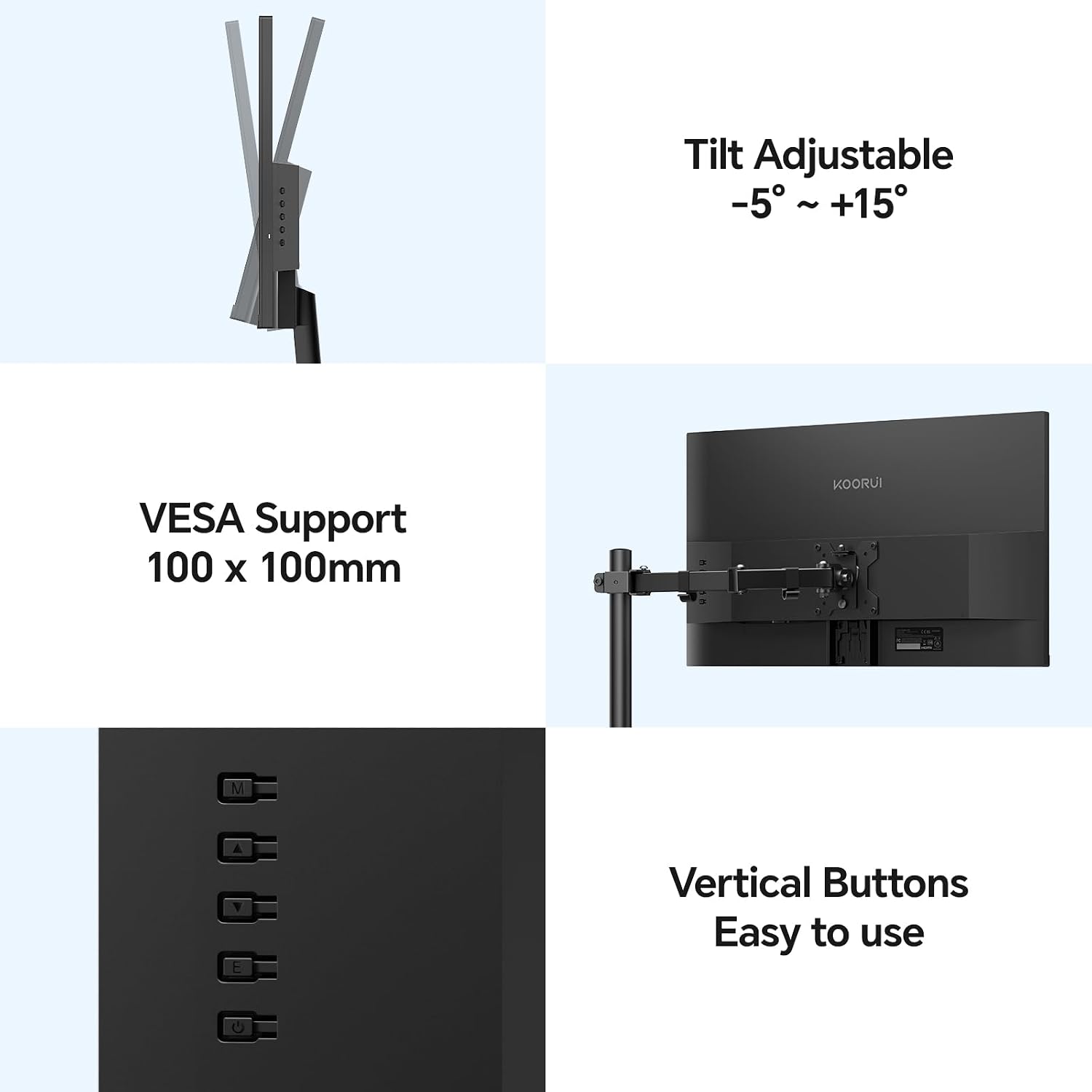
The KOORUI E2212F monitor supports VESA 100x100mm mounting standards, allowing you to attach it to compatible wall mounts or desk arms (sold separately) for enhanced flexibility and space-saving. Ensure your VESA mount is rated for the monitor's weight (2.3kg / 6.6 lbs).

3.3. Tilslutning til en enhed
Connect your computer or other device to the monitor using the provided HDMI cable or a VGA cable (not included). The monitor also features an audio output terminal for external speakers or headphones.
- HDMI (1.4): Til digital video og lyd i høj opløsning.
- VGA: For analog video signals.
- Lydudgang: Tilslut eksterne lydenheder.
- DC ind: Tilslut strømadapteren.
4. Funktioner og brug
4.1. Display Performance
- Fuld HD (1920x1080) opløsning: Leverer skarpe og klare billeder.
- VA panel: Offers superior contrast (3000:1) and deeper blacks compared to TN and IPS panels, enhancing visual depth.
- 100Hz opdateringshastighed og 5ms responstid: Provides smoother motion and reduced input lag, ideal for gaming and fast-paced content.
- AdaptiveSync Technology: Synchronizes the monitor's refresh rate with your GPU's frame rate, eliminating screen tearing and stuttering for a fluid gaming experience.
- 99% sRGB-farveskala: Sikrer præcis og levende farvegengivelse.
- 250nit Brightness: Offers clear visibility in various lighting conditions.


4.2. Ergonomi og design
- Ultra-slankt design: Features an 8mm profile and three-sided slim bezels, maximizing screen space and providing an immersive viewoplevelse.
- Justering af hældning: The monitor stand allows for tilt adjustment from -5° to +20° for optimal viewkomfort.
- Bred Viewvinkel: A 178° wide viewing angle ensures consistent image quality and vibrant colors from various perspectives.
- Eye-Friendly Features: Includes a Blue Light Filter, Flicker-Free technology, and Anti-Glare coating to reduce eye strain during prolonged use.


5. Specifikationer
| Feature | Beskrivelse |
|---|---|
| Skærmstørrelse | 22 tommer |
| Paneltype | VA |
| Maksimal opløsning | FHD (1920x1080) |
| Aspektforhold | 16:9 |
| Kontrastforhold | 3000:1 |
| Lysstyrke | 250nit |
| Farveskala | 99 % sRGB |
| Opdateringshastighed | 100 Hz |
| Responshastighed | 5 ms |
| Adaptiv synkronisering | Ja |
| Justering af hældningsvinkel | -5° til 20° |
| Datagrænseflader | 1x HDMI (1.4), 1x VGA, Audio Out |
| VESA-kompatibilitet | 100x100 mm |
| Varens vægt | 2.3 kg (6.6 pund) |
| Produktmål (BxHxD) | 495 x 388 x 185 mm (19.5 x 15.35 x 7.09 tommer) |
| Strømforbrug | 12V2A |
6. Fejlfinding
If you encounter any issues with your KOORUI monitor, please refer to the common solutions below:
- Ingen skærm / Sort skærm:
- Sørg for, at strømadapteren er korrekt tilsluttet både skærmen og en fungerende stikkontakt.
- Verify that the video cable (HDMI or VGA) is properly connected to both the monitor and your computer/device.
- Check the input source on the monitor using the control buttons on the back. Make sure it matches the cable you are using (e.g., HDMI if using an HDMI cable).
- Genstart din computer/enhed.
- Try a different video cable or port on your computer/device if available.
- Flimrende eller forvrænget billede:
- Sørg for, at videokablet er korrekt tilsluttet.
- Check your computer's display settings to ensure the resolution and refresh rate are compatible with the monitor's specifications (1920x1080 at 100Hz).
- Disable or enable AdaptiveSync in your computer's graphics settings to see if it resolves the issue.
- No Audio from Monitor (if using HDMI):
- Ensure your computer's audio output is set to the monitor (e.g.,