
1. Introduktion
This manual provides detailed instructions for the installation, operation, and maintenance of the Honeywell HC60W35R2 60 Series 5MP Indoor WDR IR IP Dome Camera. This camera is designed for indoor surveillance applications, offering high-resolution imaging and advanced features for reliable security monitoring.
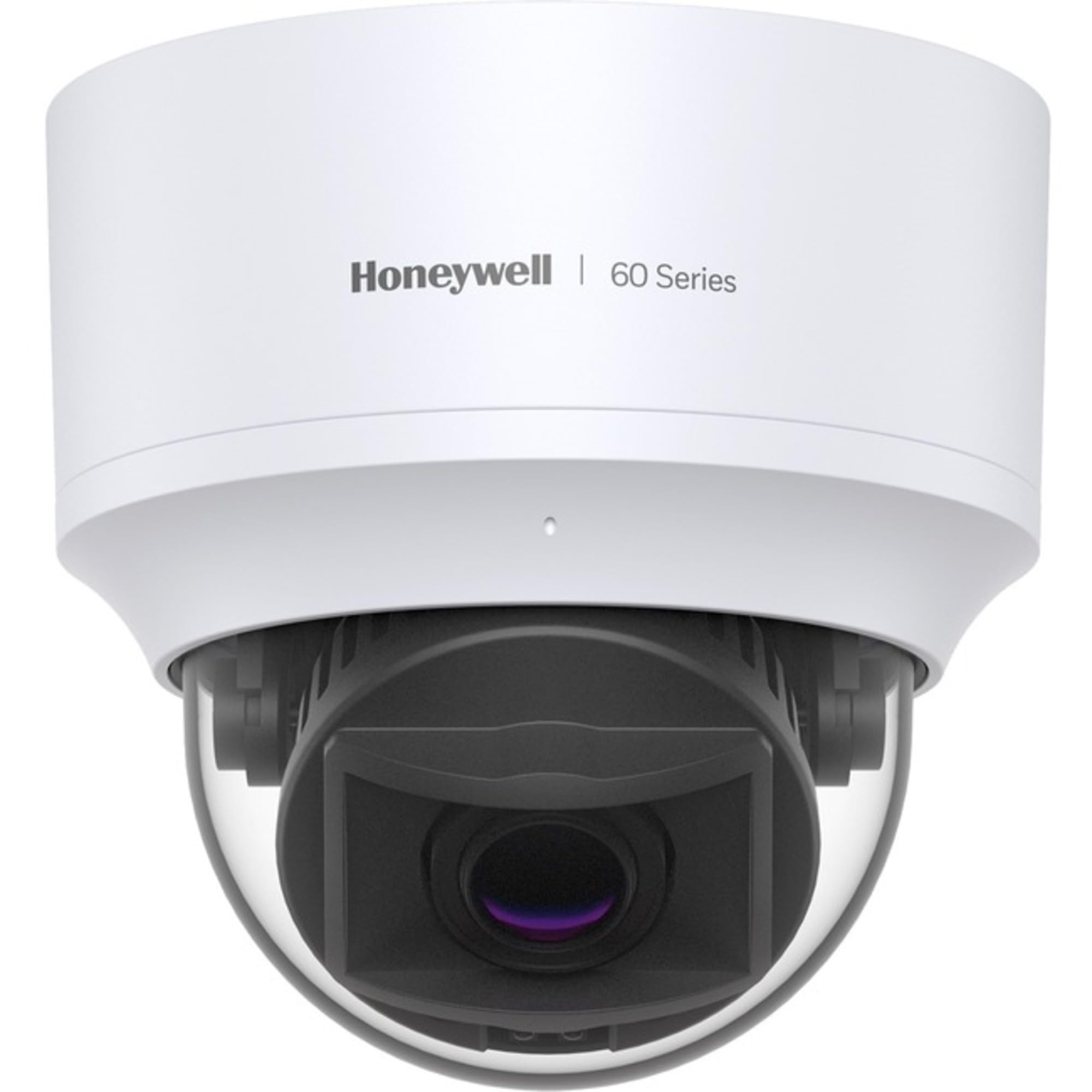
Figure 1: Honeywell HC60W35R2 5MP Indoor Dome Camera. This image shows the compact dome design of the camera, suitable for discreet indoor mounting.
Key features include a 5MP progressive scan imager, Wide Dynamic Range (WDR) up to 120 dB for clear images in varying light conditions, and low light performance. The camera also features an IR distance of up to 30 meters (98 ft) for effective night vision.
2. Sikkerhedsoplysninger
Læs alle sikkerhedsinstruktioner omhyggeligt inden installation og betjening. Manglende overholdelse af disse instruktioner kan resultere i skade på produktet eller personskade.
- Sørg for, at strømforsyningen voltage matches the camera's requirements (24 Volts AC).
- Do not expose the camera to water or moisture. This product is rated IP65, suitable for indoor use, but not for direct water immersion.
- Avoid placing the camera in areas with extreme temperatures outside its operating range (up to 60 degrees Celsius).
- Installation should be performed by qualified personnel in accordance with all local electrical codes.
- Forsøg ikke at skille kameraet ad eller ændre det. Dette vil ugyldiggøre garantien.
3. Pakkens indhold
Bekræft at alle varer er til stede i pakken:
- Honeywell HC60W35R2 Dome Camera
- Monteringsudstyr (skruer, ankre)
- Hurtig startvejledning
4. Opsætning
4.1 Montering af kameraet
- Choose a suitable indoor location for mounting, ensuring a clear field of view and access to power and network connections.
- Use the provided mounting template (if applicable) to mark drilling points on the ceiling or wall.
- Bor forhuller og isæt ankre om nødvendigt.
- Fastgør kamerabasen til monteringsfladen med de medfølgende skruer.
- Juster kameraets vinkel og retning efter behov.
4.2 Ledningsføring og tilslutning
The HC60W35R2 camera supports wired Ethernet connectivity and requires a corded electric power source.
- Tilslut et Ethernet-kabel fra din netværksswitch eller router til kameraets Ethernet-port.
- Connect the 24V AC power adapter (not included) to the camera's power input.
- Sørg for, at alle forbindelser er sikre, før du tænder for enheden.
4.3 Indledende konfiguration
After physical installation and power-up, the camera will boot. Access the camera's web interface via its IP address using a web browser on a computer connected to the same network. Refer to the Quick Start Guide for default IP address and login credentials. Follow the on-screen prompts to set up network parameters, date/time, and change default passwords for security.
5. Betjening af kameraet
5.1 Live View og optagelse
Once configured, you can access the live video feed through the camera's web interface or compatible video management software (VMS). The camera supports video capture in MPEG-4 format with a maximum resolution of 2560 x 1920 at up to 60 frames per second.
5.2 Avancerede funktioner
- Bredt dynamisk område (WDR): The camera features WDR up to 120 dB, which helps to produce clear images in scenes with both very bright and very dark areas. This feature is typically enabled or configured within the camera's web interface.
- Nattesyn: Equipped with infrared (IR) LEDs, the camera provides night vision up to 98.43 feet (30 meters). The IR illumination automatically activates in low-light conditions.
- Optisk zoom: The 5x optical zoom (2.7mm to 13.5mm varifocal lens) allows for adjustment of the field of view to focus on specific areas. This can be controlled remotely via the camera's interface.
- Bevægelsesdetektion: The camera supports motion-only alerts, which can be configured to trigger recordings or notifications when movement is detected within specified zones.
6. Vedligeholdelse
6.1 Rengøring
To maintain optimal image quality, periodically clean the camera lens and housing. Use a soft, dry cloth for the housing. For the lens, use a lens cleaning solution and a microfiber cloth to avoid scratches. Do not use harsh chemicals or abrasive materials.
6.2 firmwareopdateringer
Honeywell may release firmware updates to improve performance, add features, or address security vulnerabilities. Check the official Honeywell support website for the latest firmware for your HC60W35R2 model and follow the provided instructions for updating.
7. Fejlfinding
Dette afsnit omhandler almindelige problemer, du kan støde på med dit kamera.
- Ingen strøm: Ensure the 24V AC power supply is correctly connected and functioning. Check power outlets and cables.
- Intet videofeed: Verify network cable connection. Check network settings (IP address, subnet mask, gateway) in the camera's configuration. Ensure the camera is powered on.
- Dårlig billedkvalitet: Clean the camera lens. Adjust focus and zoom settings. Check lighting conditions and enable WDR if necessary. Ensure the camera's resolution settings are appropriate for your viewing enhed.
- Nattesyn virker ikke: Ensure the area is dark enough for IR to activate. Check IR settings in the camera's interface.
- Kan ikke få adgang Web Interface: Bekræft kameraets IP-adresse. Sørg for, at din computer er på samme netværkssegment. Prøv at pinge kameraets IP-adresse.
8. Specifikationer
| Feature | Specifikation |
|---|---|
| Modelnavn | HC60W35R2 |
| Effektiv kameraopløsning | 5 MP (2560 x 1920) |
| Billedsensortype | CMOS |
| Linsetype | Varifocal (2.7mm - 13.5mm) |
| Optisk zoom | 5x |
| Bredt dynamisk område (WDR) | Op til 120 dB |
| Nattesynsafstand | 98.43 fod (30 fod) |
| Forbindelsesteknologi | Kablet (Ethernet) |
| Strømkilde | Elektrisk ledning (24 volt AC) |
| Indendørs/Udendørs brug | Indendørs |
| Vandtæt vurdering | IP65 |
| Maksimal billedhastighed | 60 fps |
| Dimensioner (diameter x højde) | 5.0 x 4.8 tommer |
| Vægt | 1.28 lb (Approximate) |
9. Garanti og support
Producentgaranti: The manufacturer warranty description states "No Warranty". Please refer to your point of purchase for any applicable retailer warranties or return policies.
Teknisk support: For technical assistance, please visit the official Honeywell support website or contact their customer service department. Ensure you have your product model number (HC60W35R2) available when seeking support.