
1. Introduktion
The PARD NV007V2 is a versatile digital night vision monocular designed for enhanced observation in low-light conditions and complete darkness. This device offers a high-resolution sensor, an adjustable infrared (IR) illuminator, and integrated recording capabilities, making it suitable for various outdoor activities.
This manual provides essential information for the safe and effective use of your PARD NV007V2 Night Vision Monocular. Please read it thoroughly before operation.
2. Sikkerhedsoplysninger
- Do not look directly into the IR illuminator at close range, as it emits invisible infrared light that can be harmful to the eyes.
- Keep the device away from direct sunlight for prolonged periods to prevent damage to internal components.
- Undgå at tabe enheden eller udsætte den for kraftige stød.
- Forsøg ikke selv at skille enheden ad eller reparere den. Kontakt kvalificeret servicepersonale for at få hjælp.
- Sørg for, at batteriet er isat korrekt i henhold til polaritetsmarkeringerne.
- Use only the specified battery type and charging cable.
3. Produktet er slutview
The PARD NV007V2 features a compact and lightweight design, making it easy to carry and attach. Key components include the objective lens, eyepiece, IR illuminator, control buttons, and a USB-C port for charging and data transfer.

Figur 3.1: Foran til højre view of the PARD NV007V2 Night Vision Monocular.

Figur 3.2: Side view showing the control panel and eyepiece.
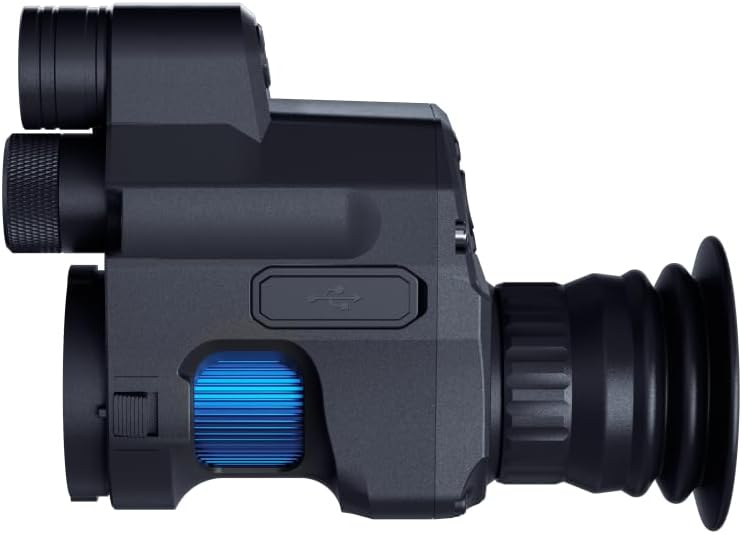
Figur 3.3: Side view highlighting the USB-C port and focus ring.
Nøglefunktioner:
- 2560 x 1440 CMOS Sensor: Provides enhanced sensitivity for clearer and more detailed imaging in low light.
- 350m Extendable IR Illuminator: Adjustable infrared light (850nm or 940nm wavelength options) for extended night vision range.
- Full HD Photo and Video Recording: Capture images and videos at 1440 x 1080 resolution.
- Optisk og digital zoom: 1.4x optical magnification with 1.5x-3.5x digital zoom for detailed observation.
- Multi-Coated Glass Lens: Reduces glare and reflections, offering sharp, high-contrast images.
- Wi-Fi-forbindelse: Connect to external devices like phones or tablets for synchronous viewing.
- Kompakt design: Lightweight and easy to carry, designed for quick attachment and detachment.
4. Opsætning
4.1 Batteriinstallation og opladning
The NV007V2 uses one C-type battery (included). Ensure correct polarity when inserting the battery. The device supports charging via a Type-C cable and can also be powered by a mobile power supply (power bank).

Figure 4.1: Rechargeable battery options, including power bank and USB-C charging.
4.2 Montering af enheden
The NV007V2 is designed for quick and easy attachment to a riflescope. It can be installed in approximately 3 seconds without needing to remove the riflescope from its mount.
- Wrap PVC tape around your riflescope's eyepiece to ensure a snug fit, then select a sleeve ring of appropriate thickness.
- Connect the NV007V2 to your riflescope's eyepiece.
- Tighten the screws to secure the device. Ensure the reticle of your scope is upright on the screen after installation.

Figure 4.2: Illustration of attaching the NV007V2 to a riflescope.

Figure 4.3: Step-by-step guide for easy installation.
5. Betjeningsvejledning
5.1 Power On/Off and Standby Mode
- For at tænde skal du trykke på og holde tænd/sluk-knappen nede.
- For at slukke skal du trykke på og holde tænd/sluk-knappen nede igen.
- Standbytilstand: A single press of the power key will swiftly put the device into standby, reducing power consumption and allowing for quick reactivation.

Figure 5.1: Standby Mode icon.
5.2 Day and Night Observation
The NV007V2 offers both day and night observation modes. The advanced sensor and OLED display provide clear images in various lighting conditions.

Figur 5.2: Sammenligning af dag- og nattesynsevner.
5.3 Justering af IR-belysning
The integrated IR illuminator can be adjusted to enhance night vision. It offers a viewing range of up to 350 meters. The intensity of the fill light can be adjusted to reveal more distinct details. The 850nm wavelength is brighter for longer distances, while the 940nm band is suitable for covert observation without a visible red glow.

Figure 5.3: Illustration of the 350m night vision range.
5.4 Zoomfunktionalitet
The device features 1.4x optical magnification and a digital zoom range of 1.5x to 3.5x. This allows for magnified viewing of targets without significant distortion, improving visibility and target identification.

Figure 5.4: Visual representation of optical and digital zoom.
5.5 Foto- og videooptagelse
Capture Full HD photos and videos with a single click. The image resolution is 1440 x 1080, and video resolution is also 1440 x 1080, providing smooth and detailed recordings of your observations. Captured media can be shared on social networks.
5.6 Wi-Fi Connectivity and HDMI Output
- Wi-Fi: Built-in Wi-Fi allows you to connect the NV007V2 to your smartphone, PC, or tablet, enabling synchronous viewpå en større skærm.
- HDMI udgang: Equipped with an HDMI interface for high-definition photo and video transmission to external displays.

Figure 5.5: HDMI Output icon.
6. Vedligeholdelse
- Rengøring af linser: Use a soft, lint-free cloth specifically designed for optical lenses to clean the objective and eyepiece. Avoid abrasive materials or harsh chemicals.
- Kropsrensning: Tør enhedens kabinet af med en blød,amp klæde. Nedsænk ikke enheden i vand.
- Batteripleje: Fjern batteriet, hvis enheden ikke skal bruges i længere tid. Opbevar batterierne et køligt og tørt sted.
- Opbevaring: Store the monocular in its protective case in a dry, dust-free environment, away from extreme temperatures.
7. Fejlfinding
| Problem | Mulig årsag | Løsning |
|---|---|---|
| Enheden tænder ikke | Low or depleted battery; Incorrect battery insertion | Charge the battery or replace it; Check battery polarity. |
| Poor image quality / blurry image | Lens is dirty; Focus is not adjusted; IR illuminator not active or too low | Clean lenses; Adjust focus ring; Activate or increase IR illuminator intensity. |
| Kan ikke optage billeder/videoer | No SD card inserted; SD card full or corrupted | Insert a compatible SD card; Delete files or format SD card. |
| Problemer med Wi-Fi-forbindelse | Device not in Wi-Fi mode; Incorrect password; Interference | Ensure Wi-Fi is enabled on the device; Verify password; Move closer to the connected device. |
8. Specifikationer
| Feature | Specifikation |
|---|---|
| Modelnummer | NV007V2-14.5/850 |
| Sensor | 2560 x 1440 CMOS |
| Vise | OLED 1440 x 1080 |
| Optisk forstørrelse | 1.4x |
| Digital Zoom | 1.5x - 3.5x |
| Objektiv linsediameter | 14.5 mm |
| IR-belysningsbølgelængde | 850 nm (or 940 nm variant) |
| Night Vision Range | Op til 350 meter |
| Foto opløsning | 1440 x 1080 |
| Video opløsning | 1440 x 1080 |
| Øjnehjælp | 35 mm |
| Materiale | Aluminium |
| Dimensioner (L x B x H) | 13.5 x 5.5 x 10 cm |
| Vægt | 250 gram |
| Batteritype | 1 C (included) |
| Forbindelse | Wi-Fi, USB Type-C, HDMI |
| Inkluderede komponenter | Type-C-kabel |
9. Garanti og support
9.1 Garantioplysninger
This PARD NV007V2 Night Vision Monocular comes with a 1 års garanti fra købsdatoen. Denne garanti dækker fabrikationsfejl og sikrer, at produktet fungerer som tilsigtet ved normal brug. Gem venligst din købsbevis til garantikrav.
9.2 Kundesupport
For technical assistance, troubleshooting beyond this manual, or warranty inquiries, please contact PARD customer support. Refer to the official PARD website or your retailer's contact information for the most up-to-date support channels.