
1. Produktet er slutview
The KVAGO iPad Keyboard Case is designed to provide protection and enhanced functionality for your compatible iPad model. It features a detachable wireless Bluetooth keyboard, multiple viewing angles, precise cutouts for ports and buttons, and an auto sleep/wake function to conserve battery life. The case is constructed from premium PU leather and a soft, microfiber-lined interior.
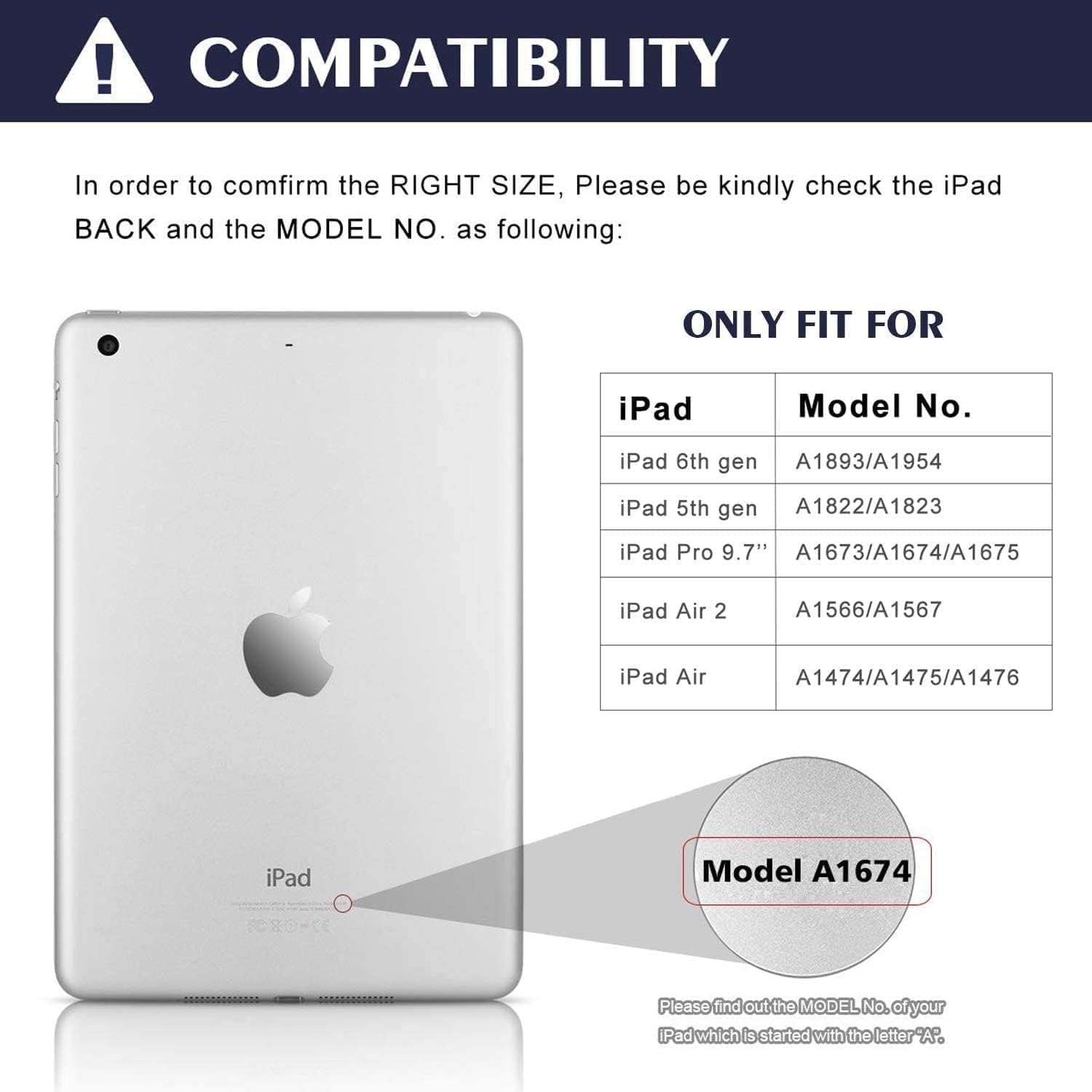
Image: KVAGO iPad Keyboard Case with iPad inserted, showing the keyboard and case in an open position.
2. Kompatibilitet
This keyboard case is specifically designed for 9.7-inch iPad models. Please verify your iPad's model number on the back of the device to ensure compatibility. The case is compatible with the following models:
- 2018 iPad 6th Generation: Modellerne A1893, A1954
- 2017 iPad 5th Generation: Modellerne A1822, A1823
- iPad Pro 9.7 tommer (2016): Modellerne A1673, A1674, A1675
- iPad Air 2 (2014): Modellerne A1566, A1567
- iPad Air1: Modellerne A1474, A1475, A1476
Note: This product is NOT compatible with iPad Air 5th Gen 10.9 inch 2022, iPad Air 4th gen 10.9 inch 2020, iPad Pro 12.9 inch 2022 6th Generation, or 2021 iPad Pro 12.9 inch 5th generation.

Image: Compatibility chart showing iPad models and their corresponding model numbers.
3. Funktioner
- Detachable Wireless Bluetooth Keyboard: The keyboard connects wirelessly via Bluetooth, allowing you to transform your iPad into a laptop-like device. The keys are designed for quiet and comfortable typing. The keyboard is magnetically attached to the case, allowing for easy removal and flexible positioning.
- multi-Viewi vinkler: The premium PU leather cover and soft, microfiber-lined interior provide full protection. Built-in anti-slip grooves support three viewing angles (120°, 125°, 130°), allowing you to adjust your iPad to the most comfortable position for working, writing, or watching videos.
- Automatisk dvale-/vågnefunktion: The smart case automatically puts your iPad to sleep when closed and wakes it up when opened, helping to conserve battery life. It is recommended to remove the keyboard to ensure this function operates normally.
- Præcise udskæringer: The case features precise cutouts for the camera, speakers, and volume buttons, ensuring all ports and controls are easily accessible without removing the iPad from the case.
- Indbygget blyantholder: The case includes a hollow groove at the bottom for storing your Apple Pencil (pencil not included).

Image: Close-up of the detachable wireless Bluetooth keyboard.

Image: iPad case demonstrating three different viewing vinkler.

Image: Diagram illustrating the auto sleep/wake function of the iPad case.
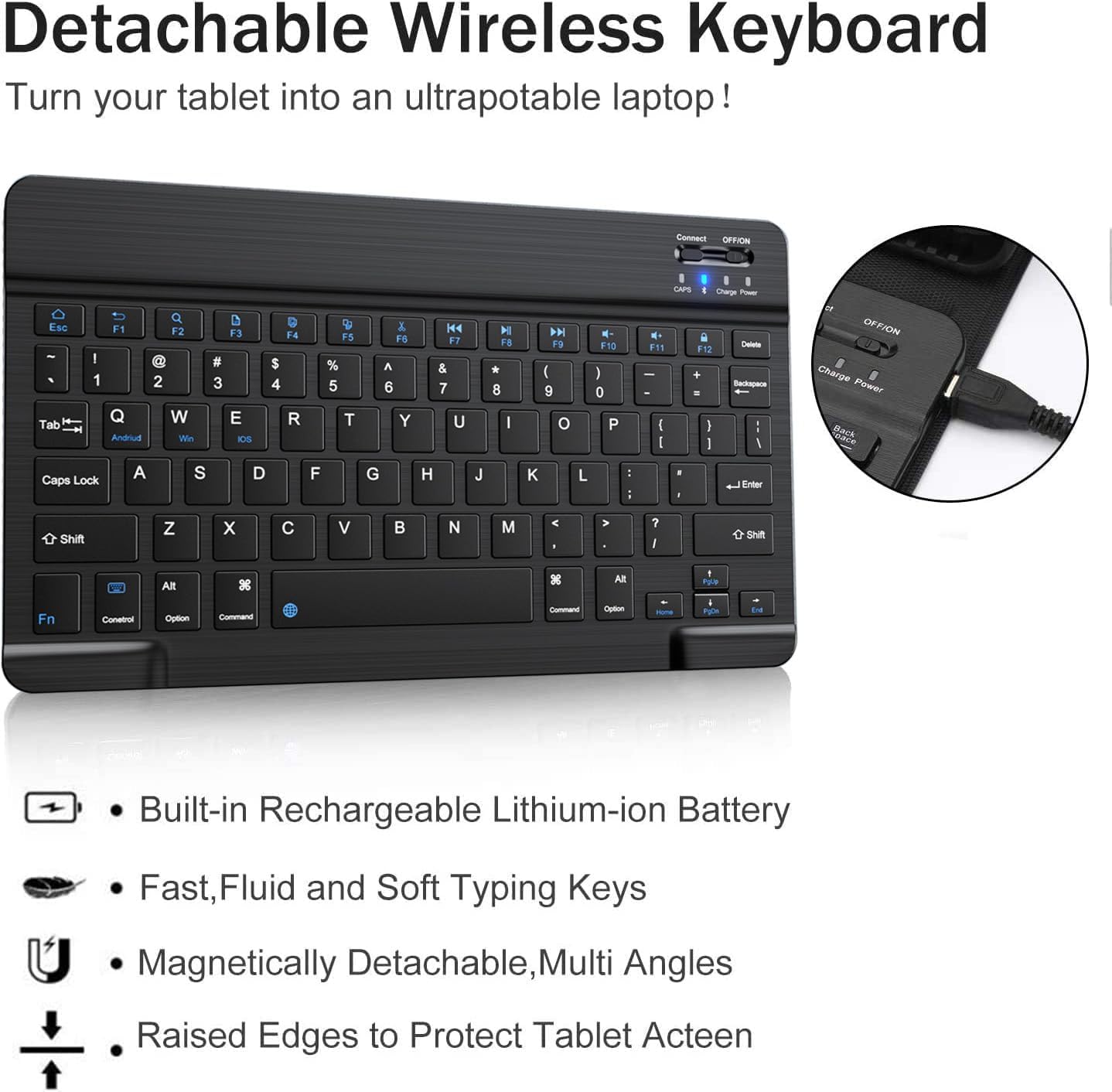
Image: Close-up images highlighting the precise cutouts for the iPad's camera and buttons.
4. Opsætning
4.1 Opladning af tastaturet
Before initial use, fully charge the keyboard using the provided USB cable. The charging port is located on the side of the keyboard. A full charge provides over 90 days of standby time and takes approximately 4 hours.

Image: Type-C charging port on the keyboard and charging duration details.
4.2 Bluetooth -parring
- Ensure the keyboard is fully charged and turn it ON using the power switch.
- Press the 'Connect' button on the keyboard to activate Bluetooth pairing mode.
- På din iPad skal du gå til Indstillinger > Bluetooth.
- Look for 'Bluetooth 3.0 Keyboard' in the list of available devices and select it to connect.

Image: Diagram illustrating the steps to connect the keyboard via Bluetooth.
5. Betjeningsvejledning
5.1 Brug af tastaturet
Once paired, the keyboard functions like a standard QWERTY keyboard. The keys are designed for a comfortable typing experience. The magnetic attachment allows you to position the keyboard optimally or remove it entirely if not needed.
5.2 Justering Viewi vinkler
The case features three grooves to prop up your iPad at different angles (120°, 125°, 130°). Simply place the edge of your iPad into the desired groove to achieve the preferred viewvinkel.
5.3 Automatisk dvale-/vågnefunktion
The case automatically activates your iPad's sleep/wake function when opened or closed. For optimal performance of this feature, it is recommended to remove the detachable keyboard from the case when closing the cover.
6. Vedligeholdelse
To maintain the longevity and appearance of your KVAGO iPad Keyboard Case, follow these simple guidelines:
- Rengøring af kabinettet: Wipe the exterior PU leather with a soft, damp klud. Undgå skrappe kemikalier eller slibende rengøringsmidler.
- Rengøring af tastaturet: Brug en blød, tør klud til at rengøre tastaturet. Ved genstridigt snavs, rens letamp cloth can be used, ensuring no moisture enters the key gaps or charging port.
- Opbevaring: Opbevar etuiet og tastaturet et køligt og tørt sted, væk fra direkte sollys og ekstreme temperaturer.
- Undgå væsker: Keep the keyboard and iPad case away from liquids to prevent damage to electronic components.
7. Fejlfinding
If you encounter issues with your KVAGO iPad Keyboard Case, please refer to the following common solutions:
- Tastatur forbinder ikke:
- Sørg for, at tastaturet er fuldt opladet.
- Kontroller, at Bluetooth er aktiveret på din iPad.
- Tryk på knappen 'Forbind' på tastaturet for at aktivere parringstilstand.
- Glem enheden i din iPads Bluetooth-indstillinger, og forsøg at parre den igen.
- Genstart både din iPad og tastaturet.
- Keys Not Responding or Typing Incorrectly:
- Sørg for, at tastaturet er fuldt opladet.
- Tjek for eventuelle snavs under tasterne.
- If specific keys are consistently malfunctioning (e.g., typing multiple characters or not responding), try resetting the keyboard by turning it off and on. If the issue persists, it may indicate a hardware fault.
- Automatisk dvale/opvågning virker ikke:
- Ensure the keyboard is removed from the case when closing the cover.
- Check your iPad's settings to ensure 'Lock/Unlock' is enabled for covers.
If these steps do not resolve the issue, please contact KVAGO customer support for further assistance.
Relevant Video: Keys Malfunctioning (User-Generated Content)
Video: A user demonstrates an issue where the keyboard keys are malfunctioning, specifically typing a period instead of the letter 'R' and the period key not working.
8. Specifikationer
| Feature | Detalje |
|---|---|
| Mærke | KVAGO |
| Kompatible enheder | iPad 5th Generation, iPad 6th Generation, iPad Air 1, iPad Air 2, iPad Pro 9.7 inch |
| Forbindelsesteknologi | Bluetooth |
| Tastaturbeskrivelse | Trådløs |
| Speciel funktion | Ergonomic, Lightweight, Portable, Rechargeable, Built-in Pencil Holder |
| Farve | Sort |
| Tastaturlayout | QWERTY |
| Antal nøgler | 78 |
| Produktdimensioner | 10.98 cm L x 7.91 cm B x 1.34 cm H |
| Varens vægt | 1.52 pund |
| Materiale | Plastic, Silicone, PU Leather |
| Strømkilde | Batteridrevet |
| Minimum krævet operativsystem | iOS 11 |
| Inkluderet i æske | USB-kabel, brugermanual |
9. Garanti og support
Your KVAGO iPad Keyboard Case comes with a 6 måneders garanti from the date of delivery, covering manufacturing defects.
Kundesupport
KVAGO is committed to providing quality products and customer satisfaction. If you have any questions, concerns, or require assistance with your product, please contact our customer service team. We offer 24-hour email contact service and a 30-day money-back guarantee.
For support, please refer to the contact information provided with your product packaging or visit the official KVAGO webwebsted.
Official Product Video: KVAGO iPad Keyboard Case 9.7 inch
Video: En officiel overview of the KVAGO iPad Keyboard Case 9.7 inch, showcasindens funktioner og design.