
Indledning
This manual provides detailed instructions for the assembly, operation, and maintenance of your Cooler Master MasterBox CM694 TG Middle Tower PC Case. Please read this manual thoroughly before beginning installation to ensure proper setup and optimal performance.
Nøglefunktioner
- Curved Mesh Panels: Front and top mesh panels with a diamond pattern for optimal breathability and dust filtration.
- Hærdet glas sidepanel: Giver en klar view af interne komponenter.
- Modular Drive Cage: Updated design for enhanced storage expandability, supporting 2.5" SSDs and 3.5" HDDs.
- Dual 5.25" Bays: Accommodates optical drives or other 5.25" devices.
- Graphics Card Stabilizer: Arm mechanism to support large graphics cards, preventing motherboard distortion and ensuring safe transport.
- Bundkort kompatibilitet: Supports E-ATX, ATX, microATX, and Mini-ITX motherboards.
- Støtte til væskekøling: Accommodates up to 360mm water cooling radiators.
- Expansion Card Clearance: Space for expansion cards up to 410 mm (16.1 inches).
- Power Supply Cover: Integrated cover to conceal the power unit for a cleaner build.
- Full I/O Ports: Features 2 x USB 3.0, 1 x USB 3.1 (Gen 2) Type-C, and a 4-pole headset jack with rubber dustproof caps.
Opsætning
1. Udpakning af kufferten
Carefully remove the PC case from its packaging. Inspect for any damage during transit. Retain all packaging materials for future transport or warranty claims.

Figur 1: Forside view of the Cooler Master MasterBox CM694 TG PC Case.
2. Afmontering af sidepaneler
Locate the thumbscrews on the rear of the case securing the tempered glass side panel. Unscrew them and carefully remove the panel. Repeat for the opposite steel side panel if necessary.
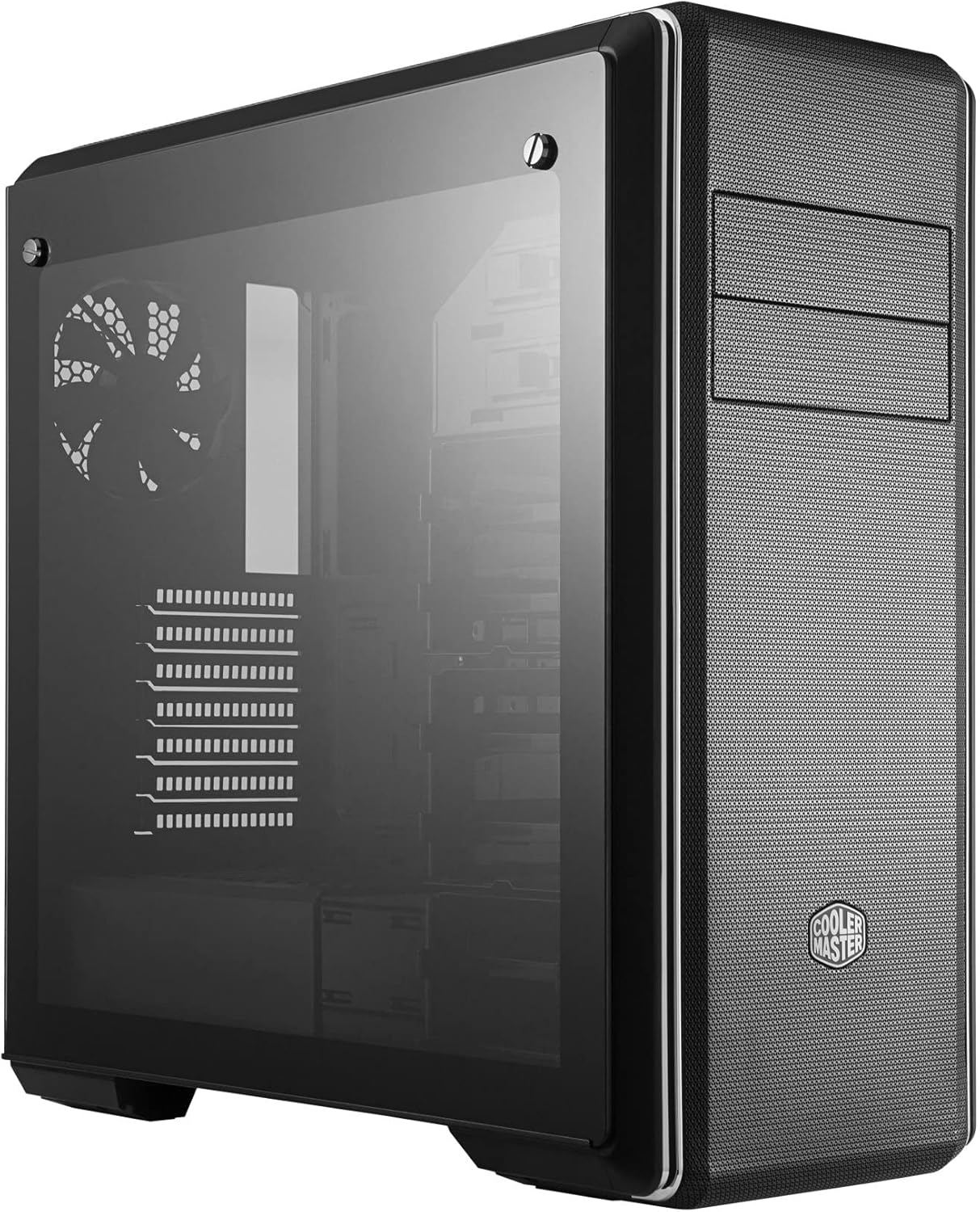
Figur 2: Side view of the PC case featuring the tempered glass panel.
3. Installation af bundkort
Install the appropriate standoffs for your motherboard form factor (E-ATX, ATX, microATX, Mini-ITX). Carefully place your motherboard onto the standoffs and secure it with screws.

Figur 3: Interiør view of the PC case, showing the motherboard tray and drive bays.
4. Installation af strømforsyning
Mount your ATX power supply in the designated compartment at the bottom rear of the case. Secure it with screws from the exterior.
5. Drevinstallation
Utilize the modular drive cages for 2.5" SSDs and 3.5" HDDs. The case also features two 5.25" bays for optical drives or other accessories. Refer to the specific drive cage mechanism for tool-less or screw-based installation.

Figur 4: Detaljeret interiør view highlighting the modular drive cages.
6. Installation af grafikkort og udvidelseskort
Install your graphics card and other expansion cards into the PCIe slots on the motherboard. Use the included graphics card stabilizer for larger cards to prevent sagging.
7. Opsætning af kølesystem
The MasterBox CM694 TG supports various cooling configurations. Install additional fans or liquid cooling radiators as needed. The case supports up to 360mm radiators.

Figure 5: Diagram illustrating fan and radiator mounting locations and sizes.
8. Kabelforvaltning
Utilize the cable routing cutouts and tie-down points behind the motherboard tray to manage cables for improved airflow and a clean aesthetic.
Drift
Once all components are installed and secured, connect your peripherals and power cable. Press the power button on the front I/O panel to start your system.
Front I/O panel
- Power knap: Initiates system startup.
- Nulstil knap: Genstarter systemet.
- USB 3.0-porte (x2): Til højhastigheds dataoverførsel med kompatible enheder.
- USB 3.1 (Gen 2) Type-C Port (x1): For fast data transfer and device connectivity.
- 4-Pole Headset Jack: Supports simultaneous audio input and output for headsets.

Figur 6: Øverst view of the PC case, showing the front I/O panel with various ports and buttons.
Opretholdelse
Rengøring af støvfilter
The MasterBox CM694 TG features mesh panels that act as dust filters. Regularly clean these panels to maintain optimal airflow and prevent dust buildup inside the case. Gently remove the panels and use compressed air or a soft brush to clear dust.
Generel rengøring
Brug en blød, damp cloth to wipe down the exterior of the case. Avoid abrasive cleaners or solvents that could damage the finish. For the tempered glass panel, use a glass cleaner and a microfiber cloth.
Fejlfinding
- Systemet tænder ikke:
- Sørg for, at strømforsyningen er tændt og korrekt tilsluttet stikkontakten og bundkortet.
- Check all front panel connectors (power switch, reset switch) are correctly attached to the motherboard.
- Ingen displayudgang:
- Verify that your monitor is connected to the graphics card (not the motherboard integrated graphics, unless intended).
- Sæt grafikkortet og RAM-modulerne i igen.
- Overophedning:
- Ensure all case fans are spinning and properly oriented for optimal airflow.
- Rengør støvfiltre og indvendige komponenter regelmæssigt.
- Verify CPU cooler and thermal paste application.
Specifikationer
| Feature | Detalje |
|---|---|
| Mærke | Cooler Master |
| Modelnummer | MCB-CM694-KG5N-S00 |
| Sagstype | Mellemtårnet |
| Bundkort kompatibilitet | E-ATX, ATX, Micro-ATX, Mini-ITX |
| Materiale | Stål, hærdet glas |
| Dimensioner (L x B x H) | 19.41 x 8.66 x 19.92 tommer |
| Varens vægt | 4.4 pund (2 kilo) |
| I/O-porte | 2x USB 3.0, 1x USB 3.1 (Gen 2) Type-C, 1x 4-Pole Headset Jack |
| 5.25" drevbåse | 2 |
| Udsalg af grafikkort | Op til 410 mm |
| Væskekøling Support | Up to 360mm radiators |
Garanti og support
For garantioplysninger og teknisk support, besøg venligst den officielle Cooler Master webwebstedet eller kontakt din lokale forhandler. Gem din købsbevis i tilfælde af garantikrav.
Online ressourcer: www.coolermaster.com