
1.Overview
The Apple iPad Mini (2019) is a compact and powerful tablet designed for portability and performance. It features a 7.9-inch Retina Display with True Tone technology, providing vibrant colors and comfortable viewing. Powered by the A12 Bionic chip, it offers fast and efficient performance for various tasks, from browsing to gaming.
Nøglefunktioner omfatter:
- 7.9-inch Retina Display with True Tone and wide Color
- A12 Bionic chip with Neural Engine
- Touch ID fingerprint sensor for secure authentication
- 8MP back camera and 7MP FaceTime HD front camera
- Stereo speakers for immersive audio
- 802.11ac Wi-Fi connectivity
- Op til 10 timers batterilevetid
- Lightning connector for charging and accessories
- Support for Apple Pencil (1st Generation)
- iPadOS 14 for enhanced tablet experience

Image 1.1: The Apple iPad Mini (2019) in Space Gray, showcasing dens kompakte design og display.
2. Hvad er der i æsken
Upon opening your iPad Mini package, ensure all the following items are present:
- iPad mini (2019)
- Lyn til USB-kabel
- USB Power Adapter
3. Opsætning
3.1. Oprindelig opkrævning
Before first use, it is recommended to fully charge your iPad Mini. Connect the Lightning to USB Cable to the iPad's Lightning port and the USB Power Adapter, then plug the adapter into a power outlet.
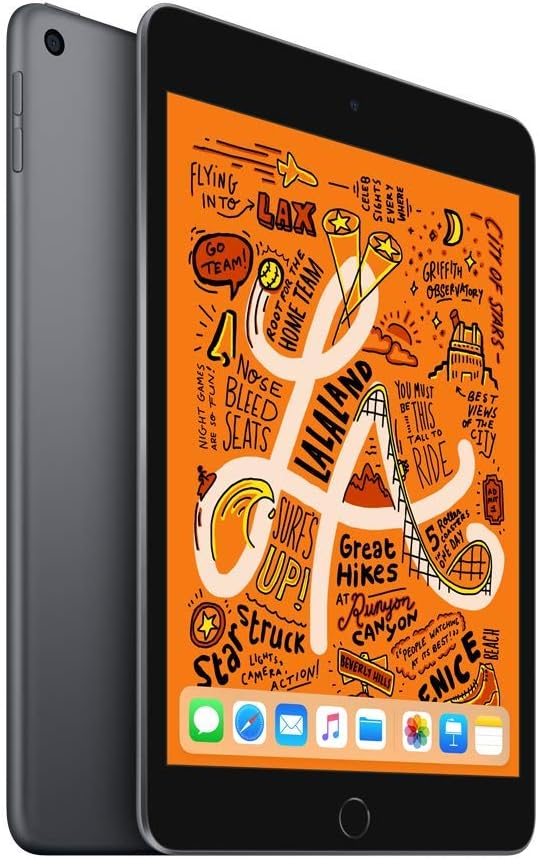
Billede 3.1: Forside view of the iPad Mini, ready for initial setup.
3.2. Tænd og grundlæggende konfiguration
- Tryk og hold på Øverste knap indtil Apple-logoet vises.
- Følg instruktionerne på skærmen for at vælge dit sprog og område.
- Opret forbindelse til et Wi-Fi-netværk.
- Indstil Tryk på ID by following the prompts to register your fingerprint.
- Opret en adgangskode.
- Restore from an iCloud or computer backup, or set up as a new iPad.
- Log ind med dit Apple-id, eller opret et nyt.
- Enable or disable location services, Siri, and other features as desired.
4. Betjening af din iPad Mini
4.1. Grundlæggende navigation
- Hjemknappen: Press once to return to the Home screen. Double-press to open the App Switcher. Press and hold to activate Siri.
- Gestik: Swipe down from the top-right corner for Control Center. Swipe down from the middle of the screen for Search. Swipe up from the bottom to go home (if using gestures instead of Home button).

Image 4.1: The iPad Mini display showing a vibrant interface.
4.2. Tilslutning til Wi-Fi
- Gå til Indstillinger > Wi-Fi.
- Slå Wi-Fi til.
- Vælg det ønskede netværk fra listen.
- Indtast adgangskoden, hvis du bliver bedt om det, og tryk derefter på Deltag.
4.3. Brug af kameraet
Åbn Kamera app from the Home screen. Tap the shutter button to take a photo. Swipe left or right to switch between photo, video, panorama, and other modes. Tap the camera icon to switch between the front and back cameras.
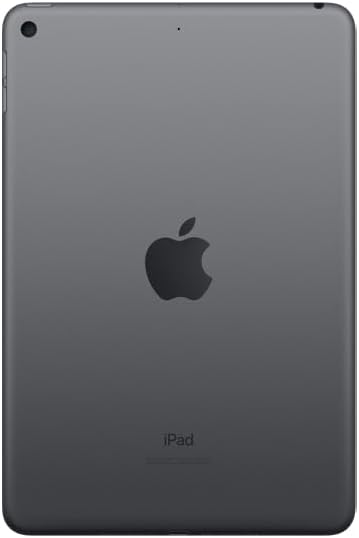
Billede 4.2: Bagside view of the iPad Mini, highlighting the back camera.
4.4. Apple Pencil (1st Generation)
The iPad Mini (2019) supports the first-generation Apple Pencil. To pair, remove the cap from your Apple Pencil and plug it into the Lightning connector on your iPad. Tap Par when the Bluetooth Pairing Request appears. Once paired, you can use it for drawing, note-taking, and more.
5. Vedligeholdelse
5.1. Cleaning Your iPad Mini
To clean your iPad Mini, use a soft, lint-free cloth. Avoid abrasive cloths, towels, paper towels, or similar items that could scratch the screen. Do not use aerosol sprays, solvents, or abrasives. Unplug all cables and power off the device before cleaning.
5.2. Softwareopdateringer
Keep your iPad Mini's software up to date to ensure optimal performance and security. Go to Indstillinger > Generel > Softwareopdatering. If an update is available, follow the on-screen instructions to download and install it.
5.3. Batteripleje
To maximize battery lifespan, avoid exposing your iPad to extreme temperatures. For long-term storage, charge the device to about 50% and power it off. Recharge it to 50% every six months.
5.4. Lagerstyring
To check and manage your storage, go to Indstillinger > Generel > iPad-opbevaring. You can offload unused apps, delete large files, or move photos and videos to iCloud to free up space.
6. Fejlfinding
6.1. Enheden svarer ikke
If your iPad Mini is unresponsive, try a force restart:
- Tryk og hold på begge Øverste knap og den Hjem-knap samtidigt.
- Continue holding until you see the Apple logo.
- Release both buttons and allow the iPad to restart.
6.2. Problemer med Wi-Fi-forbindelse
Hvis du oplever problemer med Wi-Fi-forbindelsen:
- Sørg for, at Wi-Fi er aktiveret i Indstillinger > Wi-Fi.
- Genstart din Wi-Fi-router.
- Glem netværket og genopret forbindelse: Gå til Indstillinger > Wi-Fi, tryk på informationsikon next to your network, then tap Glem dette netværk. Tilslut dig netværket igen.
- Nulstil netværksindstillinger: Gå til Indstillinger > Generel > Overfør eller nulstil iPad > Nulstil > Nulstil netværksindstillingerDette nulstiller alle netværksindstillinger, inklusive Wi-Fi-adgangskoder.
6.3. App der går ned eller fryser
Hvis en app ikke fungerer korrekt:
- Force quit the app: Double-press the Home button to open the App Switcher, then swipe up on the app's preview to close it. Reopen the app.
- Update the app: Check the App Store for updates to the problematic app.
- Reinstall the app: Delete the app from your iPad and then download it again from the App Store.
7. Specifikationer
| Modelnavn | iPad mini |
| Varemodelnummer | MUQW2LL/A |
| Vise | 7.9-inch Retina display with True Tone |
| Skærmopløsning | 2048 x 1536 pixel |
| Chip | A12 Bionic chip with Neural Engine |
| Lagerkapacitet | 64 GB |
| Bagside kamera | 8MP with HDR and 1080p HD video |
| Forreste kamera | 7MP FaceTime HD with Auto HDR |
| Batterilevetid | Up to 10 hours (Wi-Fi browsing) |
| Stik | Lyn |
| Dimensioner (H x B x D) | 8 x 5.3 x 0.24 tommer (203.2 x 134.8 x 6.1 mm) |
| Vægt | 0.66 pound (300.5 grams) Wi-Fi model |
| Udgivelsesdato | 18. marts 2019 |
8. Garanti og support
8.1. Garantioplysninger
Your Apple iPad Mini (2019) is covered by Apple's standard limited warranty, which typically covers manufacturing defects for one year from the original purchase date. For detailed warranty terms and conditions, please refer to the official Apple warranty documentation included with your product or visit the Apple webwebsted.
8.2. Kundesupport
For further assistance, technical support, or service, please visit the official Apple Support webwebsted:
You can find articles, troubleshooting guides, and contact options for Apple support specialists on their webwebsted.


