
1. Produktet er slutview
The EZoneTronics Android Car Radio is a double DIN multimedia system designed for in-car entertainment and navigation. It features a touch screen display, Android operating system, built-in Bluetooth, Wi-Fi connectivity, and GPS capabilities. This unit supports various applications and media playback, enhancing your driving experience.
Nøglefunktioner:
- Ratstyring: Compatible with factory steering wheel controls (resistive analog signal input only). Digital CANBUS signals may require an external converter.
- GPS-navigation: Integrated GPS module. Download preferred map applications from the Play Store after connecting to Wi-Fi.
- Indbygget Wi-Fi: Allows downloading applications from the Play Store.
- Bluetooth & FM Radio: Bluetooth for hands-free calls and music streaming. FM radio with preset stations for real-time traffic, news, and weather.
Inkluderede komponenter:
The package includes the Android Player unit, GPS Antenna, Power Harness, 2 USB adapters, User Manual, RCA output wire, Camera Input wire, and 2 Installation brackets.

Figure 1: EZoneTronics Android Car Radio unit and included accessories.
2. Installation
Korrekt installation er afgørende for optimal ydeevne. Det anbefales at få enheden installeret af en professionel, hvis du ikke er bekendt med ledningsføring af bilstereo.
2.1 Ledningsforbindelser:
- Strømledning: Connect the main power harness to your vehicle's power supply, ensuring correct positive, negative, and accessory connections.
- GPS-antenne: Tilslut GPS-antennen, og placer den på et sted med frit lys view af himlen for den bedste signalmodtagelse.
- USB-adaptere: Utilize the provided USB adapters for connecting external devices or media.
- RCA-udgang: Tilslut til ekstern amplifiers or subwoofers using the RCA output wires.
- Kamera input: Tilslut en bagsideview camera to the dedicated camera input wire for parking assistance.
2.2 Steering Wheel Control (SWC):
If your vehicle has factory steering wheel controls based on a resistive analog signal, the SWC feature can be retained by connecting the appropriate wires. For vehicles using a digital CANBUS data signal, an additional digital-to-resistive converter may be required. If your car does not have factory SWC, an external steering wheel controller (wired connection) can be added.

Figure 2: Steering Wheel Control in operation.
3. Betjening
3.1 Grundlæggende kontroller:
The unit features a fully capacitive touch screen for control. Side buttons typically include Power, Volume Up/Down, Home, and Back functions.
3.2 GPS-navigation:
After connecting to a Wi-Fi network, access the Play Store to download your preferred navigation application. Ensure the GPS antenna is properly installed for accurate positioning.

Figure 3: GPS Navigation Function.
3.3 Bluetooth-forbindelse:
Enable Bluetooth on your mobile phone and search for the car radio. Pair the devices to enable hands-free calling, access your phone book, and stream audio via A2DP.

Figure 4: Bluetooth features including hands-free calls and EQ regulation.
3.4 Wi-Fi and App Installation:
Connect the unit to a Wi-Fi hotspot (e.g., from your mobile phone) to access the Play Store. You can download and install various applications, including streaming services like Netflix.
3.5 Mirror Link Function:
The Mirror Link function allows you to display your smartphone screen on the car radio. Android phones can be controlled via USB, while iPhones can mirror video and audio wirelessly.
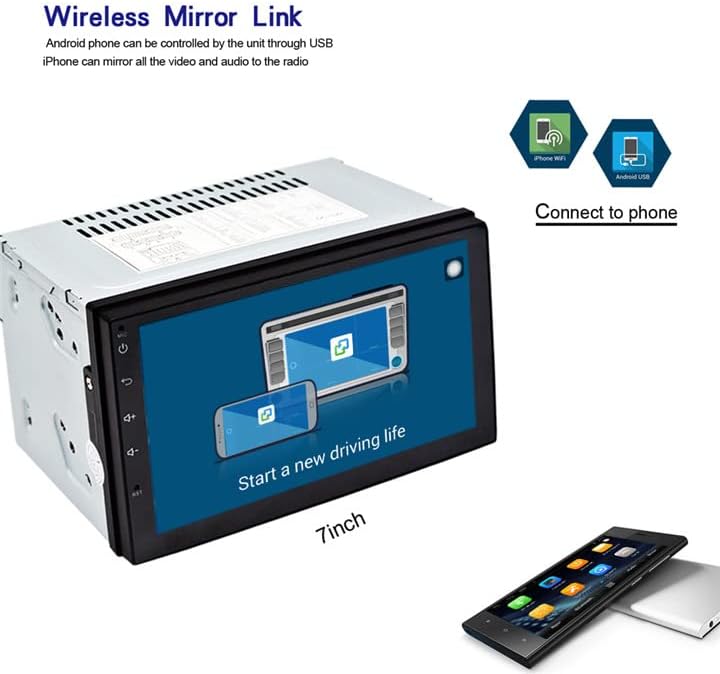
Figure 5: Wireless Mirror Link setup.
3.6 FM-radio:
Access the FM radio function to tune into local stations. You can save your favorite stations as presets for quick access.

Figur 6: FM-radiogrænseflade.
4. Specifikationer
| Feature | Beskrivelse |
|---|---|
| Mærke | EZoneTronics |
| Modelnummer | 10 |
| Forbindelsesteknologi | Bluetooth, WiFi |
| Controller type | Android |
| Særlige funktioner | Indbygget Bluetooth, Berøringsskærm |
| Kompatible enheder | Smartphone |
| Connector Type | USB |
| Lydudgangstilstand | Stereoanlæg |
| Surround Sound Kanalkonfiguration | 4.0 |
| Videokodning | H.264 |
| Udgangseffekt | 45 watt |
| Antal kanaler | 4 |
| Understøttede internettjenester | Netflix |
| Kontrolmetode | App, berør |
| Lydudgangstype | Bluetooth |
| Format | WMA |
| Fabrikant | Rhythm Electronics Limited |

Figur 7: Produktmål.
5. Fejlfinding
If you encounter issues with your EZoneTronics Android Car Radio, please refer to the following general troubleshooting steps:
- Ingen strøm: Check all power connections, including the main power harness and vehicle's fuse box. Ensure the accessory wire is correctly connected.
- Ingen lyd: Verify speaker connections and ensure the volume is not muted or set to minimum. Check RCA connections if using external amplivførere.
- Problemer med GPS-signal: Ensure the GPS antenna is installed in a location with an unobstructed view af himlen. Kontroller antenneforbindelsen til enheden.
- Bluetooth-forbindelsesproblemer: Sørg for, at Bluetooth er aktiveret på både bilradioen og din mobilenhed. Prøv at ophæve parringen og parre enhederne igen.
- Berøringsskærm reagerer ikke: Try restarting the unit. If the issue persists, a factory reset might be necessary (refer to the on-screen settings for this option).
- App-fejl: Ensure the unit is connected to Wi-Fi and the app is updated to the latest version. Clear the app's cache or reinstall it if necessary.
For persistent issues, contact EZoneTronics customer support for further assistance.
6. Sikkerhedsoplysninger
Always prioritize safety while operating your vehicle. Do not operate the car radio in a way that distracts you from driving. Adjust settings or interact with applications only when the vehicle is safely parked. Adhere to all local traffic laws and regulations.