
Indledning
Thank you for choosing the Awei B923BL Wireless Magnetic Sports Bluetooth Earphones. This manual provides essential information for setting up, operating, maintaining, and troubleshooting your new earphones. Please read it carefully before use to ensure optimal performance and longevity of your device.
Pakkens indhold
Tjek venligst pakken for følgende varer:
- Awei B923BL Wireless Magnetic Sports Bluetooth Earphones
- USB opladningskabel
- Flere størrelser af ørepropper
- Brugermanual
Produkt overview
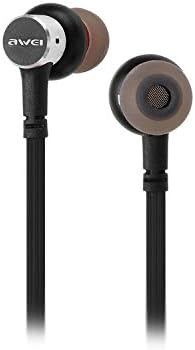
The Awei B923BL earphones are designed for active lifestyles, featuring a wireless Bluetooth connection and a magnetic design for convenient storage around your neck when not in use. They include an integrated microphone for hands-free calling.

Opsætning
1. Opladning af øretelefonerne
Before first use, fully charge your earphones. Connect the provided USB charging cable to the charging port on the earphones and the other end to a USB power source (e.g., computer USB port, wall adapter). The indicator light will show charging status and turn off or change color when fully charged.
2. Bluetooth-parring
- Sørg for, at høretelefonerne er slukkede.
- Press and hold the multi-function button (usually the power button) until the indicator light flashes red and blue alternately, indicating pairing mode.
- On your mobile phone or Bluetooth-enabled device, go to the Bluetooth settings and enable Bluetooth.
- Søg efter available devices. You should see "Awei B923BL" or a similar name in the list.
- Select "Awei B923BL" to connect. Once connected, the indicator light will usually flash blue slowly or turn off, and you may hear a confirmation tone.
- Hvis du bliver bedt om en adgangskode, skal du indtaste "0000".
Once paired, the earphones will automatically connect to the last paired device when turned on, if the device's Bluetooth is active and within range.
Betjeningsvejledning
Tænd/sluk
- Tænd: Tryk på multifunktionsknappen, og hold den nede i cirka 3 sekunder, indtil den blå indikatorlampe blinker.
- Sluk: Tryk og hold multifunktionsknappen nede i cirka 5 sekunder, indtil den røde indikatorlampe blinker og derefter slukker.
Musikafspilning
- Afspil/pause: Tryk én gang på multifunktionsknappen.
- Næste nummer: Tryk og hold Lydstyrke + knappen nede.
- Forrige nummer: Tryk på lydstyrkeknappen - og hold den nede.
Opkaldsstyring
- Besvar/afslut opkald: Tryk én gang på multifunktionsknappen.
- Afvis opkald: Tryk og hold multifunktionsknappen nede i cirka 2 sekunder.
- Genopkald sidste nummer: Dobbelttryk på multifunktionsknappen.
Lydstyrkekontrol
- Forøg lydstyrke: Tryk på knappen Lydstyrke +.
- Skru ned for lydstyrken: Tryk på Lydstyrke-knappen.
Opretholdelse
- Clean the earphones regularly with a soft, dry cloth. Do not use harsh chemicals or abrasive materials.
- Fjern ørepropperne, og rengør dem med mild sæbe og vand, hvis det er nødvendigt. Sørg for, at de er helt tørre, før du sætter dem på igen.
- Opbevar øretelefonerne et køligt, tørt sted væk fra direkte sollys og ekstreme temperaturer.
- Avoid exposing the earphones to water or excessive moisture.
- Forsøg ikke at skille eller ændre øretelefonerne, da dette vil ugyldiggøre garantien.
Fejlfinding
- Høretelefoner tænder ikke: Sørg for, at øretelefonerne er fuldt opladede.
- Kan ikke parres med enhed:
- Make sure the earphones are in pairing mode (flashing red and blue).
- Sørg for, at Bluetooth er aktiveret på din enhed.
- Flyt øretelefonerne tættere på din enhed.
- Prøv at genstarte både øretelefonerne og din enhed.
- Ryd tidligere Bluetooth-forbindelser på din enhed, hvis du har for mange.
- Ingen lyd eller lav lydstyrke:
- Kontroller lydstyrkeniveauerne på både øretelefonerne og din tilsluttede enhed.
- Sørg for, at øretelefonerne er korrekt tilsluttet din enhed.
- Prøv at afspille forskellige lydkilder.
- Problemer med opkaldskvaliteten:
- Sørg for, at mikrofonen ikke er blokeret.
- Flyt til et område med mindre interferens.
Specifikationer
| Feature | Detalje |
|---|---|
| Mærkenavn | Awei |
| Modelnummer | B923BL |
| Farve | Sort |
| Hovedtelefonens formfaktor | In Ear |
| Forbindelsesteknologi | Trådløs |
| Trådløs kommunikationsteknologi | Trådløs |
| Aldersgruppe beskrivelse | Voksen |
| Materiale | Gummi |
| Kompatible enheder | Mobiltelefoner |
| Kabelfunktion | Uden kabel |
| Kontrolmetode | Røre |
| Antal genstande | 1 |
| Fabrikant | Awei |
| Særlige funktioner | Microphone Included (Note: This model does not feature active noise cancellation as per product description.) |
Garanti og support
Garantioplysninger
This product comes with a 1-year manufacturer's warranty from the date of purchase. For warranty claims or service, please contact the manufacturer or their authorized service agent. For further details, you may also contact the retailer where the product was purchased.
Kundesupport
If you encounter any issues not covered in this manual or require further assistance, please refer to the contact information provided with your product packaging or visit the official Awei webwebsted for supportressourcer.