
1. Introduktion
Welcome to the user manual for your Lenovo ThinkPad X280 laptop. This document provides essential information to help you get started, operate, maintain, and troubleshoot your device. The ThinkPad X280 is designed for productivity and portability, featuring a robust build and efficient performance.
Key features include an Intel Core i5-8350U processor, 8GB of RAM, a 256GB SSD, and a 12.5-inch Full HD multi-touch display. It comes pre-installed with Windows 10 Pro.
2. Opsætning
2.1 Udpakning og første opkrævning
Carefully remove your ThinkPad X280 and its accessories from the packaging. The box should contain the notebook and a USB-C power adapter.
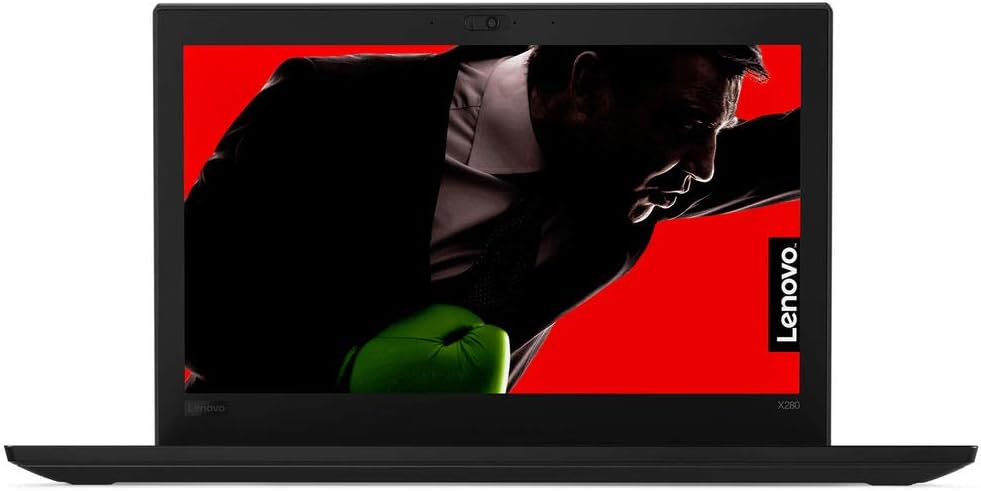
Figur 1: Forside view of the Lenovo ThinkPad X280 Laptop.
Connect the USB-C power adapter to the laptop's USB-C port and plug it into a power outlet. Allow the battery to charge fully before initial use. The battery has a 45 Watt-Hour capacity and supports Rapid Charge.
2.2 Powering On and Operating System Setup
Press the power button to turn on your laptop. Follow the on-screen instructions to complete the Windows 10 Pro setup, including language selection, network connection, and user account creation.
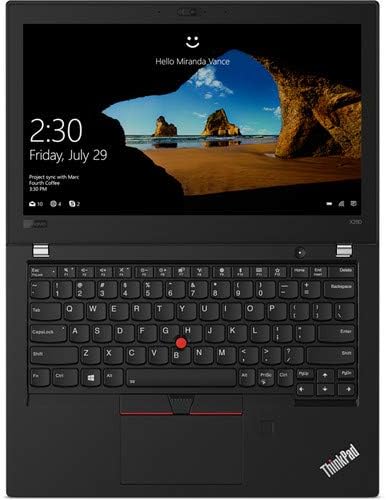
Figure 2: Windows 10 Pro login screen on the ThinkPad X280.
2.3 Tilslutning af eksterne enheder
Your ThinkPad X280 supports various connectivity options:
- USB-enheder: Connect external drives, mice, or keyboards to the available USB ports. The laptop has 2 total USB ports.
- HDMI: Use the HDMI port to connect to external displays.
- Bluetooth: Par Bluetooth-aktiverede enheder som hovedtelefoner eller højttalere.
- Wi-Fi: Opret forbindelse til trådløse netværk for at få internetadgang.

Figur 3: Side view of the ThinkPad X280, highlighting connectivity ports.
3. Betjening af din ThinkPad X280
3.1 Keyboard, Touchpad, and Touchscreen
The ThinkPad X280 features a backlit keyboard for comfortable typing in various lighting conditions. The integrated touchpad and TrackPoint provide precise cursor control. The 12.5-inch Full HD (1920x1080) IPS display also supports 10-point multi-touch input for intuitive interaction.

Figure 4: Keyboard and touchpad layout of the ThinkPad X280.
3.2 Webkamera og ThinkShutter
The laptop includes a 720p webcam for video conferencing. For enhanced privacy, utilize the integrated ThinkShutter, a physical cover for the webcam.
3.3 fingeraftrykslæser
For secure and convenient login, the ThinkPad X280 is equipped with a fingerprint reader. Configure it through Windows Hello settings in your operating system.
4. Vedligeholdelse
4.1 Rengøring af din bærbare computer
- Skærm: Brug en blød, fnugfri klud lidt damprengøres med vand eller en skærmrens. Undgå skrappe kemikalier.
- Tastatur og kabinet: Brug en blød klud. Til genstridigt snavs, en letamp En klud med mild sæbe kan bruges, så det sikres, at der ikke trænger væske ind i åbningerne.
- Porte: Keep ports free of dust and debris using compressed air.
4.2 Softwareopdateringer
Regularly update your Windows operating system and Lenovo drivers to ensure optimal performance and security. You can check for Windows updates via the Settings app and Lenovo updates through the Lenovo Vantage-applikationen eller Lenovos support webwebsted.
4.3 Pleje af batterier
For at forlænge batteriets levetid skal du undgå ekstreme temperaturer og hyppig fuldstændig afladning af batteriet. Ved langtidsopbevaring skal batteriet oplades til ca. 50-60%.
5. Fejlfinding
Dette afsnit indeholder løsninger på almindelige problemer, du kan støde på.
- Den bærbare computer tænder ikke: Ensure the power adapter is securely connected and the battery is charged. Try holding the power button for 10-15 seconds.
- Problemer med skærm: Hvis skærmen er blank, kan du prøve at tilslutte en ekstern skærm for at kontrollere, om problemet skyldes den bærbare computers skærm. Juster lysstyrkeindstillingerne.
- Problemer med Wi-Fi- eller Bluetooth-forbindelse: Check if wireless features are enabled. Restart your router or Bluetooth device. Update network drivers.
- Langsom ydeevne: Close unnecessary applications, check for malware, ensure sufficient free storage space, and update your operating system.
6. Specifikationer
| Feature | Detalje |
|---|---|
| Mærke | Lenovo |
| Modelnavn | Lenovo ThinkPad X280 |
| Modelnummer | 20KF0022US |
| Processor | Intel Core i5-8350U (1.7 GHz, up to 3.6 GHz, 4 Cores) |
| Grafik | Integreret Intel UHD Graphics 620 |
| VÆDDER | 8GB Soldered DDR4-2400 |
| Opbevaring | 256GB SSD M.2 2280 PCIe NVMe Opal2 |
| Vise | 12.5" FHD (1920x1080) IPS 300nits Anti-glare, 10-point Multi-touch |
| Operativsystem | Windows 10 Pro 64 |
| Webcam | 720p with ThinkShutter |
| Tastatur | Baggrundsbelyst |
| Sikkerhed | Fingeraftrykslæser |
| Batteri | 45 Watt Hours, Lithium Ion |
| Trådløs forbindelse | Bluetooth, Wi-Fi (802.11abg) |
| Havne | 2x USB ports, 1x HDMI port |
| Vægt | 2.8 pund |
7. Garantioplysninger
The Lenovo ThinkPad X280 comes with a 3 års begrænset garanti. The battery is covered by a 1 års begrænset garanti. For detailed terms and conditions, please refer to the warranty documentation included with your product or visit the official Lenovo support webwebsted.
8. Support
For further assistance, technical support, or to download the latest drivers and software, please visit the official Lenovo Support webwebsted. Du kan også finde ofte stillede spørgsmål og fællesskabsfora der.
Lenovo Support Webwebsted: support.lenovo.com