
Fujifilm X-A5
Fujifilm X-A5 spejlløst digitalkamera brugermanual
Model: X-A5
1. Introduktion
This manual provides essential instructions for the safe and effective use of your Fujifilm X-A5 Mirrorless Digital Camera. The Fujifilm X-A5 is a compact and stylish mirrorless camera featuring a 24.2MP APS-C sensor, a 180-degree tilting LCD screen, and Bluetooth connectivity, designed for high-quality photography and ease of use.

Billede 1.1: Forside view of the Fujifilm X-A5 camera with the XC15-45mm lens attached.
2. Hvad er der i æsken
Please ensure all the following items are present in your product package:
- Fujifilm XA5 kamerahus
- XC15-45mmF3.5-5.6 OIS PZ Lens
- Li-Ion Battery (NP-W126)
- Wall Plug Adapter
- USB kabel
- Skulderrem
- Instruktionsmanual (dette dokument)
- USA Warranty Card

Billede 2.1: View of the Fujifilm X-A5 camera and lens inside the packaging box.
3. Indledende opsætning
3.1. Charging and Inserting the Battery
- Insert the supplied Li-Ion battery (NP-W126) into the battery charger.
- Connect the charger to a power outlet using the wall plug adapter. The charging indicator will illuminate.
- Når opladningen er færdig, slukkes indikatoren. Fjern batteriet.
- Åbn batteridækslet i bunden af kameraet.
- Sæt det opladede batteri i batterirummet, og sørg for at det vender korrekt. Luk dækslet ordentligt.
3.2. Montering af objektivet
- Remove the body cap from the camera and the rear lens cap from the XC15-45mm lens.
- Juster det hvide monteringsmærke på objektivet med det hvide monteringsmærke på kamerahuset.
- Mount the lens onto the camera body and rotate it clockwise until it clicks into place.
3.3. Indsættelse af et hukommelseskort
- Åbn dækslet til hukommelseskortpladsen, som typisk er placeret på siden eller undersiden af kameraet.
- Insert a compatible SD, SDHC, or SDXC memory card into the slot with the label facing the correct direction until it clicks.
- Luk dækslet til hukommelseskortet.
4. Betjeningsvejledning
4.1. Tænd/sluk
For at tænde kameraet skal du skubbe tænd/sluk-knappen på toppladen. For at slukke skal du skubbe knappen tilbage til OFF-positionen.
4.2. Grundlæggende fotografering
- Turn the camera on. The lens will extend automatically.
- Select your desired shooting mode using the mode dial (e.g., SR+ AUTO for automatic settings, P for Program AE, A for Aperture Priority, S for Shutter Priority, M for Manual).
- Komponer dit billede ved hjælp af den 3-tommer LCD-skærm.
- Tryk udløserknappen halvt ned for at fokusere. Fokusrammen bliver grøn, når fokus er opnået.
- Tryk udløserknappen helt ned for at tage et billede.
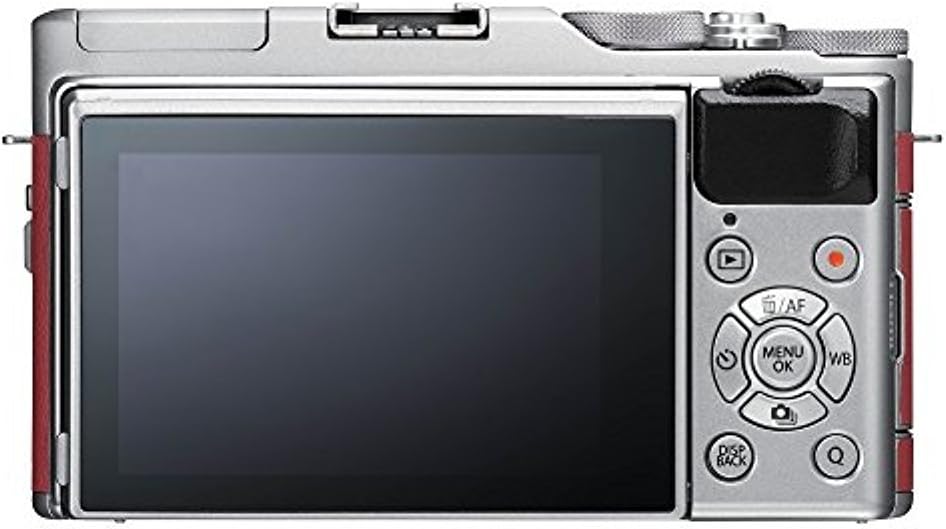
Image 4.1: Rear panel of the Fujifilm X-A5, highlighting the LCD screen and navigation controls.
4.3. Using the Tilting LCD Screen
The X-A5 features a 180-degree tilting LCD screen. Pull the screen outwards and tilt it up or down to compose shots from various angles, including selfies. When tilted 180 degrees upwards, the camera automatically activates Face/Eye Detection AF for self-portraits.

Image 4.2: Fujifilm X-A5 with the LCD screen tilted for high-angle or low-angle shooting.
4.4. Indbygget blitz
To use the built-in flash, locate the flash pop-up lever or button (if available) and activate it. The flash will automatically pop up and fire when needed in appropriate modes, or can be manually controlled via the menu.

Image 4.3: Fujifilm X-A5 camera with the integrated flash unit extended.
4.5. Bluetooth-forbindelse
The X-A5 supports Bluetooth for easy transfer of images and videos to a paired smartphone or tablet. Download the Fujifilm Camera Remote app to your smart device and follow the in-app instructions to pair with your camera.
5. Vedligeholdelse
5.1. Rengøring af kameraet
- Kamerahus: Brug en blød, tør klud til at tørre kamerahuset af. Tør let genstridigt snavs afampSkyl kluden med vand. Undgå at bruge organiske opløsningsmidler.
- Linse: Brug en linseblæser til at fjerne støv, og tør derefter forsigtigt af med en linserengøringsklud. Undgå at berøre linsens overflade med fingrene.
- LCD-skærm: Tør forsigtigt af med en blød, tør klud.
5.2. Opbevaring
- When not in use for extended periods, remove the battery and store it separately.
- Opbevar kameraet et køligt, tørt og godt ventileret sted, væk fra direkte sollys og høj luftfugtighed.
- Use desiccant packets if storing in humid environments to prevent mold growth.
6. Fejlfinding
| Problem | Mulig årsag/løsning |
|---|---|
| Kameraet tænder ikke. | Battery is depleted or incorrectly inserted. Ensure battery is charged and inserted correctly. |
| Kan ikke tage billeder. | Memory card is full, locked, or not inserted. Check card status. Lens may not be properly attached. |
| Billeder er slørede. | Camera shake, incorrect focus, or dirty lens. Hold camera steady, ensure focus is achieved, clean lens. |
| Bluetooth-forbindelse mislykkes. | Ensure Fujifilm Camera Remote app is installed and updated. Check Bluetooth settings on both devices. |
| Batteriet aflades hurtigt. | Frequent use of LCD, flash, or Wi-Fi/Bluetooth. Reduce usage or carry spare batteries. |
7. Specifikationer
| Feature | Detalje |
|---|---|
| Sensor | 24.2 MP APS-C CMOS |
| Linsemontering | Fujifilm X Mount |
| Medfølgende linse | FUJINON XC15-45mmF3.5-5.6 OIS PZ |
| LCD-skærm | 3.0-inch, 1,040k-dot Tilting Touchscreen LCD |
| Videooptagelse | 4K UHD (3840 x 2160) at 15p, Full HD (1920 x 1080) at 59.94p/50p/24p |
| Forbindelse | Bluetooth 4.1 LE, Wi-Fi (802.11b/g/n), USB 2.0, HDMI micro (Type D) |
| Batteri | NP-W126S Li-Ion Battery (approx. 450 frames per charge) |
| Dimensioner (B x H x D) | 116.9 x 67.7 x 40.4 mm (4.6 x 2.7 x 1.6 tommer) |
| Vægt | Ca. 361 g (12.7 oz.) inklusive batteri og hukommelseskort |
| Lagermedier | SD Card (-2GB) / SDHC Card (-32GB) / SDXC Card (-256GB) UHS-I |
8. Garanti og support
8.1. Garantioplysninger
Your Fujifilm X-A5 camera comes with a USA Warranty. Please refer to the included warranty card for specific terms, conditions, and duration of coverage. Keep your proof of purchase for warranty claims.
8.2. Kundesupport
For technical assistance, troubleshooting beyond this manual, or warranty service, please contact Fujifilm customer support. You can find contact information and additional resources on the official Fujifilm webwebsted:
Ask a question about this manual
Ask about setup, troubleshooting, compatibility, parts, safety, or missing instructions. Manuals+ will review the question and use this page’s manual context to help answer it.