
1. Introduktion
Thank you for choosing the Henry HVR 160-11 Bagged Cylinder Vacuum. This manual provides essential information for the safe and efficient operation, maintenance, and troubleshooting of your new vacuum cleaner. Please read these instructions carefully before use and retain them for future reference.

Figur 1: Front view of the Henry HVR 160-11 Bagged Cylinder Vacuum. This image shows the iconic red and black design with the friendly 'Henry' face, the main suction inlet, and the carrying handle.
2. Sikkerhedsinstruktioner
Følg altid grundlæggende sikkerhedsforanstaltninger, når du bruger elektriske apparater, for at mindske risikoen for brand, elektrisk stød eller personskade.
- Sørg for, at strømforsyningen voltage matches the rating shown on the vacuum cleaner's label.
- Brug ikke støvsugeren på våde overflader eller til at opsuge væsker.
- Saml ikke brandfarlige eller brændbare materialer, varm aske eller skarpe genstande op.
- Hold hår, løstsiddende tøj, fingre og alle dele af kroppen væk fra åbninger og bevægelige dele.
- Tag stikket ud af stikkontakten, når den ikke er i brug, og før servicering.
- Do not use with a damaged cord or plug. If the cord is damaged, it must be replaced by the manufacturer, its service agent, or similarly qualified persons to avoid a hazard.
- Dette apparat er ikke beregnet til brug af personer (inklusive børn) med nedsatte fysiske, sensoriske eller mentale evner, eller mangel på erfaring og viden, medmindre de har fået opsyn eller instruktion i brugen af apparatet af en person, der er ansvarlig for deres sikkerhed.
- Important Note for US Users: This product is designed for UK electrical standards (230V). Use with a suitable voltage converter and adapter is required for safe and effective operation in regions with 120V power supplies, such as the United States. Failure to do so may result in poor performance, damage to the unit, or electrical hazard.
3. Opsætning og montering
3.1. Hvad er der i æsken
Pak forsigtigt alle komponenter ud, og kontroller dem i forhold til listen nedenfor:
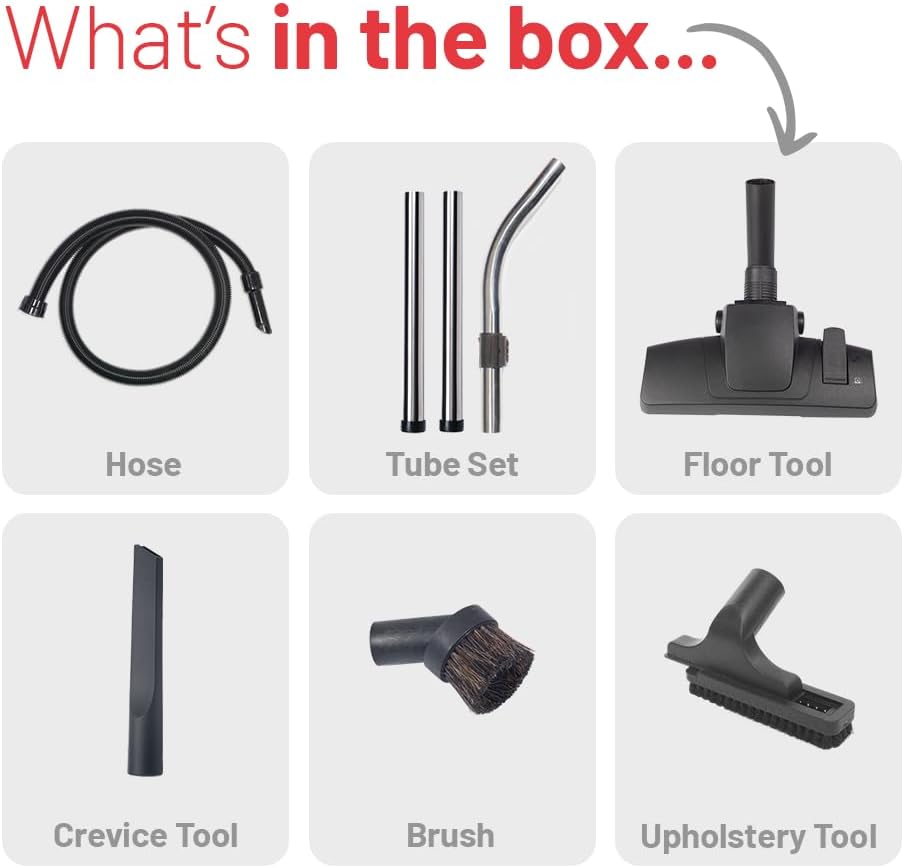
Figur 2: All components included in the Henry HVR 160-11 packaging. This image displays the hose, tube set, floor tool, crevice tool, brush, and upholstery tool.
- Fleksibel slange
- Tube Set (usually 2 or 3 metal tubes)
- Gulvværktøj
- Sprækkeværktøj
- Støvbørste
- Polstringsværktøj
- Filter (forinstalleret)
- Dust Bag (one pre-installed, usually one spare)
3.2. Monteringstrin
- Tilslut slangen: Insert the larger end of the flexible hose into the suction inlet on the front of the vacuum cleaner until it clicks securely into place.
- Assemble the Tube Set: Connect the metal tubes together by twisting them firmly. Attach one end of the assembled tube set to the handle end of the flexible hose.
- Fastgør gulvmundstykket: Connect the desired floor tool to the open end of the tube set. Ensure it is securely fitted.
- On-board Tool Storage: The vacuum features convenient on-board storage for accessories. Attach the crevice tool, dusting brush, and upholstery tool to the designated clips on the back of the vacuum for easy access.

Figur 3: Illustration of the on-board tool storage feature. This image shows how the various cleaning tools can be neatly stored on the vacuum cleaner itself.
4. Betjeningsvejledning
4.1. Tænd/sluk
Plug the power cord into a suitable electrical outlet. To turn the vacuum cleaner on, press the red power switch located on the top of the unit. Press it again to turn the unit off.
4.2. Using the Floor Tool
The main floor tool is designed for both carpets and hard floors. It features a brush bar that can be engaged or disengaged depending on the surface.
- For tæpper, ensure the brush bar is engaged (bristles extended) to agitate and lift dirt from the fibers.
- For hard floors, disengage the brush bar (bristles retracted) to prevent scratching and to allow for optimal suction on smooth surfaces.

Figur 4: The floor tool demonstrating the switch mechanism for different floor types. The top panel shows the tool configured for carpet, and the bottom panel shows it configured for hard floors.
4.3. Brug af tilbehør
The Henry HVR 160-11 comes with several accessories for versatile cleaning:
- Sprækkeværktøj: Ideel til at nå ind i smalle sprækker, hjørner og langs kanter.
- Støvbørste: Soft bristles for delicate surfaces, shelves, and intricate items.
- Polstringsværktøj: Designed for cleaning fabric surfaces like sofas, chairs, and curtains.

Figur 5: A collage showing the various tools in action. This image illustrates the dusting brush cleaning skirting boards, the upholstery tool cleaning a mattress, the crevice tool reaching between sofa cushions, and the main floor tool on carpet.
5. Vedligeholdelse
Regular maintenance ensures optimal performance and extends the life of your Henry vacuum cleaner.
5.1. Udskiftning af støvposen
The Henry HVR 160-11 uses high-efficiency dust bags. Replace the bag when the suction power noticeably decreases or when the 'full' indicator (if present) suggests it's time.
- Tag støvsugeren ud af stikkontakten.
- Unclip and remove the top head unit of the vacuum.
- Carefully lift out the full dust bag. The Henry bags feature an innovative self-seal tab to lock dust inside, ensuring a dust-free emptying process.
- Dispose of the full bag responsibly.
- Insert a new Henry dust bag, ensuring the cardboard collar is correctly seated in the bag holder.
- Replace the top head unit and secure the clips.

Figur 6: A hand demonstrating the self-seal feature of the Henry dust bag during emptying. This image highlights the clean and dust-free process of removing a full bag from the vacuum and placing it into a waste bin.
5.2. Rengøring af filteret
The vacuum is equipped with a foam filter. Periodically check the filter for excessive dust build-up. To clean:
- Træk støvsugeren ud.
- Remove the top head unit and the dust bag.
- Carefully remove the foam filter.
- Gently tap the filter to dislodge loose dust. For a more thorough clean, the foam filter can be rinsed under cold water.
- Ensure the filter is completely dry before reinserting it into the vacuum cleaner. Operating the vacuum with a wet filter can cause damage.
5.3. Cleaning Hoses and Accessories
Inspect the hose and accessories regularly for blockages or damage. Clear any obstructions using a blunt object. Do not use sharp objects that could puncture the hose.
6. Fejlfinding
If you encounter issues with your Henry HVR 160-11, refer to the table below for common problems and solutions.
| Problem | Mulig årsag | Løsning |
|---|---|---|
| Vakuum tænder ikke | Ingen strømforsyning; Beskadiget ledning/stik; Defekt afbryder | Check power outlet; Inspect cord/plug for damage (do not use if damaged); Contact support if switch is faulty. |
| Lav eller ingen sugning | Full dust bag; Clogged hose/filter/accessories; Incorrectly fitted bag/filter; Motor issue; Incorrect voltage (for US users) | Replace dust bag; Clear blockages; Re-seat bag/filter correctly; Ensure correct voltage converter is used (if applicable); Contact support for motor issues. |
| Usædvanlig støj | Blockage in hose/brush head; Motor issue | Check and clear blockages; Contact support if noise persists. |
| Overophedning | Blocked airflow (bag/filter/hose); Prolonged use | Check and clear blockages; Allow unit to cool down before resuming use. |
7. Specifikationer
Key technical specifications for the Henry HVR 160-11 Bagged Cylinder Vacuum:
| Feature | Specifikation |
|---|---|
| Modelnavn | Henry 160 |
| Modelnummer | HVR 160-11 |
| Strømkilde | Elektrisk med ledning |
| Wattage | 620 watt |
| Kapacitet | 6 liter |
| Slange længde | 2.2 meter |
| Filtertype | Skum |
| Vakuumopsamlingsteknologi | Indpakket |
| Støjniveau | 72 decibel |
| Produktdimensioner | 13.39 x 13.58 x 12.6 tommer |
| Varens vægt | 16.54 pund |
| Farve | Rød, sort |
8. Garanti og support
For warranty information and customer support, please refer to the documentation provided with your purchase or visit the official Henry webwebsted. Gem din købsbevis i tilfælde af garantikrav.
If you require technical assistance or have questions not covered in this manual, please contact Henry customer service.