
1. Introduktion
Thank you for choosing the TimeFlys Audio Baby Monitor Crown Series. This device is designed to provide reliable audio monitoring of your baby, ensuring peace of mind. It features clear sound transmission, temperature monitoring, a night light, and two-way communication. Please read this manual thoroughly before use to ensure proper operation and safety.
Vigtige sikkerhedsoplysninger
- Keep the baby unit and its power cord out of reach of children (at least 1 meter / 3 feet away from the crib).
- Do not place the baby unit in or near water.
- Brug kun de medfølgende strømadaptere.
- Ensure proper ventilation for both units. Do not cover them with clothes or blankets.
- Dette produkt er ikke et medicinsk udstyr og bør ikke bruges som erstatning for ansvarlig voksenovervågning.
2. Pakkens indhold
Pak forsigtigt kassen ud, og sørg for, at alle dele er til stede:
- Parent Unit (with built-in rechargeable lithium battery)
- Babyenhed
- 2 x Micro USB Power Adapters
- Brugermanual

Image: Contents of the TimeFlys Audio Baby Monitor Crown Series package.
3. Produktet er slutview
Forældrenhed

Billede: Forside view of the Parent Unit, showing the LCD display, signal indicator, power button, night light button, lullaby button, intercom button, vibration button, and volume controls.

Billede: Bagside view of the Parent Unit, highlighting the battery compartment, volume controls, power button, push-to-talk button, lullaby button, night light button, USB connection, and belt clip.
Babyenhed

Billede: Forside og bagside views of the Baby Unit, illustrating its compact design with integrated night lights, microphone, speaker, power button, and DC5V micro USB port.
4. Opsætning
4.1 Strømforsyning til enhederne
- Forældreenhed: The Parent Unit has a built-in rechargeable lithium battery. Charge it fully before first use by connecting it to a power outlet using one of the provided Micro USB power adapters. A full charge provides up to 15 hours of operation.
- Babyenhed: The Baby Unit does not have a built-in battery and must be continuously plugged into a power outlet using the other Micro USB power adapter for operation.
4.2 Placering
- Place the Baby Unit within 1 to 2 meters (3 to 6 feet) of your baby, ensuring it is out of reach.
- Position the Parent Unit in a location where you can easily hear alerts and monitor the display.
- Avoid placing units near other electronic devices that may cause interference (e.g., Wi-Fi routers, cordless phones).
4.3 Parring (automatisk)
The Parent Unit and Baby Unit are pre-paired at the factory. Once both units are powered on, they should automatically connect. If they do not connect, ensure both units are within range and try restarting them.
5. Betjeningsvejledning
5.1 Grundlæggende overvågning
- Tænd/sluk: Press and hold the Power button on both units to turn them on or off.
- Lydstyrkekontrol: Use the '+' and '-' buttons on the Parent Unit to adjust the listening volume.
- Lydniveauindikator: The Parent Unit's LED display will show visual indicators of sound levels detected by the Baby Unit.

Image: A woman monitoring her baby using the TimeFlys Parent Unit, with the baby unit placed near the baby.
5.2 Night Mode (Zero Radio Emission)
The Crown Series features a unique Night Mode that reduces radio emissions to zero when the baby's room is silent. The monitor will automatically activate when noise in the baby's room exceeds 50 dB. This feature is designed for energy efficiency and reduced exposure.
5.3 Tovejssamtale
To speak to your baby through the Baby Unit, press and hold the Samtaleanlæg button (often labeled with a microphone icon) on the Parent Unit. Release the button to resume listening.

Image: Visual representation of the two-way talk function, showing sound transmission from parent to baby unit.
5.4 Vuggeviser
Tryk på Vuggevise button (often labeled with a music note icon) on the Parent Unit to play soothing melodies through the Baby Unit. Press it again to cycle through available lullabies or to turn them off.

Image: A baby sleeping while a lullaby icon indicates the feature is active.
5.5 Natlysstyring
The Baby Unit features an integrated night light. You can remotely control this night light from the Parent Unit by pressing the Natlys button (often labeled with a light bulb icon).
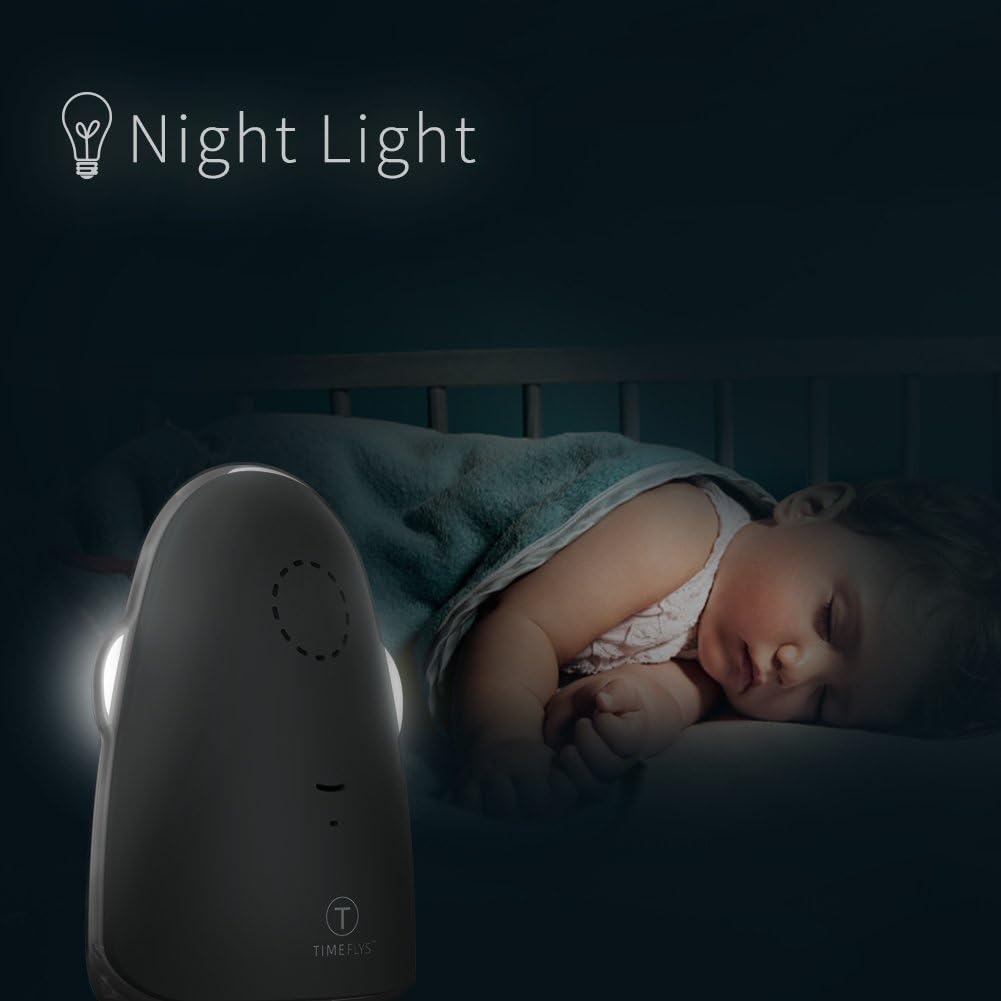
Image: The Baby Unit's night light providing a soft glow in a baby's room.
5.6 Temperature Monitoring & Alarm
The Parent Unit's LCD screen displays the real-time temperature of the baby's room, measured by the Baby Unit. An acoustical warning will sound if the room temperature goes outside the range of 60.8°F - 86°F (16°C - 30°C).

Image: A visual representation of the temperature monitoring feature, showing a thermometer and a sleeping baby.
5.7 Vibrationsalarm
The Parent Unit can be set to vibrate when sound is detected, providing a silent alert. Press the Vibration button (often labeled with a vibration icon) to activate or deactivate this feature.

Image: A visual depicting the vibration function of the parent unit.
6. Vedligeholdelse
- Clean the units with a dry, soft cloth. Do not use cleaning sprays or liquid cleaners.
- Nedsænk ikke nogen del af produktet i vand.
- Opbevar skærmen på et køligt, tørt sted, når den ikke er i brug.
- Avoid exposing the units to extreme temperatures or direct sunlight.
7. Fejlfinding
| Problem | Mulig årsag | Løsning |
|---|---|---|
| Ingen lyd fra forældreenheden | Volume is too low; Units are out of range; Baby Unit is not powered on. | Increase volume; Move units closer; Ensure Baby Unit is plugged in and powered on. |
| Dårlig modtagelse eller statisk støj | Units are too far apart; Interference from other electronic devices. | Move units closer; Relocate units away from other electronics. |
| Forældreenhedens batteri aflades hurtigt | Battery not fully charged; Old battery (if applicable for replacement). | Ensure Parent Unit is fully charged; Contact support if battery life significantly degrades. |
| Temperature alarm sounds frequently | Room temperature is outside the set range. | Adjust room temperature or check for drafts/heat sources near the Baby Unit. |
8. Specifikationer
- Mærke: TimeFlys
- Model: Krone
- Farve: Grå
- Antal kanaler: 36
- Maksimal taleafstand: 1000 fod (ca. 300 meter)
- Batterilevetid (forældreenhed): Up to 15 Hours (rechargeable lithium battery)
- Særlige funktioner: Long Range, Dust Proof, Night Mode (Zero Radio Emission), Night Light Control, Temperature Monitoring & Alarm, Two-Way Talk, Lullabies, Vibration Alert.
- Strømindgang: DC 5V (mikro-USB)
- Vandmodstandsniveau: Ikke vandafvisende
9. Garanti og support
For warranty information or technical support, please refer to the documentation provided with your purchase or contact TimeFlys customer service through their official webwebstedet eller forhandleren, hvor produktet blev købt.