
Indledning
Tak for købetasing the Ezonetronics 1DIN Car Stereo, Model RM-CW9601. This unit features a 7-inch retractable touchscreen, Bluetooth connectivity, FM radio, and multimedia playback capabilities. This manual provides essential information for installation, operation, and maintenance to ensure optimal performance and user satisfaction. Please read this manual thoroughly before using the product.
Sikkerhedsoplysninger
- Betjen ikke enheden på en måde, der distraherer dig fra kørslen. Prioritér altid trafiksikkerhed.
- Ensure proper installation by a qualified professional to prevent damage to the unit or vehicle.
- Undgå at udsætte enheden for ekstreme temperaturer, direkte sollys i længere perioder eller fugt.
- Forsøg ikke at skille enheden ad eller ændre den. Dette kan ugyldiggøre garantien og udgøre en sikkerhedsrisiko.
- Hold lydstyrken på et niveau, der gør det muligt at høre trafiklyde udefra.
Pakkens indhold
Bekræft at alle varer er til stede i pakken:
- Ezonetronics 1DIN Car Stereo Unit (RM-CW9601)
- Strøm- og højttalerledningsnet
- Fjernbetjening
- Brugervejledning (dette dokument)
- Monteringstilbehør (beslag, skruer)
- Valgfrit: Bagpåview Camera (if included in your specific package)
Produkt overview
The Ezonetronics RM-CW9601 features a single DIN chassis with a motorized retractable 7-inch touchscreen display. The front panel includes essential controls and ports for easy access.

Figur 1: Front view of the Ezonetronics RM-CW9601 car stereo, illustrating the 7-inch screen in both retracted and extended positions, along with front panel controls and ports.
Front Panel Controls and Ports:
- Tænd/sluk-knap: Press to turn on/off, short press to change mode.
- Lydstyrkeknap: Drej for at justere lydstyrken. Tryk for at slå lyden til/fra.
- USB-port: Til afspilning af medier fra USB-drev.
- SD-kortplads: Til afspilning af medier fra SD-kort.
- AUX-indgang: 3.5 mm jackstik til eksterne lydenheder.
- Nulstil knap: Lille knap til at nulstille enheden (kræver en spids genstand).
- Screen Retract/Extend Button: Controls the motorized screen movement.
Opsætning
1. Installation
The RM-CW9601 is designed for a standard 1DIN car stereo opening. Professional installation is highly recommended. Ensure the vehicle's battery is disconnected before starting installation.
- Fjern den eksisterende bilstereo fra instrumentbrættet.
- Connect the wiring harness to the vehicle's wiring.
- Secure the unit into the dashboard using the provided mounting brackets and screws.
- Tilslut køretøjets batteri igen, og test enheden.
2. Ledningsdiagram (generelt)
Refer to the detailed wiring diagram included with your product packaging for specific connections. Below are common connections:
- Gul ledning: Konstant 12V (batteri)
- Rød ledning: Tændt 12V (tilbehør/tænding)
- Sort ledning: Jord
- Orange ledning: Illumination (Optional)
- Blå ledning: Strømantenne / AmpFjernbetjening til lifer
- Højttalerkabler: Connect to vehicle speakers (e.g., White/White-Black for Front Left, Grey/Grey-Black for Front Right, Green/Green-Black for Rear Left, Purple/Purple-Black for Rear Right).
- Bakkameraindgang: Connect to the rearview camera video output and reverse trigger wire.
- Indgang til ratbetjening: Connect to vehicle's steering wheel control wires (if applicable).

Figur 2: Illustration of USB connection points, relevant for media input and smartphone integration.
Betjeningsvejledning
1. Grundlæggende betjening
- Tænd/sluk: Tryk på tænd/sluk-knappen på frontpanelet eller fjernbetjeningen.
- Lydstyrkejustering: Rotate the volume knob or use the remote control.
- Valg af tilstand: Short press the power/mode button to cycle through available modes (Radio, USB, SD, Bluetooth, AUX, CarPlay/Android Auto).
- Skærmkontrol: Use the dedicated button to retract or extend the 7-inch display.
2. Bluetooth-funktion
The unit supports Bluetooth for hands-free calling and wireless audio streaming.
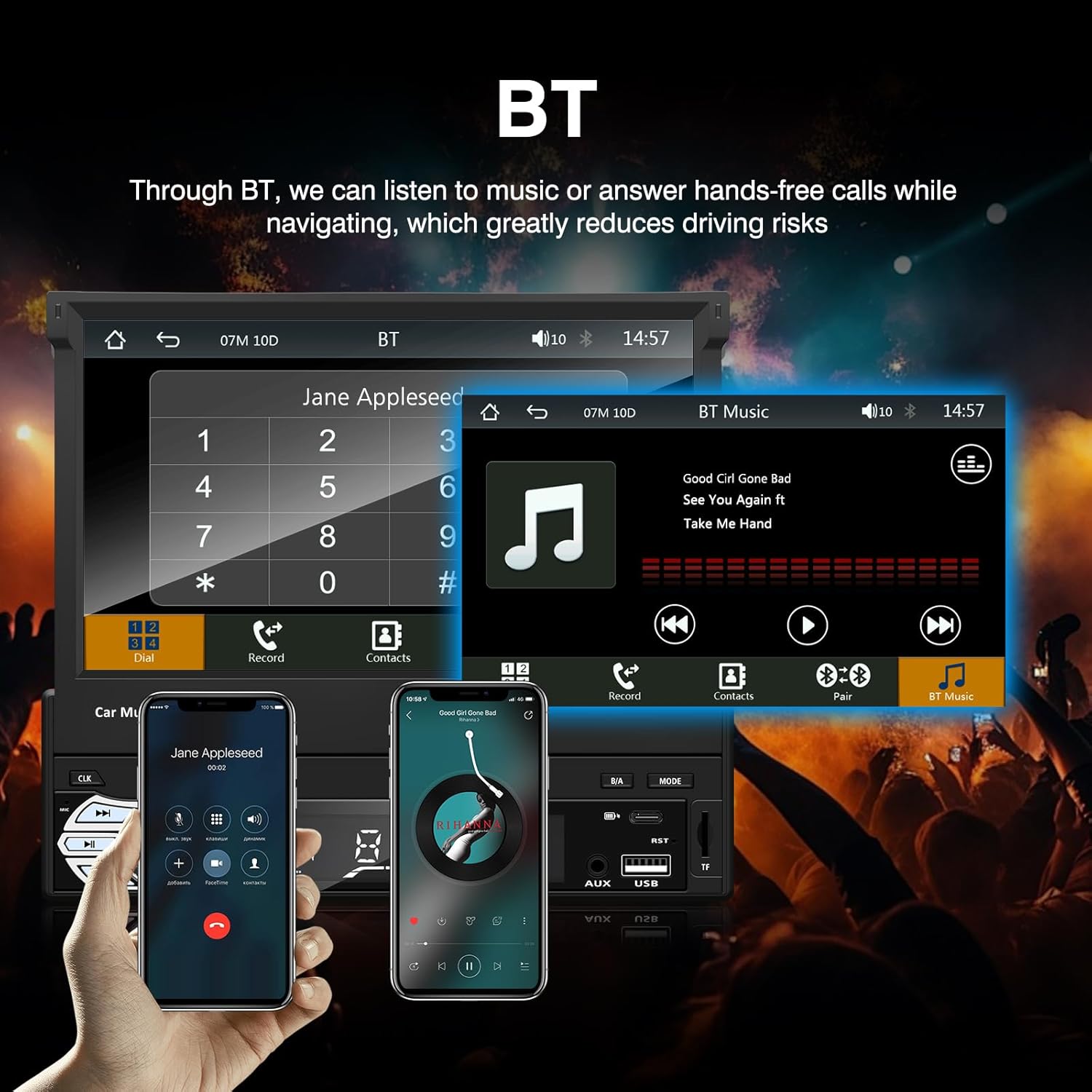
Figur 3: Bluetooth interface for hands-free calls and music streaming, showing a dial pad and music controls.
- Parring: Aktiver Bluetooth på din mobilenhed. Søg efter available devices and select "Ezonetronics" or similar. Enter PIN "0000" if prompted.
- Håndfri opkald: Once paired, you can make and receive calls directly through the car stereo. Use the touchscreen or remote to dial, answer, or end calls.
- Lydstreaming (A2DP): Play music from your paired device wirelessly. Control playback (play/pause, skip) from the car stereo or your device.
3. USB/SD-medieafspilning
Insert a USB drive or SD card into the respective slot. The unit will automatically switch to USB/SD mode and begin playing compatible media files.

Figur 4: Icons indicating support for Bluetooth, Auxiliary input, TF (SD) Card, and USB connections for media playback.
- Supported formats include RM, RMVB, ASF, MKV, DIVX, MPEG4, AVI, VOB for video, and MP3/MP4 for audio.
- Naviger gennem mapper og files using the touchscreen interface.
4. FM Radio
Access the FM radio mode to listen to local broadcasts.

Figur 5: FM Radio interface with frequency display and equalizer settings for audio customization.
- Automatisk scanning: Automatically search and save strong stations.
- Manuel indstilling: Fine-tune frequencies using the touchscreen.
- Presets: Save your favorite stations for quick access (up to 18 preset stations).
5. Apple CarPlay / Android Auto
Connect your compatible smartphone via USB to access Apple CarPlay or Android Auto features directly on the stereo's display.

Figur 6: Wired Apple CarPlay interface, displaying phone applications like navigation, music, and messages on the car stereo screen.

Figur 7: Wired Android Auto interface, displaying Android applications like Google Maps, Spotify, and phone calls on the car stereo screen.
- Ensure your phone has CarPlay or Android Auto enabled.
- Use a high-quality USB cable for a stable connection.
- Access navigation, music, messages, and other compatible apps safely while driving.
6. Spejllink
Mirror Link allows you to display your smartphone's screen content directly onto the car stereo's display via a USB data cable.

Figur 8: Mirror Link function demonstrating a smartphone screen being projected onto the car stereo display.
- Connect your smartphone to the USB port using a data cable.
- Følg instruktionerne på skærmen på både stereoanlægget og din telefon for at oprette forbindelse.
- Note: Functionality may vary depending on your smartphone model and operating system.
7. Bagsideview Kamera input
Når en bagendeview camera is connected and the vehicle is shifted into reverse, the stereo automatically displays the camera feed.

Figur 9: Reversing display showing the view bagfraview camera with parking assistance lines, providing an intuitive aid for parking.
- Sørg for bagsidenview camera is properly installed and connected to the dedicated input.
- Skærmen skifter automatisk til kameraet view når bakgearet er indkoblet.
8. Ratbetjening
The unit supports connection to your vehicle's existing steering wheel controls for convenient operation. Refer to your vehicle's manual and the stereo's wiring diagram for proper connection and configuration.
Opretholdelse
- Rengøring af skærmen: Brug en blød, fnugfri klud til forsigtigt at tørre berøringsskærmen af. Brug ikke slibende rengøringsmidler eller opløsningsmidler.
- Generel rengøring: Wipe the unit's exterior with a dry, soft cloth.
- Undgå væsker: Sprøjt ikke væsker direkte på enheden.
- Temperatur: Avoid prolonged exposure to extreme heat or cold, which can affect the unit's lifespan.
Fejlfinding
| Problem | Mulig årsag | Løsning |
|---|---|---|
| Enheden tænder ikke. | Forkert ledningsføring; Sprunget sikring; Problem med bilens batteri. | Kontroller strømtilslutningerne (gule, røde, sorte ledninger). Undersøg køretøjets sikringer. Sørg for, at batteriet er opladet. |
| Ingen lyd. | Lydstyrken er for lav; Mute aktiveret; Forkert højttalerledningsføring. | Skru op for lydstyrken. Kontroller, om lydløs er aktiv. Kontroller højttalerforbindelser. |
| Bluetooth opretter ikke forbindelse. | Bluetooth not enabled on phone; Incorrect pairing process. | Ensure phone's Bluetooth is on and discoverable. Re-attempt pairing. |
| USB/SD media not playing. | Ikke understøttet file format; Corrupted media; Drive/card not inserted correctly. | Check file formats. Try a different USB drive/SD card. Ensure proper insertion. |
| Bagview kameraet viser ikke. | Kamera ikke tilsluttet; Bakudløserledning ikke tilsluttet. | Verify camera video input and reverse trigger wire connection. |
Hvis problemerne fortsætter, skal du kontakte en kvalificeret tekniker eller kundesupport.
Specifikationer
- Mærke: EZoneTronics
- Modelnummer: RM-CW9601
- Farve: Sort
- Skærm: 7-inch Capacitive Touchscreen, Retractable
- Forbindelse teknologi: Bluetooth, USB, SD, AUX, RCA
- Bluetooth: Integrated Bluetooth 2.0 with A2DP/Hands-free
- Kompatible enheder: Smartphone
- Lydudgangstilstand: Stereoanlæg
- Understøttelse af videokodning: RM, RMVB, ASF, MKV, DIVX, MPEG4, AVI, VOB
- USB/SD-understøttelse: Up to 32GB max.
- Særlige funktioner: Touchscreen, Steering Wheel Control Support, Rear Camera Input, Apple CarPlay, Android Auto, Mirror Link
- Fabrikant: Rhythm Electronics Limited
Garanti og support
This product comes with a limited manufacturer's warranty.
- Garanti for hovedenheden: 12 months for defective items (excluding damaged or misused items after receipt).
- Tilbehørsgaranti: 3 months for accessories.
Ved garantikrav eller teknisk support bedes du kontakte din forhandler eller producenten direkte. Gem din købskvittering som købsbevis.