
1. Introduktion og overview
The Yamaha NX-50 Premium Computer Speakers are designed to provide high-quality audio for various devices, including personal computers, laptops, tablets, and smartphones. Featuring a unique cabinet shape and front-ported design, these speakers deliver clear sound reproduction.
Nøglefunktioner:
- Dual mini-jack inputs with auto-mix functionality for simultaneous playback from two audio sources.
- Front-panel volume control and headphone jack for convenient access.
- Automatic standby mode for power efficiency, eliminating the need for manual power cycling.
- Robust construction with metal grilles for durability and aesthetic appeal.
- Versatile connectivity for computers, TVs, smartphones, and tablets.
2. Pakkens indhold
Bekræft, at alle nedenstående varer er til stede i pakken:
- Yamaha NX-50 Speaker Units (Left and Right)
- AC strømadapter
- 3.5mm Stereo Mini Cable (Audio Input Cable)
- Speaker Connection Cable (for connecting left and right speakers)
3. Opsætning
Follow these steps to set up your Yamaha NX-50 speakers:
- Placering: Position the left and right speakers on a stable, flat surface, such as a desk or shelf. Ensure they are equidistant from your listening position for optimal stereo imaging. The right speaker typically houses the main controls and connections.
- Tilslut højttalere: Connect the left speaker to the right speaker using the provided speaker connection cable. This cable typically connects to a dedicated output on the right speaker and an input on the left speaker.
- Tilslut lydkilde: Use the 3.5mm stereo mini cable to connect your audio source (e.g., computer, smartphone) to one of the "INPUT" jacks on the rear of the right speaker. The NX-50 features two mini-jack inputs, allowing you to connect two sources simultaneously.
- Tilslut strøm: Plug the AC power adapter into the "DC IN" jack on the rear of the right speaker, then plug the adapter into a standard electrical outlet.
- Tænd: Turn on the main power switch located on the rear of the right speaker. The power indicator on the front panel will illuminate.
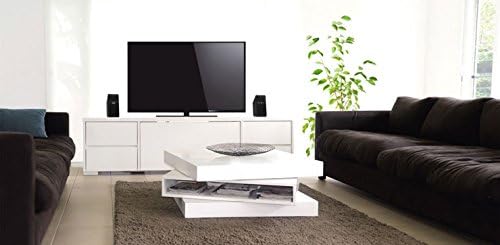
Image: Yamaha NX-50 speakers integrated into a home entertainment setup, demonstrating typical placement next to a television.

Billede: Et nærbillede view of the Yamaha NX-50 speakers, highlighting their design and front grilles.
4. Betjeningsvejledning
Tænd/sluk og standby:
After connecting the power adapter and turning on the main power switch on the rear, the speakers will enter an active state. The NX-50 features an automatic standby function. If no audio signal is detected for a period, the speakers will automatically enter a low-power standby mode. They will automatically reactivate when an audio signal is detected again. This feature helps conserve energy.
Lydstyrkekontrol:
Adjust the overall volume using the large rotary knob located on the front panel of the right speaker. Turn clockwise to increase volume and counter-clockwise to decrease it.
Hovedtelefonudgang:
A 3.5mm headphone jack is located on the front panel of the right speaker. Plugging in headphones will mute the main speakers, allowing for private listening.
Connecting Multiple Audio Sources:
The NX-50 includes two mini-jack inputs. You can connect two different audio devices simultaneously. The speakers will automatically mix the audio from both sources, allowing for seamless transitions or combined playback.
5. Vedligeholdelse
Proper maintenance ensures the longevity and optimal performance of your speakers.
- Rensning: Gently wipe the speaker cabinets with a soft, dry cloth. For stubborn dirt, slightly dampSkyl kluden med vand. Undgå at bruge slibende rengøringsmidler, opløsningsmidler eller kemiske spray, da disse kan beskadige overfladen.
- Gitre: The metal grilles can be carefully cleaned with a soft brush to remove dust. Do not attempt to remove the grilles.
- Ventilation: Ensure that the speakers have adequate ventilation around them. Do not block any vents or place them in enclosed spaces that could lead to overheating.
- Opbevaring: Hvis højttalerne opbevares i længere tid, skal de afbrydes fra strømmen og opbevares et køligt, tørt sted, væk fra direkte sollys og ekstreme temperaturer.
6. Fejlfinding
If you encounter issues with your Yamaha NX-50 speakers, refer to the following common problems and solutions:
| Problem | Mulig årsag | Løsning |
|---|---|---|
| Ingen lyd fra højttalere. |
|
|
| Forvrænget eller uklar lyd. |
|
|
| Speakers not entering auto standby. |
|
|
7. Specifikationer
| Feature | Detalje |
|---|---|
| Modelnavn | NX-50 |
| Højttaler type | Desktop |
| Anbefalede anvendelser | For Computers, TV, Smartphones, Tablets |
| Kompatible enheder | Smartphone, Tablet, Desktop, Laptop |
| Antal enheder | 2.0 stk. (par) |
| Surround Sound Kanalkonfiguration | 2.0 |
| Farve | Sort |
| Produktmål (hver højttaler) | 3.4" D x 7.3" B x 7.3" H |
| Varens vægt | 4.3 pund (i alt for parret) |
| Impedans | 6 Ohm |
| Antal genstande | 2 (speakers) |
| Kontrolmetode | Manual (Front Panel Volume) |
| Trådløs kommunikationsteknologi | None (Wired) |
| Højttaler størrelse | 2.75 Inches (driver) |
| Strømkilde | AC (via adapter) |
| Audio driver type | Dynamisk Driver |
| Højttaler Maksimal udgangseffekt | 75 watt |
| Forbindelsesteknologi | Auxiliary (3.5mm mini-jack) |
| Lydudgangstilstand | Stereoanlæg |
| Monteringstype | Bordplademontering |
| Fabrikant | Yamaha Elektronik |
8. Garanti og support
Begrænset garanti:
The Yamaha NX-50 speakers come with a limited warranty. Please refer to the warranty card included with your product or visit the official Yamaha webwebstedet for detaljerede vilkår og betingelser vedrørende garantidækning, varighed og reklamationsprocedurer. Gem dit købsbevis for at validere garantien.
Kundesupport:
For technical assistance, troubleshooting beyond this manual, or service inquiries, please contact Yamaha customer support. Contact information can typically be found on the official Yamaha webwebsted eller i produktemballagen.