
TecTake 800136
TecTake Premium Wall Mounted Double Glass Shelf Unit
Model: 800136
1. Produktet er slutview
The TecTake Premium Wall Mounted Double Glass Shelf Unit is designed to provide a practical and elegant storage solution for home entertainment devices such as receivers, DVD players, gaming consoles, and more. Its space-saving design and integrated cable management system help maintain a tidy and organized living space.
Nøglefunktioner
- Elegant design with stable safety glass shelves.
- Integrated cable channel for neat cable management.
- Height-adjustable shelves for versatile placement of devices.
- Space-saving wall-mounted installation.
- Nem monteringsproces.
- Each shelf supports a maximum load of 14 kg.

Billede 1.1: Forside view of the TecTake Premium Wall Mounted Double Glass Shelf Unit.
2. Pakkens indhold
Sørg for, at alle komponenter er til stede, inden monteringen påbegyndes:
- 1 x Wall shelf unit (main frame)
- 3 x Safety glass shelves
- Extensive assembly material (screws, wall anchors, washers, etc.)
- 1 x Detailed installation instructions (this manual)
3. Specifikationer
| Attribut | Værdi |
|---|---|
| Produktmål (HxBxD) | 80 x 42 x 33 cm |
| Vægt | 7.3 kg |
| Materiale | Steel frame, 6 mm safety glass shelves |
| Finish Type | Poleret |
| Antal hylder | 3 |
| Maks. belastning pr. hylde | 14 kg |
| Monteringstype | Vægmontering |
| Montering påkrævet | Ja |
| Modelnummer | 800136 |

Image 3.1: Dimensional diagram of the wall shelf unit.
4. Opsætning og installation
Careful installation is crucial for the stability and safety of your wall shelf unit. Please read all instructions before proceeding.
Værktøj påkrævet
- Drill with appropriate drill bits (for masonry, wood, or drywall)
- vaterpas
- Målebånd og blyant
- Screwdriver (compatible with provided screws)
- Hammer (if using expansion anchors)
Installationstrin
- Udpak og verificér: Pak forsigtigt alle komponenter ud, og kontroller dem med pakkens indholdsliste.
- Vælg placering: Select a suitable wall location. Ensure the wall can support the combined weight of the shelf unit and its intended contents (up to 14 kg per shelf). Avoid areas with hidden electrical wires or plumbing.
- Markér borepunkter: Use the provided template (if applicable) or measure carefully to mark the drilling points on the wall. Use a spirit level to ensure marks are perfectly horizontal.
- Bore huller: Drill holes at the marked points using an appropriate drill bit for your wall type. The depth and diameter of the holes should match the provided wall anchors.
- Indsæt vægankre: Insert the appropriate wall anchors into the drilled holes. For plasterboard or hollow walls, use suitable cavity anchors (may not be included).
- Monter vægbeslag: Secure the main wall bracket to the wall using the provided screws. Ensure it is firmly attached and level. Do not overtighten.
- Fastgør hylder: Slide the glass shelves onto the support arms. Adjust their height as desired using the adjustment mechanism.
- Sikre hylder: Secure the shelves in place using the provided fasteners or locking mechanisms. Ensure each shelf is stable and cannot easily be dislodged.
- Kabelstyring: Route cables from your devices through the integrated cable channel for a neat and organized appearance.
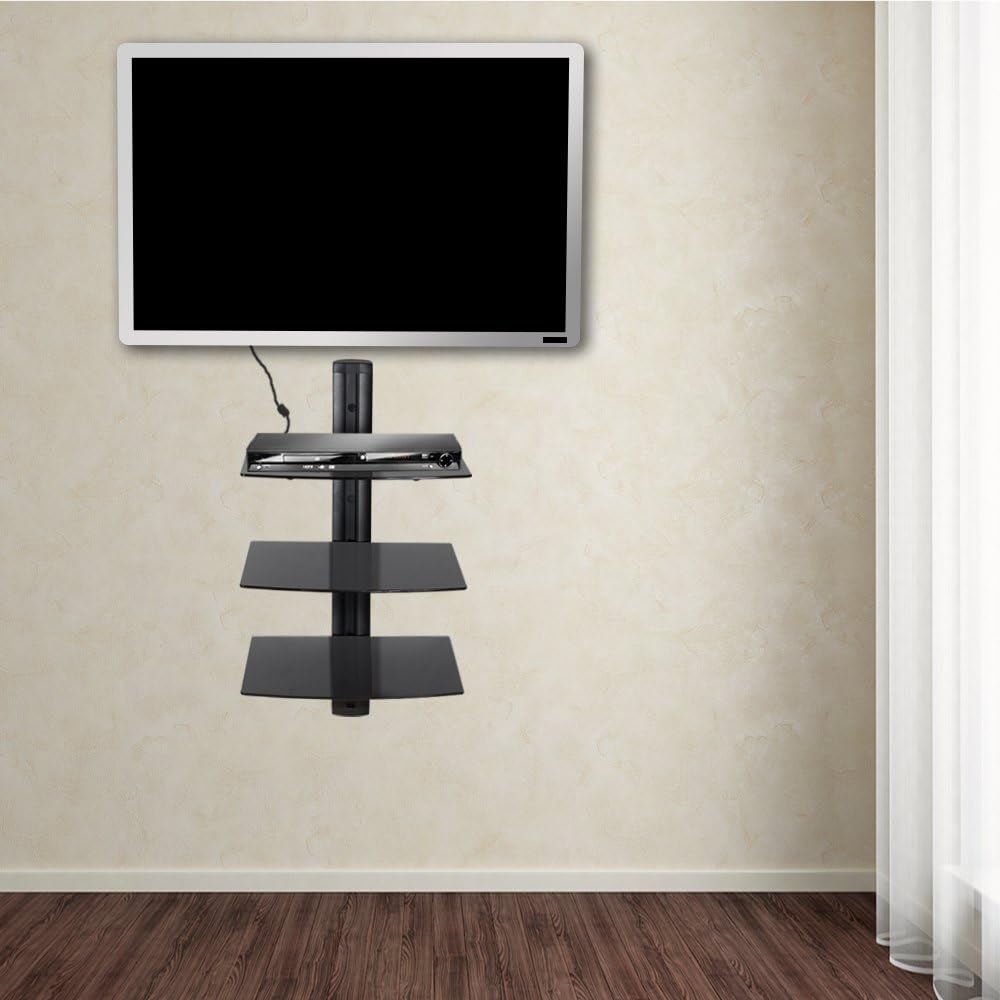
Billede 4.1: Eks.ample of the wall shelf unit installed in a living space.

Billede 4.2: Side view of the shelf unit, showing shelf placement.
5. Betjening og brug
Once installed, the TecTake wall shelf unit provides a functional and aesthetic platform for your media devices.
Placing Devices
Carefully place your electronic devices on the glass shelves. Ensure the weight of each device, along with any accessories, does not exceed the maximum load capacity of 14 kg per shelf. Distribute weight evenly across the shelf surface.
Justering af hyldehøjde
The shelves are designed to be height-adjustable. To adjust a shelf's position, locate the securing mechanism on the support arm, loosen it, slide the shelf to the desired height, and then firmly re-secure the mechanism. Always ensure the shelf is level after adjustment.

Image 5.1: Detail of the shelf adjustment mechanism and glass shelf support.
Kabelstyring
Utilize the integrated cable channel along the central column to conceal and organize power and AV cables from your devices. This feature helps prevent tangles, reduces clutter, and improves the overall aesthetic of your entertainment area.
6. Vedligeholdelse
Regular cleaning and inspection will help maintain the appearance and functionality of your shelf unit.
Rensning
- Glashylder: Clean glass surfaces with a soft, damp cloth and a mild glass cleaner. Avoid abrasive cleaners, scouring pads, or harsh chemicals that could scratch or damage the glass.
- Metalramme: Wipe the steel frame with a soft, dry or slightly damp klæde. Brug ikke slibende rengøringsmidler.
Regelmæssig kontrol
Periodically check all screws and connections, especially those securing the unit to the wall, to ensure they remain tight and secure. This is particularly important after moving or adjusting the unit, or if you notice any instability.
7. Fejlfinding
If you encounter any issues with your TecTake wall shelf unit, refer to the following common problems and solutions:
- Hylden er ikke i vater:
- Ensure the main wall bracket is mounted perfectly level. Re-adjust if necessary.
- Verify that individual shelves are properly seated and secured on their support arms. - Cables Not Tidy:
- Ensure all cables are routed through the designated integrated cable channel.
- Use additional cable ties (not included) to bundle excess cable length for a cleaner look. - Enheden føles ustabil:
- Double-check that the wall anchors and screws used are appropriate for your specific wall type and are securely fastened.
- Ensure the total weight placed on the shelves does not exceed the maximum load capacity of 14 kg per shelf. Redistribute weight if necessary.
8. Garanti og support
This TecTake product is manufactured with high-quality materials and undergoes strict quality control to ensure durability and performance. For information regarding warranty coverage, claims, or technical support, please refer to your original purchase documentation or contact TecTake customer service directly. Please retain your proof of purchase for any warranty-related inquiries.
For further assistance, please visit the official TecTake webwebstedet eller kontakt deres kundesupportlinje.
Ask a question about this manual
Ask about setup, troubleshooting, compatibility, parts, safety, or missing instructions. Manuals+ will review the question and use this page’s manual context to help answer it.