
1. Introduktion
This instruction manual provides essential information for the safe and efficient operation of your Nuwave Pro Plus Infrared Oven. Please read all instructions thoroughly before initial use to ensure proper function and to prevent injury or damage. Keep this manual for future reference.
2. Vigtige sikkerhedsinstruktioner
Ved brug af elektriske apparater skal grundlæggende sikkerhedsforanstaltninger altid følges for at reducere risikoen for brand, elektrisk stød og personskade, herunder følgende:
- Læs alle instruktioner, inden du betjener apparatet.
- Rør ikke ved varme overflader. Brug håndtag eller knopper.
- For at beskytte mod elektrisk stød må ledningen, stik eller apparatet ikke nedsænkes i vand eller anden væske.
- Tæt opsyn er nødvendigt, når et apparat bruges af eller i nærheden af børn.
- Træk stikket ud af stikkontakten, når det ikke er i brug, og før rengøring. Lad det køle af, før du sætter dele på eller af.
- Betjen ikke noget apparat med en beskadiget ledning eller stik, eller efter at apparatet ikke fungerer korrekt eller er blevet beskadiget på nogen måde.
- Brug af tilbehør, der ikke er anbefalet af apparatets producent, kan forårsage skader.
- Må ikke bruges udendørs.
- Lad ikke ledningen hænge ud over kanten af bordet eller bordpladen eller røre ved varme overflader.
- Må ikke placeres på eller i nærheden af en varm gas- eller elektrisk brænder eller i en opvarmet ovn.
- Der skal udvises ekstrem forsigtighed ved flytning af et apparat, der indeholder varm olie eller andre varme væsker.
- Sæt altid stikket i apparatet først, og sæt derefter ledningen i stikkontakten. For at afbryde forbindelsen skal du slukke for en vilkårlig knap og derefter tage stikket ud af stikkontakten.
- Brug ikke apparatet til andet end tilsigtet brug.
3. Produktkomponenter
The Nuwave Pro Plus Infrared Oven consists of several key components designed for efficient cooking.

Figure 3.1: The Nuwave Pro Plus Infrared Oven, shown with its instruction manual and a recipe CD.
- Power Head: Indeholder varmeelement, ventilator og kontrolpanel.
- Kuppel: A transparent, heat-resistant dome that covers the cooking area.
- Kogestativ: Used to elevate food for even cooking.
- Base Pan: Collects drippings and holds the cooking rack.
- Digital kontrolpanel: For setting time, temperature, and other functions.

Figur 3.2: Nærbillede view of the heating element and internal fan located within the power head.
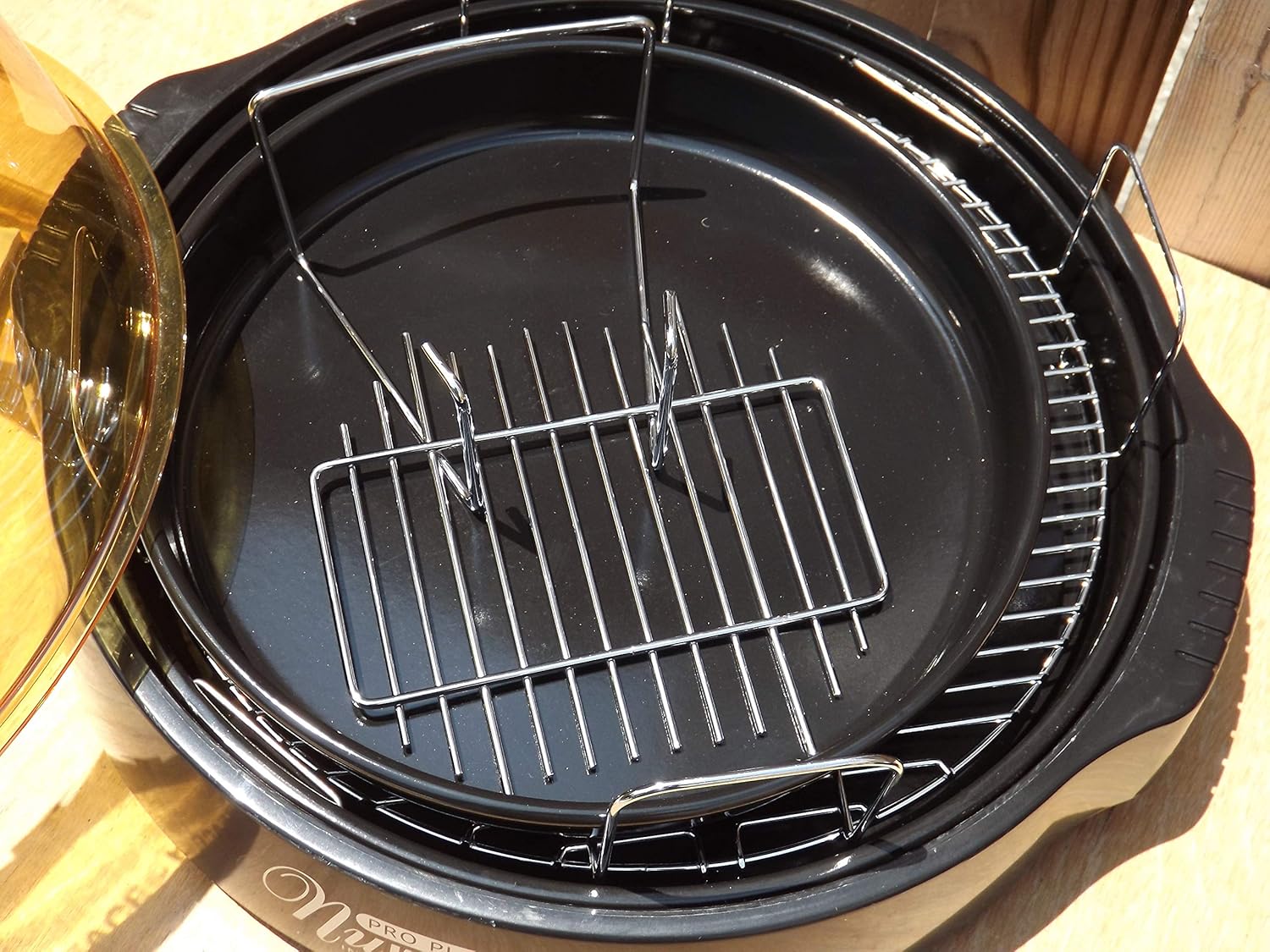
Figure 3.3: The cooking racks positioned within the oven's base pan, ready for food placement.
4. Opsætning
Before first use, ensure all packaging materials are removed and the appliance is assembled correctly.
- Pakker ud: Fjern forsigtigt alle komponenter fra emballagen.
- Ren: Wash the dome, cooking rack, and base pan with warm, soapy water. Rinse thoroughly and dry completely. The power head should only be wiped with a damp klæde.
- Samle: Place the base pan on a stable, heat-resistant surface. Insert the desired cooking rack into the base pan. Place the food on the rack. Carefully position the dome over the base pan. Finally, place the power head securely on top of the dome.
- Strømtilslutning: Sæt netledningen i en standard 120V AC stikkontakt.
5. Betjeningsvejledning
The Nuwave Pro Plus Infrared Oven features a digital control panel for precise cooking.

Figure 5.1: The digital control panel with buttons for Cook Time, Cook Temp, Reheat, Warm, Delay, Pause/Clear, Start, and numerical input.
- Tænd: Once plugged in, the display will illuminate.
- Indstil tilberedningstid: Press the 'Cook Time' button. Use the numerical keypad to enter the desired cooking duration in minutes. Press 'Start' to confirm.
- Set Cooking Temperature: Press the 'Cook Temp' button. Use the numerical keypad to enter the desired temperature in degrees Fahrenheit. Press 'Start' to confirm.
- Begynd at lave mad: After setting time and temperature, press the 'Start' button to begin the cooking cycle.
- Pause/Clear: To temporarily stop cooking, press 'Pause/Clear'. Press 'Start' to resume. To cancel the current program, press 'Pause/Clear' twice.
- Genopvarmningsfunktion: Press the 'Reheat' button for a preset reheating cycle. Adjust time if necessary using 'Cook Time'.
- Varm funktion: Press the 'Warm' button to keep food warm after cooking.
- Forsinkelsesfunktion: Press the 'Delay' button to set a delayed start time for cooking. Follow on-screen prompts to set the delay duration.
Always monitor food during cooking. Cooking times may vary based on food type, quantity, and desired doneness.
6. Vedligeholdelse og rengøring
Regular cleaning ensures optimal performance and extends the life of your Nuwave Pro Plus Infrared Oven.
- Tag stikket ud og køl ned: Always unplug the oven from the power outlet and allow all components to cool completely before cleaning.
- Dome, Rack, and Base Pan: These components are dishwasher safe or can be washed by hand with warm, soapy water. Use a non-abrasive sponge or cloth. Rinse thoroughly and dry completely.
- Power Head: The power head contains electrical components and should NEVER be immersed in water. Wipe the exterior with a damp klud. Til genstridige pletter skal du bruge et mildt rengøringsmiddel på kluden og derefter tørre af med en ren, tør klud.amp Sørg for, at den er helt tør, før den opbevares eller bruges igen.
- Opbevaring: Opbevar ovnen et rent og tørt sted, når den ikke er i brug.
7. Fejlfinding
Se dette afsnit for almindelige problemer og deres løsninger.
| Problem | Mulig årsag | Løsning |
|---|---|---|
| Ovnen tænder ikke. | Ikke tilsluttet; strømmen er slukkettage; defekt stikkontakt. | Sørg for, at netledningen er korrekt tilsluttet. Kontroller afbryderen. Prøv en anden stikkontakt. |
| Maden tilberedes ikke jævnt. | Improper food placement; too much food; incorrect temperature/time. | Ensure food is placed on the rack and not directly on the base. Do not overcrowd the oven. Adjust cooking time or temperature as needed. |
| Røg eller usædvanlig lugt under drift. | Food drippings on heating element; residue from previous cooking. | Unplug immediately. Allow to cool and clean all components thoroughly. Ensure no food particles are on the heating element. |
| Kontrolpanelet reagerer ikke. | Temporary electrical glitch; power head not seated correctly. | Unplug the oven for 1 minute, then plug back in. Ensure the power head is securely placed on the dome. |
8. Specifikationer
Detailed technical specifications for the Nuwave Pro Plus Infrared Oven.
- Mærke: Nuwave
- Modelnavn: Nu-Wave Oven
- Kontroltype: Knob (Digital Keypad)
- Dørstil: Side Swing (Dome Lift)
- Inkluderede komponenter: Crumb Tray (Base Pan), Cooking Rack
- Udfør type: Malet
- Dørmaterialetype: Stainless Steel (referring to internal components/accents)
- Strømkilde: AC adapter
- Antal hylder: 1 (Cooking Rack)
- Størrelse: Medium
- Varens vægt: 14.26 pund
- Pakkedimensioner: 15.8 x 14.9 x 12.1 tommer
- ASIN: B00IXC09QC
- UPC: 652185206021
9. Garanti og support
For warranty information and customer support, please refer to the documentation included with your purchase or visit the official Nuwave webwebsted. Gem din købskvittering som købsbevis i tilfælde af garantikrav.
For further assistance, you may contact Nuwave customer service directly. Contact details are typically found on the product packaging or the manufacturer's official webwebsted.