
Sony 30CDQ80XP
Sony 30CDQ80XP CD-R-diske Brugermanual
Brand: Sony | Model: 30CDQ80XP
Indledning
This manual provides instructions for the proper use and care of your Sony 30CDQ80XP CD-R discs. These discs are designed for reliable data storage and audio recording, offering 700MB of capacity or 80 minutes of digital audio. Adhering to these guidelines will help ensure optimal performance and longevity of your recorded content.
Produkt overview
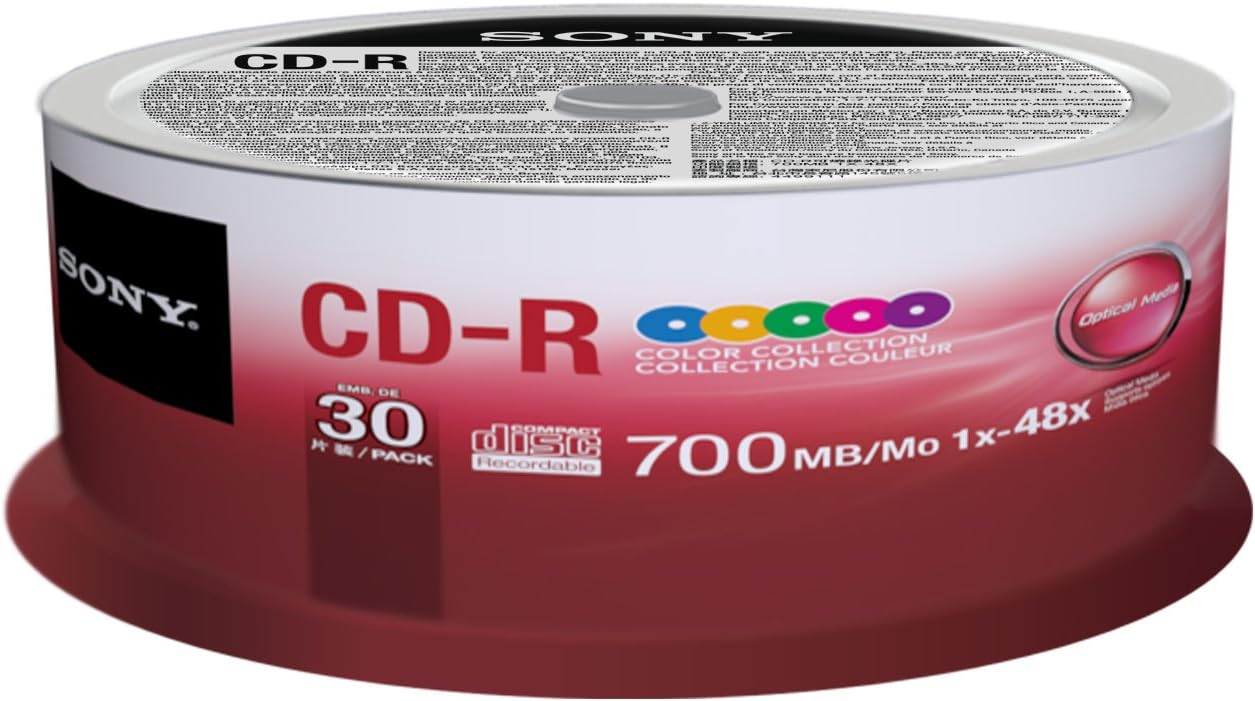
Image: A spindle of 30 Sony CD-R discs, featuring a 'Color Collection' design and clearly indicating specifications such as 700MB/80min capacity and 1x-48x write speed compatibility.
Opsætning og forberedelse
- Kompatibilitetskontrol: Ensure your CD writer (burner) and software are compatible with CD-R media and support the desired recording speeds (up to 48x).
- Diskhåndtering: Always hold the CD-R disc by its edges or by inserting a finger into the center hole. Avoid touching the recording surface (bottom, shiny side) or the label side to prevent fingerprints, dust, or scratches.
- Overfladeinspektion: Before use, visually inspect the disc for any visible defects, scratches, or dust particles. A clean, undamaged disc is crucial for successful recording.
- Mærkning: Use a soft, felt-tip marker specifically designed for CDs/DVDs to write on the label side. Avoid ballpoint pens or sharp objects, as they can damage the disc's recording layer.
Betjeningsvejledning
Follow these steps to record data or audio onto your Sony CD-R discs:
- Indsæt disk: Gently place a Sony CD-R disc into your CD writer's tray, ensuring it is seated correctly with the label side facing up.
- Start optagesoftware: Open your preferred CD burning software (e.g., Nero, Roxio, Windows Media Player, iTunes).
- Select Project Type: Choose the type of project you wish to create (e.g., Data CD, Audio CD, MP3 CD).
- Tilføje Files: Træk og slip files (documents, photos, music tracks) you want to record into the software's project window. Ensure the total size does not exceed 700MB or 80 minutes for audio.
- Vælg optagehastighed: While these discs support up to 48x, recording at a slightly lower speed (e.g., 16x or 24x) can sometimes improve recording reliability and playback compatibility, especially with older drives.
- Start optagelse: Initiate the burning process. Do not interrupt the computer or CD writer during recording.
- Finalize Disc: Most software will automatically finalize the disc after recording, making it readable on standard CD players and drives. Confirm this step if prompted.
- Skub disk ud: Once recording is complete and verified, eject the disc from the drive.
Vedligeholdelse og opbevaring
- Korrekt opbevaring: Store recorded CD-R discs in a cool, dry place away from direct sunlight, extreme temperatures, and high humidity. Use jewel cases, sleeves, or spindle cases to protect them from dust and scratches.
- Rensning: If a disc becomes dirty, gently wipe it with a soft, lint-free cloth (e.g., microfiber) from the center outwards in a straight line. Do not wipe in circular motions. Use a specialized CD cleaning solution if necessary, avoiding harsh chemicals.
- Undgå at bøje: Do not bend or flex the discs, as this can cause irreparable damage to the recording layer.
Fejlfinding
- Optagelsesfejl:
- Sørg for, at disken er ren og fri for ridser.
- Try a different recording speed.
- Update your CD writer's firmware and recording software.
- Close other applications during recording to free up system resources.
- Verify the disc is a CD-R and not a CD-RW or a read-only CD.
- Problemer med afspilning:
- Clean the disc carefully as described in the Maintenance section.
- Test the disc in another CD player or drive to rule out a drive issue.
- Ensure the playback device supports CD-R media.
- Check if the disc was properly finalized after recording.
- Disk ikke genkendt:
- Re-insert the disc.
- Restart your computer or playback device.
- Ensure the disc is inserted correctly (label side up in most drives).
Specifikationer
| Mærke | Sony |
| Modelnummer | 30CDQ80XP |
| Optagelseskapacitet | 700 MB / 80 Minutes |
| Skrivehastighed | 1x - 48x |
| Disktype | CD-R (Compact Disc Recordable) |
| Pakkemængde | 30 diske |
| Produktdimensioner | 6 x 3.05 x 0.19 inches (per disc, approximate) |
| Varens vægt | 0.736 ounces (per disc, approximate) |
| Oprindelsesland | Japan |
Garanti og support
Sony CD-R discs are manufactured under strict quality control. For specific warranty information regarding manufacturing defects or product performance, please refer to the packaging or contact Sony customer support directly.
For further assistance or to explore other Sony products, please visit the official Sony store: Sony Official Store.
Ask a question about this manual
Ask about setup, troubleshooting, compatibility, parts, safety, or missing instructions. Manuals+ will review the question and use this page’s manual context to help answer it.