
1. Introduktion
Tak for købetasing the Gemini PS3-USB 3 Channel 10-Inch Mixer. This manual provides essential information for the proper setup, operation, and maintenance of your mixer. Please read this manual thoroughly before use to ensure optimal performance and to prevent damage.
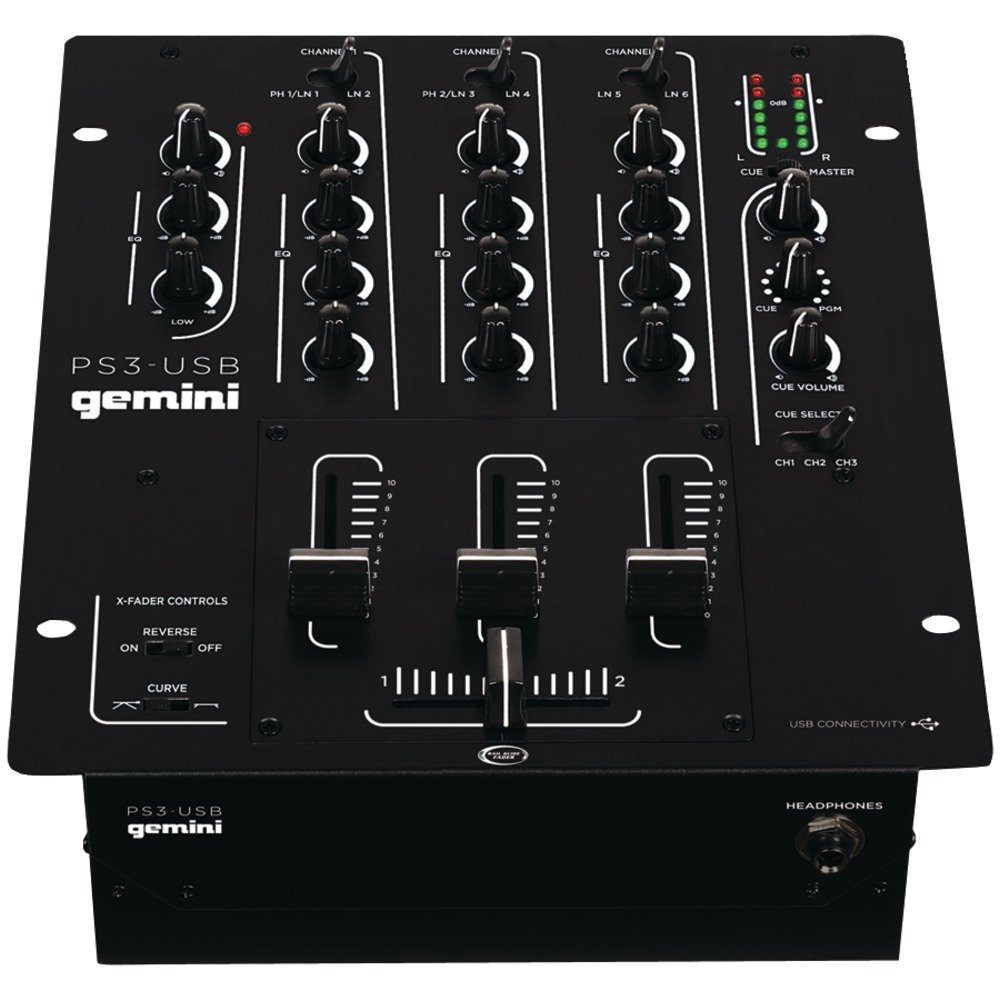
Figur 1: Forside view of the Gemini PS3-USB Mixer, showing controls and inputs.
2. Sikkerhedsinstruktioner
- Strømkilde: Tilslut kun enheden til den angivne strømforsyning.
- Ventilation: Sørg for tilstrækkelig ventilation. Bloker ikke ventilationsåbningerne.
- Vand og fugt: Udsæt ikke enheden for regn eller fugt. Placer ikke genstande fyldt med væsker oven på enheden.
- Varme: Hold enheden væk fra varmekilder såsom radiatorer, varmeapparater, komfurer eller andre apparater (herunder ampløftere), der producerer varme.
- Rensning: Rengør kun med en tør klud.
- Service: Overlad al service til kvalificeret servicepersonale. Forsøg ikke selv at servicere dette produkt.
3. Opsætning
3.1 Udpakning
Carefully unpack the mixer and check for any signs of damage. Retain the packaging materials for future transport or storage.
3.2 Tilslutning af strøm
Tilslut den medfølgende strømadapter til mixerens strømindgang og derefter til en passende stikkontakt.
3.3 Lydforbindelser
The PS3-USB features 5-line, 3-channel inputs with 2 convertible Phono/Line RCA inputs.
- Phono/Line Inputs: Connect turntables or line-level devices (CD players, media players) to the RCA inputs. Use the Phono/Line switch to select the appropriate input type for each channel.
- Master output: Connect the Master RCA outputs to your amplifier eller drevne højttalere.
- Optag output: Connect the Record RCA outputs to a recording device if you wish to record your mix.
- Hovedtelefoner: Plug your 1/4" (6.3mm) headphones into the front panel headphone connector.
3.4 USB-forbindelse
Connect the mixer to your Mac or PC using a standard USB cable. This allows for simultaneous playback and recording through your computer's media player software.
4. Betjeningsvejledning
4.1 Controls and Functions Overview
Familiarize yourself with the mixer's layout:
- Channel Gain Control: Justerer inputniveauet for hver kanal.
- 3-Band Rotary EQ: Provides control over High, Mid, and Low frequencies for each channel.
- Kanalfadere: Control the volume of each individual channel.
- Crossfader: A user-replaceable Rail Glide crossfader with curve and reverse controls for blending between channels.
- Hovedvolumen: Styrer det overordnede outputniveau for mixeren.
- VU målere: Visual indicators for master or cue levels.
- Cue Section: Includes rotary cue volume, CUE/PGM controls, and a split cue switch for headphone monitoring.
- Mikrofonsektion: Features a rotary microphone volume control and a 2-band EQ for microphone input.
4.2 Grundlæggende blanding
- Connect your audio sources to the appropriate Phono/Line inputs.
- Set the Phono/Line switch for each channel to match your source.
- Adjust the Gain control for each active channel to achieve a healthy input level without clipping (distortion).
- Use the channel faders to bring up the volume of your desired audio sources.
- Utilize the 3-band EQ to shape the sound of each channel.
- Use the crossfader to smoothly transition between channels.
- Monitor your mix using headphones via the Cue section and adjust the Master Volume for the main output.
4.3 USB-afspilning og -optagelse
Once connected via USB, your computer should recognize the PS3-USB as an audio device.
- Afspilning: Select the PS3-USB as the output device in your computer's sound settings or media player software to route audio through the mixer.
- Indspilning: Select the PS3-USB as the input device in your recording software. The mixer's master output will be sent to your computer for recording.
5. Vedligeholdelse
- Rensning: Brug en blød, tør klud til at rengøre mixerens yderside. Brug ikke flydende rengøringsmidler eller opløsningsmidler.
- Crossfader Replacement: The Rail Glide crossfader is user-replaceable. Refer to the Gemini website or authorized service centers for replacement parts and instructions if needed.
- Opbevaring: When not in use for extended periods, store the mixer in a cool, dry place, preferably in its original packaging.
6. Fejlfinding
| Problem | Mulig årsag | Løsning |
|---|---|---|
| No sound output from master. | Master volume too low; incorrect input selection; amplifier/speaker issues. | Increase Master Volume. Check Phono/Line switches. Verify amphøjttaler-/højttalertilslutninger og strøm. |
| Ingen lyd fra en bestemt kanal. | Channel fader down; Gain too low; incorrect Phono/Line selection; source device off/muted. | Raise channel fader. Adjust Gain. Correct Phono/Line switch. Check source device. |
| Forvrænget lyd. | Input Gain too high; Master Volume too high; faulty cable. | Reduce channel Gain. Reduce Master Volume. Replace cables. |
| USB recording/playback not working. | Incorrect USB connection; computer audio settings incorrect; driver issues. | Ensure USB cable is securely connected. Select PS3-USB as audio device in computer settings. Restart computer. |
7. Specifikationer
- Model: PS3USB
- Kanaler: 3
- Indgange: 5-Line, 2 Convertible Phono/Line RCA, USB
- Udgange: Master RCA, Record RCA, 1/4" (6.3mm) Headphone
- EQ: 3-Band Rotary EQ per channel, 2-Band EQ for Microphone
- Crossfader: User-replaceable Rail Glide with Curve and Reverse controls
- Forbindelse: USB for Mac/PC Playback & Recording
- Dimensions (Approximate Shipping): 12.00 tommer x 10.00 tommer x 3.25 tommer
- Weight (Approximate Shipping): 6.2 lbs (2.8 kg)
- UPC: 747705208149
8. Garanti og support
This Gemini product is covered by a 90 dages garanti fra købsdatoen. Denne garanti dækker fabrikationsfejl og udførelse under normal brug. Den dækker ikke skader forårsaget af misbrug, ulykker, ændringer eller uautoriseret reparation.
For technical support, service inquiries, or warranty claims, please contact your authorized Gemini dealer or visit the official Gemini webwebsted for kontaktoplysninger.
Gem venligst din købsbevis for at validere garantien.