
1. Introduktion
The DigiPower TC-55S is a compact travel battery charger designed for various Sony camera Li-Ion batteries. This charger allows for convenient charging of your camera battery and features an additional USB port to charge another device simultaneously. Its compact design with a flip-close plug makes it suitable for travel.
Nøglefunktioner:
- Charges digital camera Li-Ion batteries in one step.
- Integrated USB port for simultaneous charging of a second device.
- Features an LCD display to indicate charging status.
- Compact design with a foldable AC plug for portability.
- Compatible with various Sony NP-series batteries.
2. Opsætning
2.1 Udpakning og inspektion
Carefully remove the TC-55S charger from its packaging. Inspect the unit for any signs of damage. Ensure all components are present.
2.2 Identifikation af dele
- Batterislot: Area where the camera battery is inserted for charging.
- LCD-skærm: Shows charging progress and status.
- Sammenklappelig AC-stik: For direct connection to a wall outlet.
- USB udgangsport: For charging other USB-powered devices.

Billede 1: Forside view of the DigiPower TC-55S charger, showing the battery slot and LCD screen.
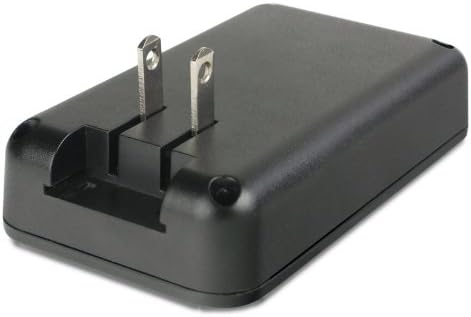
Billede 2: Bagside view of the DigiPower TC-55S charger, illustrating the foldable AC plug in an extended position.
2.3 Tilslutning til strøm
- Locate the foldable AC plug on the back of the charger.
- Flip out the prongs until they are fully extended.
- Plug the charger directly into a standard wall power outlet (100-240V AC).
- Note: For international travel, a suitable plug adapter (not included) may be required for non-US outlets. Some versions of this charger may include a European plug adapter.
3. Betjening
3.1 Charging a Camera Battery
- Sørg for, at opladeren er tilsluttet en strømkilde.
- Carefully insert your compatible Sony Li-Ion battery into the designated battery slot on the charger. Ensure the battery is oriented correctly; it should slide in smoothly. For some batteries like the Sony NP-BX1, ensure it fits flush left in the slot with the green arrow facing up and in.
- The LCD display will illuminate and show the current charging status, typically indicating the battery's charge level.
- Charging is complete when the LCD display indicates a full charge. Remove the battery once fully charged.
Compatible Sony Batteries: NP-BK1, NP-BN1, NP-FD1/BD1, NP-FG1/BG1, NP-FR1, NP-FT1, and NP-BX1.
3.2 Charging Another Device via USB
The TC-55S charger includes a USB output port, allowing you to charge a second USB-powered device (e.g., smartphone, tablet) simultaneously with your camera battery.
- Connect your USB device to the USB output port on the charger using a compatible USB cable (not included).
- Ensure the charger is plugged into a wall outlet.
- The device will begin charging. The charger prioritizes the camera battery, but both devices can charge concurrently.
4. Vedligeholdelse
4.1 Rengøring
- Before cleaning, always unplug the charger from the power outlet.
- Brug en blød, tør klud til at tørre opladerens yderside af.
- Do not use liquid cleaners, solvents, or abrasive materials, as these can damage the unit.
- Hold batteriets kontakter rene og fri for støv eller snavs.
4.2 Opbevaring
- Når opladeren ikke er i brug, skal den opbevares køligt og tørt, væk fra direkte sollys og ekstreme temperaturer.
- Ensure the foldable AC plug is retracted for compact storage.
4.3 Sikkerhedsforanstaltninger
- Opladeren må ikke skilles ad eller modificeres.
- Undgå at udsætte opladeren for vand eller høj luftfugtighed.
- Opbevares utilgængeligt for børn.
- Use only with compatible batteries as specified.
5. Fejlfinding
| Problem | Mulig årsag | Løsning |
|---|---|---|
| Charger not powering on / LCD not displaying. | No power from outlet; charger not properly plugged in. | Ensure the charger is securely plugged into a live wall outlet. Test the outlet with another device. |
| Batteriet oplades ikke. | Battery not inserted correctly; incompatible battery; faulty battery. | Re-insert the battery, ensuring correct orientation and a secure fit. Verify the battery is compatible with the TC-55S. Try charging a different, known-good battery. |
| USB-enheden oplades ikke. | USB cable faulty; device not compatible; charger overloaded. | Try a different USB cable. Ensure the USB device is compatible with standard USB charging. If charging a camera battery simultaneously, ensure the charger is not overloaded (though this charger is designed for simultaneous use). |
| Battery fits too snugly or peels sticker. | Specific battery design (e.g., NP-BX1) can be tight. | Exercise caution when inserting and removing batteries. Ensure correct orientation to minimize friction. |
6. Specifikationer
| Mærke | DigiPower |
| Modelnummer | TC-55S |
| Input bindtage | 100-240V AC (Wall Outlet) |
| Udgang Voltage (batteri) | 3.6 volt |
| Udgang Voltage (USB) | 5 volt |
| Antal havne | 2 (1x Battery Slot, 1x USB) |
| Varens vægt | 0.41 pund |
| Camera Model Compatibility | Sony Alpha 6400, Sony Alpha 7 III, Sony Alpha 7R IV (and others using compatible NP-series batteries) |
| Batterikompatibilitet | Sony NP-BK1, NP-BN1, NP-FD1/BD1, NP-FG1/BG1, NP-FR1, NP-FT1, NP-BX1 |
| Certificeringer | FCC |
7. Garanti og support
7.1 Garantioplysninger
The DigiPower TC-55S Travel Charger comes with a Et års begrænset garanti fra købsdatoen. Denne garanti dækker fabrikationsfejl ved normal brug. Den dækker ikke skader som følge af misbrug, ulykker, ændringer eller uautoriseret reparation.
Gem venligst dit købsbevis for garantikrav.
7.2 Kundesupport
For technical assistance, warranty service, or product inquiries, please contact DigiPower customer support. Refer to the official DigiPower webwebstedet eller produktemballagen for de mest aktuelle kontaktoplysninger.
Note: Do not attempt to repair the device yourself. Unauthorized repairs will void the warranty.